Managing ERP Transformation with Confidence
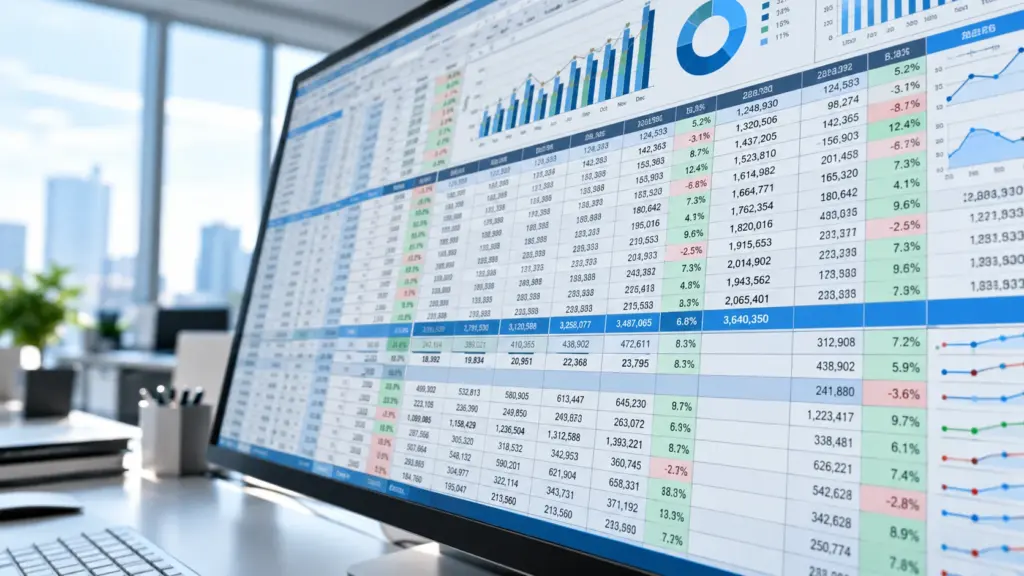
The problem starts when the business grows. More people need the same information. More files appear. Different teams create their own versions. Data is copied from one system to another. Small mistakes become daily problems.
Moving to an ERPAn ERP system connects a company’s core processes—such as sales, finance, inventory, manufacturing, and service—in one place so teams can work with shared information. system can solve these issues. But ERP implementation is not only a software project. It changes how people work. It changes who owns data. It changes how decisions are made. It may also change roles, approvals, and responsibilities.
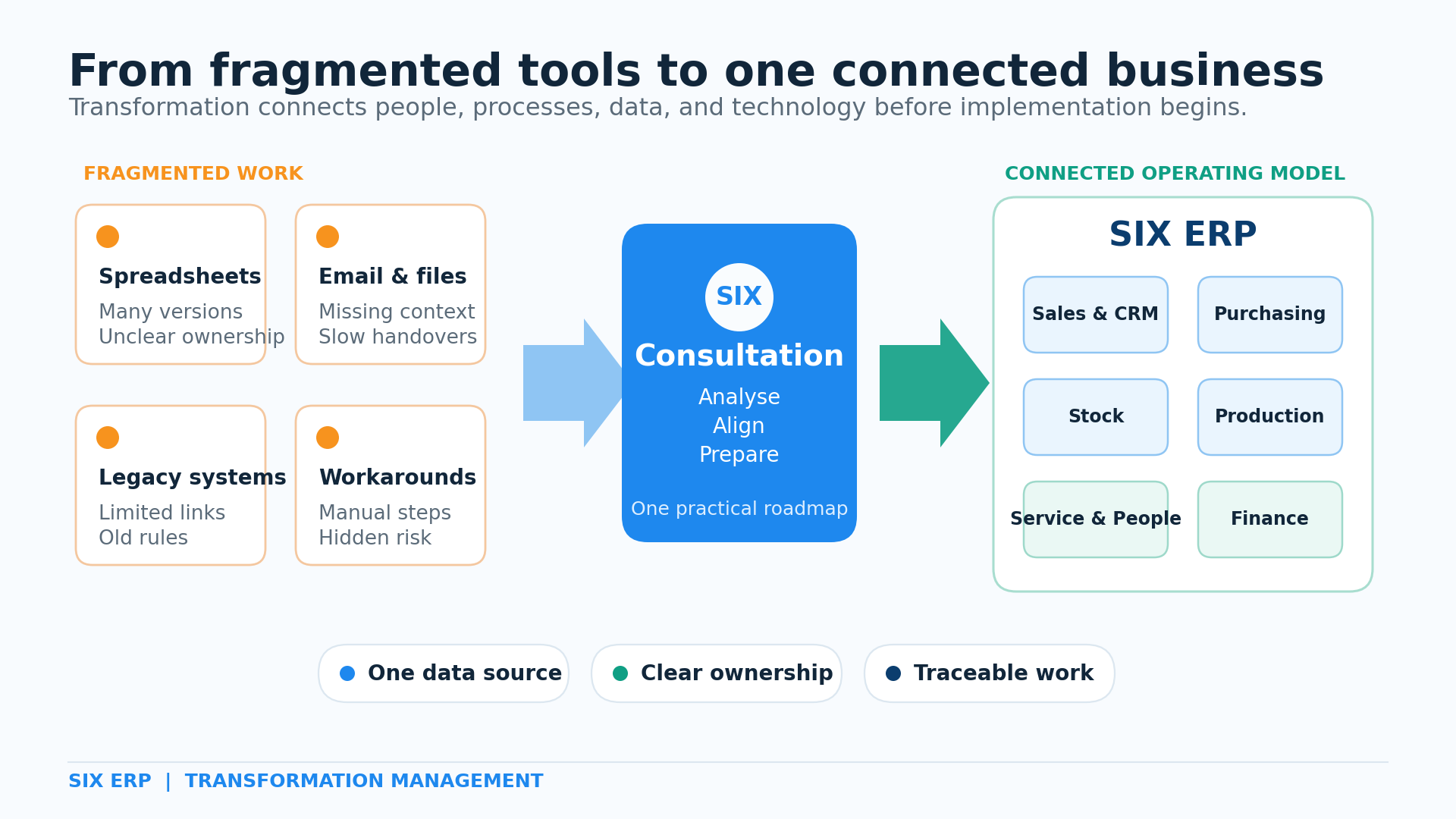
That is why transformation management matters. It creates a safe path from the old way of working to a new, connected operating model. The SIX Consultation Pathway manages this journey from the first analysis through implementation readiness and long-term improvement.
Why Spreadsheets Work at First
Spreadsheets are useful tools. They are flexible. They are easy to start. Most employees already know how to use them.
A small company may use one file for customers and another for stock. A manager may build a sales forecast. Finance may prepare reports at the end of each month. This can work while the business is simple.
Over time, the files become more important. They also become more complex. Formulas are added. Links connect several workbooks. Macros may automate certain steps. Only one or two people understand how everything works.
The spreadsheet is no longer just a tool. It becomes part of the company’s operating system. Yet it was not designed for this role.
When the Old Way Starts to Break
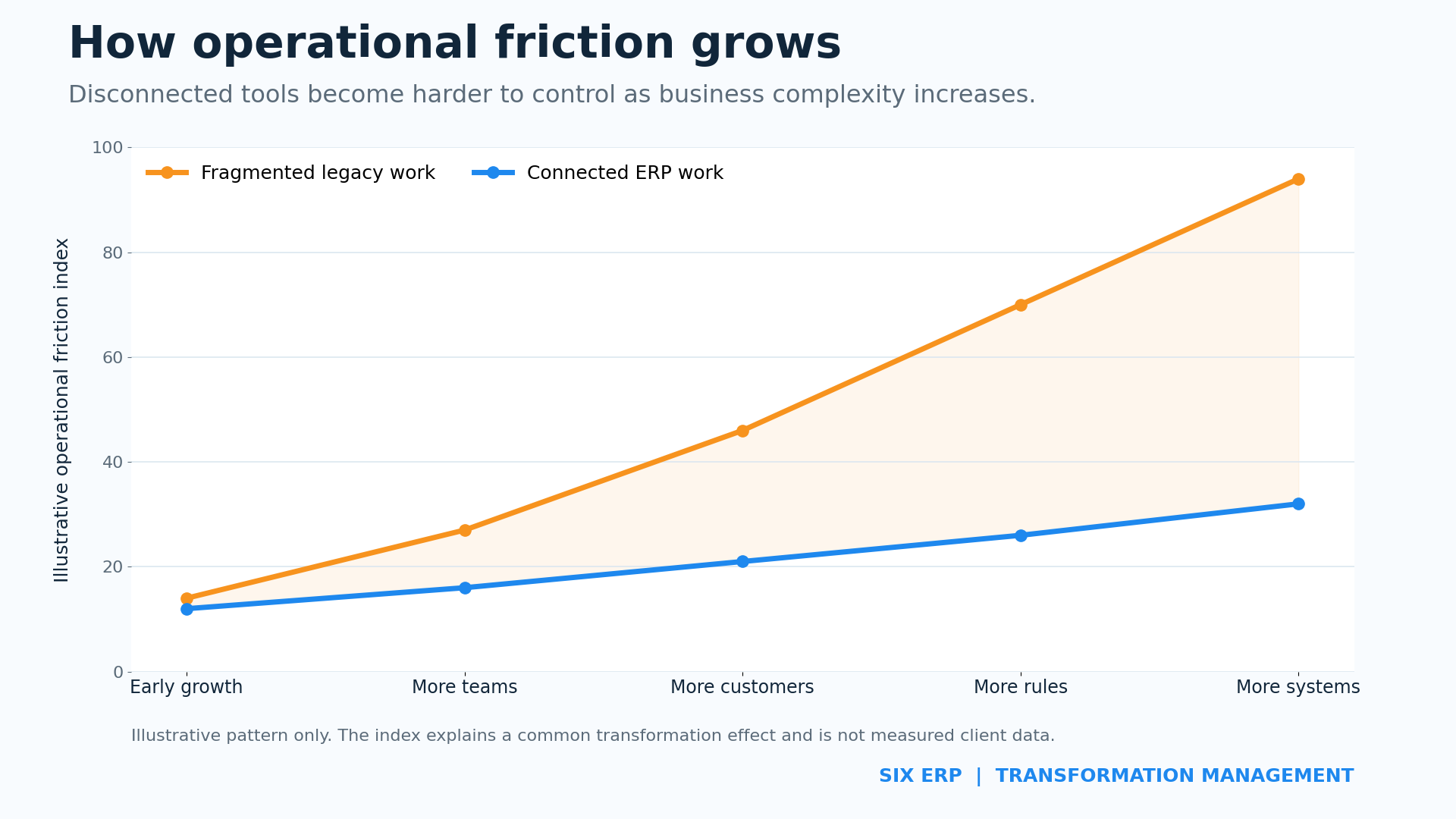
Growth creates pressure. More customers create more orders. More products create more stock movements. More employees create more approvals and responsibilities. New laws create new reporting needs.
At this point, separate files and older systems begin to cause friction.
Common warning signs include:
- Different teams use different versions of the same data.
- Numbers must be copied by hand between systems.
- Reports take hours or days to prepare.
- Managers do not see current information.
- Important knowledge exists only in one person’s head.
- Errors are found after an order, payment, or delivery is complete.
- Employees build private workarounds because the official process is too slow.
- Customers receive different answers from different departments.
- The business cannot trace who changed a record and when.
These problems are not caused by lazy employees. They are signs that the tools no longer match the size and needs of the business.
The Hidden Cost of Legacy Work
The direct cost of an old system may look low. The company already owns it. Staff members know it. There may be no large monthly fee.
But the hidden cost can be high.
Employees spend time searching for information. They compare files. They correct duplicate records. They enter the same data several times. Managers wait for reports. Teams meet to confirm which number is correct.
These activities feel normal because they happen every day. Yet they do not create value for the customer.
The company also carries risk. A broken formula can change a forecast. An old price list can reduce profit. A missing stock update can delay production. A forgotten approvalAn approval is a formal decision that allows a request or action to proceed. An ERP system can route approvals and record who made each decision. can stop a purchase. A file stored on one computer can become a serious point of failure.
Legacy work also makes compliance harder. The company may need to prove where data came from. It may need to show who changed it. It may need to keep records for a set period. This is difficult when information is spread across emails, folders, spreadsheets, and older applications.
An ERP Project Can Still Fail
Buying modern software does not guarantee improvement.
A company can move old problems into a new ERP system. This happens when the project copies every old step without asking why it exists. It also happens when teams try to rebuild every spreadsheet inside the new platform.
The result may be a newer system with the same delays, duplicate work, and unclear ownership.
Another common mistake is to treat ERP as an IT project. IT is important. But technology is only one part of the change. People must understand the goal. Leaders must make decisions. Departments must agree on shared processes. Data must be prepared. Training must match real work.
ERP success depends on business transformation. The software supports the change. It cannot lead the change by itself.
What Transformation Management Means
Transformation management is the structured work that moves a company from its current state to a better future state.
It connects four areas:
People
People need to know what is changing and why. They need clear roles. They need time to learn. They also need a safe way to raise concerns.
Processes
The company must understand how work moves today. It must find delays, duplicate steps, weak controls, and missing handovers. It can then design a simpler process.
Data
Old data must be reviewed before it is moved. Duplicates, missing fields, and unclear codes must be fixed. Data owners must be named.
Technology
The ERP system must support the future process. It must also connect with required tools, machines, portals, accounting systems, or external services.
These four areas must move together. If one area is ignored, the project becomes weaker.
Leadership Makes the Change Real
ERP transformation needs visible leadership.
Employees watch what leaders do. A manager may say that the new system is important. But if the manager still asks for a private spreadsheet, the team receives a different message.
Leaders must set the direction. They must explain why the change matters. They must support shared rules across departments. They must also make decisions when teams want different solutions.
Strong leadership does not mean forcing every detail. It means creating clarity and removing obstacles.
Leaders should:
- Agree on the business goals before configurationConfiguration sets up software using its existing options. In an ERP system, it adapts workflows, roles and other settings to the company's business processes. begins.
- Name process owners with real decision power.
- Protect project time for key employees.
- Support one source of truth for business data.
- Resolve conflicts between departments.
- Communicate progress in simple language.
- Use the new process themselves.
- Measure adoption after go-live.
The project becomes easier when leadership is consistent. People know that the change is real. They also know where to ask for help.
Bring People On Board Early
People often resist ERP projects because they fear loss.
They may fear losing control over their work. They may worry that mistakes will become more visible. They may believe the system will make their role less important. Some may have seen a failed project before.
These concerns should not be dismissed. They should be discussed early.
Employees who perform the daily work hold important knowledge. They know where orders stop. They know which fields are often missing. They know why a customer needs a special process. They also know which spreadsheet is used when the official system cannot help.
The project needs this knowledge.
Key users should join workshops. They should review future workflows. They should test real cases. They should explain the change to their teams. This does not mean that every old habit must remain. It means that decisions are based on real work.
When people help shape the solution, adoption becomes easier. The new ERP feels less like a system imposed from above. It becomes a tool built around a shared business plan.
Process Analysis Comes Before Configuration
An ERP system should not be configured from assumptions.
The company first needs a clear view of its current processes. This includes formal steps and informal workarounds.
A process analysis asks simple questions:
- What starts the process?
- Who performs each step?
- What information is required?
- Which system or file is used?
- Where does approval happen?
- Where does work wait?
- Where is data entered again?
- What can go wrong?
- What must be measured?
- Which legal or customer rules apply?
The answers create a current-state map. The team can then design the future state.
The goal is not to automate every old action. The goal is to remove unnecessary work and create a clear flow.
Data Must Be Prepared, Not Just Moved
Data migration is often treated as a technical upload. It is much more than that.
Old data reflects old decisions. It may contain duplicate customers, inactive products, missing units, unclear categories, or several names for the same supplier. Moving all of it into the new ERP will move the confusion as well.
The company must decide what data is useful.
Data can be grouped into four types:
- Active master data. This includes current customers, suppliers, products, employees, and assets.
- Open transactions. This includes open orders, unpaid invoices, current stock, active projects, and planned work.
- Required history. This includes records needed for service, warranty, reporting, audit, or legal reasons.
- Archive data. This includes older information that should remain available but does not need to enter the live ERP database.
Each data group needs an owner. Each important field needs a rule. Test migrations should happen before go-live.
Good data improves trust. Poor data makes users blame the new system for old problems.
The SIX Consultation Pathway
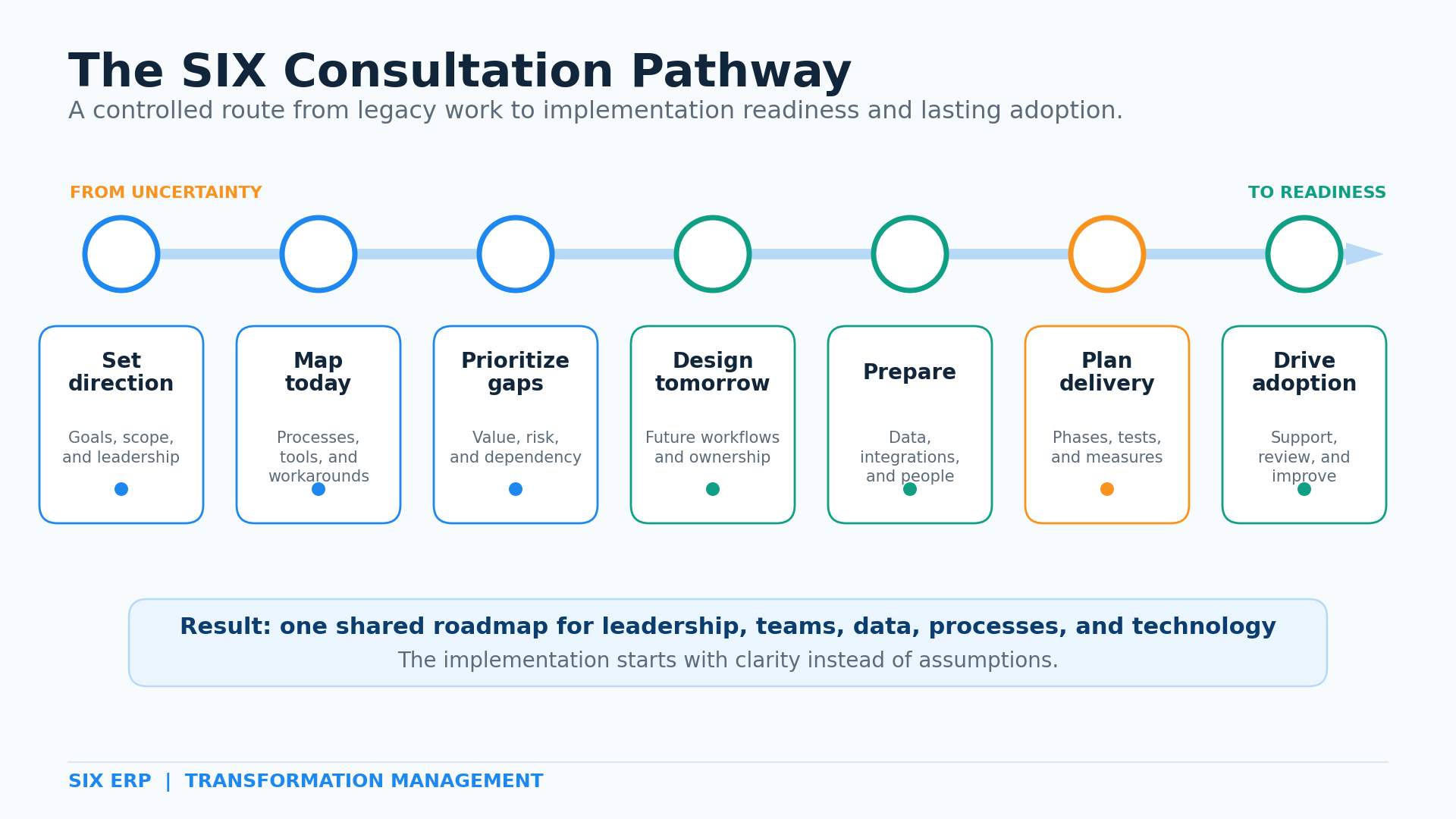
The SIX Consultation Pathway creates a controlled route from legacy work to ERP readiness. It connects business goals, people, processes, data, and technology before major implementation decisions are locked in.
Step 1: Set the Direction
The first step defines why the company wants to change.
Leaders agree on the main business goals. They may want faster order handling, better stock control, clearer production planning, stronger compliance, or more reliable reporting.
The project also needs boundaries. The team defines which companies, locations, departments, and processes are included. This prevents confusion later.
Step 2: Understand the Current State
SIX works with the people who know the daily processes.
Together, we map how work moves today. We review systems, files, approvals, handovers, reports, and workarounds. We identify where information is delayed, repeated, or lost.
This stage creates a shared view of the real starting point.
Step 3: Find Gaps and Priorities
Not every problem has the same value or risk.
The team reviews each gap. We consider its effect on customers, employees, cost, control, compliance, and growth. Critical gaps are handled first. Lower-value wishes can wait.
This keeps the project focused on business results.
Step 4: Design the Future Process
The future process shows how work should move in SIX ERP.
Roles become clear. Required data is defined. Approvals are placed at the right points. Connections between sales, purchasing, stock, production, service, people, and finance are planned.
The future process should be simpler than the old one. It should also be practical for the people who will use it.
Step 5: Prepare Data, Integrations, and People
This step turns the design into a readiness plan.
The team identifies data sources and owners. Migration rules are agreed. Required integrations are documented. Key users and training groups are selected. Communication needs are planned.
Risks are recorded early. This reduces surprises during implementation.
Step 6: Build the Implementation Roadmap
The roadmap divides the project into clear phases.
Each phase has owners, decisions, dependencies, tests, and success measures. The plan may use pilots or staged go-live dates. This can reduce disruption and help teams learn before the next phase begins.
The roadmap gives leadership a realistic view of time, effort, and responsibility.
Step 7: Support Adoption and Improvement
Transformation continues after go-live.
SIX reviews system use, process results, support needs, and new improvement ideas. Teams receive help as they build confidence. Reports and controls are adjusted when real use shows a better path.
This turns implementation into lasting business improvement.
A Safe Way to Leave Excel Behind
Stopping all spreadsheets on one day is rarely a good plan.
Some spreadsheets are temporary. Some hold important history. Others support a real need that has not yet been included in the ERP design.
The safe approach begins with an inventory.
List the spreadsheets used by each department. Record the owner, purpose, users, inputs, outputs, formulas, and business risk. Then place each file into one of four groups:
- Replace: The ERP will perform this work.
- Integrate: The file or specialist tool must exchange data with the ERP.
- Archive: The information must be stored for reference.
- Retire: The file is no longer needed.
High-risk files should receive special attention. These include files used for pricing, payroll, stock valuation, production planning, purchasing, financial reporting, or legal records.
During the transition, the team must define which system is the source of truth. Two live sources for the same data create confusion.
The old file may remain available for reference. But new transactions should follow the agreed process in SIX ERP.
Testing Must Follow Real Work
Technical tests confirm that features work. Business tests confirm that the company can operate.
Users should test complete scenarios. A sales test should not stop after creating an order. It should continue through stock, purchasing or production, delivery, invoicing, payment, and reporting.
The test should include normal cases and difficult cases.
Examples include:
- A customer changes an order after confirmation.
- A required material is not available.
- A supplier delivers only part of a purchase order.
- A product fails a quality check.
- A service technician becomes unavailable.
- A manager rejects an approval.
- A user enters incomplete data.
- An integrationIntegration connects systems so they can exchange information or coordinate actions. An ERP integration helps link business tools and reduce manual transfers between them. is temporarily unavailable.
Real testing shows whether roles, data, and decisions work together. It also gives users practice before go-live.
Training Must Match Each Role
One large training session is not enough.
A warehouse worker, sales manager, production planner, accountant, and service technician use the ERP in different ways. Each person needs training based on real tasks.
Good training uses the company’s own examples. It explains both the steps and the reason behind them. It also shows what happens before and after each task.
Key users need deeper knowledge. They support colleagues and help protect the agreed process. Managers need training on dashboards, approvals, exceptions, and team performance.
Training should happen close to the time of use. Short practice sessions are often better than one long presentation.
Go-Live Is a Managed Business Event
Go-live is not only the moment when the new system is switched on.
It is a planned move from one operating model to another.
The team needs clear rules for final data entry, migration, open transactions, user access, support, and decision making. Everyone should know where to report a problem. Everyone should know which issues are urgent.
Extra support is normal during the first days. Users are learning. Some data may need correction. A process may need a small adjustment.
The goal is not a perfect first day. The goal is a controlled start with fast learning and clear ownership.
The Adoption Curve Is Normal
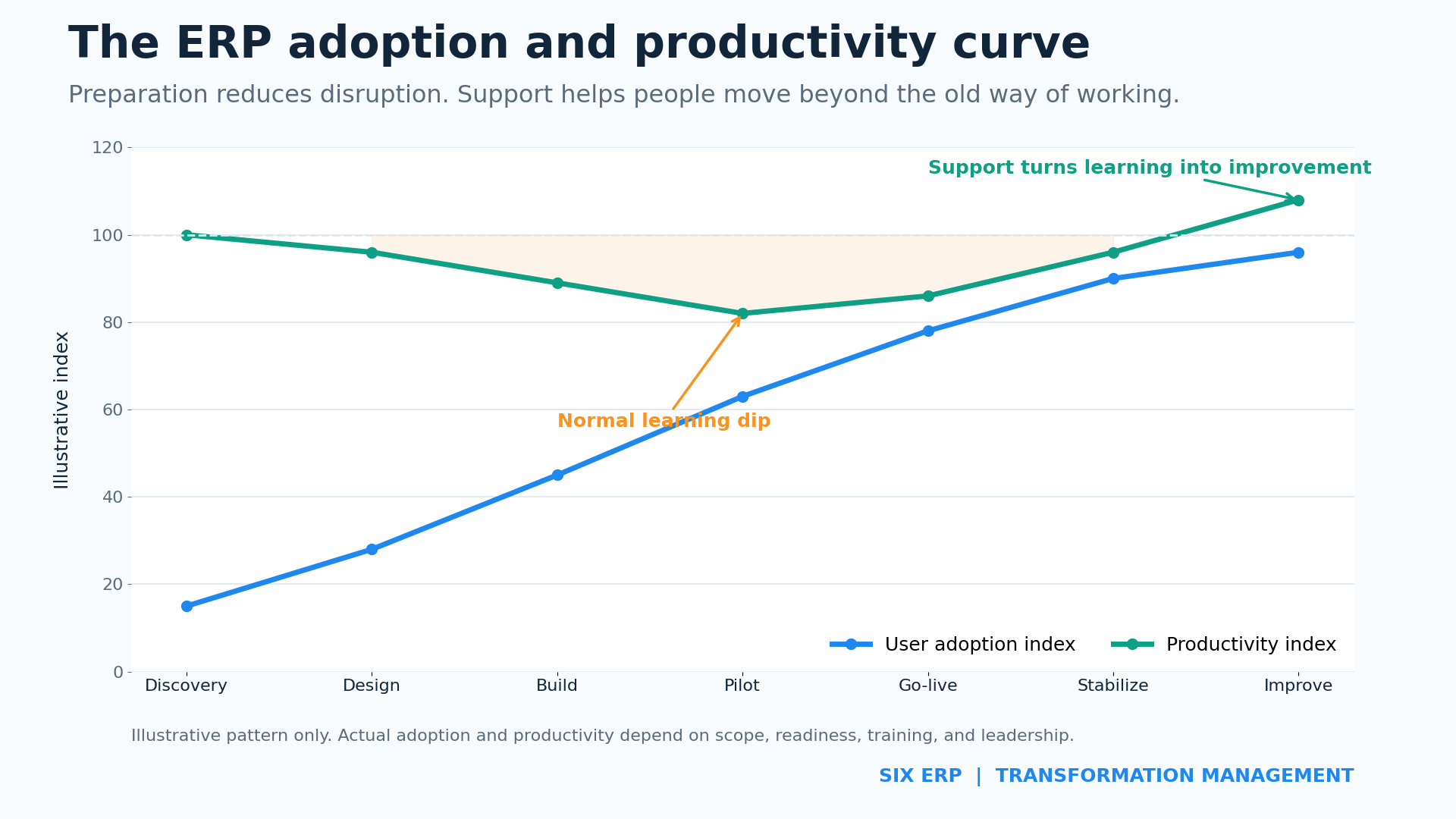
Productivity may fall for a short time during an ERP change. People are learning new steps. They need to think about tasks that were automatic before.
This temporary dip is not always a sign of failure. It becomes a problem when the company did not plan for it.
Good preparation reduces the dip. Strong support shortens it. Clear leadership prevents teams from returning to old tools.
As skill and trust grow, adoption rises. Productivity can then recover and move above the old level because duplicate work and delays are removed.
Measure More Than Technical Completion
An ERP project is not successful only because the system is live.
Success should be measured through business results and user behavior.
Useful measures may include:
- Time needed to process an order.
- Number of manual entries per transaction.
- Stock accuracy.
- On-time purchasing and delivery.
- Production plan accuracy.
- Time needed to close the month.
- Number of duplicate customer or product records.
- Use of the official ERP process instead of private files.
- Number and type of support requests.
- User confidence by role.
- Management access to current information.
The first measurements should be taken before implementation. This creates a baseline. The company can then see whether the transformation is producing real improvement.
Common Transformation Risks
Unclear Goals
Teams focus on features instead of results. The answer is a short list of agreed business goals and success measures.
Weak Leadership Support
Departments protect old habits. The answer is visible leadership, clear process owners, and fast decisions.
Too Much Scope
The project tries to change everything at once. The answer is a phased roadmap based on value, risk, and dependency.
Poor Data
Users lose trust in the new system. The answer is early data ownership, cleaning, mapping, and test migration.
Late User Involvement
The solution does not match real work. The answer is early workshops, key-user reviews, and realistic testing.
Rebuilding Every Old Customization
Complexity moves into the new platform. The answer is to challenge each requirement and protect a simpler future process.
Weak Training
Users create new workarounds. The answer is role-based learning, practice, and support after go-live.
No Plan for Adoption
The system is live, but the company still works outside it. The answer is clear usage rules, adoption measures, and management follow-up.
What a Well-Managed Transformation Delivers
A successful ERP transformation gives the business more than one new system.
It creates shared processes. It gives teams a common language. It creates clearer responsibility. It improves traceability. It makes current information easier to reach.
Sales can see stock and delivery status. Purchasing can see real demand. Production can see materials and capacity. Service can see customer history. Finance can receive cleaner operational data. Management can make decisions from one connected picture.
The company also becomes easier to change. New locations, products, services, rules, and teams can enter a defined operating model.
This is the real value of transformation. The business becomes more connected, more controlled, and more ready for growth.
Start With Clarity. Transform With Confidence.
The move from spreadsheets and legacy systems should not begin with software configuration. It should begin with understanding.
The SIX Consultation Pathway creates that understanding. It brings leaders, process owners, key users, data, and technology into one plan. It identifies risks before they become delays. It prepares people before the new system reaches them. It turns implementation into a managed business transformation.
SIX does not ask your business to fit a generic model. We first learn how your company works. We then help you decide what should remain, what should change, and what should become connected.
The result is a practical ERP roadmap. Every stage has a purpose. Every key decision has an owner. Every team understands the next step.
If your company has outgrown spreadsheets, disconnected software, or older systems, the next step is not to rush. The next step is to create clarity.
Explore the SIX Consultation Pathway and build the right foundation for lasting ERP success.