An ERPAn ERP system connects a company’s core processes—such as sales, finance, inventory, manufacturing, and service—in one place so teams can work with shared information. system is business software that puts the core work of a company, such as sales, purchasing, inventory, production, projects, people and finance, into one shared database with one set of workflows. ERP stands for enterprise resource planningAn ERP system connects a company’s core processes—such as sales, finance, inventory, manufacturing, and service—in one place so teams can work with shared information.. Instead of each department keeping its own spreadsheet or tool, everyone works from the same current records. An order entered by sales is visible to the warehouse, purchasing and accounting without anyone retyping it.
This article goes beyond the dictionary line. You will see why an ERP system matters, how it works under the hood, which modules it includes, how well-known ERP software compares, how to use it day to day, and how to choose one without regretting it. We also cover the mistakes that sink ERP projects, so you can avoid them.
We build and implement ERP at SIX, so the advice here comes from mapping real processes in service, manufacturing, and sales and distribution companies. The goal is simple: after reading, you should understand what ERP is and what to do next, without opening ten more tabs.
Why an ERP system matters for your business
An ERP system matters because it closes the gaps between departments, and those gaps are where most delays, errors and hidden costs in a growing company live. A team of five can run on a shared spreadsheet and good memory. A team of thirty cannot.
What disconnected tools cost you
Most companies reach ERP the same way. Sales keeps quotes in one file, the warehouse tracks stock in another, purchasing works from email, and accounting has its own package. Each handoff means someone retypes data, and every retyped number is a chance for a mismatch between departments. You also pay in hours spent reconciling versions instead of running the business.

Picture a field service company. A technician finishes a repair, writes the parts used on paper, and hands the note to the office the next day. Someone types it in, someone else checks stock, and the invoice goes out a week later. Nothing in that chain is dramatic, yet cash arrives late, parts get ordered twice, and the customer calls to ask where the invoice is. A modern ERP system removes those steps. The technician records the job on a phone, and the invoice builds from that record.
Most of the value of an ERP system comes from deleting handoffs, not from adding features.
What changes when everyone shares one database
Understanding ERP systems comes down to one idea: one record, many users. A customer, item, supplier or employee is created once, and every department sees the same current version. That gives you real-time visibility, so a manager sees open orders, stock levels and cash position without asking three people for three files. It also gives you traceability, because you can follow an order or a batch back through every step.
The table shows how everyday situations change.
| Situation | Without an ERP system | With an ERP system |
|---|---|---|
| Quoting a customer | Prices and stock checked by hand in separate files | Prices, stock and customer history on one screen |
| Checking availability | A phone call to the warehouse | A live stock figure on the order |
| Approving a purchase | An email chain with no clear owner | A request routed to the approver and logged |
| Closing the month | Days of reconciling exports | Transactions already posted to finance |
| Answering “how are we doing?” | A report built by hand on Friday | A dashboard updated as work happens |
Who gains the most from ERP software
Owners and general managers gain control without micromanagement. They see margin, backlog and cash on a dashboard and stop chasing people for numbers. Finance gains faster, cleaner closes because transactions post as work happens. Operations leaders gain fewer surprises, since purchasing, stock and production plan from the same data.
Employees benefit too, and this is often overlooked. Less retyping means fewer errors that land on their desk, and fewer “who has the latest file?” questions. When you evaluate an ERP system, count this saved friction. It rarely appears in a business case, yet it decides whether people actually adopt the software.
Signs you have outgrown spreadsheets
You do not need an ERP system the day you hire your second employee. You need one when coordination costs more than the software would. Watch for these signs:
- The same customer or product exists under different names in different files.
- Sales promises delivery dates that the warehouse cannot meet.
- Month-end close takes longer every quarter.
- You cannot say which products or jobs make money without a manual analysis.
- Only one person understands the master spreadsheet, and everyone fears they will leave.
- Customers, auditors or regulations ask for traceability you cannot produce quickly.
- Growth means hiring more administrators rather than more people who do the real work.
If three or more of these sound familiar, start looking seriously.
How an ERP system works
An ERP system works by storing company data in one central database and letting separate modules read and write that data according to each user’s role and the workflow rules you define. Everything else is detail on top of that principle.
One database, many modules
Think of the database as the company’s memory. It holds master data, the things that change rarely, such as customers, items, suppliers, employees and price lists. It also holds transaction data, the things that happen every day, such as quotes, orders, goods receipts and invoices. Modules are the screens and rules built on top of that memory.
Because every module reads the same master data, one action ripples through the business. When purchasing receives goods, stock updates, sales sees new availability, and finance sees a payable. Nobody exports or imports anything. This is the real difference between an ERP system and a set of apps that sync overnight, where each app still keeps its own version of the truth.
Workflows, roles and approvals
Workflows are the rules that move work from person to person. A purchase request above a set amount goes to a manager. A service request creates a job for a technician. A delivered order triggers an invoice. You define these rules once, and the system enforces them every time, which is how a company stops depending on who remembers what.
Roles control who sees and changes what. A technician sees assigned jobs but not salaries, and a buyer sees supplier prices but not payroll. An audit trail records who changed what and when, which helps with internal control and with customer or regulatory questions. A good implementation shapes workflows around how your company really operates, because a generic template that ignores your process will be bypassed within a month.
One order from first contact to payment
Walk through a single sales order in an ERP software system and you see how the pieces connect:
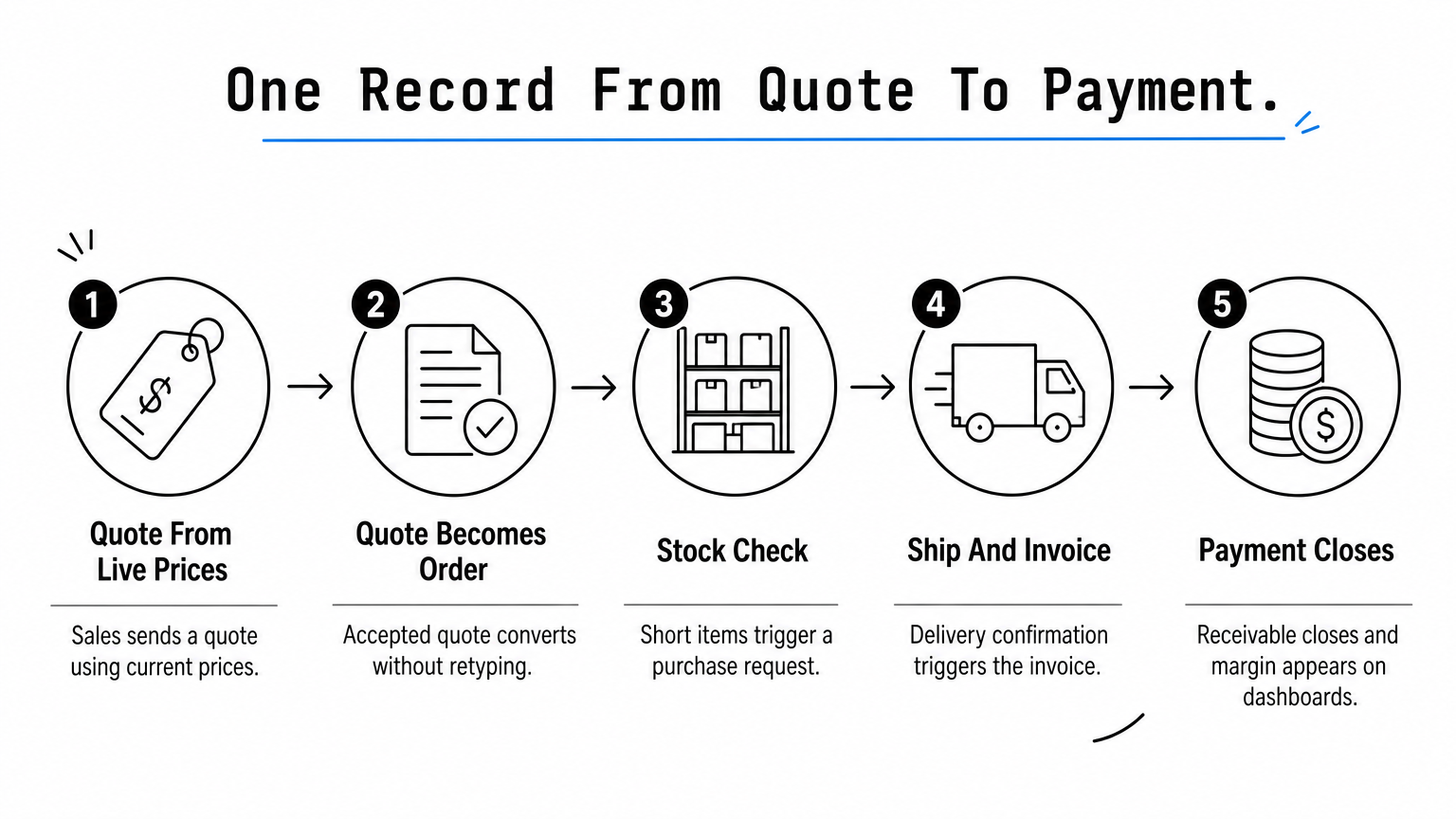
- Sales records the customer and the opportunity, then sends a quote based on current prices.
- The customer accepts, and the quote becomes a sales order with no retyping.
- The system checks stock. If items are short, it creates a purchase request.
- Purchasing approves and sends the order to the supplier, and the goods are received into the warehouse.
- The warehouse picks, packs and ships, or production builds the product from its bill of materials.
- Delivery confirmation triggers the invoice, and finance posts it to the ledger.
- When the customer pays, the receivable closes, and dashboards show the margin on that order.
Seven steps, three or four departments, one record. At no point does anyone copy data from one place to another, and that is where the time savings and the error reduction come from.
In an ERP system, an order is one record that travels, not seven records that get copied.
How an ERP system connects to other tools
No ERP does everything, so integration matters. Most systems connect to other tools through APIs or ready-made connectors, for example to a web shop, a bank, a business intelligence tool or a specialist application you already depend on. When you assess a system, ask whether data moves in real time or in scheduled batches, and who maintains the connection when either side updates.
Automation works the same way. Recurring invoices, payment reminders, reorder points and approval escalations all run from rules you set. Start with the repetitive tasks that eat the most hours, because those deliver the quickest visible payoff and build trust in the system.
ERP modules and what each one does
ERP software is built from modules, and the common ones cover sales, purchasing, inventory, production, projects, service, people and finance. Vendors name them differently, but the job each module does is the same from system to system.
The standard modules at a glance
The table lists the modules you will meet in almost any ERP system, what they handle, and who uses them.
| Module | What it handles | Main users |
|---|---|---|
| Sales and CRM | Contacts, pipelines, proposals, quotes, orders, follow-up | Sales reps, account managers |
| Purchasing | Requests, approvals, supplier orders, supplier performance | Buyers, department heads |
| Inventory and warehouse | Stock levels, locations, receipts, picking, traceability | Warehouse staff |
| Manufacturing | Demand planning, bills of materials, production orders, shop-floor execution, quality control, cost tracking | Planners, production, quality |
| Projects | Budgets, tasks, time, project costs, billing | Project managers |
| Service management | Requests, scheduling, technician planning, mobile jobs, customer approval | Dispatchers, technicians |
| HR and people | Employee records, hire-to-exit processes, training, skills | HR, line managers |
| Finance | Ledger, payables, receivables, invoicing, budgets | Accountants, CFO |
| Reporting and analytics | Dashboards, KPIs, forecasts | Management |
Which modules to start with
Do not switch on everything at once. Start where handoffs hurt most, and add the rest as you grow. Finance almost always comes along, because every other module posts its results there. After that, the right starting set depends on how you make money:
- Field service company: service management, inventory, finance.
- Manufacturer: purchasing, inventory, production, finance.
- Distributor: sales, purchasing, inventory, finance.
- Project or professional services firm: projects, people, finance.
A modular approach also protects your budget. You pay for the processes you run today, and you add the next module when the business is ready, instead of buying a giant suite and using a fifth of it.
How modules differ from separate apps
Here is a quick test for any system you evaluate. Enter a new customer once, then look for a second place where you must enter it again. If you find one, that part is bolted on rather than integrated. In a real ERP system the item master and cost data flow through purchasing, stock, production and finance, so valuation and margin figures agree without manual reconciliation.
This matters most when you scale. Separate apps tend to multiply spreadsheets between them, and those spreadsheets become the new silo. Integrated modules keep the number of places where truth lives at exactly one.
A module is only worth switching on if it reads and writes the same records as the rest of the system.
Industry-specific functions and compliance data
Many businesses need more than the standard set. Food, electronics and spare-parts companies need lot and serial tracking. Service firms need mobile execution for people in the field. Manufacturers need quality checkpoints and cost tracking from customer order to finished product.
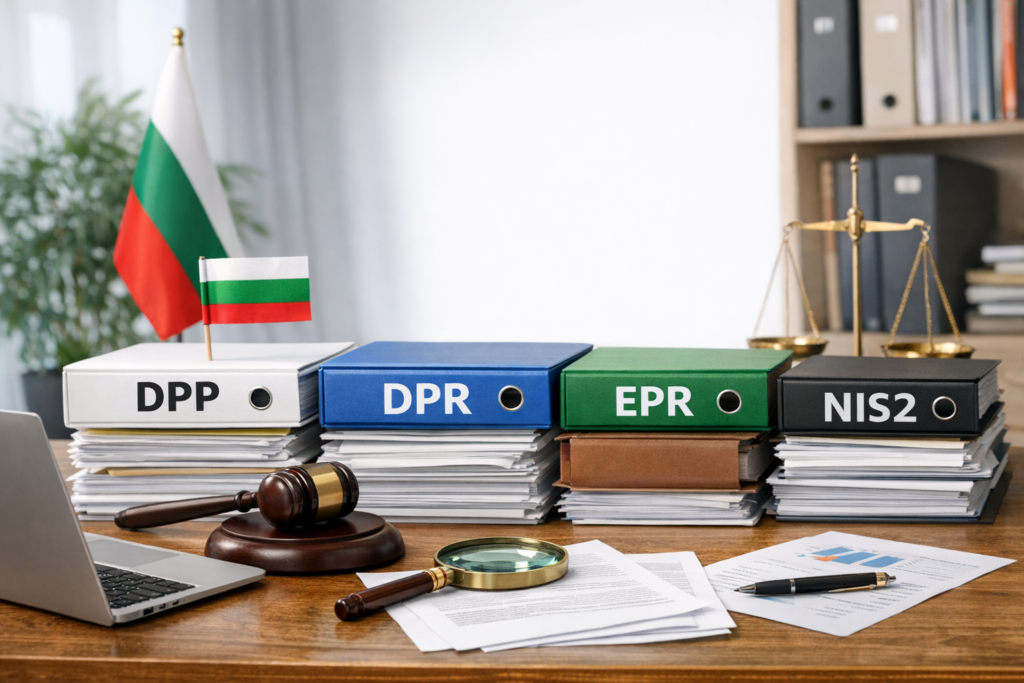
Regulation adds another layer. EU rules such as NIS2 on cybersecurity, packaging requirements under PPWR, extended producer responsibility (EPR) and digital product passports can create new record-keeping and reporting demands, depending on your sector and products. Companies in Bulgaria that fall under these rules benefit from keeping product, packaging and supplier data structured in one system rather than scattered across files. Check which rules apply to you, and ask any vendor how its system helps you collect the underlying data.
ERP system examples: common software and real use cases
Well-known ERP software ranges from enterprise suites such as SAP S/4HANA to modular systems for small and mid-sized firms such as SIX ERP. The right example for you depends on company size, industry and how complex your processes are.
ERP software examples by company size
The table groups widely used ERP systems by the kind of company they typically suit. Vendors change editions and packaging often, so confirm current product details with each vendor before you shortlist.
| ERP software | Typically suited to | Known for |
|---|---|---|
| SAP S/4HANA | Large enterprises and groups | Broad functionality, deep finance and supply chain |
| SAP Business One | Small and mid-sized companies | SAP’s smaller-company ERP covering finance, sales and inventory |
| Oracle NetSuite | Growing mid-sized companies | Cloud ERP combining finance, commerce and inventory |
| Microsoft Dynamics 365 | Small to large companies | Modular applications that connect with Microsoft 365 |
| Odoo | Small and mid-sized companies | Open-source base with modular apps and deep customization |
| Sage Intacct | Finance-led companies | Cloud financial management and reporting |
| Epicor | Manufacturers and distributors | Production and distribution focus |
| Infor | Industry-specific needs | Cloud ERP tailored by industry |
| IFS | Asset-heavy and service-driven firms | Projects, assets and field service |
| SIX ERP | Small and mid-sized companies in field service, manufacturing, and sales and distribution | Modular Flows configured around your own process, with implementation support |
Accounting packages such as QuickBooks and Xero often appear in lists of ERP examples. They cover finance very well, but they do not run stock, production, service scheduling and purchasing approvals in one shared model. Treat them as a starting point you may outgrow, not as full ERP.
How companies use an ERP system in practice
A field service company uses ERP to receive a service request, schedule the nearest qualified technician, and push the job to a mobile app. The technician records time and parts on site, the customer approves the work, and the invoice generates from the same record. The office stops chasing paperwork, and billing happens in days instead of weeks.
A manufacturer uses ERP to follow an order from demand planning through the bill of materials, purchasing of missing components, shop-floor execution and quality control. Costs accumulate on the job as work happens, so the company knows the real margin on a finished product, not an estimate from last year.
A sales and distribution company uses ERP to quote from live stock, check availability while the customer is still on the phone, and route supplier purchases through approvals. Managers see which customers and products drive margin, and which stock sits idle.
The best ERP example for you is the one whose process model already looks like how you work.
How SIX ERP is built
SIX ERP organizes the business into modular Flows that you select and connect as you grow: SalesFlow, CustomerFlow, PurchaseFlow, StockFlow, DeliveryManufacturingFlow, ServiceFlow, ProjectFlow, PeopleFlow, FinanceFlow, RepeatBusinessFlow and AIFlow. A web app covers all business processes, and a mobile app gives teams full control in the field. SIX ERP comes with dashboards for data-driven decisions, extensive automation and customizable processes.
The software is only half the offer. Before configuration, the team maps your operations in detail, so the system follows your process instead of forcing a generic one. Implementation covers analysis, pre-integration, configuration, customization, training and continuous updates, which lowers the adoption risk that sinks many ERP projects.
Cloud, on-premises and hybrid ERP software
ERP software runs in the cloud, on your own servers, or as a hybrid of both, and cloud or web-based delivery is the usual choice for small and mid-sized companies because it starts faster and needs less IT effort.
Cloud, on-premises and hybrid compared
Each deployment model trades control against effort. Here is how they compare:
| Model | How it runs | Strengths | Trade-offs |
|---|---|---|---|
| Cloud | Vendor hosts it, you access it through the internet on a subscription | Lower upfront cost, updates handled for you, easy remote and mobile access | Less control over hosting and upgrade timing |
| On-premises | Installed on servers you own and maintain | Full control over data and configuration | Hardware, maintenance, security and upgrade work fall on you |
| Hybrid | Some functions on your servers, others in the cloud | Gradual migration, keeps sensitive systems in-house | Two environments to integrate and manage |
Choosing a model for your situation
Start with four questions. Do you have in-house IT staff who can run servers and security? Do regulations or customer contracts restrict where your data may live? Do your sites and field teams have reliable internet access? And do you prefer a predictable subscription over a large upfront investment? Honest answers usually point to one model quickly.
For most companies without a large IT department, a cloud or web-based ERP system is the practical option, particularly if technicians or sales staff work away from the office. On-premises still makes sense when you have a strict control requirement and the team to meet it. Hybrid works well as a stepping stone when part of your operation, such as a legacy production system, cannot move yet.
Pick the deployment model that matches the IT effort you can actually sustain, not the one that sounds most modern.
How company size and industry change the choice
Size shapes what you need. Small companies need quick setup and a simple structure. Mid-sized companies need more departments connected, richer reporting and approvals. Large groups need multi-entity consolidation and heavy customization. Industry shapes the rest: a service business needs scheduling and mobile execution, a manufacturer needs production planning and traceability, and a distributor needs fast order handling and supplier control.
In practice you want a system with a modular structure and industry-specific configurations, so you can start small without hitting a ceiling. Ask any vendor to show you a customer of similar size and type, not just a big-name logo.
How to use ERP software and roll it out well
To use ERP software well, map your processes first, load clean data, switch on modules in phases, train people by role, and then run the business from the system only. Skipping any of those steps is the reason most disappointing ERP projects disappoint.
A rollout in six steps
- Map the process. Draw how an order, job or purchase really moves today, and mark where it stalls. If you automate a broken process, you get a faster broken process.
- Define what you will measure. Pick five to eight indicators, such as days to invoice, order cycle time, stock accuracy and margin per job. These become your dashboards and your proof that the project works.
- Clean the data. Merge duplicate customers, retire dead items, and standardize names and units before anything is imported. Dirty data loaded into a new system stays dirty, just in a nicer interface.
- Configure and pilot. Set up workflows, roles and documents, then test with one team or one process. Fix what the pilot reveals before the wider launch.
- Train by role. Teach each person the five or six actions they perform daily, not the whole system. Short, role-specific sessions beat one long training day.
- Go live in phases and review. Launch the first modules, review weekly for the first weeks, and only then add the next flow.
What each role does in the system day to day
Using an ERP system is not one skill but a set of small routines. The table shows what daily work looks like by role.
| Role | Typical daily actions |
|---|---|
| Sales rep | Updates the pipeline, builds quotes from live prices, checks availability, converts quotes to orders |
| Buyer | Reviews purchase requests, approves and sends orders, tracks supplier deliveries |
| Warehouse staff | Receives goods, picks orders, runs stock counts in the system |
| Technician | Opens jobs on the mobile app, logs time and parts, collects customer approval |
| Accountant | Reviews invoices and payments, posts adjustments, closes the period |
| Manager | Reads dashboards, approves requests, investigates exceptions |
Making the habit stick
The single most useful rule is this: if it is not in the system, it did not happen. Set a cutoff date after which quotes, stock moves and approvals outside the system are not accepted. Side spreadsheets are the quickest way to rebuild the silos you just paid to remove.
Appoint an internal owner, often called a super user, who answers daily questions and collects improvement ideas. Then use the dashboards in your weekly meeting. When managers ask for numbers straight from the system, people keep the data accurate, because they know someone reads it.
An ERP system only works as long as people keep entering the work in it, so make it the only place work counts.
How to choose an ERP system
Choose an ERP system by testing how well it fits your processes, how easily it grows with you, what it costs over several years, and how much help you get during implementation. A polished demo tells you far less than these four checks.
Criteria that matter most
Judge every candidate against the same list:
- Process fit: can it follow your real workflow for orders, jobs and purchases, or does it force a standard one?
- Modularity: can you start with the modules you need and add more without re-implementing?
- Single database: do all modules share the same records, with no re-entry between them?
- Field and mobile support: can technicians and sales staff work from a phone with current data?
- Reporting: can managers get dashboards and answers without asking IT for each report?
- Integration: does it connect to your web shop, bank and other tools you keep?
- Implementation support: does the vendor handle analysis, configuration, training and updates?
- Local fit: does it support your language, local tax and invoicing requirements, and the compliance data your sector needs?
What an ERP project costs beyond the license
The license or subscription is only one line. A realistic budget for any ERP system includes several others:

- Implementation work: analysis, configuration and any customization.
- Data cleanup and migration from your current tools.
- Integrations with systems you keep.
- Training time, which is also paid staff time.
- Internal effort from your super user and department leads.
- Ongoing support and updates after go-live.
Ask for these in writing and compare total cost over three to five years. A cheap license with heavy customization often costs more than a higher subscription with configuration that fits.
Questions to ask every vendor
Run a demo built on your own scenario, such as one real order or service job from start to finish, rather than the standard showcase. Then ask who does the process mapping, how long a comparable project took, and what the first phase includes. Ask how updates are delivered and whether your customizations survive them.
Also ask for a conversation with a company like yours. A vendor who has implemented ERP for a similar business can answer detailed questions about what went wrong and how it was fixed. That answer tells you more than any feature sheet.
The best ERP system for your business is the one that survives a demo built on your own process.
ERP mistakes that cause projects to fail
Most failed ERP projects fail for ordinary reasons: unclear processes, bad data, too much customization and too little attention to people. None of these are technical problems, so you can prevent all of them.
Process and data mistakes
The first mistake is buying features instead of fixing the process. A company with unclear approvals and inconsistent pricing rules will not be saved by software. Write down how work should flow first, then pick the system that supports it. The second is skipping data cleanup. Duplicate customers and mismatched item codes make every report suspect, and people lose trust in the system within weeks.
A third mistake is over-customizing the system to copy every old habit. Some customization is healthy, since your processes are your advantage. But each custom piece adds cost, complicates updates and slows training. Ask of each request whether it reflects a real business need or only a comfort with the old spreadsheet.
People and scope mistakes
Many projects try to launch everything on one date. A phased rollout reduces risk, gives the team time to learn, and lets you fix problems while they are small. Starting with the modules that hurt most also produces visible wins early, which keeps support strong.
The most common people mistake is treating ERP as an IT project. It is a business change project, so department leads must own their processes and involve their teams from the first workshop. Without that, staff see the system as something imposed on them, and they keep a private spreadsheet in case it fails. Communicate why the change is happening, what each role gains, and who to ask for help.
ERP projects rarely fail because the software is weak. They fail because nobody owned the process or the data.
Where to go from here
An ERP system replaces scattered tools and spreadsheets with one shared database, clear workflows and real-time visibility. It works through modules for sales, purchasing, stock, production, service, projects, people and finance, and it pays off most when you map your processes first, start with the modules that matter, and keep all work inside the system.
Your next step is practical. List the three handoffs that cost you the most time or money today, write down how one order or job really moves, and use that as your test for any vendor. If you want to see how a modular system configured around your own processes would look, talk to the SIX ERP team about your operations.