TL;DR - Key Takeaways
A quick overview for busy decision-makers.
Sales has promised a delivery date, purchasing says the parts are on order, and the warehouse has a different quantity in Excel. Meanwhile, a project manager can’t tell whether the latest time entries have used up the remaining budget. Everyone has a file, but nobody has a dependable answer.
Learning how to move from Excel to ERPAn ERP system connects a company’s core processes—such as sales, finance, inventory, manufacturing, and service—in one place so teams can work with shared information. starts with those unanswered questions, not an import template. An enterprise resource planningAn ERP system connects a company’s core processes—such as sales, finance, inventory, manufacturing, and service—in one place so teams can work with shared information. system, or ERP, connects operational records and the rules people follow when they change them. A sound migration moves a working business process into that shared system, rather than copying disconnected spreadsheets into a new database.
Sort Every Workbook Before You Import
Which materials are free to use? Can the team meet the promised date? Is the project still inside its budget? If answering these questions requires several employees to compare files, Excel has become the operational database rather than an analysis tool.
The failure often sits between departments. A planner changes a production schedule, purchasing updates a material list, and a warehouse employee adjusts a stock workbook. Someone then copies those figures into a project forecast. Each transfer creates another opportunity to omit a row, change a unit, or carry forward an outdated assumption.
A review of spreadsheet-error literature identifies calculation-chain length as a main factor increasing error likelihood. Separately, a systematic review submitted to the UK Parliament reports an error rate near 5% for complex logical work, with financial-model building described as comparable to software writing. That’s a reason to inspect hidden logic, not trust a workbook because its totals look familiar.
What to do with each Excel workbook
Before discussing software configurationConfiguration sets up software using its existing options. In an ERP system, it adapts workflows, roles and other settings to the company’s business processes., give every workbook a role.
| Workbook role | Typical contents | What to do | Who decides |
|---|---|---|---|
| System of record | Customers, items, BOMs, stock, suppliers, project budgets, time, open invoices | Redesign as an ERP workflow and stop operational edits in the file | Named process owner |
| Analytical tool | Forecasts, what-if margins, one-off simulations | Keep in Excel, fed by approved ERP figures | Analyst or manager |
| Personal productivity | Scratch calculations and private task lists | Leave outside ERP | The individual user |
| Obsolete workaround | Duplicate price lists, old versions, abandoned trackers | Archive and do not import | Data owner |
A system of record is the authoritative place where the business maintains a fact. If purchasing and production each maintain an item’s unit of measure, neither file is reliably authoritative until the business resolves that ownership.
"In any business there should be only one source of truth. Two or even more burns the food. Big Time"Dr. Andreas Maier, CEO SIX ERP
A bill of materials, or BOMA Bill of Materials (BOM) lists the materials and components, and their quantities, needed to make a product., deserves particular attention. It defines the components and quantities needed to make a product. Don’t treat a planner’s adjusted copy as an approved manufacturing requirement without checking its version, units, and intended use.
Keep useful Excel work without keeping duplicate operations
Spreadsheet use doesn’t automatically mean a business has failed to adopt integrated systems. The MNP 2025 Advanced Manufacturing Outlook Report found that 72% of manufacturers still used spreadsheets, while 58% used integrated ERP systems. The practical distinction is what people use those spreadsheets to control.
A margin simulation can stay in Excel. A separately maintained inventory balance shouldn’t remain an unofficial alternative to the warehouse record after its ERP workflow is accepted.
Practical rule: Preserve useful analysis. Remove competing places where employees can change the same operational fact.
A controlled spreadsheet can also be safer than a rushed customizationCustomization changes or adds software functionality beyond standard settings. In an ERP project, it can meet specific business needs while adding development and maintenance work. whose rules nobody has approved. Keep a temporary exception register with its owner, access restrictions, review date, and replacement condition. Don’t turn every workaround into a permanent ERP requirement.
Start with a workbook register today. Record the file location, owner, role, inputs, outputs, formulas, approvals, and business consequence of an incorrect result. Mark which files contain employee rates, project budgets, time, and unpaid invoices. Then assign one role per file, including the uncomfortable decision to archive something nobody needs.
How to Phase Work Out of Excel
Move a complete transactional chain, not an isolated department’s worksheet. For a manufacturer, that usually means customer orders, material requirements, purchasing, and inventory. For a project business, it means the customer order or project, resource planning, time, purchasing, and billing.
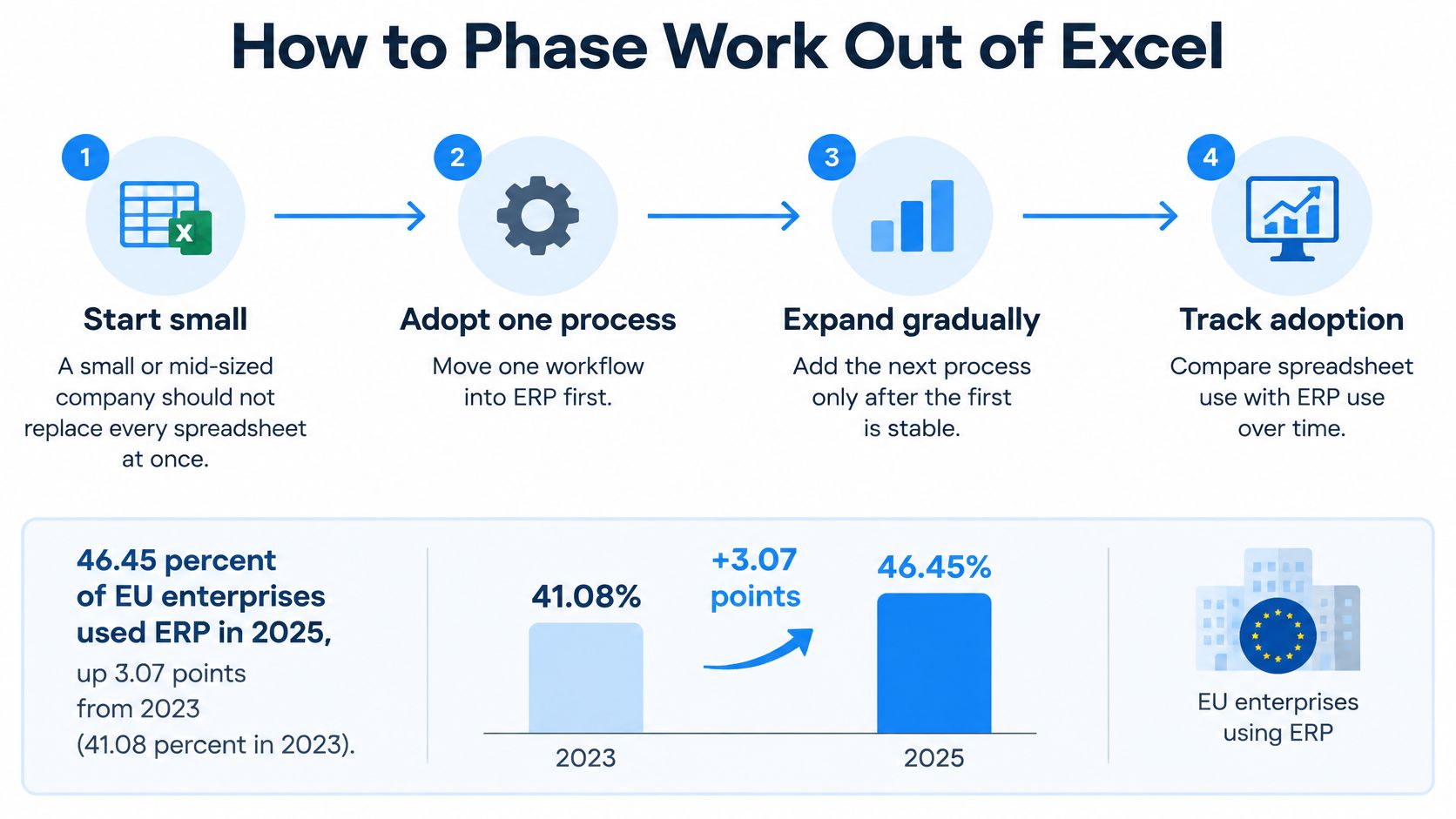
Company size helps explain why implementation scope needs discipline. Eurostat’s enterprise digital-economy statistics report that 46.45% of EU enterprises used ERP in 2025, up 3.07 percentage points from 2023, with adoption reaching 41.08% among small enterprises, 69.93% among medium-sized enterprises, and 88.71% among large enterprises. A smaller business shouldn’t copy a large organization’s rollout scope without the staff to support it.
Move the chain in workable stages
- Choose the daily question to fix. Start with reliable material availability or dependable project cost, rather than a list of desired screens. Pick a pilot such as a warehouse, product family, or project team.
- Load the master data that this chain needs. Avoid delaying a useful pilot while employees clean unrelated historical records.
- Activate the underlying transactions. Record purchasing and warehouse movements, or task-level time. Compare these with a controlled validation sheet.
- Add manufacturing orders or project execution, including consumption, progress, and completion updates.
- Connect cost and invoices. Finance should receive the operational facts through the agreed accounting and billing path, not another manual summary.
- Set the date when ERP becomes the authoritative record for the chain. Tell users in writing when the operational workbook becomes read-only.
The step-by-step ERP implementation planning guide helps turn these stages into assigned work, dependencies, and acceptance decisions.
When each phase leaves Excel behind
| Phase | ERP becomes the record for | Excel may still be used for | Stop operational use when |
|---|---|---|---|
| Master data | Customers, suppliers, items, units, employees, project codes, current BOMs | A checklist of open questions and the archive of old codes | Business owners sign the active records |
| Supply or time | Purchase orders, receipts, stock balances, or hours on tasks | A side-by-side validation sheet | Sample quantities or hours match the source |
| Execution | Manufacturing orders or project tasks, consumption and status | Read-only history | Users complete a full order or project in ERP |
| Cost and billing | Project or production cost and the customer invoice | Analysis and what-if models only | Finance reconciles totals and approves the invoice path |
Train employees on the handoffs they’ll use first. A warehouse employee needs to practice a receipt, discrepancy, and return, not sit through every finance function. A project supervisor needs to review incorrect time and understand what approvalAn approval is a formal decision that allows a request or action to proceed. An ERP system can route approvals and record who made each decision. releases downstream.
Keep a parallel run short and controlled. Name who enters the validation record, who compares results, and who resolves differences. A matching sample is an acceptance condition for that phase, not proof that every possible transaction works.
Track order-cycle time, stock accuracy, invoice-processing time, and reconciliation effort against an agreed starting point. Also record whether employees complete transactions in ERP or maintain substitute files. A tidy database means little if the operational decisions still happen elsewhere.
Clean Master Data and Reconcile the Load
Most migration failures start in the master data, so treat the load as a data project. Master data describes the reusable business entities behind transactions, including customers, suppliers, items, employees, and projects. If those records are inconsistent, importing them neatly won’t make the resulting orders reliable.
An ERP-migration study published in the International Journal of Multidisciplinary Research and Growth Evaluation identifies harmonization, entity matching, validation, ownership, and data lineage as recurring migration controls. In practical terms, people need to know what a record means, which source supplies it, and how it changes during the import.
Prepare records and their relationships
- Identify every source. Collect workbooks and application exports covering customers, suppliers, item catalogs, inventory, BOMs, employees, rates, and projects. Mark the authoritative source for each field where files overlap.
- Deduplicate and standardize values. Correct item codes, verify units, and flag obsolete or incomplete records. Don’t merge similarly named customers without checking whether they are separate legal or billing entities.
- Define relationships. Each BOM component must point to a valid item. Each project transaction must point to the right project, task, person, and applicable rate. Keep a mapping register showing old identifiers and their approved ERP equivalents.
- Separate active records from history. Preserve older information in a controlled archive where appropriate, while retaining the references needed to explain current balances and obligations.
- Run a sample import. Check stock quantities, BOM structures, project budgets, dates, and linked records. Include awkward cases such as inactive suppliers, alternative units, and employees whose rates change.
- Reconcile and obtain approval. Compare record counts, inventory quantity and value by location, open-order status, and unpaid customer and supplier balances.
The guide to data management provides useful context for ownership beyond migration day. Someone must remain responsible when a new item, customer, or project code is created after go-live.
Rehearse the load before approving cutover
Freeze the source extracts before a test load so everyone compares the same version. Load master data before open transactions, and retain transformation rules so another person can reproduce the result.
Use a full-volume rehearsal as well as sample testing. An ERP data-migration framework separates discovery, cleansing, execution, validation, reconciliation, and cutover readiness. Check rejected rows, unmapped codes, missing required fields, duplicate records, inventory differences, and financial control totals.
A successful import message proves that the software accepted a file. It doesn't prove that the business can trust the records.
Classify defects as blocking or non-blocking. A broken customer address may need correction before dispatch; an invalid stock unit can prevent the entire affected workflow from going live. Fix defects in the source or mapping, then reload and retest rather than patching unexplained differences directly in production.
The implementer supplies import structures, mapping tools, and validation checks. The business confirms the correct item, BOM version, labor rate, and project code. SIX’s Consulting & Pre-Integration Support covers this kind of process mappingProcess mapping documents the steps, people and decisions involved in business work. In an ERP project, it helps define workflows and identify improvements before system setup. for organizations replacing spreadsheets or planning a wider transformation, but the final acceptance belongs to the responsible business owners, not the import operator.
How Projects Plan Cost Time and Bill
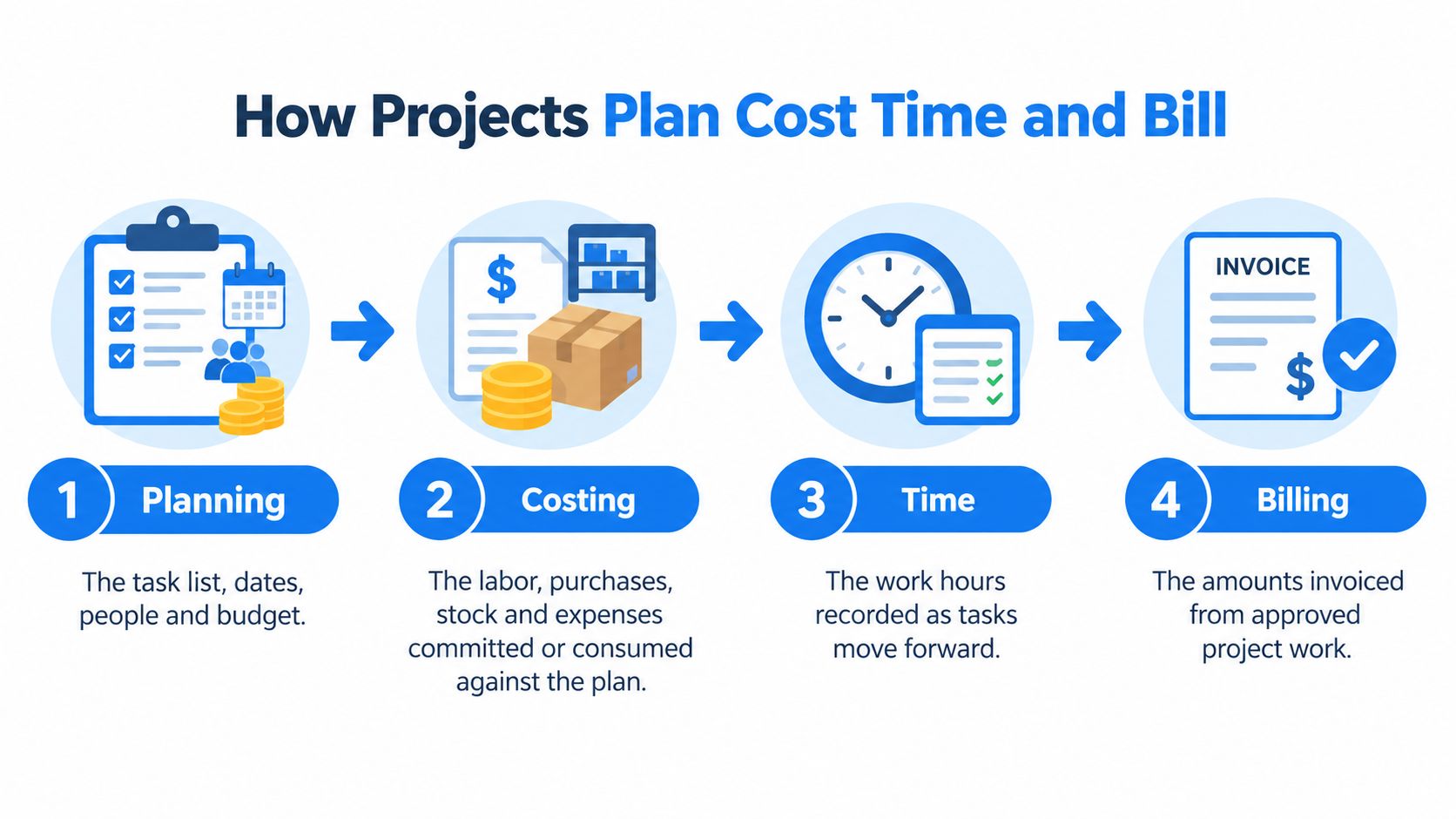
Planning defines tasks, dates, people, and budget. Costing tracks labor, purchases, stock, and expenses committed or consumed against that plan. Time capture records hours against the work, and billing turns approved time or an agreed milestone into a customer invoice. One record, four views of the same job.
Treat them as linked stages of that shared record. A project business that moves to ERP file by file ends up keying the same job into four places and reconciling at month end. Moving the whole chain from plan to invoice is what retires the spreadsheet.
Follow a hypothetical engineering job
Suppose an engineering business designs and installs a customer assembly. The project manager sets the approved tasks, dates, budget, and milestones in SIX ProjectFlow, which covers planning, tasks, and cost tracking.
PeopleFlow supplies the people records, skills, and agreed labor rates used in the configured workflow. PurchaseFlow records the supplier orders for parts, and StockFlow records material issued to the job. Employee spending is captured against the person and the task that incurred it. FinanceFlow handles the financial records and the invoice path for approved time or milestones.
An approved time entry consumes budgeted hours and supplies eligible work to the time-and-materials invoice draft. A supplier receipt updates receipt status and the committed-versus-received cost position, with no one rebuilding a workbook. Accounting recognition and customer billing still follow the company’s configured rules.
What one project event updates
| Event | Planning or cost effect | Supply or people effect | Billing effect |
|---|---|---|---|
| Approved budget | Sets the baseline hours and cost | Reserves named people or capacity | No invoice yet |
| Time entry | Consumes budgeted hours and labor cost | Shows who worked and remaining availability | Can feed a time-and-materials draft |
| Purchase order | Commits expected material cost | Creates a supplier delivery to track | Stays unbilled until the rule says to bill it |
| Stock issue | Adds actual material cost to the project | Reduces the warehouse quantity | Can be included on the next invoice |
| Expense | Adds a reimbursable or internal cost | Ties the spend to a person and task | Included only if the billing rule allows it |
| Milestone invoice | Compares billed value with cost to date | No stock movement | Creates the receivable in finance |
These effects describe the intended workflow for the example, not automatic behavior under every contract. A fixed-price project does not become billable merely because someone records time. The guide from project idea to profitable delivery examines the wider connection between delivery work and financial control.
Assign owners and test the exceptions
The project manager owns the plan and the scope baseline. Team members own accurate time entries, purchasing owns supplier orders, and finance owns the invoice and margin review.
Test missing labor rates, time booked to closed tasks, and receipts arriving after an invoice. A missing rate must remain visible as an exception rather than posting as zero cost. A late receipt can change the margin review without changing an invoice the customer already has.
Scope changes need an approved new baseline, not a quiet budget edit. The record should show who approved the change and what it did to dates, cost, and billing.
SIX investigates ERP issues by looking at the wider business process around the issue, not only the screen where it appeared. Apply the same approach in acceptance testing: follow one approved budget through work, purchasing, cost, and invoice. Software preserves the trail; the company decides who can approve each step.
What Nachevi Reported After Connecting Work
A customer example is most useful as a measurement pattern. When production scheduling, purchasing, and warehouse activity share one workflow, the gain to look for is a shorter manual trail: fewer copied values, fewer status checks, and a clearer path from demand to cost. Treat any outside result as context for your own baseline.
Measure the chain, not the headline
Build the baseline before cutover. Pick the transactions that already cause arguments: a material need, a supplier order, a warehouse movement, a project cost, an invoice. Record how work moves between them while Excel still carries the load.
| Baseline to capture | How to observe it | What better looks like |
|---|---|---|
| Material availability | Count the places employees check before confirming stock | One current stock view used by planning and purchasing |
| Duplicate entry | Track where the same order, item, or customer value is typed again | Entry once, reused by the next step |
| Purchasing overlap | Compare supplier orders with open demand before approval | Existing commitments visible before another order is placed |
| Project cost to billing | Follow approved work through time, purchasing, cost, and invoice | Finance can trace billed value back to approved activity |
| Exception handling | List missing rates, closed-task time, and late receipts | Exceptions stay visible until owned and cleared |
A project firm should read the example through its own chain. A project manager approves a material purchase, an employee records installation time, and finance reviews the resulting cost before billing. If those events sit in separate files, every handoff is a place where scope, rate, or status can drift. In SIX ERP, sales, purchasing, inventory, projects, finance, and daily operations connect in one platform, so the review point is the shared record rather than the latest spreadsheet version.
Compare the work that disappears between departments, not another customer's percentages.
No customer result transfers automatically. Workflow design, purchasing discipline, inventory control, and production coordination do the work; removing spreadsheets only shows whether those practices are connected.
For a management review, put the current workflow map beside the baseline table. Mark each manual transfer, each approval that happens outside the file, and each place finance has to ask operations what a number includes. After the chosen chain goes live, repeat the same observation with the same definitions. The useful comparison is whether the team performs fewer manual transfers and can follow one trail from demand to cost.
Choose the First Chain and Start There
Choose the question that already causes operational pain. If nobody trusts stock and purchasing, start with orders, materials, supplier orders, and warehouse movements. If nobody trusts project margin, start with the project, people and rates, time, purchasing, and billing.
Keep the first decision meeting narrow. Bring the actual workbooks and a recent transaction that employees struggled to complete or explain.
Leave the meeting with an accountable scope
- Workbook role and owner. Identify which files control operations and who can approve their replacement.
- Required master data. Name the customers, items, units, rates, projects, and current structures that must be correct.
- Validation evidence. Choose representative transactions, exceptions, and financial totals for acceptance.
- Cutover authority. Record who approves the switch and the date operational edits move exclusively into ERP.
Finance should also check that the operational opening position agrees with its supporting accounts. Bookkeeping and Accounting of Florida Inc.’s guide to balance sheet checks for small businesses is a useful companion when preparing that reconciliation.
Match implementation support to the decision
Our Consulting & Pre-Integration Support suits organizations replacing spreadsheets, evaluating ERP options, or unsure where implementation should begin. Once scope is agreed, IntegrationIntegration connects systems so they can exchange information or coordinate actions. An ERP integration helps link business tools and reduce manual transfers between them. & Configuration & Customization supports organizations starting a SIX ERP implementation, including connections to existing accounting or specialist systems where needed.
Each customer runs a separate, managed instance. You can start with the Flows your business needs and connect more as requirements grow, rather than treating every department as a launch-day dependency.
Choose one chain to map this month. Keep Excel for analysis, place operational changes in one shared record, and retain company ownership of controls and approvals. The strongest starting scope is one your users can explain, your owners can validate, and finance can trace.
SIX ERP offers a free demo and process-mapping support for teams moving away from operational spreadsheets. Visit SIX ERP to arrange a conversation around your first order-to-delivery or project-to-billing flow, using your workbook register and a representative transaction rather than a tour of every module.