
TL;DR - Key Takeaways
A quick overview for busy decision-makers.
Most advice about ERPAn ERP system connects a company’s core processes—such as sales, finance, inventory, manufacturing, and service—in one place so teams can work with shared information. system data starts in the wrong place. Teams are told to store every field, keep every old spreadsheet, and run one big cleanup before go-live. More rows do not make the business clearer. A record that cannot connect a promise, a movement, and a cost is not a small gap. In a structured system, an incomplete record is bad data. Reports built on it disagree, and any model that fills the blank will invent an outcome the company never recorded.
The better test is whether one fact can travel. Can sales, the warehouse, purchasing or production, shipping, and finance use the same customer, item, and document without retyping the order?
Three Kinds of ERP System Data
The value of ERP data comes from how reliably records connect business processes, preserve traceability, and support decisions.
ERP system data is the shared set of records a company uses to sell, buy, store, make, deliver, serve, and account. Judge it by the links between those records.
Eurostat reported that 43.3% of EU enterprises used ERP software in 2023, an increase of 5.4 percentage points compared with 2021. Usage was 38% among small enterprises and 86% among large enterprises, a gap of 48 percentage points. The figures cover enterprises with at least 10 employees in the business economy, and they exclude agriculture, forestry and fishing, mining and quarrying, and financial activities. Smaller firms rarely have a large technical team, so shared customer, supplier, inventory, project, production, and finance records have to work without a separate system in every department.
What each kind is for
| Data type | What it describes | Typical record | If the record is incomplete |
|---|---|---|---|
| Master | Lasting business entities | Customer, supplier, product, employee, warehouse, cost center | The same item or partner is created twice and later reports do not match |
| Transactional | Events and movements | Sales order, purchase order, stock move, work order, invoice, payment | History cannot be traced and quantities or money cannot be explained |
| ConfigurationConfiguration sets up software using its existing options. In an ERP system, it adapts workflows, roles and other settings to the company’s business processes. | Rules the system applies | Unit of measure, conversion, tax code, approvalAn approval is a formal decision that allows a request or action to proceed. An ERP system can route approvals and record who made each decision. limit, document number, role | Calculations, approvals, or documents run with the wrong rule |
A wholesaler that keeps flour under two codes, one in a price list and one in the warehouse sheet, has split its master data in half. The sales order, the goods receipt, and the supplier invoice are transactional data. The kilogram-to-bag conversion, the tax code, and who may approve a price change are configuration data. Confuse the layers and a cleanup project edits the wrong one: it merges product codes when the fault is a missing conversion rule, or it rewrites tax codes when two customer records describe the same buyer.
A blank required field is not a tidy-up for later. A product with no unit of measure cannot be bought, reserved, or costed. The order may save, then purchasing, stock, and finance each guess a different quantity. A company modernizing legacy ERP systems should sort its current spreadsheets into these three types before any cleanup starts. Load history only after that sort.
How One Order Stays Connected
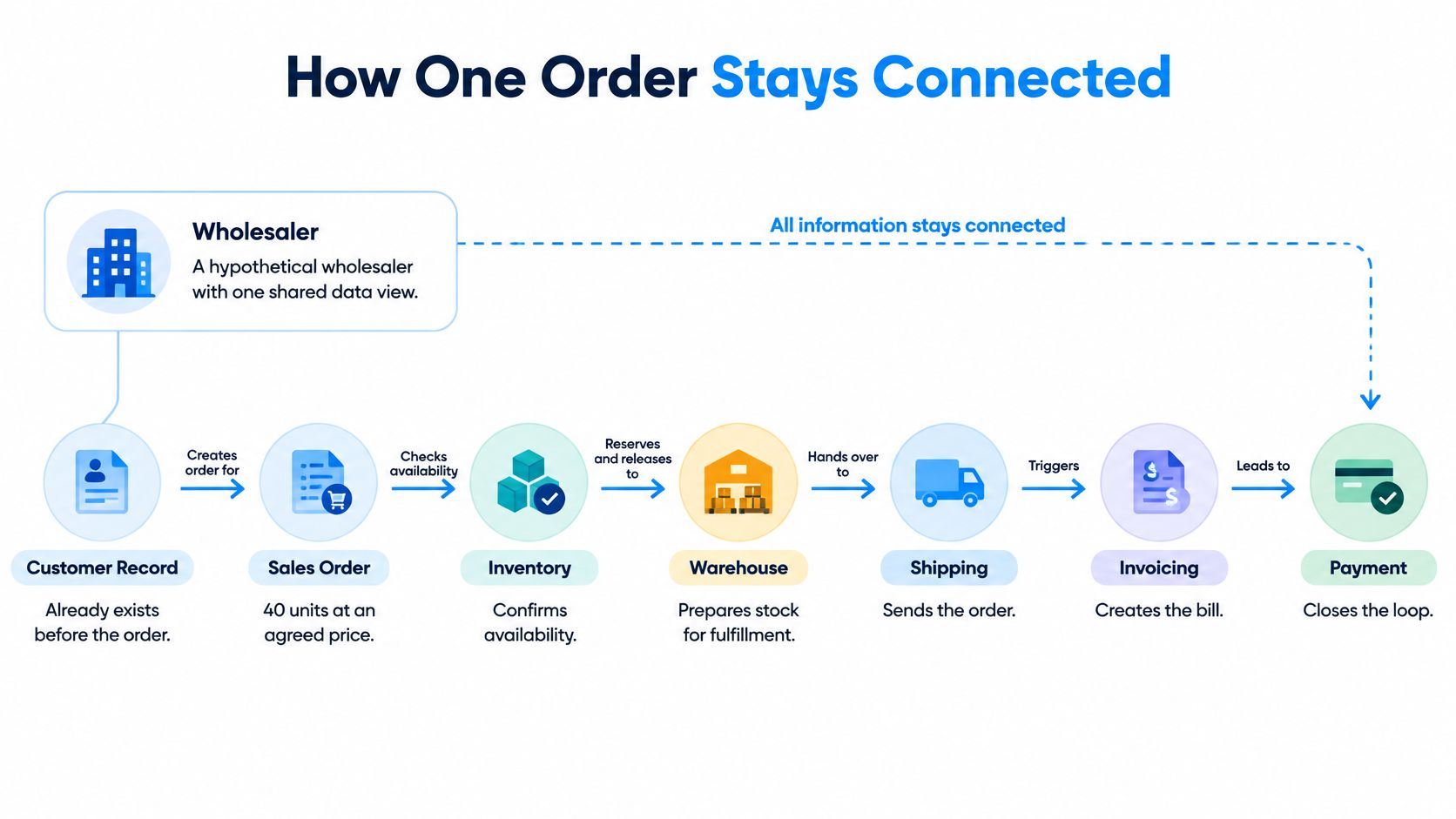
Picture a hypothetical wholesaler with one shared view of customers, items, and documents. The customer record already exists. Sales enters an order for 40 units at an agreed price in EUR and a promised delivery date. Stock checks what is on hand and reserves it. 15 units are short, so purchasing raises a supplier order for that gap only. If the item is made in house, production follows the bill of materials on a work order. Shipping records the delivery. Finance invoices the delivered quantity and later matches the payment. Nobody pastes the order into a second spreadsheet.
Who owns each handoff
Sales owns the commercial promise. The warehouse owns the reservation. Purchasing owns the supplier commitment. Production owns consumption. Finance owns the invoice and the cash. SIX SalesFlow keeps that path in one sales process, from the customer order through stock, purchasing or production, picking, delivery, invoicing, payment status, and follow-up.
| Step | Owner | Linking record | Failure point |
|---|---|---|---|
| Order entry | Sales | Customer and order number | Second product code for the same item |
| Stock reservation | Warehouse | Item and warehouse balance | Stock move posted to the wrong warehouse |
| Work order for made-in-house item | Production | Bill of materials version and work order | Material consumption not posted to the work order |
| Delivery | Shipping | Delivery linked to order and lot | Delivery recorded against the wrong order |
| Invoice and payment | Finance | Invoice, order, and payment | Invoice points to a code that does not match the order |
A second product code, a missing delivery address, or a stock move posted to the wrong warehouse breaks the chain even when every screen looks busy. The count of entities changes with the processes you turn on and the way the company is set up. Value sits in the relationships, not in the number of tables.
You should be able to open any invoice and walk back to the order, the stock movement, and the cost.
Data Model Rules That Hold
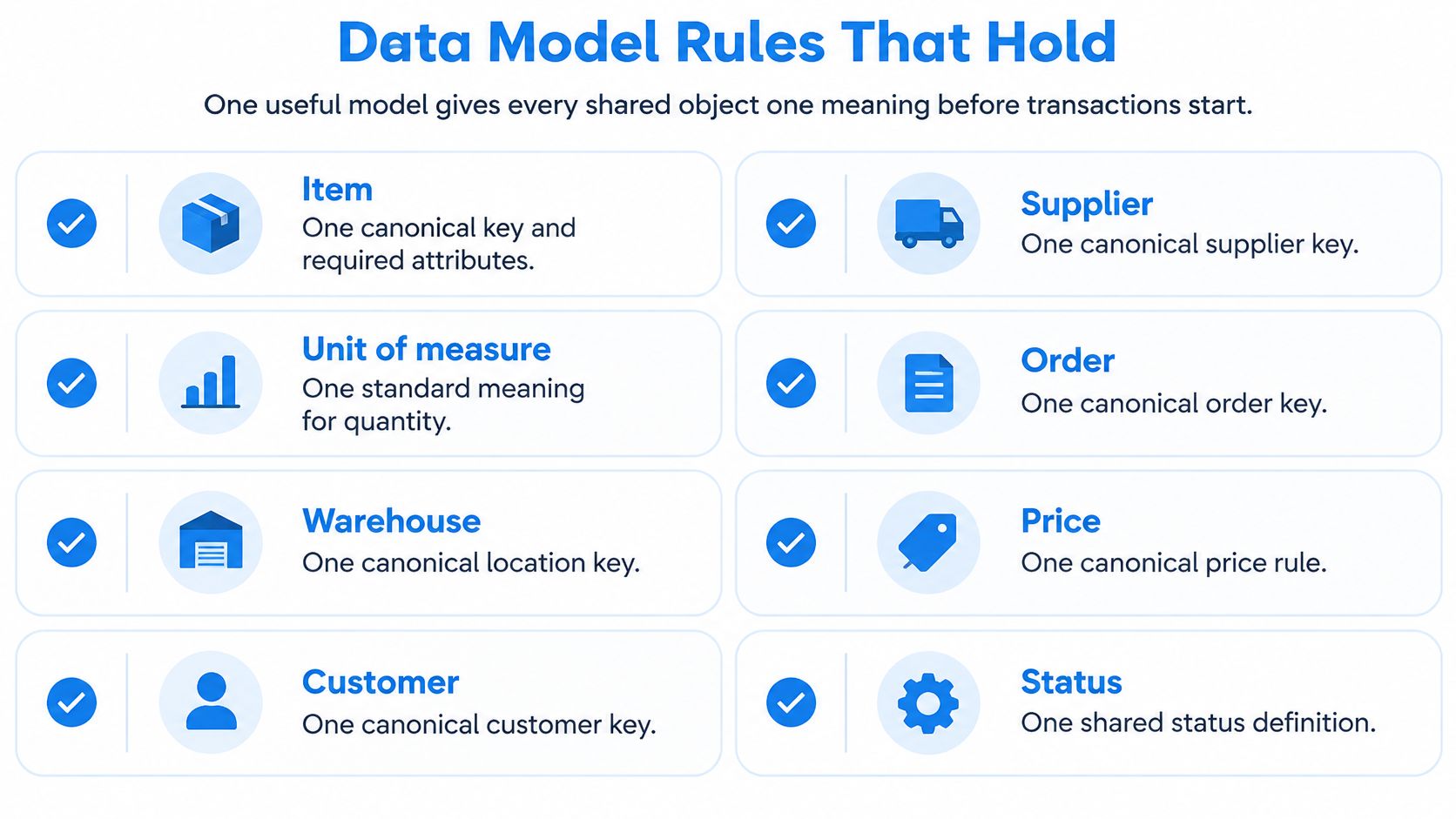
A useful model gives every shared object one meaning before the first transaction posts. IBM’s description of master data management calls this a single version of truth for customers, products, suppliers, and financial structures, so each module resolves the same entities.
Decisions before go-live
Give each of these objects one canonical key and a short list of required attributes: item, unit of measure, warehouse, batch or lot, supplier, customer, employee, project, and cost center. SIX CustomerFlow is the customer side of that rule, one journey for conversations, leads, opportunities, and the next step, tied to the wider platform.
For every item, require one code, one description standard, one base unit, and only the conversions you have written down. Kilograms purchased, packages stored, and grams consumed can all be valid. Store each conversion as a written factor on the item record, tested against a real delivery before it goes live.
For a manufactured item, require a bill of materials with component quantities, a version, and a status. Add a scrap allowance or an alternative material only when the plant uses one. A structured record with a required field left empty is bad data, and any automationAutomation uses software or equipment to carry out tasks according to defined rules. An ERP system can automate routine business steps and highlight exceptions for review. or AI that reads it will fill the gap with an invented outcome.
- Stage the import. Park incoming rows before they become live masters.
- Standardize fields. Apply the same codes, names, and units.
- Detect duplicates and keep one survivor. Link the rest to that record.
- Enrich, then validate. Fill missing required attributes and block the row if it still fails.
- Queue the failure. Store source, effective date, steward, and change history. Do not accept the row in silence.
Purchasing carries the same resin as RES-01 while production books it as R01. Material planning doubles demand because it sees two items. Merge them into one surviving item and block the duplicate at import, then correct the reports that consumed both codes. If the same partner or product keeps two identifiers, joins fail, balances diverge, and a KPIA KPI (Key Performance Indicator) measures progress towards a business goal. An ERP system can calculate KPIs from business records and show changes in performance over time. can count the same event twice.
Practical rule: Write the required fields and the one allowed base unit for your top 20 items before you load history.
Who Owns Quality After Go-Live
A one-time migration cleanup does not create lasting quality. New customers, urgent item fixes, and fresh imports arrive the week after go-live, and the file drifts. Quality is an operating habit, measured every month, not a project that ends at cutover.
Five tests and a named owner
| Measure | Question to ask | Owner |
|---|---|---|
| Completeness | Are required fields such as unit, supplier, and lot filled in? | Process steward for that record |
| Uniqueness | Does one real customer, supplier, or item have only one active code? | Master-data steward |
| Consistency | Do the order, stock movement, and invoice point to the same code? | Operations and finance together |
| Validity | Is the unit conversion or bill of materials version an allowed value? | Owner of the rule, such as production or finance |
| Timeliness | Was the stock, production, or field update posted before the next decision? | Team that performs the work |
Assign stewards by process, not to the IT team alone. Sales owns customers. Purchasing owns suppliers. Operations owns items and bills of materials. The warehouse owns balances and lots. Finance owns tax, cost, and payment terms. Each steward reads a monthly quality report and approves exceptions. A broader look at what data management covers day to day helps those owners see the habit, not only the software screen.
Limit master-record edits by role so only the steward can change a code, a unit, or a partner. Keep an audit trailAn audit trail records who created, changed or approved information and when. In an ERP system, it helps trace transactions, investigate errors and support audits. on every correction and tie that trail to the report it changed. Do not claim a percentage improvement unless you measured the same test before and after.
Name one steward and one pass-or-block rule for new items this month. If the unit is blank, the item does not go live.
Integrations That Do Not Copy Errors
Treat every link to accounting, a web shop, a machine, a portal, or a phone as a pipeline you keep watching. Feeds need monitoring long after go-live, because every retry, format drift, or stale master record travels downstream on its own. IBM’s note on data integration challenges lists duplicate records, missing values, inconsistent formats, outdated records, and conflicting information, and each fault gets worse once it spreads into analytics and reports.
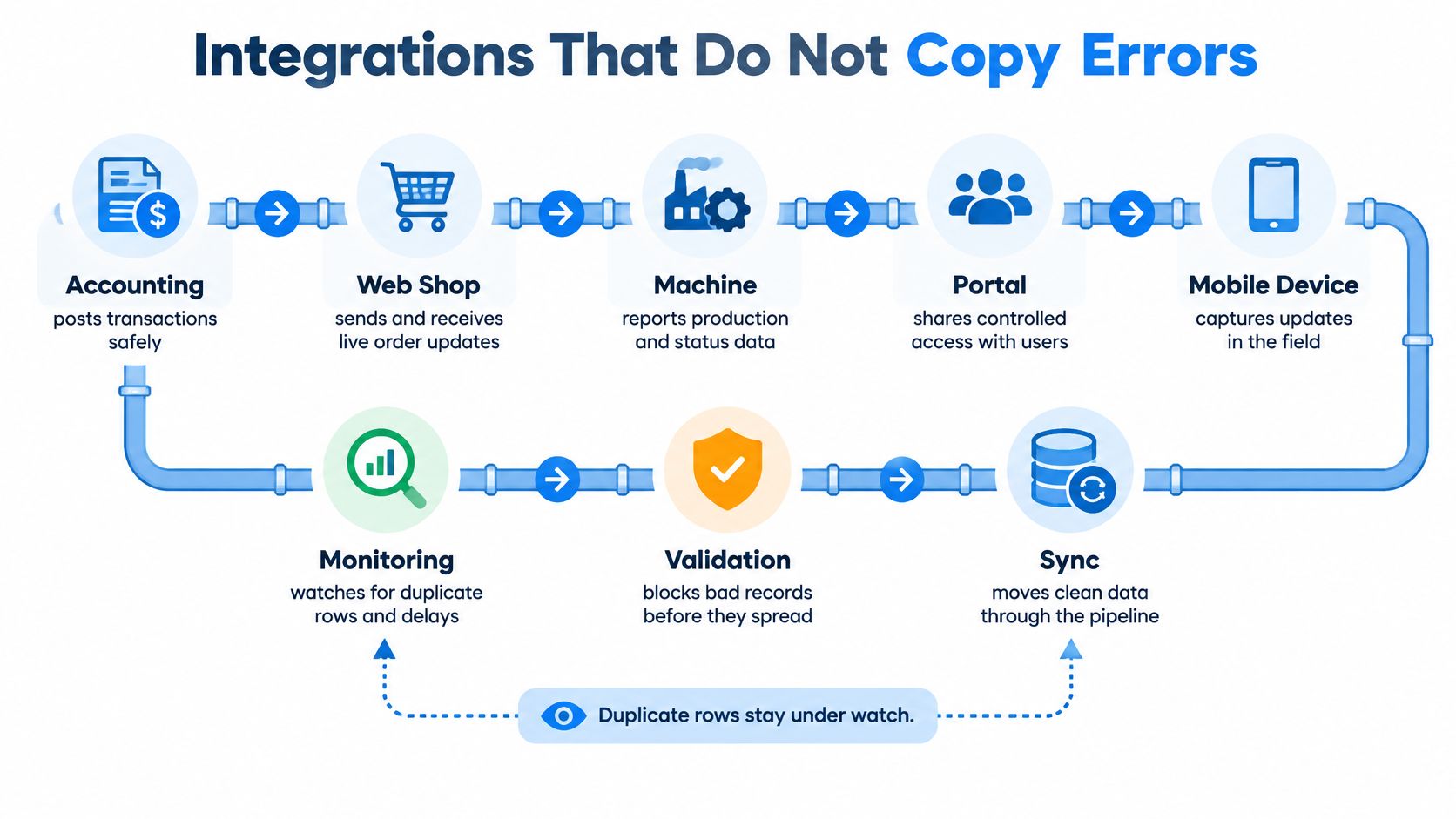
Six control points you should pay attention to:
Run them in this order on every feed.
- Check the incoming schema before anything is saved.
- Use an idempotency key so the same message cannot post twice.
- Reject a row whose customer, item, or supplier does not match master data.
- Compare document counts and EUR totals between source and target.
- Retry temporary failures and park poison messages for review.
- Watch delay and unusual volume.
The dashboardA dashboard brings key figures and status information together on one screen. An ERP dashboard helps teams monitor performance and identify issues that need attention. should separate rejected, quarantined, delayed, duplicated, and accepted records so each state has an owner. A shop import that retries an order without an idempotency key creates a second sales order and reserves the same stock twice. Block the duplicate at the door, then reconcile order count and value between source and target. The report keeps showing the extra reservation so the repair lands on the feed that caused it, and a blank or malformed field never reaches the target to be guessed at later.
Schedule a reconciliation across sales, purchasing, stock, production, service, and finance. Keep each correction as an audit event with a reason attached, since a silent overwrite deletes the trace a quality question or a recall will depend on. A practical discussion of whether an ERP integration is worth doing belongs next to that list. Write down each external feed, its matching key, and the total you will reconcile.
Where Bad Records Show Up in Work
The same faults show up as wrong stock, a recall you cannot answer or trace, or a margin that looked fine on the quote.
Units on the shop floor
A hypothetical plant buys a material in kilograms, stores it in packages, and consumes it in another unit. Purchase invoices can be correct and stock, purchasing, and production cost still disagree, because no conversion ties the three quantities. Alternative materials, scrap allowances, and extra bill of materials versions widen the gap.
The repair is one item master, a checked bill of materials, shared conversions, consumption posted to the work order, and an exception raised before the next plan. Counting the bins after the fact does not remove the rule that created the error.
A margin view, not a customer result
A representative cross-module view, not a verified customer deployment, can combine sales prices and promises, purchasing costs, stock consumption, production labor and material, and finance invoices and payments. A quote that looked profitable at a 1,000 EUR margin can fall after expedited freight or extra labor. SIX ManufacturingFlow is built so a customer order, materials, bills of materials, work steps, and quality checks stay on one production path into inventory, delivery, costing, and invoicing. Configurable dashboards and the cross-module Report Builder can combine those entities.
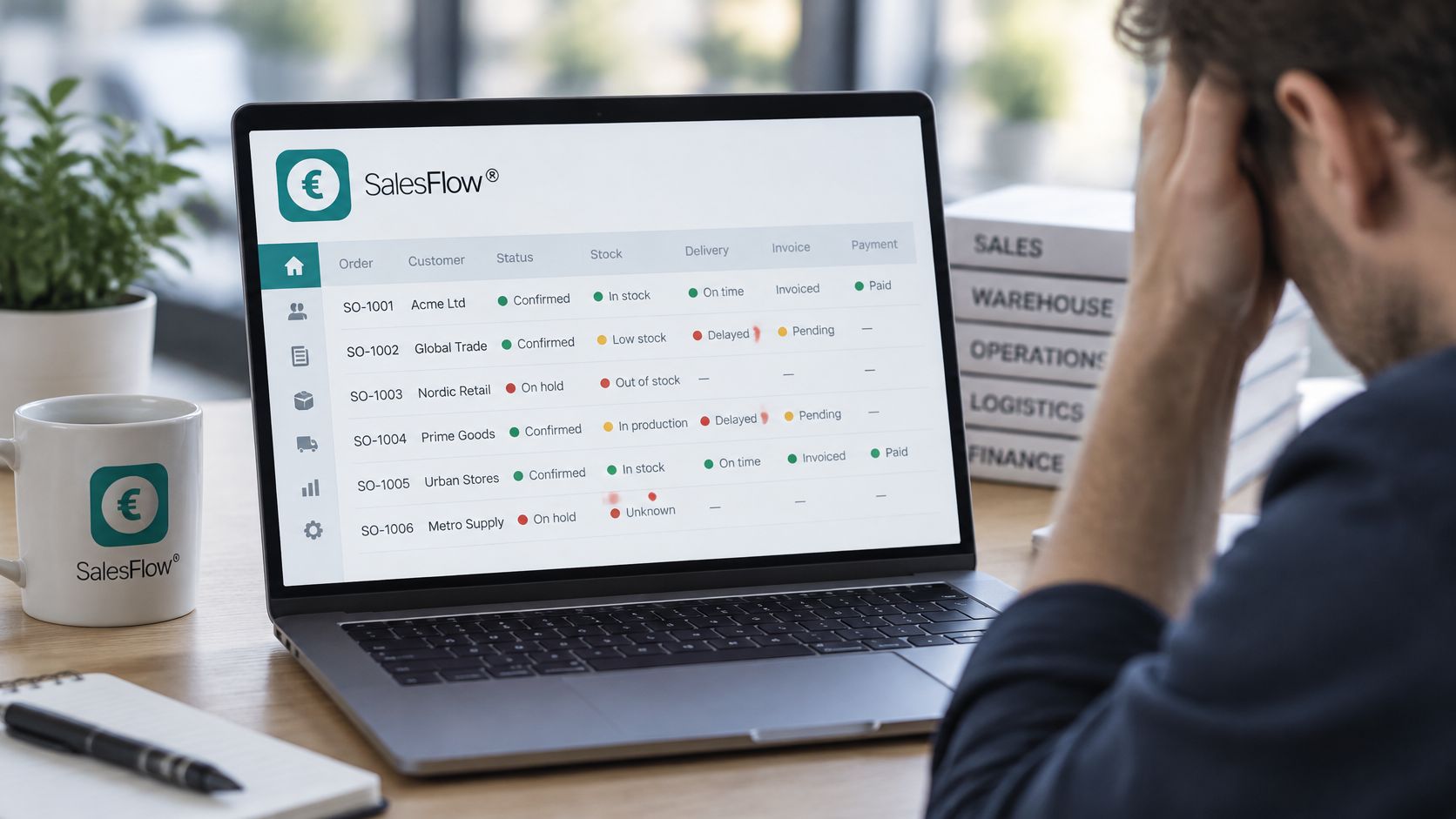
Typed invoices still fail when a unit or a partner code is wrong on the page. Teams that are automating transaction entry with OCR still need the same master match before a scanned line becomes a posting. For how those records should change a decision, see data-driven decision making.
Confirm Records Before You Automate
A report or an automatic posting may go through when permissions and validation pass. An AI recommendation needs more than that. It needs complete context, a confidence threshold, a human approver, an explanation that points at source transactions, an audit log, and a way to roll the action back.
A 2025 enterprise-data study reports that 84% of organizations are investing in AI, only 17% say AI is operationalized and delivering business value, 97% face context gaps in definitions, quality, or trust, and, citing IBM, 45% of business leaders name data accuracy or bias as a leading barrier to scaling AI. In that setting bad data does not stay neutral: the model fills missing context with invented outcomes the company never recorded.
Refuse a forecast, a purchase suggestion, or a staffing tip when units, calendars, customer identities, or production definitions conflict. Map a trusted path from demand through fulfillment to the financial result, including mobile updates and quality records, and stop when a required fact is missing. SIX ERP keeps each fact in one connected record chain, so stock levels, customer details, costs, schedules, and documents reuse the same entry instead of copying it between tools. Each customer keeps data in their own pod, with no shared database and no access from outside. That supports dependable records. It does not certify compliance, and the company remains responsible for its legal duties. SIX also stays involved after go-live, tracing issues to the wider business process around the screen where they appeared and keeping the platform ready for new requirements.
Review item, unit, and partner master data with a SIX specialist before you automate the next recommendation. The manufacturing overview shows how those masters sit under production planning.
SIX ERP keeps sales, purchasing, stock, production, service, and finance on one connected data foundation, so a record entered once can be traced from the order to the cost. If incomplete masters are already bending your reports, start with the items, units, and partners rather than another dashboard.