Make-to-order (MTOMTO means production starts after a customer places an order, allowing products to be made to the customer’s requirements.) means production begins only after a confirmed customer order; for example, a factory builds an industrial pump to a buyer’s specifications. Make-to-stock (MTSMTS (Make to Stock)is a production method where a company makes products before customers order them. The finished products are stored in a warehouse and are ready to ship when an order arrives.Manufacturers often use MTS for products with steady demand and standard designs. It can help them deliver orders quickly. However, making too much can leave the company with) means products are made in advance and held for sale; a standard water filter can ship from finished-goods inventory.
MTO ties production to actual demand, while MTS uses forecasts to prepare stock before demand arrives. Many manufacturers combine the two: they stock shared components, then configure or finish them after an order. In our review of production planning models, the manufacturers who struggle most are often those that have not made an explicit choice about which items should follow each policy. SIX ERPAn ERP system connects a company’s core processes—such as sales, finance, inventory, manufacturing, and service—in one place so teams can work with shared information. supports MTO, MTS, and hybrid planning in one system. Its ERP tools can support inventory planning, including inventory decisions, while a product’s configurationConfiguration sets up software using its existing options. In an ERP system, it adapts workflows, roles and other settings to the company's business processes. can be completed after the order.
Quick decision aid: Choose MTO when specifications vary or finished-goods risk is high; choose MTS when demand is predictable and customers expect immediate delivery; consider hybrid planning when common components can be stocked while final details remain order-specific. The decision should reflect lead times, capacity, inventory cost, and the customer’s delivery expectations.
How We Approached This Guide
We organized this guide around the decisions manufacturers make when setting production policy: what triggers production, where inventory sits, how delivery dates are promised, and where forecast risk falls. The examples illustrate those mechanics rather than claim results from product testing. We also distinguish finished goods from the materials that feed production, since confusing those two inventory pools can lead to poor replenishment decisions. Where a term or planning principle benefits from an external explanation, we link to a relevant reference.
Make-to-Order: Build When the Customer Orders
In manufacturing and business, MTO most commonly means make-to-order: a confirmed customer order triggers production of the specified product. This is distinct from unrelated uses of the acronym in slang or project management; Investopedia’s make-to-order definition describes the production model. In our review of MTO planning, the failure mode that stands out is promising a delivery date before checking both material availability and real capacity.
MTO is useful when customers need special sizes, colours, packaging, firmware, labelling, testing, or technical configurations. Rather than producing every version in advance, the manufacturer makes what the customer ordered. A sofa, for example, can be built to a selected combination of upholstery, frame, and size; an engineered product may require a specific configuration and test plan. Tredence’s overview of MTO and MTS describes how the customer order drives the production process.
The principal benefit is lower exposure to unsold finished goods. The trade-off is that the customer waits while materials are sourced, capacity is scheduled, production is completed, and quality checks are performed. MTO shifts the planning challenge from stocking finished variants to coordinating materials, labour, and capacity against an order.
From Quote to Shipment
Before confirming a date, the business needs an honest view of supply and capacity:
- Available-to-Promise (ATP): What materials, components, and sub-assemblies are available or expected from confirmed inbound orders?
- Capable-to-Promise (CTP): Is there enough machine time, labour, tooling, and production capacity to complete the work by the requested date?
Once the order is confirmed, SIX ERP can create the production flow. It reads the Bill of Materials, follows the routing, creates work orders, and identifies missing materials that need to be purchased.
For configurable products, approved variant rules can select the correct components, operations, test instructions, and labels. This reduces repeat engineering work and helps prevent production errors.
Capacity Must Be Realistic
An MTO schedule must account for the limits of the factory, including:
- Machine availability and shift calendars.
- Labour availability and setup or changeover time.
- Planned maintenance and tooling restrictions.
- Outsourced operations.
- Existing work orders and customer priorities.
If a machine is fully booked, SIX ERP can identify the next available slot, suggest another resource, or show how the schedule affects the delivery promise. A date grounded in capacity is more useful than an optimistic commitment that production cannot meet.
Traceability, Quality, and Actual Cost
MTO is valuable when each order needs a clear material and production history. Materials can be reserved for a specific customer job, while operators receive work instructions, drawings, quality specifications, and test limits at the workstation.
As work progresses, teams record quantities, actual time, scrap, rework, and quality results. If a critical measurement falls outside tolerance, the process can be paused before defective parts move to the next operation.
Job costing can include material consumption, labour and machine time, subcontracting, scrap, rework, supplier price changes, and extra setup or handling. This makes it possible to review actual margin by order rather than relying only on an average product cost.
A Simple MTO Example
A customer orders 120 custom pumps with a special seal. The seal takes five days to arrive, setup takes one day, the line produces 60 pumps per day, and testing and packing take another day.
A workable schedule allows five days for the seal, one for setup, two for assembly, and one for final checks and packing. If the seal repeatedly constrains delivery, the company could keep a controlled safety stock of that component without holding finished custom pumps.
Make-to-Stock: Produce Before Orders Arrive
MTS production is planned ahead of individual customer orders, using expected demand to decide what to make and when. Finished products are stored so an order can be shipped quickly. The model suits standard products with repeat demand, stable specifications, and customers who value short delivery times.
Its benefit is availability; its risk is the cost of getting the forecast wrong. Lower-than-expected sales can leave excess stock, while a demand spike can cause a stockout and send customers elsewhere.
How MTS Inventory Works
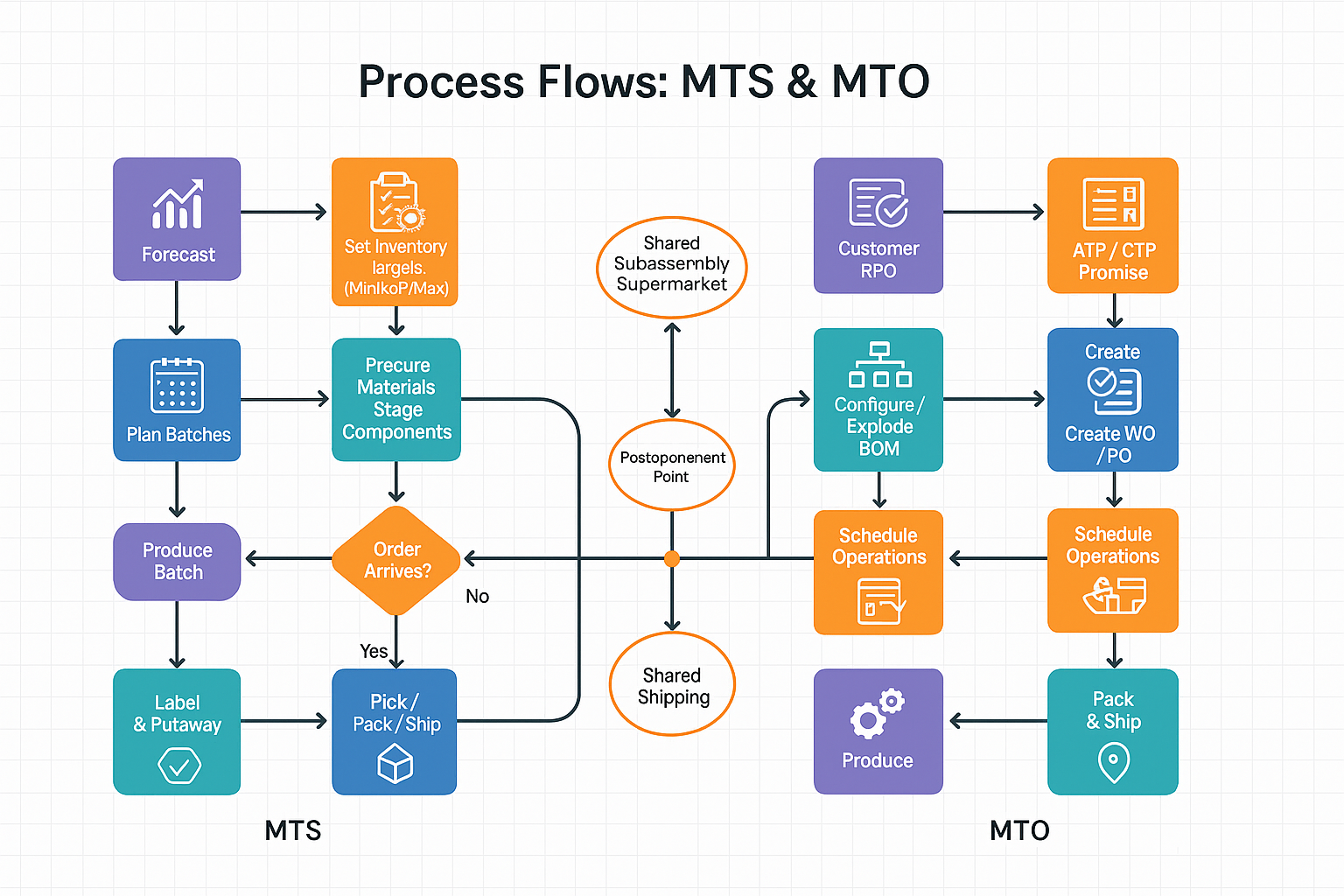
The typical cycle is forecast demand, schedule a production batch, receive the completed goods into finished-goods stock, ship customer orders from that stock, and replenish when inventory reaches a trigger. The finished product is only one part of the inventory picture: manufacturers may also hold raw materials and components that feed the batch. Those inputs have their own lead times and replenishment decisions, so a full view must distinguish component availability from saleable finished goods.
For example, a target of 300 finished units at a unit production cost of EUR 40 represents EUR 12,000 tied up in finished-goods stock before considering raw materials, labour timing, and other costs. That stock can support fast fulfilment, but it also carries cash-flow and obsolescence risk if demand falls or specifications change. In our review of MTS planning, the common policy failure is treating a target-stock number as a guarantee of availability without checking the replenishment trigger, production lead time, and upstream components. ASCM’s inventory-management resources explain inventory planning concepts, including replenishment decisions.
Forecasting and Inventory Targets
A useful forecast draws on sales history, seasonality, customer patterns, promotions, known contracts, and planned market activity. It must be reviewed as conditions change rather than treated as a permanent promise.
Once demand is estimated, the business defines controls such as:
Minimum stock: A basic buffer against ordinary fluctuations.
Reorder Point (ROPROP (reorder point) is the inventory level that signals when to replenish stock, based on expected demand during supplier lead time and the safety stock needed to reduce stockout risk.): The level that triggers replenishment early enough to cover demand during replenishment lead time.
Maximum stock: A ceiling that helps limit excess inventory and unnecessary cash tied up in stock.
Some businesses also use green, amber, and red buffer zones to make planning signals easier to interpret.
Production Planning for MTS
SIX ERP can translate forecasts and inventory settings into suggested production orders. Planners review batch sizes, dates, material requirements, and capacity, then level the schedule across days and shifts to reduce avoidable peaks, idle time, overtime, and inefficient changeovers.
If demand rises, production may need to start sooner; if it slows, batches can be delayed or reduced to limit excess stock. For specialist replacement parts, American Additive Manufacturing’s article on 3D printing for on-demand production discusses an alternative to holding every part in inventory.
The aim is not to fill the warehouse. It is to make the stock needed for service available without allowing inventory to grow beyond its purpose.
A Simple MTS Example
A manufacturer sells a standard water filter with average demand of 100 units per week and occasional peaks of 130. It sets a target of 300 units, a reorder point of 180, and a batch size of 300.
On Monday, 240 filters are available. A customer orders 120, reducing stock to 120—below the reorder point. SIX ERP creates a replenishment proposal for the next production slot. The team starts the batch on Tuesday and completes it on Wednesday, restoring stock while the customer’s order ships from existing inventory.
Key MTS Controls
Because MTS holds cash in inventory, performance needs to be monitored. SIX ERP can track:
- Service level or fill rate: How often orders ship directly from stock.
- Forecast accuracy: How closely expected demand matches actual sales.
- Inventory turns: How often stock is sold and replaced.
- Days of Inventory on Hand: How long current stock would last at the current sales rate.
- Slow-moving and obsolete inventory: Products that are not selling as expected.
- Supplier delivery performance: Whether critical inputs arrive on time and in full.
MTS works best when faster fulfilment justifies holding stock and replenishment is controlled against demand.
Hybrid Production: Combining MTO and MTS
Many manufacturers need more than one planning policy. Some items must be ready to ship, while others need customer-specific configuration. A hybrid approach stocks common components or semi-finished goods and delays final work until the order arrives—a form of postponement.
| Decision factor | MTO | MTS |
|---|---|---|
| Production trigger | Confirmed customer order | Forecast and replenishment plan |
| Customer lead time | Includes production and sourcing time | Usually shorter when stock is available |
| Inventory risk | Lower finished-goods exposure; input availability still matters | Higher risk of excess or obsolete finished goods |
| Best suited to | Customized, engineered, or variable products | Standard goods with steady, repeat demand |
| Cash-flow profile | Less cash in finished variants; order may require working capital during production | Cash is committed to stock before the sale |
The Decoupling Point
The decoupling point is where work shifts from forecast-driven production to customer-order-driven completion. Before it, common components are produced for expected demand; after it, customer-specific operations wait for an order. Siemens’ explanation of MTO versus MTS planning discusses how the order can pull work through procurement and production. For additional context on postponement and supply-chain decoupling points, see this overview of the decoupling point.
A manufacturer might hold common housings, standard motors, circuit boards, frames, or base kits. After an order arrives, it completes firmware configuration, customer-specific assembly, labelling, packaging, final testing, and documentation. This can shorten delivery without requiring stock for every finished variant.
Hybrid Example: Configurable Controller
Suppose a controller’s circuit board, housing, and standard accessories are shared across many versions. The business produces those common parts in efficient batches. When an order specifies a variant, the team loads the correct firmware, tests the unit, prints the required label, and ships it.
Customers get a quicker response than a fully order-driven build, while the manufacturer avoids accumulating rare finished variants. The final configuration remains tied to the customer’s requirements.
Switching Between Policies
Demand and product mix change. A product with unpredictable sales may need to move from MTS to MTO to limit excess stock; a regular, high-volume product may justify MTS to improve delivery speed. SIX ERP lets businesses set an item’s policy as MTO, MTS, or hybrid, with the decoupling point at finished-product, sub-assembly, or component level.
Changes can be controlled through approvalAn approval is a formal decision that allows a request or action to proceed. An ERP system can route approvals and record who made each decision. and audit trails so planning, sales, purchasing, and finance can see what changed and why. The decision should be reviewed when demand patterns, lead times, or customer expectations change.
How SIX ERP Supports MTO, MTS, and Hybrid Production
SIX ERP supports all three approaches in one connected system. Each item can have a planning policy, Bill of Materials, routing, lead times, capacity requirements, quality checks, costing rules, and inventory controls.
For MTO, the system links sales orders to work orders and material requirements, then checks ATP and CTP to support realistic delivery dates. For MTS, forecasts, stock levels, Reorder Points, buffers, batch sizes, and capacity calendars inform replenishment suggestions. For hybrid products, shared sub-assemblies can be stocked while final production remains linked to the customer order.
The same operational data supports each team:
- Sales sees delivery promises based on supply and capacity.
- Planning sees demand, buffers, capacity, and production priorities.
- Purchasing sees critical materials, supplier performance, and approved alternatives.
- Production sees work orders, drawings, instructions, and priorities.
- Quality sees checks, test limits, traceability records, and certificates.
- Finance sees work-in-process, inventory value, actual costs, and variances.
Measuring Success
A planning policy should be judged by operating results, not by the label assigned to it. SIX ERP can help monitor:
- On-Time-In-Full (OTIF): Whether orders ship on the promised date and in the correct quantity.
- Service level or fill rate: How often stocked products ship directly from inventory.
- Forecast accuracy: How closely expected demand matches actual demand.
- Inventory turns and Days of Inventory on Hand: Whether cash is moving through stock or sitting on the shelf.
- Plan and schedule adherence: Whether production completes the planned work on time.
- First-Pass Yield: How many products pass quality checks without rework.
- Scrap and rework: Where time, materials, and margin are being lost.
- Cost variance: Why actual costs differed from planned costs.
These measures can prompt specific changes: adjust a Reorder Point, reduce a batch, protect a critical component with safety stock, review a supplier, or reassess an item’s planning policy.
A Safe Rollout Approach
Start with one product family and classify its items as MTO, MTS, or hybrid. Clean the master data that drives the pilot: Bills of Materials, routings, work centers, supplier lead times, inventory settings, and quality requirements. Set stock targets and replenishment rules for MTS items; validate material availability, capacity calendars, and lead times for MTO items.
Run the pilot for four to eight weeks. Have sales use the promise dates, planning review suggested orders, and production record actual time, quantities, scrap, and completions. Review the results weekly. If stockouts occur, adjust the Reorder Point or replenishment time; if one long-lead component delays MTO work, consider a small buffer for that part. Change one factor at a time and measure the effect.
A 12–18 Month Roadmap for Hybrid MTO/MTS
A practical rollout moves through discovery, platform setup, pilot, scale, and stabilization over roughly 12–18 months. In months 1–3, map order-to-shipment processes, classify items, choose decoupling points, clean master data, and define measures and approval requirements. During months 3–6, configure inventory rules, ATP/CTP, costing, quality, traceability, and integrations, then test migration and user roles. In months 6–9, pilot one product family for four to eight weeks, review service and production results, and correct supplier, safety-stock, setup, or routing assumptions. From months 9–12, extend the model to additional product families and refine scheduling and operational reviews. Months 12–18 are for wider site or warehouse rollout, standardization, baseline comparisons, and ongoing optimization of excess stock, delivery reliability, and planning rules.
Frequently Asked Questions
What does MTO mean in business?
MTO means make-to-order: production starts after the business receives a confirmed customer order. It is commonly used for customized or engineered products where producing every version in advance would create unnecessary finished-goods stock.
What is the difference between MTO and MTS?
MTO uses a customer order as the production trigger, so delivery includes the time needed to make the item. MTS uses a forecast to build products ahead of orders, allowing faster shipment from stock but exposing the business to excess-inventory risk.
What does MTS inventory include?
MTS inventory primarily includes finished products held for customer orders. The planning process also has to account for the raw materials and components needed to replenish those finished goods, which may be stored and replenished separately.
Can manufacturing software handle MTO and MTS in the same system?
Yes. Manufacturing software can support both when it allows item-level planning policies, connects sales orders to production and material requirements, and manages forecasts, stock targets, capacity, and replenishment. A hybrid setup can stock common components while reserving final configuration for a confirmed order.
Is MTO the same as a project-management term or a text abbreviation?
No. In this manufacturing context, MTO refers to make-to-order production. The acronym can have other meanings in other settings, so the surrounding business or production context matters.
Glossary
Make-to-Order (MTO)
Production begins after a confirmed customer order. It suits customized, expensive, or variable products.
Make-to-Stock (MTS)
Production takes place before customer orders, based on demand forecasts. It suits standard products with predictable demand.
Bill of Materials (BOMA Bill of Materials (BOM) lists the materials and components, and their quantities, needed to make a product.)
The structured list of components, materials, and sub-assemblies required to make a product.
Routing
The ordered sequence of manufacturing operations, machines, setup times, and work instructions.
Available-to-Promise (ATP)
A check of available stock and confirmed incoming supply used to support a delivery date.
Capable-to-Promise (CTP)
A check of material availability, machine capacity, labour, changeovers, and lead times for order-driven production.
Work Order (WO)
The production instruction describing what to make, how much to make, how to make it, and by when.
Purchase Order (PO)
The formal document sent to a supplier to purchase materials, services, or components.
Decoupling Point
The point where production changes from forecast-driven MTS work to order-driven MTO work.
Minimum / Reorder Point / Maximum
Inventory rules that define the lowest safe level, replenishment trigger, and highest acceptable stock level.
On-Time-In-Full (OTIF)
The percentage of orders shipped on the promised date and in the complete quantity.
Service Level / Fill Rate
The percentage of customer orders that can be delivered directly from available stock.
Forecast Accuracy
A measure of how closely predicted demand matches actual demand.
Inventory Turns / Days of Inventory on Hand
Measures of how quickly stock moves and how long it will last.
First-Pass Yield (FPY)
The percentage of products that pass quality checks the first time, without rework.
Work-in-Process (WIP)
The value of materials and products that have started production but are not yet finished.
Postponement
A hybrid approach in which common components are made for stock and final configuration waits until a customer order.
Choose the Right Model—and Keep It Flexible
MTO is suited to products where customizationCustomization changes or adds software functionality beyond standard settings. In an ERP project, it can meet specific business needs while adding development and maintenance work., traceability, and lower finished-goods exposure matter most.
MTS is suited to predictable demand where fast delivery is a competitive advantage.
Hybrid planning is suited to products that need both quick fulfilment and controlled customization.
SIX ERP lets manufacturers define planning rules by item, coordinate materials and capacity, and adjust policies as the market changes. Start with one product family, measure the result, and refine the rules before expanding.
The goal is a production policy that meets delivery expectations without tying up unnecessary cash or sacrificing control. To discuss how MTO, MTS, or hybrid planning could fit your factory, book a free 30-minute consultation with the SIX ERP team.