

Production planning and purchasing ERPAn ERP system connects a company’s core processes—such as sales, finance, inventory, manufacturing, and service—in one place so teams can work with shared information. works when one demand signal drives both. The work order creates the material need, the material need creates the purchase order, and the received goods create the accounting entry. Break any of those links and your team rebuilds them by hand in spreadsheets.
Here is how to connect the three, and what to check before you pick a system.
The Usual Failure Is Three Systems Guessing
Picture a planner who schedules a work order on Monday. Purchasing doesn’t see it until Wednesday, when someone emails a shortage list. Finance sees the supplier invoice on Friday and has no idea which job it belongs to.
Nobody in that chain is careless. Each team has its own tool, its own numbers and its own version of the truth.
The problem isn’t discipline. It is data that lives in three places.
Typical symptoms:
- Shortages discovered after the work order is released
- Purchase orders keyed in twice, once in the planning file and once in accounting
- Invoices that can’t be matched to a receipt
- Job costs that are only known after the job is closed
Start With One Demand Signal
A manufacturing ERP workflow starts at demand: a sales order, a forecast or a stock replenishment rule. Everything downstream should read from that single record.
In an ERP for discrete manufacturing, that demand explodes through the bill of materials. Each component is checked against stock, reservations and open purchase orders. What is missing becomes a purchase requirement. What is available is reserved for the work order.
A spreadsheet can list the shortages. It can’t keep them current when the sales order changes on Tuesday.
Let the Bill of Materials Drive Purchasing
The bill of materials is the bridge between planning and buying. If it is wrong, every purchase order downstream is wrong too.
Get these right first:
- Structure: Components, quantities and scrap allowances per product
- Lead times: Supplier lead time per material, not one default for everything
- Alternatives: Approved substitute materials, so a shortage doesn’t stop the line
- Capacity: Work center load, so the plan reflects what the shop floor can actually run
Then the rule is simple. A material requirement becomes a purchase request. The request goes through approvalAn approval is a formal decision that allows a request or action to proceed. An ERP system can route approvals and record who made each decision.. The approved request becomes a purchase order with a due date that matches the production schedule.
Don’t let buyers work from a separate list. A separate list is how a due date drifts away from the schedule.
Connect Purchasing and Accounting at the Receipt
To connect purchasing and accounting, tie the invoice to the goods receipt, not just to the purchase order. This is the three-way match, and it is where most reconciliation pain starts.
The sequence is short:
- The purchase order records what you agreed to buy and at what price.
- The warehouse receipt records what actually arrived.
- The supplier invoice is matched to both before it is approved for payment.
When the three records share one ERP, the match is a check, not a project. The system flags a quantity or price difference at the moment it appears. In separate tools, finance finds it at month end.
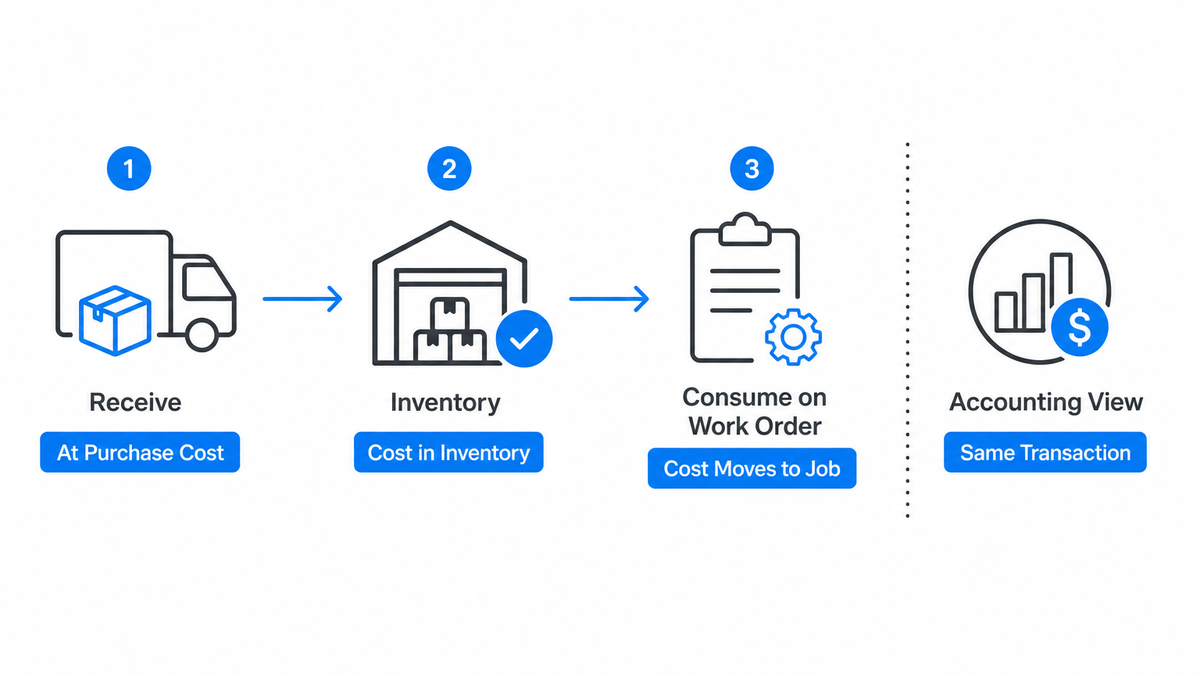
Receiving also drives cost. Received materials enter inventory at their purchase cost. When a work order consumes them, the cost moves into the job. Accounting doesn’t need a separate entry. It needs the same transaction, seen from the finance side.
Cost the Job While It Runs
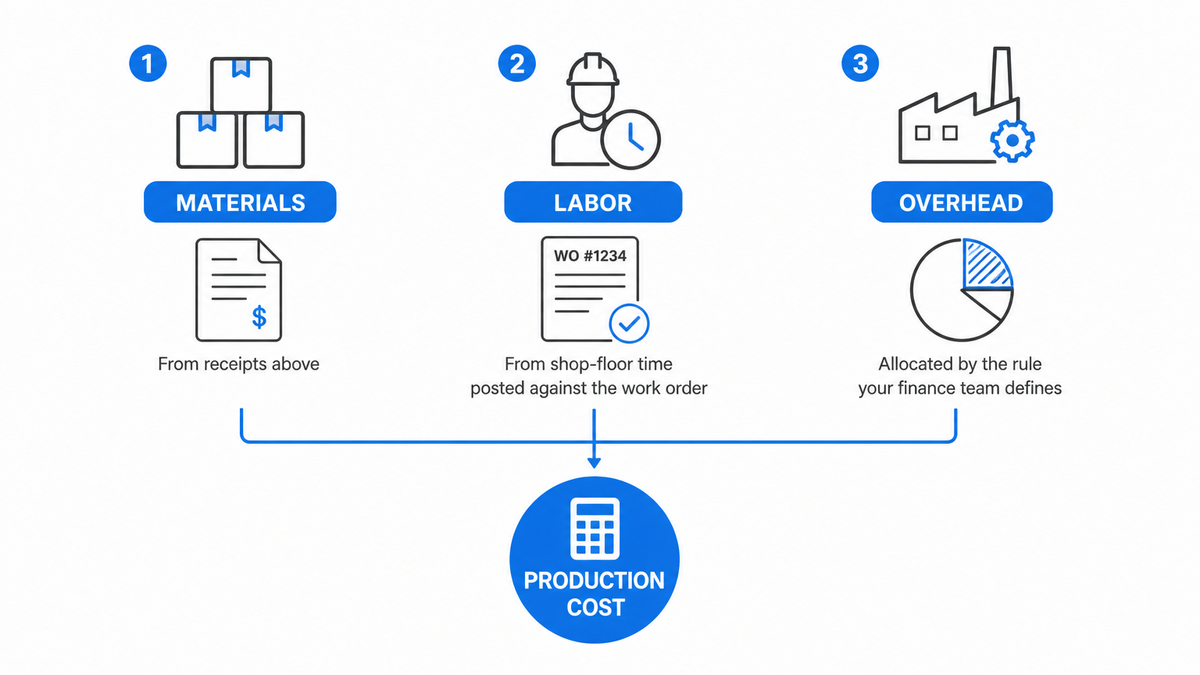
Production cost has three parts: materials, labor and overhead. Materials come from the receipts above. Labor comes from the shop-floor time posted against the work order. Overhead is allocated by the rule your finance team defines.
Connected, this gives you a running cost for each work order instead of a number that arrives after the job is closed. Compare it with the standard cost during production and you can still act on the difference.
This is also where margin problems show up. If a material price rose between the purchase order and the receipt, the job cost shows it. Nobody has to dig through supplier emails.
What To Check Before You Choose a System
Vendors will all say their modules are integrated. Test it with your own process.
Ask for a demo that follows one sales order from start to finish:
- Does a sales order create a material requirement without re-entry?
- Does a shortage become a purchase request in the same system?
- Is the supplier invoice matched to the receipt automatically?
- Does the work order show actual material, labor and overhead cost?
- Can you trace a finished batch back to its supplier lot?
Also check how the vendor charges. Per-user licensing punishes the companies that want planners, buyers, warehouse staff and accountants all in the same system. And ask what happens to customizationCustomization changes or adds software functionality beyond standard settings. In an ERP project, it can meet specific business needs while adding development and maintenance work. on upgrade.
Don’t pick a system merely because it is the one your peers use. Pick the one that follows your process without workarounds.
How SIX ERP Connects the Three
SIX ERP is a configurable, fully managed platform that runs planning, purchasing, inventory, production and finance in one private environmentA private environment is a software environment set aside for one customer. It separates that customer's data and settings while supporting agreed access, maintenance and backup arrangements.. ManufacturingFlow covers production planning, bills of materials, work orders, capacity, shop-floor execution, quality, warehouses, traceability and costing. PurchaseFlow handles purchase requests, supplier offers, approvals, purchase orders and incoming deliveries. FinanceFlow covers invoicing, payments, budgets, accounting and reporting.
They share one data model, so a work order, its purchase orders and its costs are linked records, not exports. The business value of SIX ERP in real operations shows what that looks like in manufacturing and sales implementations.
If you want the planning side in more detail, see SIX ManufacturingFlow for production planning and tracking. For the wider picture, ERP for manufacturing covers MTOMTO means production starts after a customer places an order, allowing products to be made to the customer’s requirements., MTSMTS (Make to Stock)is a production method where a company makes products before customers order them. The finished products are stored in a warehouse and are ready to ship when an order arrives.Manufacturers often use MTS for products with steady demand and standard designs. It can help them deliver orders quickly. However, making too much can leave the company with and hybrid production, materials and traceability.
SIX is licensed annually. Implementation, integrationIntegration connects systems so they can exchange information or coordinate actions. An ERP integration helps link business tools and reduce manual transfers between them. and customization are scoped separately, and existing accounting platforms can be connected through APIs when you don’t want to replace them.
FAQ
Do I need to replace my accounting software to connect it to production?
Not always. If your accounting platform is sound, you can integrate it through APIs and keep it as the ledger. The real requirement is that receipts and work order costs flow into it automatically. If you re-key them, you haven’t connected anything.
What is the three-way match?
It’s the check that a supplier invoice agrees with both the purchase order and the goods receipt. If quantity or price differs, the invoice is held until someone resolves it. It stops you paying for goods that never arrived.
How long does it take to connect these processes?
It depends on data quality and scope. The slow part is rarely the software. It is cleaning bills of materials, supplier lead times and item codes. Start there, before the cutover is scheduled.
Is this only for large manufacturers?
No. Small and midsize discrete manufacturers feel the problem sooner, because the same few people plan, buy and reconcile. A connected system removes the handoffs that those people are doing by hand.
Start With the Process, Not the Software
Map one product from sales order to paid supplier invoice. Mark every place where someone re-enters data. Those are the links to fix, in any ERP. When you are ready to see it in one system, visit book an appointment with a SIX Consultant.