

The most popular advice on Microsoft Dynamics alternatives is also the least useful. You’re told to build a feature matrix, count modules, compare license prices, and pick the longest list. That method tells you almost nothing about what the system will cost to run, how much internal time it’ll consume, or whether a sales order can travel through purchasing, stock, production, service, and finance without being retyped.
I would rank options differently. Put post-go-live operating cost, migration risk, and cross-module connection first. A platform that looks cheaper on a pricing page can become the expensive option once you add partner days, reporting licenses, integrations, and custom code that needs repair at every release. A broader suite can also be the wrong fit if your team has no one to administer it.
Use the comparison below as a starting filter, not a decision. The decision comes from running your own orders, lots, jobs, and invoices through each shortlisted system and costing five years of ownership in writing.
Microsoft Dynamics Alternatives Compared Side by Side
Two platforms can show the same module list and still cost very differently to run. The table below ranks options on what decides the outcome: post-go-live operating cost, migration risk, and whether the modules share one record. It reflects publicly described scope as of 2026, and vendor packages, localization, partner capacity, and contract terms change the result, so confirm scope in writing before you sign.
Microsoft Dynamics Alternatives by Running Cost, Migration Risk and Connection
| Platform | Deployment | Post-go-live operating cost | Migration risk | Cross-module connection | Best fit |
|---|---|---|---|---|---|
| Microsoft Dynamics 365 | Cloud or on-premises, depending on the application | Rises with partner days, reporting licenses and custom code upkeep | Moderate, and it varies by which applications you combine | Broad coverage across finance, sales, service and supply chain | Companies already invested in the Microsoft stack |
| Odoo | Cloud-hosted or self-hosted | Low license entry; self-hosting and custom modules shift cost to your own admin time | Moderate; the open-source core gives you an exit path | Apps added onto one modular core | Small and midsize firms that want modular growth |
| Oracle NetSuite | Cloud (SaaS) | High subscription plus setup; costs grow with scope | Higher; one suite means one migration but deeper lock-in | One cloud suite for mid-market and enterprise firms | Multi-subsidiary firms wanting one cloud suite |
| SAP Business One | Cloud or on-premises | Add-ons and SAP partner services drive ongoing spend | Moderate; implementation quality depends on the partner | Core ERPAn ERP system connects a company’s core processes—such as sales, finance, inventory, manufacturing, and service—in one place so teams can work with shared information. extended through partner add-ons | Firms seeking SAP depth at SMB scale |
| Sage Intacct | Cloud (SaaS) | Finance subscription plus integrations for operational needs | Lower for a finance-led move | Strong inside accounting; operations run through add-ons and APIs | Finance-led teams that need strong accounting controls |
| SIX ERP | Managed cloud, separate instance per customer | Fully managed serviceA managed service gives an external provider responsibility for agreed services, such as software maintenance and support. It helps companies plan technical work and ongoing system care., where the provider maintains the agreed environment | Lower; consulting and pre-integration analysis map your workflows before build | Modules share one connected data foundation from day one | Operations-heavy SMBs and midsize firms wanting one connected platform |
If NetSuite is on your shortlist, a closer look at NetSuite from TopToolAdvisor is useful context on where a mature cloud suite fits, and where its cost and setup demands start to bite.
How to Read This Table
Match the company profile first. If you don’t have subsidiaries to consolidate, multi-subsidiary strength has no value. If finance controls are your only pain, a finance-led product may be enough. If you run production, stock, and field work every day, finance-only scope will leave your core problem unsolved.
Read the operating cost and migration risk columns as a workload forecast, not a verdict. ConfigurationConfiguration sets up software using its existing options. In an ERP system, it adapts workflows, roles and other settings to the company's business processes. you can change through settings is different from custom modules, add-ons, or partner-built flows that someone must test and maintain after each update. Ask who does that work, how long it takes, and what it costs.
SIX ERP runs as a separate managed instance for each customer, where SIX MS Ltd maintains the environment while your team keeps responsibility for users, business processes, and data.
Practical rule: Before you shortlist anything, name the three processes that must share one record on day one. If a vendor can’t show those three working end to end, the rest of the demo doesn’t matter.
Check every competitor claim against current official documentation before you rely on it. Where a vendor won’t confirm a point in writing, treat it as an open question, not a feature.
Selection Criteria That Predict Long-Term Fit
Module lists hide an important history. Microsoft built Dynamics from acquisitions, and by 2006 it was describing a plan to integrate and rationalize four separate ERP suites from the Great Plains and Navision transactions, according to RCP Magazine’s history of Microsoft business applications. That heritage brings specialized products and a large partner network. It can also mean differences in data structures, user experience, release cycles, and upgrade work between applications, and those differences surface later as operating cost.
License price and module count tell you little about any of this. What predicts long-term fit is how much the platform costs to run after go-live, how risky the migration will be, and whether the modules share data without manual effort. The eight criteria below measure exactly that.
Eight Criteria to Measure in Every Evaluation
Connected data: Sales, purchasing, stock, production, service, and finance should share one record. Measure how often anyone retypes the same information as work moves between departments, because each retype is labor cost and error risk for as long as you run the system.
Industry fit: Traceability, production costing, and field-service scheduling should be built in, not bolted on. A native capability is maintained by the vendor at each release; a bolt-on is maintained by you.
Configuration versus custom code: Count how much behavior comes from settings. Custom code needs an owner after every update, so name that owner and get the maintenance answer into the contract.
IntegrationIntegration connects systems so they can exchange information or coordinate actions. An ERP integration helps link business tools and reduce manual transfers between them. openness: Every candidate should show working connectors and APIs for e-commerce, accounting, and logistics tools. An APIAn API (Application Programming Interface) allows software systems to exchange information. Connected to an ERP system, it helps transfer business data and reduce manual entry. described in documentation is not the same as an integration you have seen pass data.
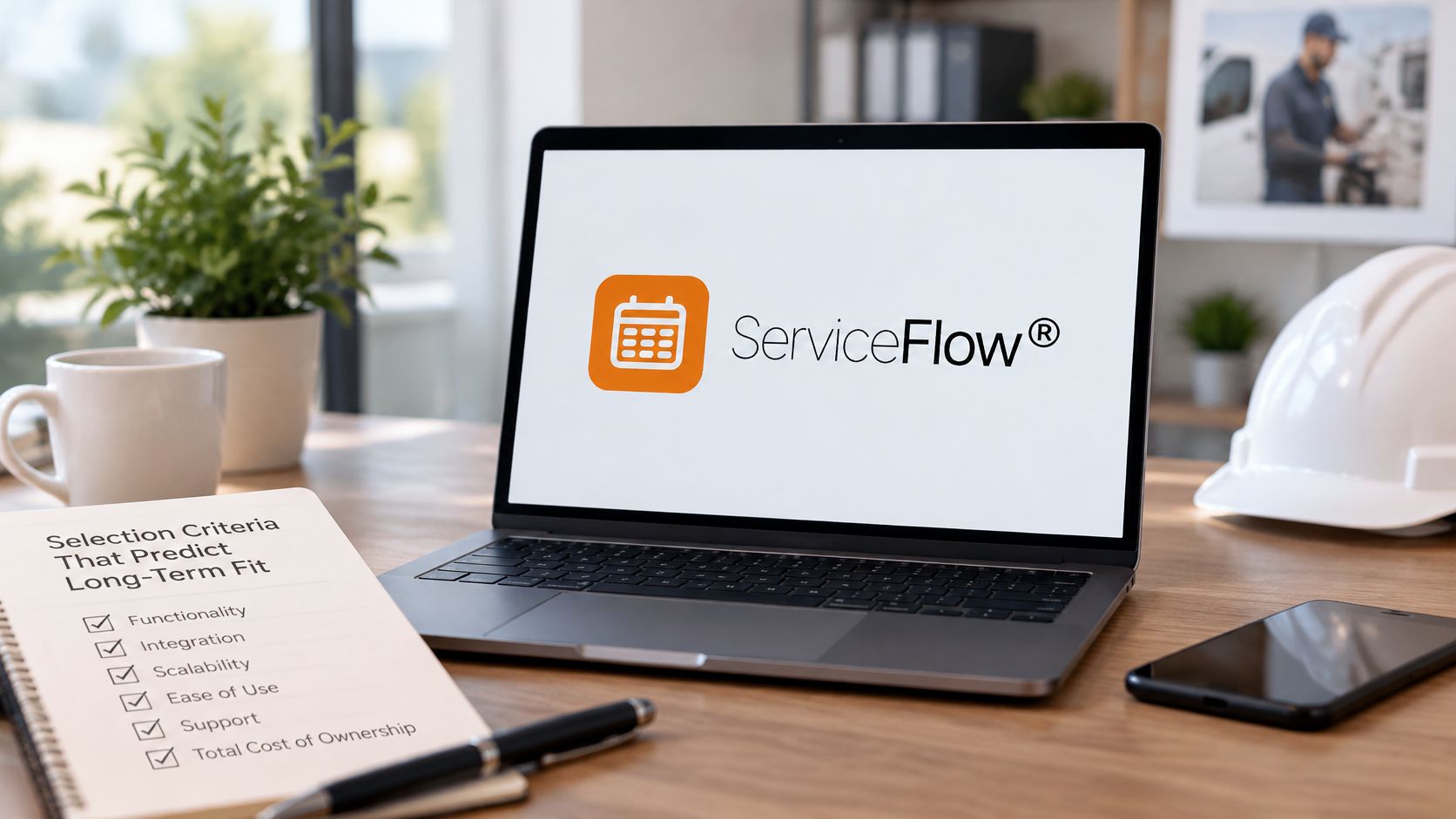
Mobile execution: Technicians and warehouse staff must record time, parts, and status on site, because notes entered later can become billing errors and stock discrepancies. SIX ServiceFlow covers field service management connected to the wider business, from the first customer request to the final signature and invoice, with office and field teams working from the same current information.

Reporting: Check whether managers can see cross-module indicators and drill into the records behind them without building a separate reporting layer. Confirm any extra licensing, because embedded content and full reporting rights aren’t always the same thing.
Traceability and controls: Check role-based accessRole-based access controls what users can see and do according to their responsibilities. In an ERP system, it helps protect sensitive information and manage permissions consistently., audit trails, and retention settings. Software supports compliance work, but your company remains responsible for its legal duties.
Support and internal capacity: Choose self-managed, partner-led, or fully managed support deliberately. In a managed arrangement the provider maintains the agreed environment while your company keeps its users, business processes, and data responsibilities. Estimate the admin hours your team can give each month, then ask vendors if that is enough.
Integration deserves special skepticism. Recent manufacturing field-service research reports that 74% of respondents prefer best-of-breed stacks, while ERP/CRM integration remains a leading pain point, according to Zuper’s manufacturing field-service white paper. Best-of-breed tools can be excellent in one area. They can also recreate the fragmented data problem that sent you looking for an ERP in the first place.
One auditable chain from customer demand through shop-floor or field execution to the financial outcome is worth more than a longer module list.
Score every shortlisted platform against these criteria before price enters the conversation. A low license fee on a weakly connected suite costs more to operate than a higher fee on a platform that shares data, and most migration risk sits in the gaps between modules.
Best Fit by Industry and Use Case
Generic rankings segment platforms by company size. That doesn’t help a food manufacturer who needs lot records, or a service firm whose technicians work offline. Use the table below by use case instead. A row counts as a fit only when its demo test passes with your real data, not vendor sample data.
Must-Have Capabilities and Demo Tests by Use Case
| Use case | Must-have capability | Demo test | Watch-out |
|---|---|---|---|
| Discrete manufacturer | Bills of materials, planning, production costing and quality | Trace one order from quote to finished goods | Check capacity limits in the test |
| Food or dairy manufacturer | Lot traceability, expiry tracking and receiving records | Trace one lot forward and backward within a time limit agreed before the demo | Confirm legal retention and export duties with the relevant authority |
| Wholesale and distribution | Purchasing, stock visibility, availability and invoicing | Process a sales order with partial stock | Test supplier lead-time data |
| Field-service organization | Scheduling, mobile execution, parts capture and approvals | Move a job from request to invoice with technician updates | Test offline behavior on site |
| Project-based service provider | Project planning, time capture and cost tracking | Compare project budget with actual cost on one record | Timesheet discipline decides data quality |
| Multi-site group | Consolidated finance, role-based access and shared reports | Produce one consolidated report across two sites | Check currency and localization settings |
For a wider view of which sectors depend most on connected systems, see the industries that need ERP systems most.
Food Traceability Is a System Requirement, Not a Report
For US food businesses covered by the FDA Food Traceability Rule, the FDA’s FSMA final rule page defines Critical Tracking Events such as harvesting, initial packing, shipping, receiving, and transformation, with required Key Data Elements linked to the food’s traceability lot code at each event. That makes lot-level links between suppliers, locations, shipments, receipts, and transformations a core data requirement.
The response duty is concrete. Covered entities generally must maintain required records for two years and provide them to the FDA within 24 hours of a request unless the agency agrees to a longer period, according to FDA guidance on the traceability rule. Searchable, linked, exportable records matter because a spreadsheet archive won’t assemble itself during a recall.
Verify the current compliance date and your specific duties on the FDA website. Responsibilities are shared among trading partners, rules in other countries differ, and software only supports the records. Your company remains responsible for meeting its legal obligations.
SIX ManufacturingFlow is built for connected manufacturing from customer order to finished product, with sales, purchasing, warehouse, and production teams working from the same current information. It connects materials and capacity so each order moves from customer demand to finished goods. Our coverage spans manufacturing, sales and distribution, wholesale, services, and field servicesField service is work performed at a customer’s site, such as installation, maintenance, repair, or technical support. for small and medium businesses and enterprises, which matches the mixed operations many midsize firms run.
Five-Year Cost and Hidden Costs After Go-Live
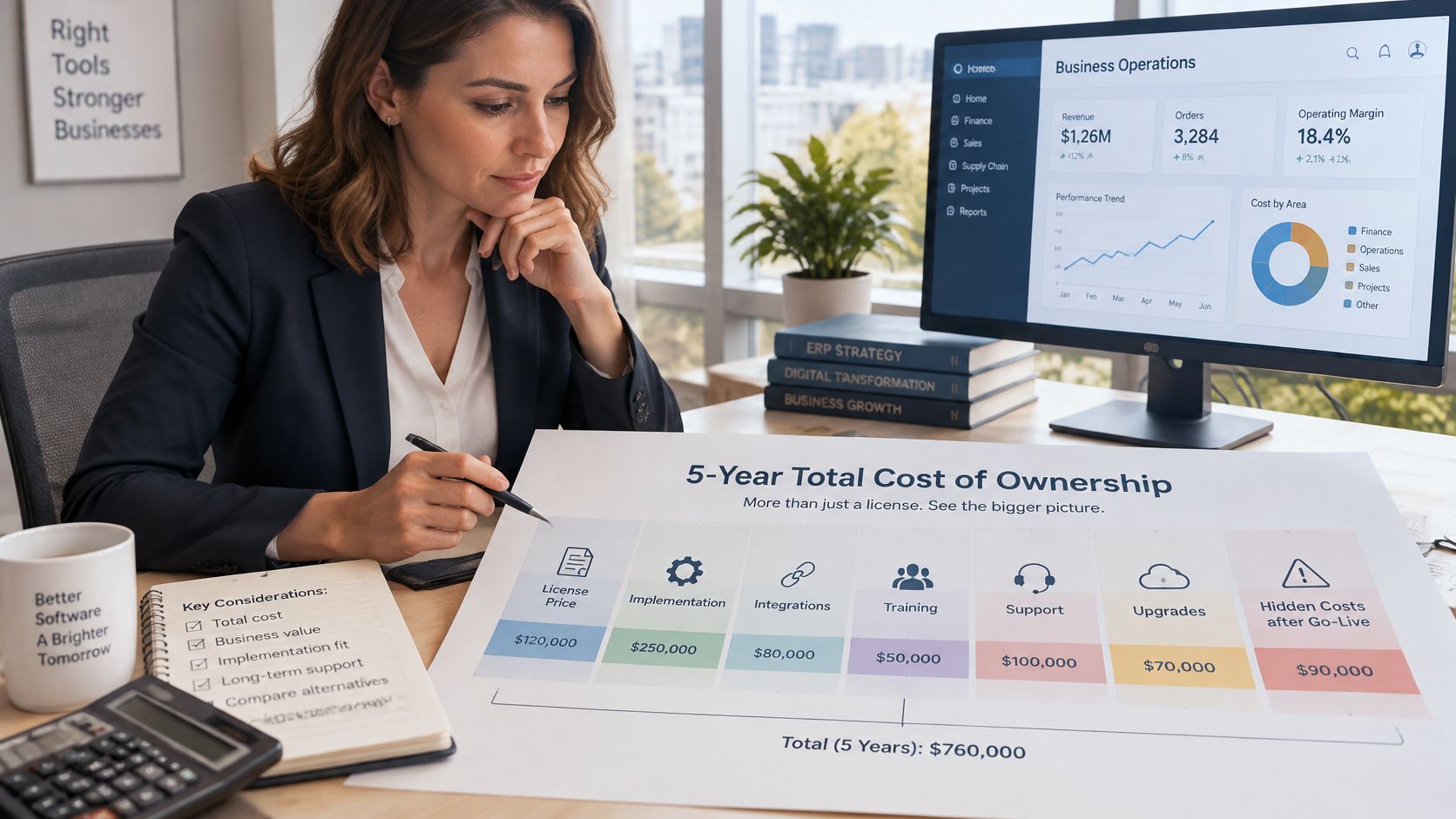
License price is one line in five-year total cost of ownership. It’s also the line vendors most want you to compare, because it’s the easiest to make look small. Independent reporting citing Gartner estimates that more than 70% of recent ERP initiatives fail to fully meet their original use-case goals, while up to 25% fail catastrophically, and a Panorama survey found 30% of respondents exceeded their ERP project budgets, according to TechTarget’s reporting on hidden ERP costs. Those outcomes usually come from scope, data, and operating workload, not from a missing module.
Five-Year Cost Categories to Model for Each Shortlisted Platform
| Cost category | What to model | Question to ask the vendor |
|---|---|---|
| Licenses or subscriptions | Per-user or per-module fees and growth in users | Are user limits and module fees fixed in the contract? |
| Implementation and configuration | Process mappingProcess mapping documents the steps, people and decisions involved in business work. In an ERP project, it helps define workflows and identify improvements before system setup., data migration, testing and training | Which services are included and which are excluded? |
| Integrations | Connectors to e-commerce, accounting and logistics tools | Which APIs and connectors are included at no extra cost? |
| Infrastructure and hosting | Servers and backups for on-premises, or hosting for cloud | Who patches, monitors and backs up the environment? |
| Upgrades and custom code | Testing effort at each release and rework of custom features | Who tests and repairs custom code after each update? |
| Internal staff time | Admin hours per month for users, permissions and reports | How many hours per month does a system of this size need internally? |
For a structured way to build the model, ERP cost planning with Lucentive covers total cost categories in more detail, and our own guide to ERP pricing models explains how different pricing structures behave as users grow.
Hidden costs appear after go-live. Teams keep spreadsheets alive because reporting doesn’t cover what managers need. Staff reconcile figures manually between modules that don’t share data. Custom code breaks at a release and waits for a consultant. User and permission administration becomes someone’s second job.
Here’s a hypothetical example. A 20-user company budgets 60,000 EUR for licenses, then finds that integrations, data cleanup, and two years of partner-led changes add a similar amount. Nothing about that outcome is unusual, and none of it appeared in the license comparison.
A managed service moves infrastructure, patching, and monitoring to the provider. In our model, the provider maintains the agreed environment and supports its operation, while your company still manages its users, business processes, and data responsibilities. Build every model from written vendor quotes, not published list prices.
Run this calculation for each platform: five-year cost per active user, including internal hours at a loaded rate. That’s the number worth comparing.
Choosing a Platform by Situation
No platform wins across the board. Four situations cover most decisions I see, and each points to a different verdict once you weight post-go-live operating cost, migration risk, and how tightly the modules share data.

Four Situations, Four Verdicts
- Keep Dynamics when it already fits: Your Microsoft stack, partner skills, and reporting setup work, and the connected-process test passes on real data. Replacing a working system to save license fees rarely pays back, and every migration carries risk you do not need to take.
- Shortlist alternatives when spreadsheets run the gaps: Processes span several departments, integrations drive most admin work, or your five-year review shows hidden costs above the license fee. Those are structural problems that training will not fix.
- Choose a managed, connected platform when IT capacity is limited: If nobody on your team can own patching, upgrades, and user administration, a provider-run environment removes work you cannot staff. Under that model the provider maintains the agreed environment and supports its operation, while your company keeps control of its users, business processes, and data.
- Consider a broader suite for group complexity: If you already run several entities and need consolidated finance from day one, weight that requirement heavily and test consolidation early, before contracts are signed.
Decide on evidence from your own transactions. We offer a free demo, and you should use any vendor’s demo the same way: bring a real order, a real lot, or a real service job and watch it move through the system without retyping.
The decision rule is an hours budget. Set a ceiling on the internal administration your team can absorb each month: user management, report fixes, integration babysitting, release testing. Drop any platform whose realistic load exceeds that ceiling, whatever its license price says. A system that demands admin capacity you do not have will cost more than the one with the higher quote.
How to Plan a Migration From Dynamics to SIX ERP
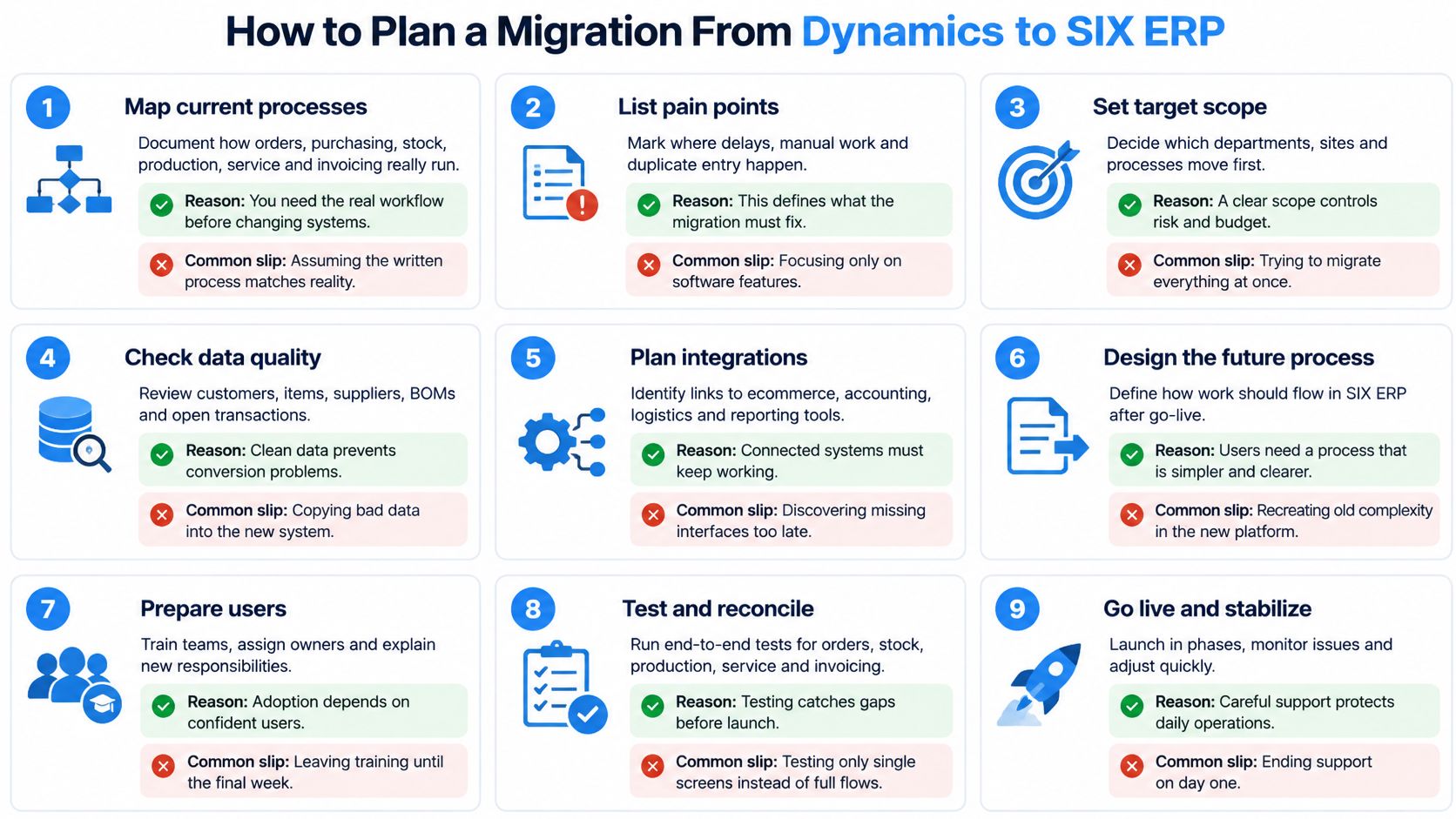
Cutover is a business handover, and the data load is one step within it. The nine steps below follow our documented approach of process mapping, data preparation, configuration, integration, testing, training, and adoption. They also decide your operating cost after go-live, because every workaround you carry forward becomes admin work your team pays for later. Our Consulting and Pre-Integration Support suits organizations evaluating ERP options, replacing spreadsheets or legacy software, planning a group-wide transformation, or unsure where implementation should begin.
Nine Steps From Mapping to Go-Live
- Map current processes: Document how orders, purchasing, stock, production, service, and invoicing run, including spreadsheets and side habits. Teams usually document the official process instead of the one people follow.
- Agree the target: Decide what the new system should reproduce, improve, or retire. Carrying every old workaround forward rebuilds the problem you paid to leave.
- Identify data and owners: Decide which records move and assign a named owner to each dataset. Duplicates and dead records migrated unchecked poison a new system on day one.
- Clean and map data: Business owners clean records and map them to the new structures. Treating mapping as a purely technical task produces technically valid, commercially wrong data. For validation discipline, validation and rollback for data migrations from Rite NRG is a solid reference.
- Configure workflows, reports, and integrations: Build the agreed flows, including customer processes. SIX CustomerFlow brings customer conversations, leads, opportunities, and next steps into one connected journey linked to the wider platform.
- Migrate a representative dataset: Load a realistic sample into a test environment. The people responsible for each area validate the records and totals themselves; a matching record count proves nothing on its own.
- Run real scenarios end to end: Process a sales order with partial stock, a production order, and a service job through to invoice. Screen-by-screen testing misses handoff failures between modules.
- Train on real tasks and rehearse cutover: Train each role on its daily work, then rehearse the switch with timings. Generic sessions leave users improvising on the first morning of go-live.
- Agree go/no-go criteria and move: Named owners confirm the checks that must pass before the business switches, and the go-live decision waits until every check is green. Staff the support plan for the first weeks before you commit to a date.
Keep a read-only archive of Dynamics records you must retain, such as food traceability records, so historical duties survive the switch. After go-live, our post-integration support covers user guidance, investigation of system or workflow issues, performance and integration monitoring, controlled updates, access reviews, and improvements to workflows and automationAutomation uses software or equipment to carry out tasks according to defined rules. An ERP system can automate routine business steps and highlight exceptions for review.. The platform stays ready for new requirements, integrations, and compliance demands rather than being installed and forgotten.
For the broader selection method behind these steps, see our practical guide to ERP selection and migration. Measure the project on three numbers: time to go-live, post-launch transaction defects, and internal hours per module. Published case studies report large drops in implementation time after ERP adoption, yet small samples cannot predict your result, so validate any saving in your own pilot rather than assuming it.
Start with a pilot on representative data. A passed pilot gives you evidence; a failed one surfaces problems while they are still cheap to fix.
Bring a representative order and the processes that depend on shared data, and we’ll show you how they run as one connected flow across sales, purchasing, stock, production, service, projects, and finance in a managed instance built for your company. Book a demo and test the fit on your own data before you commit to a migration.