

Ask three managers in the same company how much stock is on hand and you can get three different answers. Ask sales whether a delivery date is realistic and the honest reply often comes from the warehouse rather than the system. That gap, between what one team knows and what another team can see, is the problem Enterprise Resource PlanningAn ERP system connects a company’s core processes—such as sales, finance, inventory, manufacturing, and service—in one place so teams can work with shared information. Modules are meant to close.
Most explanations of these modules read like a parts catalog. Finance does ledgers, inventory does stock, CRM does contacts, and the reader is left to assemble the connections alone. That format answers what each screen does. It leaves the harder question untouched.
The question that decides whether a platform works isn’t what each module contains. It’s what passes between modules, in what form, how fast, and what happens downstream when it doesn’t arrive. Read with that lens and a module list turns into a map of handoffs.
Enterprise Resource Planning Modules at a Glance
Enterprise Resource Planning Modules are the functional areas of a single business management platform. Each one covers a group of related tasks, such as selling, buying, storing, building, billing or paying staff, and all of them work from the same records. That shared record is the point. Each module is a filtered view of one set of business data for the team that needs it.
Standalone tools invert this. Your accounting package keeps its own customer list, the warehouse system keeps its own stock file, and a spreadsheet reconciles the two badly at month end. Every crossing between them is a manual step with a delay built in. In SIX ERPAn ERP system connects a company’s core processes—such as sales, finance, inventory, manufacturing, and service—in one place so teams can work with shared information. each business area is delivered as a SIX FlowA SIX Flow is a connected business process area within SIX ERP. It shares information with other Flows to link activities across the company. module and all modules share the same data, so CustomerFlow, SalesFlow, StockFlow and FinanceFlow behave as four views of one order rather than four applications exchanging files.
A quick diagnosis: pick one order from last month and count how many times its details were typed in. Two or more means your modules are talking through people, not through data.
One order proves the point. A customer buys 200 units, stock covers part of it, purchasing has to buy the rest, production may need ManufacturingFlow to plan and build a component, and finance invoices the whole thing. No single department owns that sequence. The module that starts it and the module that finishes it sit in different rooms, and every handoff between them is a place where the order can stall, duplicate or contradict itself.
Where the Modular Structure Came From
The structure didn’t arrive as a design decision. It accumulated, one operational need at a time. Computer-based accounting and inventory systems came first, and organizations later pushed them into material requirements planning (MRP), manufacturing resource planning (MRP II) and enterprise-wide ERP.
A historical review of ERP development records SAP’s R/2 launch in 1979 as a milestone in integrated ERP, MRP use among manufacturers rising from 5.2% in 1983 to 16.8% by 1987, and implementation rates among large enterprises reaching 24.7% by 1995 and 43.8% by 1999.
What that history left behind is the shape still in use today. Finance and accounting, materials management, production planning, sales, purchasing, inventory, projects and HR run as specialized modules while exchanging information through a common database. ERP grew by joining systems that already ran parts of the business separately, which is why the joins deserve more scrutiny than the feature lists inside each module.
The Nine Core Flows and What Each One Owns
| Module | Main purpose | Typical users | Key records | Main connections |
|---|---|---|---|---|
| CustomerFlow (CRM) | Manages customer records, leads, opportunities and communication history | Sales reps, account managers, marketing | Contacts, leads, pipeline stages | SalesFlow |
| SalesFlow | Handles quotations, proposals, sales orders, pricing and fulfillment coordination | Sales staff, order desk | Quotes, sales orders, price lists | StockFlow, ManufacturingFlow, FinanceFlow |
| PurchaseFlow | Manages purchase requests, supplier records, RFQs, approvals and incoming deliveries | Buyers, approvers, receiving staff | Requisitions, purchase orders, supplier records | StockFlow, FinanceFlow |
| StockFlow | Runs warehouse and inventory movements, reservations, picking, batch and serial tracking | Warehouse staff, inventory controllers | Stock levels, movements, lot and serial records | SalesFlow, PurchaseFlow, ManufacturingFlow |
| ManufacturingFlow | Covers BOMs, production orders, material planning, shop-floor execution, quality and costing | Production planners, shop-floor staff, quality teams | BOMs, work orders, production logs | SalesFlow, StockFlow, PurchaseFlow, FinanceFlow |
| ServiceFlow | Covers technician scheduling, dispatch, mobile work orders, spare parts and service history | Dispatchers, field technicians | Service requests, work orders, customer signatures | StockFlow, PeopleFlow, FinanceFlow |
| ProjectFlow | Tracks tasks, milestones, resources, timesheets, budgets and profitability | Project managers, consultants | Project plans, timesheets, project costs | PeopleFlow, PurchaseFlow, FinanceFlow |
| PeopleFlow | Manages employee records, attendance, leave, qualifications, skills and performance | HR staff, managers, employees | Employee files, time records, qualifications | ProjectFlow, ServiceFlow, FinanceFlow |
| FinanceFlow | Runs the general ledger, receivables, payables, invoicing, payments, budgets and reporting | Finance staff, controllers, CFO | Journal entries, invoices, ledgers | All operational modules |
| AIFlow (optional) | Provides AI-assisted document processing, summaries, recommendations and automationAutomation uses software or equipment to carry out tasks according to defined rules. An ERP system can automate routine business steps and highlight exceptions for review. with human oversight | Finance, operations and management teams | Documents, summaries, recommendation logs | Records in other modules, where enabled |
AIFlow sits outside the nine core Flows as an optional add-on, which is why the table lists it separately in the module column.
Read the table as a chain of custody. The Main connections column matters more than the purpose column, because it lists where a record stops being one team’s property and becomes the next team’s obligation. A row with three connections is a row with three chances to drop something. When the sales order reaches StockFlow without the customer’s delivery date, the warehouse picks the wrong priority. When a purchase receipt reaches FinanceFlow without the order reference, the invoice gets matched by hand. When a service work order closes without the parts used, stock and billing both drift away from what happened on site.
Adoption is now mainstream: 57.62% of EU manufacturing enterprises used ERP in 2025, according to Eurostat’s e-business integration statistics.
No SIX customer is assumed to run every Flow. A distributor may never open ManufacturingFlow, and a consultancy may live mostly in ProjectFlow and PeopleFlow. Read the rows you need, then watch the connections in the last column, because a missing handoff there is what turns one order into three versions of the truth.
Front-Office and Supply Modules From Lead to Stock
Follow one order and the modules stop looking like a menu. They become stations on a line, each handing the same record to the next and adding detail the previous station couldn’t know.
The areas organizations connect first are the ones that join money, materials, capacity and demand. In a comparative study, order-entry modules were used by 87.7% of surveyed U.S. organizations and materials-management modules by 89.2%, while Swedish respondents reported 90.5% for order entry and 91.8% for materials management, as reported in research on ERP module development. Ordering and stock sit at the center of nearly every first implementation.
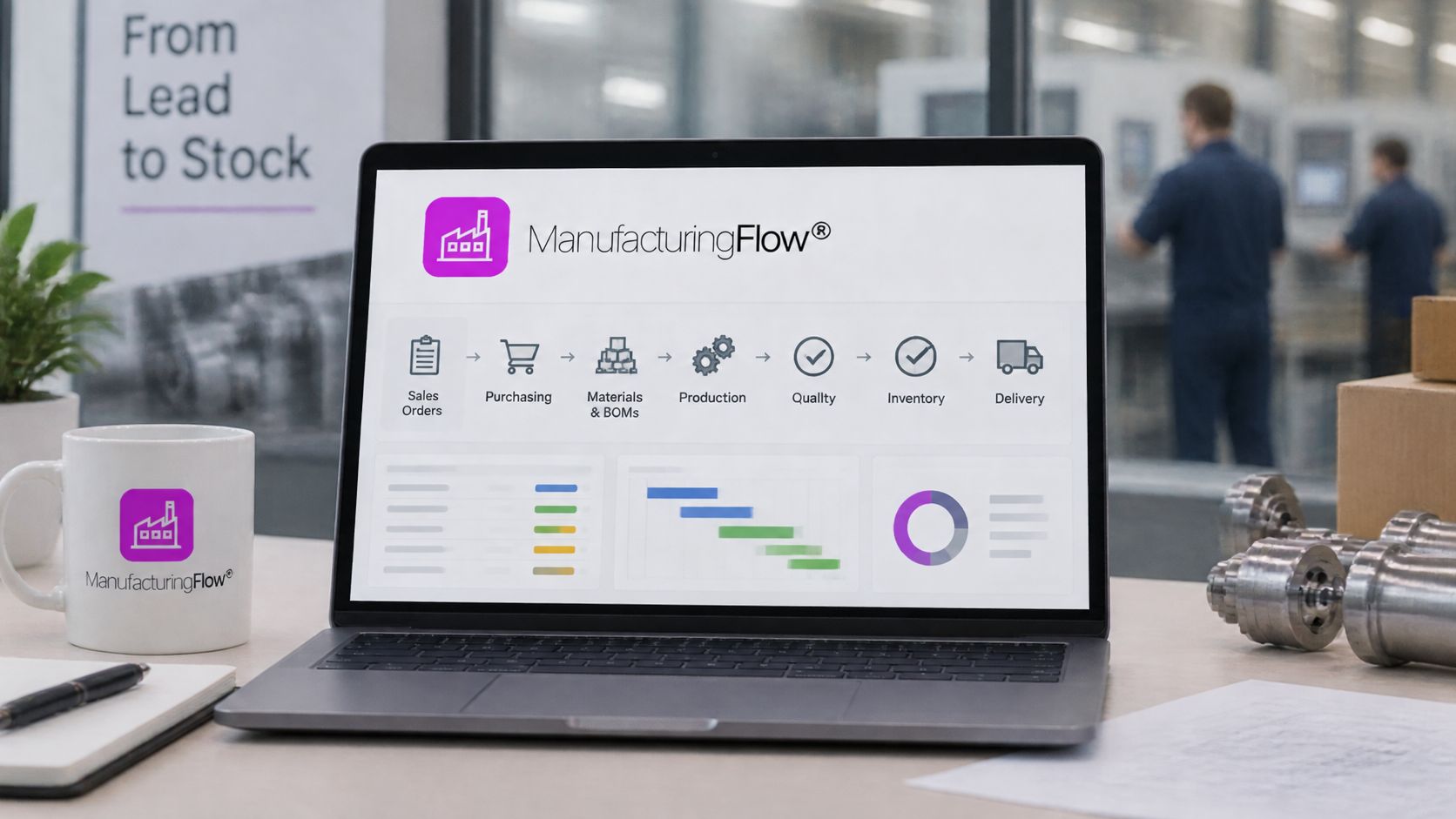
Here is what the production side of that chain looks like when the order is something you build rather than something you buy.
CustomerFlow Holds One Version of the Buyer
CustomerFlow is where the relationship lives: contacts, leads, opportunities, pipeline stages and the history of every conversation. The practical value is that sales doesn’t rebuild the customer file each time a rep leaves or a new channel opens. Terms, addresses, delivery preferences and the people who sign off sit in one record that SalesFlow and FinanceFlow both read.
SalesFlow Turns a Conversation Into a Commitment
Quotations and proposals become sales orders here, with price lists, discount rules and an availability check before anyone promises a date. That check is the first real integrationIntegration connects systems so they can exchange information or coordinate actions. An ERP integration helps link business tools and reduce manual transfers between them. test. If the order desk can’t see reserved and free stock while quoting, the promise is a guess with a delivery date attached.
PurchaseFlow and the Approval Path
A buyer raises a request, an approver clears it, the purchase order goes to the supplier, and the incoming delivery is matched line by line against what was ordered. Supplier records and lead times decide how much of the sales order is possible at all. For a closer look at those steps, see how PurchaseFlow moves from business need to supplier delivery.
Take a hypothetical wholesaler, Northgate Supplies, and an order for 200 units. Available stock covers 120, so StockFlow reserves them against the order and the shortfall of 80 goes to purchasing. The buyer sees supplier lead times and raises a purchase order, and the later goods receipt releases the reservation. If the product is assembled rather than bought in, SIX ManufacturingFlow takes the demand instead and plans the build.
StockFlow Holds the Physical Truth
Multiple warehouses, reservations, barcode picking and packing, batch and serial tracking, and replenishment triggers all belong here. The reservation is the quiet mechanism that makes the rest work: it converts a promise into held stock so two orders can’t claim the same pallet.
Warehouse work has drifted toward system operation, and the people who pick, scan and reconcile now spend more time in software than on a forklift. If you’re staffing that team, this guide to warehouse jobs without a degree outlines the entry routes and the skills employers screen for.
The data each stage needs is unglamorous and decisive. CustomerFlow needs clean terms and ship-to addresses, SalesFlow needs item masters and price lists, PurchaseFlow needs supplier lead times, and StockFlow needs item codes that match the bill of material exactly. Get those four right and the chain runs.
Three failures show up repeatedly: duplicate customer records created by two teams typing the same buyer, reservations never released after a cancellation, and purchase requests approved without a budget check. The first two corrupt stock and reporting. The third removes a control that finance assumed it had.
Production, Service, Project and People Modules in Practice
The modules that do the operational work share one trait: none can run on its own data. A production order needs materials another team bought, a technician needs a skill recorded by HR, and a project needs hours logged by people assigned from a resource plan.
ManufacturingFlow Builds the Plan and Records the Run
It starts with the bill of materials, the list of parts and quantities behind each finished product. Demand turns into production orders through material requirements planning, capacity scheduling spreads the work across available machines and people, and shop-floor operators record time, quantities, waste and rejected items as the run progresses. Quality checks sit at the end of the run and production costing closes it, which is where the shop floor finally meets finance.
ServiceFlow Moves the Job Into the Field
Scheduling, dispatching, mobile work orders, spare parts pulled from stock, service history, customer signature on site and invoicing all belong to the same job. SIX ServiceFlow keeps that chain in one place, from the first request through the assigned technician and the parts consumed to the signature that closes the visit.
ProjectFlow and PeopleFlow Supply the Hours
ProjectFlow holds tasks, milestones, resource plans, timesheets, budgets and project costs, so a manager can see whether a project is profitable while it’s still running rather than three weeks after it closes. Delivery, resourcing and costing details sit on the SIX ProjectFlow solution page.
PeopleFlow stores employee records, attendance, working hours, leave, qualifications, skills and performance. That sounds administrative until a planner tries to assign a certified welder to a job on a date the welder is on leave, or a scheduler needs a technician who holds the right gas certification. Qualifications are operational data, not HR paperwork. The wider case for connecting personnel records is set out in this guide to human resource management in ERPs.
The dependency runs in every direction. A production order can’t start until stock is reserved and purchased materials arrive, a technician can’t be dispatched without a qualification match, and a project can’t be billed accurately without logged hours and the purchases charged against it. Each module is a consumer of another module’s record, which is why a weak link shows up twice: once as a delay at the source, once as an error in the reporting.
Finance Module and AIFlow Controlling Money and Decisions
Every operational event eventually lands in FinanceFlow, and how it lands is the difference between a close that takes two days and one that takes two weeks.
FinanceFlow holds the general ledger, accounts receivable and payable, invoicing, payments, budgets and financial reporting. A goods receipt in StockFlow creates a posting. A completed service order or a delivered production order creates the invoice. A supplier invoice is matched against the purchase order and the receipt before it is paid. The ledger does no bookkeeping in isolation. It receives evidence of work that already happened somewhere else, which is why a failed handoff upstream becomes a reconciliation problem downstream. If the warehouse posts a receipt against the wrong purchase order, the mismatch surfaces in finance, not in stock.
The finance module is also where most audit questions get answered, so its controls deserve more attention than its reports.

Your company decides its own legal duties, such as tax treatment and statutory reporting, and the software’s job is to keep the records those duties need. A closer look at ledgers, approvals and period control sits in this guide to financial management systems.
AIFlow as an Optional Add-On With Human Sign-Off
AIFlow is an optional add-on with four practical uses: document processing such as reading supplier invoices, operational summaries, recommendations, and workflowA workflow defines the steps, responsibilities and decisions needed to complete work. An ERP system can guide tasks through these stages and show progress. automation. None of those remove the need for a person to decide. A controller who approves a payment suggestion before it posts is still the control that matters.
The pause that keeps AI honest: name the step where a person signs off before the automation goes live, not after the first wrong posting.
Before enabling any of it, run a readiness test. Master data is clean, access is role-based, approvals leave a trace, and someone owns monitoring of output quality. Skip any of those and the recommendation is only as good as the records it reads. An invoice-reading tool trained on messy supplier master data will confidently post to the wrong account, and it will do so at a volume no manual process could reach.
Decide which steps may be automated and which need a signature. A credit note, a price override, a change to supplier bank details and a stock write-off all deserve a human at the gate. Routine matches, such as a supplier invoice that agrees with the purchase order and the receipt to the last cent, are exactly the volume work automation handles well. The split keeps speed where speed is safe and judgment where judgment matters.
Silent Flows Cross-Module Processes That Connect the Business
Who owns an order after the screen says confirmed, and which desk has to finish the next handoff?
A silent flow is a business process that runs across several modules at once and has no menu of its own. You don’t license it. You live inside it every time an order, a purchase or a service job moves. It works like a hallway between departments: the doors have names, the corridor does not, and the work still has to cross it.
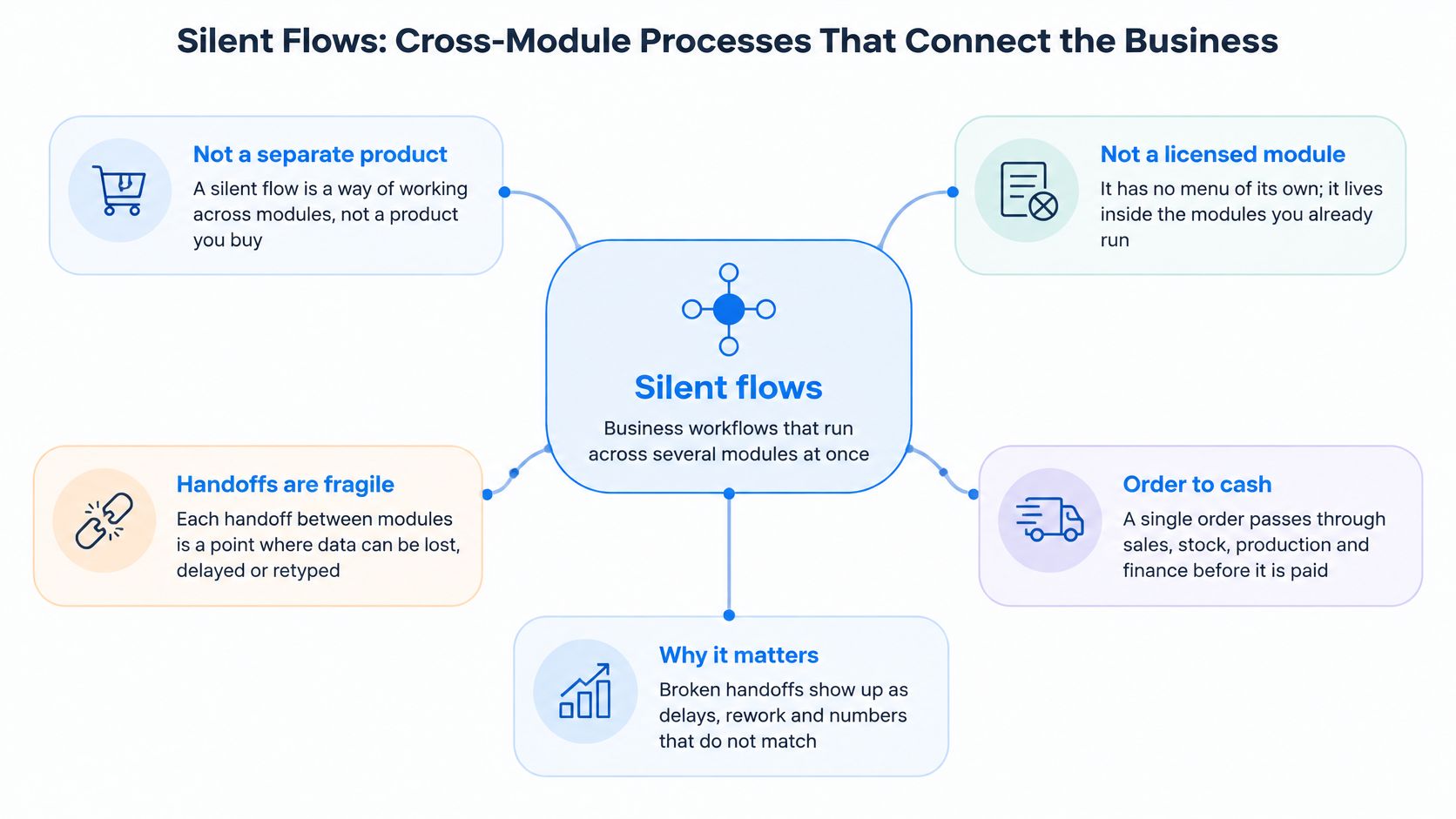
| Silent flow | Modules connected | Starts when | Finishes when |
|---|---|---|---|
| OmniSales | CustomerFlow, SalesFlow, StockFlow, FinanceFlow, external eCommerce and POS platforms | A customer order arrives from a web store, POS, B2B portal or sales rep | The order is invoiced and the stock and financial records are updated |
| Order-to-Cash | CustomerFlow, SalesFlow, StockFlow, FinanceFlow | A customer accepts a quotation or places an order | Payment is received and recorded |
| Procure-to-Pay | PurchaseFlow, StockFlow, FinanceFlow | A purchase request is raised | The supplier invoice is paid and matched |
| Plan-to-Produce | SalesFlow, ManufacturingFlow, StockFlow, PurchaseFlow | Sales demand or a forecast is confirmed | Finished goods are in stock and ready to deliver |
| Service-to-Invoice | ServiceFlow, StockFlow, PeopleFlow, FinanceFlow | A service request is logged | The service work is signed off and invoiced |
| Lead-to-Order | CustomerFlow, SalesFlow | A new lead is recorded | A sales order is confirmed |
| Project-to-Profit | ProjectFlow, PeopleFlow, PurchaseFlow, FinanceFlow | A project is approved and planned | Project revenue and costs are reported against budget |
Each flow has one joint that gives way first. In Order-to-Cash it’s the reservation, when an order is confirmed against stock that’s already committed elsewhere. In Procure-to-Pay it’s the three-way match between purchase order, goods receipt and supplier invoice, which fails when a receipt is posted against the wrong line. A warehouse can look busy and still ship a promise the shelf cannot keep, because two screens agreed while the quantity on hand did not.
OmniSales is the widest of the set. It connects external e-commerce platforms, POS systems and B2B portals through integrations and APIs, subject to what each project confirms, along with sales representatives, customer records, inventory availability and financial transactions. See how OmniSales connects sales channels in ERP for a closer look at that workflow. Its weak joint is item identity: a web SKU that doesn’t match a stock item code creates an order nobody can pick. That is two departments using two names for one product. The picker searches StockFlow, the web order sits in SalesFlow, and FinanceFlow later invoices a line that never left the shelf.
Service-to-Invoice breaks at unbilled time, when a technician records work but the labor line never reaches the invoice. Project-to-Profit breaks at allocation, when a purchase or a timesheet posts to the wrong project or the wrong period. Lead-to-Order breaks at duplicate leads, where two reps work the same prospect in two pipelines. The join between planning, purchasing and accounting gets its own treatment in this piece on connecting production planning, purchasing and accounting in ERP.
A silent flow has no owner on the org chart, which is exactly why it needs one in the process design.
Machine data is a handoff too. A sensor or a line controller feeding production status into the platform is another silent flow with a fragile joint at the interface, and this explainer on SCADA and sensor data integration covers how that data flow is built.
In a structural-equation study of 200 firms, business-process reengineering and organizational fit were significant antecedents of ERP benefits in information quality and coordination, and information quality was then a significant predictor of organizational performance, according to research on ERP integration and information quality. Reliable shared records deliver that benefit, and connected screens do not on their own. Validation rules, duplicate detection and audit trails sit in that shared record, so a handoff cannot invent a second version of the same order.
Shared Platform Capabilities That Support Every Module
Some of what makes a module usable isn’t a module at all. Dashboards, workflow rules, permissions, audit trails, integrations and mobile access sit on the platform underneath every function. These capabilities are the joints in the handoffs: a purchase approvalAn approval is a formal decision that allows a request or action to proceed. An ERP system can route approvals and record who made each decision. only moves from PurchaseFlow to FinanceFlow if the permissions let it, and a corrected stock figure only stays trustworthy if the audit trailAn audit trail records who created, changed or approved information and when. In an ERP system, it helps trace transactions, investigate errors and support audits. shows who touched it. Treating this layer as an optional extra is the mistake that turns a solid implementation into a permanent support queue.
AIFlow stands apart from this shared layer. It is an optional add-on rather than part of the standard platform, so teams that want it plan for it separately during licensing.
Who Can Approve This, and Who Changed That
Three controls cover most needs, and configurationConfiguration sets up software using its existing options. In an ERP system, it adapts workflows, roles and other settings to the company’s business processes. answers them rather than goodwill.
- Permissions: who may approve a supplier, change a price or release a payment.
- Audit logs: who changed a record, when, and what it held before the change.
- Retention: how long that evidence stays retrievable.
Watch what happens when one of these fails at a handoff. A buyer edits a supplier’s bank details and no log captures the change. The payment posts weeks later, the fraud surfaces months after that, and nobody can reconstruct who approved what. The failure was never in FinanceFlow’s screens. It was in the platform layer that every module depends on.
That layer has a legal edge. The European Commission states that organizations responsible for personal data must ensure and demonstrate appropriate data security, and where a breach is likely to create a risk to an individual’s rights and freedoms, the organization must notify the supervisory authority without undue delay and at the latest within 72 hours of becoming aware of it, as set out in the European Commission guidance on data protection obligations. Audit trails and incident records help you establish who accessed what and assemble the evidence in time. They don’t replace a formal GDPR program or legal advice.
SAF-T and electronic invoicing belong in the same bracket. Requirements differ by country, so confirm them against official national sources before anyone configures a file format. Each SIX customer also runs a separate, managed instance rather than a shared multi-tenant product, which keeps records and configuration inside one environment.
If part of your accounting still lives outside the platform, this explanation of how Zaro connects finance systems shows what a clean handoff between an operational platform and an accounting tool looks like. That junction matters more than many expect, because a mismatched posting there is a silent flow failure wearing an integration’s clothes.
Mobile access matters more than it sounds. A technician closing a job in a customer’s hallway, or a warehouse operator scanning a pallet at the dock, updates the same record the office sees. That is the difference between a capture step that happens and one that gets remembered at five o’clock. When the field capture fails, every downstream handoff inherits the gap: the invoice waits, the stock count drifts, and the next planner works from numbers that were never true.
Following a Manufacturing Order and a Field Service Request
Two hypothetical companies show how the modules behave under pressure. Both are invented examples, and the failures they hit are the ones to watch for in real operations.
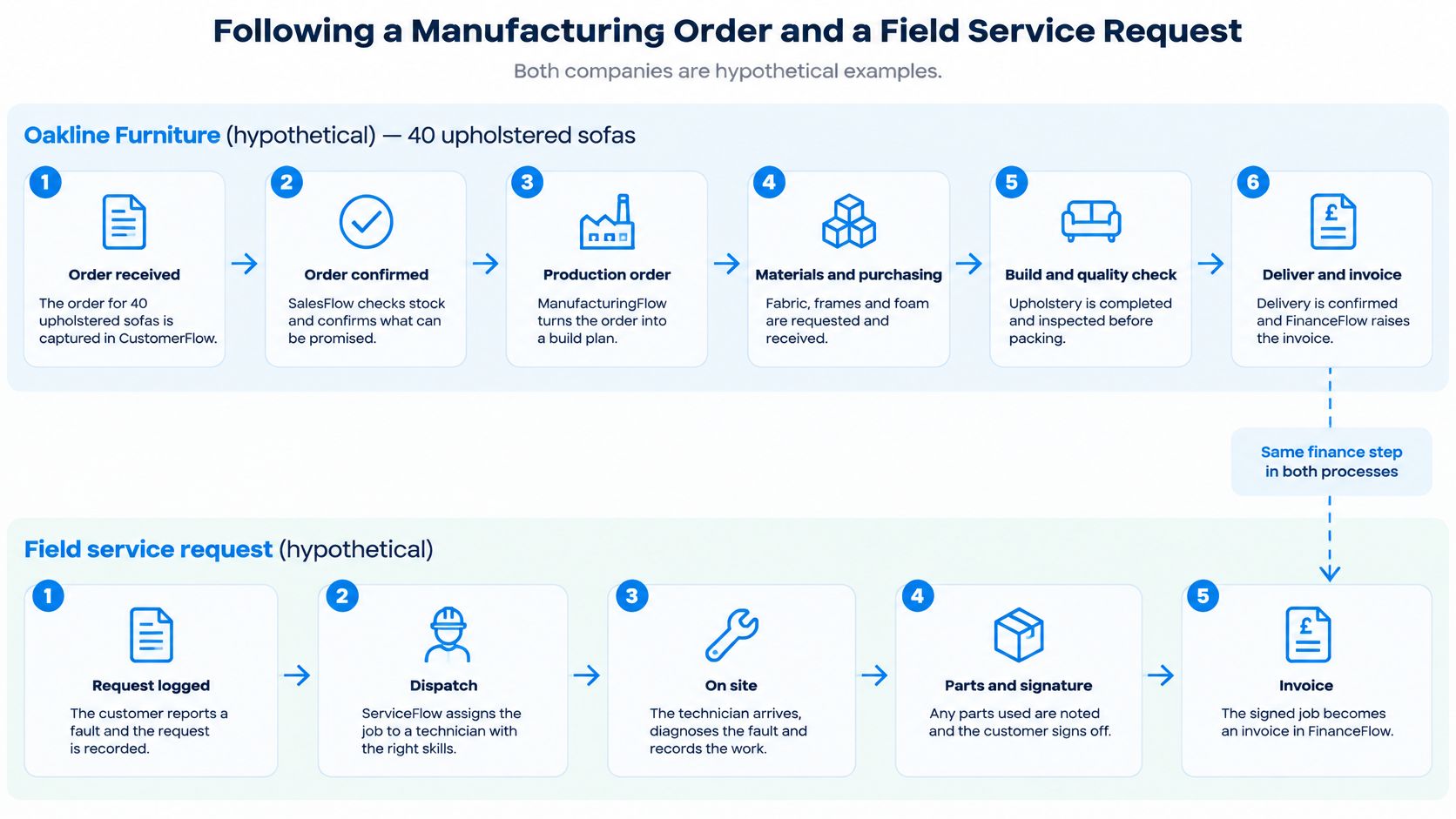
Oakline Furniture, 40 Upholstered Sofas
- Order received. CustomerFlow and SalesFlow capture the order for 40 sofas, with fabric and frame choices recorded as configured items.
- Availability check. StockFlow reserves the free frames and fabric, while ManufacturingFlow reads the bill of materials to see what the full run needs.
- The gap appears. Material planning finds a foam shortage and raises a purchase request, which PurchaseFlow routes for approval and sends to the supplier.
- Goods arrive. The receipt updates stock and the purchase record, and the reservation now covers the whole run.
- The shop floor records the truth. Operators log time, quantities, waste and rejects, and quality checks run on the finished batch before packing.
- Deliver and invoice. Finished sofas move to stock, ship against the order, and FinanceFlow issues the invoice with production costs attached.
Three things go wrong in a run like this. A missing material stops the line after the delivery promise was already made. A rework loop on upholstery adds hours the original cost estimate never carried. A delivery date the reservation never supported happens whenever sales confirms before stock is checked.
Brightline Service, One Boiler Repair
- Request logged. CustomerFlow records the caller, the boiler model and the fault, and ServiceFlow opens a service request.
- Dispatch with a skill match. PeopleFlow qualifications confirm which technicians hold the right certification, and the dispatcher assigns one.
- On site. The technician works from a mobile work order, diagnoses the fault and records findings.
- Parts and signature. A replacement part comes out of van stock, which updates StockFlow, and the customer signs on the device.
- Invoice and payment. Parts and labor move into FinanceFlow as an invoice, and the payment closes the job.
A part missing from the van turns one visit into two and eats the margin the job was priced on. An unqualified technician sent to a gas appliance creates a safety and compliance problem that no amount of later paperwork repairs.
The lesson is the same in both cases. One shared record moves through every module, and each step adds detail rather than re-entering it. Where that record breaks, someone rebuilds it by hand, usually under time pressure and usually on a Friday.
Most module troubles are handoff troubles wearing a software label.
Is AI ready to use on day one? Only after clean master data, role-based accessRole-based access controls what users can see and do according to their responsibilities. In an ERP system, it helps protect sensitive information and manage permissions consistently. and traceable approvals are in place. Without them, automation repeats whatever the records already get wrong.
Choose Your First Modules and Confirm the Connections
The first module decision is really a process decision. Pick the workflow that removes the most manual handoffs, then buy the modules that workflow crosses.
A useful test is to follow one transaction from its first record to its financial result. Where does someone copy information into another system? Where does a missing approval, stock reservation or qualification stop the work? Those points show which modules must connect first.
| Business profile | Modules to start with | Connections to verify first | Common failure point |
|---|---|---|---|
| Manufacturer | SalesFlow, ManufacturingFlow, StockFlow, PurchaseFlow, FinanceFlow | Bills of materials match stock item codes, and purchase lead times feed planning | Production planned against stock that is not reserved |
| Field service company | CustomerFlow, ServiceFlow, PeopleFlow, StockFlow, FinanceFlow | Technician skills link to job types, and van stock links to parts used | Technicians assigned without the required qualification |
| Wholesale or distribution business | SalesFlow, PurchaseFlow, StockFlow, FinanceFlow | Customer terms and item prices match, and reservations release on cancellation | Orders promised against stock that is already committed |
| Project-based service provider | ProjectFlow, PeopleFlow, PurchaseFlow, FinanceFlow | Timesheets link to project codes, and purchases link to project budgets | Project costs posted to the wrong project or period |
| Small firm with a general need | CustomerFlow, SalesFlow, FinanceFlow | Customer records are unique, and invoices post to the correct ledger | Duplicate customer records and manual re-keying between tools |
Sequence matters as much as selection. In research on ERP implementation success factors, a study of 204 companies found end users to be the most significant actor in implementation success, and information quality had the strongest effect on internal efficiency, competitiveness and profitability among the measured dimensions. The same body of work treats rollout as a staged project: map the target processes first, cleanse and reconcile master data second, configure a minimum viable module set third, then run end-to-end tests across demand-to-cash, procure-to-pay, plan-to-produce and service-to-cash.
Test the negative cases too: authorization failures, partial deliveries, substitute materials, lot traceabilityTraceability follows a product or material through its history, from origin to use or delivery. An ERP system connects the records needed to investigate issues and track affected items., returns, cancellations, mobile offline synchronization, tax treatment and period closing. Software that handles the happy path is common. Software that handles a partial delivery and a cancellation on the same order is the one worth running a business on.
These tests expose handoff problems early. If a cancelled sales order does not release its reservation, purchasing sees demand that no longer exists. If a technician records parts offline and the update never synchronizes, stock records and the final invoice can both be wrong. The module may look correct on its own screen while the business flow is already broken.
FinanceFlow usually goes live last and gets checked first. SIX FinanceFlow connects invoicing, expenses, payments, budgets, accounting and financial reporting in one controlled process, which gives finance teams and management a current view of cash flow, costs, revenue and profitability.
A readiness check before configuration:
- Named process owners: one person accountable for each workflow going live, not a committee.
- Approved permissions: roles defined and signed off before the first transaction, not after the first dispute.
- Defined reporting questions: the five or six questions the business wants answered weekly, written down first.
- Assigned data owners: someone responsible for customers, suppliers, items, bills of materials and employee records.
Package selection should follow the same process logic. SIX ERP licensing begins with an industry package built around the processes your team needs to manage, and the user level then determines the scale of the environment. Confirm which specialized modules belong in that package before configuration starts, because capabilities such as ManufacturingFlow, ServiceFlow, PurchaseFlow, PeopleFlow and FinanceFlow depend on business requirements and package configuration.
Start with the process that costs you the most manual rekeying, prove it on real transactions, and add the next module once the handoff it feeds becomes visible. That’s the approach SIX ERP is built for: nine connected Flow modules on one shared data foundation, mapped to your processes before anything is configured. Bring your current process map, your master data and the three questions your reports never answer, and talk them through with our team at SIX ERP in a pre-integration analysis.