
The best ERPAn ERP system connects a company’s core processes—such as sales, finance, inventory, manufacturing, and service—in one place so teams can work with shared information. for small manufacturers is the one that connects your quotes, purchasing, inventory, production and invoicing in a single record. Feature count doesn’t decide it. Fit does. This guide shows how to compare options without getting lost in demos.
Start With the Problem, Not the Vendor List
A sales rep promises a delivery date. Purchasing hasn’t ordered the material. The warehouse count is a week old. Production finds out when the work order lands on the floor.
That isn’t a people problem. It’s a visibility problem, and it is what a small manufacturing ERP exists to fix.
Before you open a single comparison page, write down where information breaks today:
- Orders re-typed from email into a spreadsheet
- Stock numbers nobody trusts
- Work orders created without a materials check
- Costs known only after the job is shipped
Rank these by what they cost you. Your comparison criteria come from this list, not from a vendor’s feature sheet.
What a Manufacturing ERP Comparison Must Cover
Manufacturing ERP comparison is not a checkbox exercise. Most products tick the same boxes. The difference sits in how well the modules share data.
Check these areas first:
- Production planning. Bills of materials, work orders, capacity and material requirements.
- Inventory visibility. Stock by warehouse and location, reservations, batches and serial numbers.
- Purchasing. Requests, approvals, supplier orders and receiving, tied to what production needs.
- Quality and traceability. Can you trace a finished product back to its materials?
- Costing and finance. Does production cost flow into invoicing and reporting without re-entry?
- Integrations. Your accounting tool, online shop, barcode devices and machines.
Ask each vendor to walk one real order from quote to invoice. Not a demo order. Yours.
Production and Inventory Visibility Come First
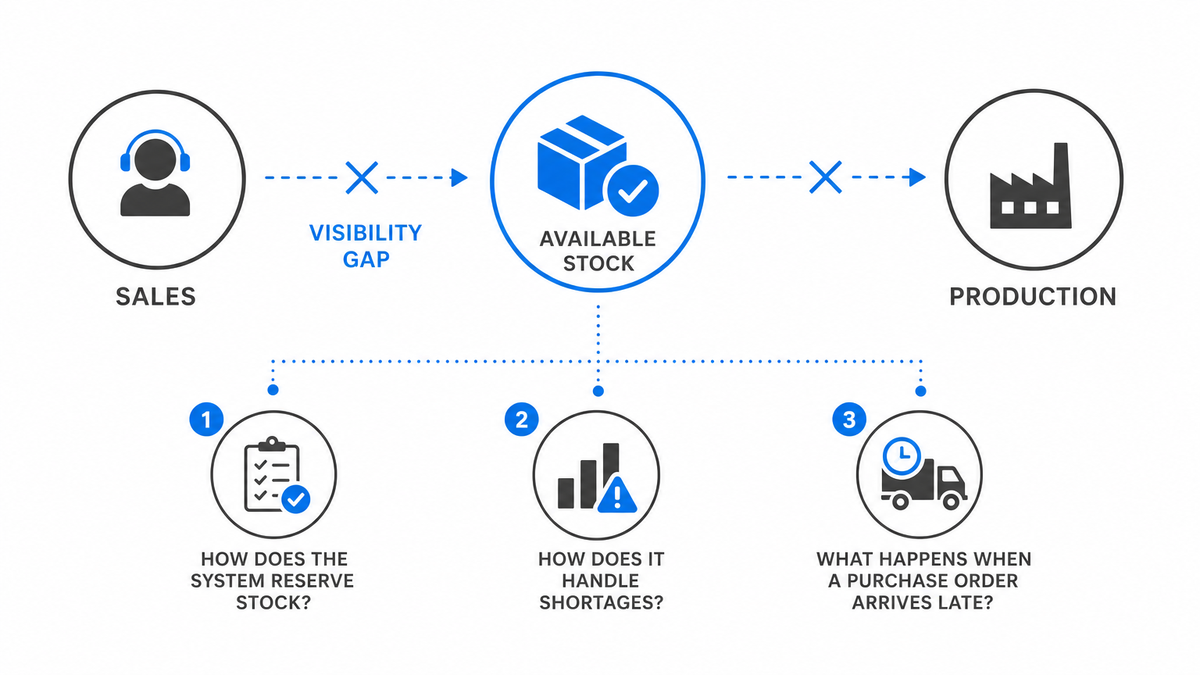
Inventory visibility is not a report. It is the state of your stock at the moment someone makes a decision.
Reservations matter here. If sales can promise material that production already claimed, you have a visibility gap, whatever the dashboardA dashboard brings key figures and status information together on one screen. An ERP dashboard helps teams monitor performance and identify issues that need attention. says. Ask how the system reserves stock, how it handles shortages, and what happens when a purchase order arrives late.
Production visibility works the same way. A work order should show its materials, its status on the floor and its cost as it builds up. If you need a second tool to see that, the ERP isn’t doing its job.
How Fit Differs by Company Size and Setup
Small manufacturers in the US usually fall into one of three camps.
- Simple, single-site shops that need clean quoting, stock and invoicing before anything else.
- Make-to-order shops where every job differs and the bill of materials changes per customer.
- Growing shops adding a second warehouse, a second entity or a second currency.
Don’t pick for the company you’ll be in five years. Pick for the one you are, and check that the platform can grow with you without a rebuild. Common names on shortlists include Odoo, Oracle NetSuite, Microsoft Dynamics 365 Business Central, SAP Business One and Sage X3. Treat them as alternatives to test against your own process, not as a ranking.
Forum threads can help you find the questions to ask. They can’t tell you which system fits your floor. A recommendation from a shop with different products and different volumes is an opinion about their problem.
Cost Is More Than the License
The price on the first slide is the smallest part of the decision. Add up the full picture:
- Licensing model and what it covers
- Implementation and process mappingProcess mapping documents the steps, people and decisions involved in business work. In an ERP project, it helps define workflows and identify improvements before system setup.
- Data migration
- Integrations and customizationCustomization changes or adds software functionality beyond standard settings. In an ERP project, it can meet specific business needs while adding development and maintenance work.
- Training
- Hosting, updates, backups and support
Ask for the scope in writing. Ask what happens when your process needs a change after go-live. Predictable total cost matters more than a low entry price.
A Simple Scoring Method
Pick five or six criteria. Weight them by the pain they cause. Score each shortlisted system from one to five after a scripted demo using your own data. Then check references in your industry.
The scoring sheet won’t make the decision. It keeps the decision honest. When the favorite loses on a heavily weighted criterion, you’ll see it.
Where SIX ERP Fits
SIX ERP is a configurable, managed platform that connects sales, purchasing, inventory, manufacturing, finance and reporting in one private environmentA private environment is a software environment set aside for one customer. It separates that customer's data and settings while supporting agreed access, maintenance and backup arrangements.. For manufacturers, ManufacturingFlow covers production planning, bills of materials, work orders, materials, capacity, quality, warehouses, traceability and costing. StockFlow handles multi-location inventory with reservations, picking, batches and serial numbers. PurchaseFlow ties supplier orders to what production needs.
ConfigurationConfiguration sets up software using its existing options. In an ERP system, it adapts workflows, roles and other settings to the company's business processes. is built around your process, and implementation includes process mapping, data migration, training and post-go-live support. If you want to see how this plays out in practice, read how SIX ERP delivers business value in real operations. For the production side in detail, see ERP for manufacturing.
SIX isn’t the right answer for every shop. It is worth a place on your shortlist when disconnected tools and spreadsheets are the main problem.
Before You Sign: A Short Checklist
Run through these before any contract:
- Did the vendor run your real order end to end?
- Can you see stock, reservations and production status in one place?
- Is the cost of implementation and change scoped in writing?
- Do the integrations you need exist, or are they custom work?
- Who supports you after go-live?
If a vendor can’t answer one of these plainly, that is your answer.
FAQ
How do I compare ERP systems for a small manufacturer?
List your process breaks first. Then score each system on production planning, inventory visibility, purchasing, traceability, costing and integrations, using a scripted demo with your own order. Weight the criteria by how much each problem costs you today.
What features does small manufacturing ERP need?
At minimum: bills of materials, work orders, material planning, inventory with reservations, purchasing, quality and costing that flows into finance. Add traceability if you ship to regulated or high-liability customers. Skip anything, you can’t tie to a current problem.
Does a small manufacturer need a cloud ERP?
Not necessarily. What matters is who runs it, who backs it up and who updates it. Read cloud versus on-premises ERP before you decide and compare the support model as closely as the hosting model.
Can an ERP replace my spreadsheets completely?
Yes, if the data model matches how you work. Migration needs planning, and some reporting may stay outside for a while. The goal is one source of truth for orders, stock and production, not zero spreadsheets on day one.
Next Step
Write your list of process breaks and run one real order through every shortlisted system. If you want to see that order run through a connected platform, talk to the team at SIX ERP.