


A distributor’s accounts payable clerk spends the morning typing supplier invoice details, checking prices, and entering amounts that already exist in purchase orders. In this hypothetical situation, the ERPAn ERP system connects a company’s core processes—such as sales, finance, inventory, manufacturing, and service—in one place so teams can work with shared information. holds much of the information, but the employee still connects it by hand. AI powered ERP should reduce that repetitive effort, without removing the checks that protect the business.
What AI Powered ERP Means for Daily Work
AI powered ERP is an enterprise resource planningAn ERP system connects a company’s core processes—such as sales, finance, inventory, manufacturing, and service—in one place so teams can work with shared information. system that uses AI to read documents, spot patterns, explain risks, and draft recommendations, while business rules control posting and people approve significant decisions. Enterprise resource planning, or ERP, connects records and workflows across departments such as purchasing, inventory, production, sales, and finance.
For the invoice clerk, the useful improvement isn’t a chat window. It’s a prepared invoice record with the supplier, document number, amounts, and purchase references already identified. The employee can spend less time copying information and more time resolving a price difference or a missing delivery record.
Less repetitive work, not less human responsibility
The true value of AI isn’t taking a person’s job. It’s reducing the time people need to complete repetitive tasks. That leaves employees with more capacity for work that requires judgment, customer knowledge, negotiation, and accountability.
The distinction matters when setting an implementation target. Replacing manual entry with a large correction queue doesn’t improve the process. A useful deployment reduces total effort while keeping employees able to understand and challenge the result.
Measure the work people no longer need to repeat, not just the tasks the software can perform.
AI operates on top of shared transactional data, the recorded orders, receipts, stock movements, invoices, and payments that describe business activity. It doesn’t replace those records or make disconnected information trustworthy by itself.
Connected records make assistance useful
A proposed purchase can affect available cash, warehouse space, production plans, and customer delivery dates. An assistant that reads only stock quantities can’t explain all those consequences. It needs the relevant records and the business context around them.
As described in a systematic review of AI-enabled ERP, AI powered ERP builds on enterprise systems that automate narrow tasks such as classification and alerts, adding prediction, recommendations, and natural-language interaction.
The practical questions are straightforward:
- Where does effort accumulate? Find repeated reading, searching, copying, and drafting across ERP areas.
- Would a rule be sufficient? Don’t introduce AI where a fixed condition gives the right answer.
- Can employees trust the inputs? Establish data ownership, validation, permissions, and approvalAn approval is a formal decision that allows a request or action to proceed. An ERP system can route approvals and record who made each decision..
- Can the platform prove value? Test complete workflows rather than isolated demonstrations.
How AI Differs From Rule-Based Automation
When stock falls below a reorder point, a rule can create a purchasing requirement. When a purchase order exceeds its approval limit, another rule can route it to an authorized manager. These actions follow conditions and outcomes set in advance.
A goods receipt follows the same principle. Once someone records the transaction, the system updates inventory according to the configured process. No interpretation is needed.
Rule-based automationAutomation uses software or equipment to carry out tasks according to defined rules. An ERP system can automate routine business steps and highlight exceptions for review. compared with AI-assisted support
| Aspect | Rule-based automation | AI-assisted support |
|---|---|---|
| Trigger | Stock falls below a reorder point | Shortage risk builds before a threshold is crossed |
| Outcome | Fixed and known in advance | A recommendation for a person to review |
| Example | A purchase order above its approval limit goes to a manager | A supplier invoice in a new layout is read and matched to records |
| Failure mode | A misconfigured rule fires incorrectly each time | A reading error or outdated data requires validation |
| Handles | Predictable postings and approvals | Varied information and changing conditions |
Interpretation is different from execution
AI can help when information arrives in different formats or several changing conditions need to be considered together. A supplier might move the invoice total, rename a column, or change the layout. AI can interpret the document without requiring an employee to rebuild a fixed extraction template.
That flexibility carries risk. A model might mistake a subtotal for the amount due or associate a document with the wrong supplier. A plausible reading alone cannot authorize a financial transaction.
Use rules for predictable transactions. Use AI to help people interpret uncertain information.
AI can prepare extracted fields or suggest an action. ERP validation checks required fields, matching records, permitted values, and approval requirements before the transaction affects business records. Authorized people review exceptions and approve decisions that require judgment.
Material planning shows the difference too. A minimum-stock rule answers a narrow question. Assessing supplier reliability alongside upcoming demand requires more context, as the furniture shortage example demonstrates.
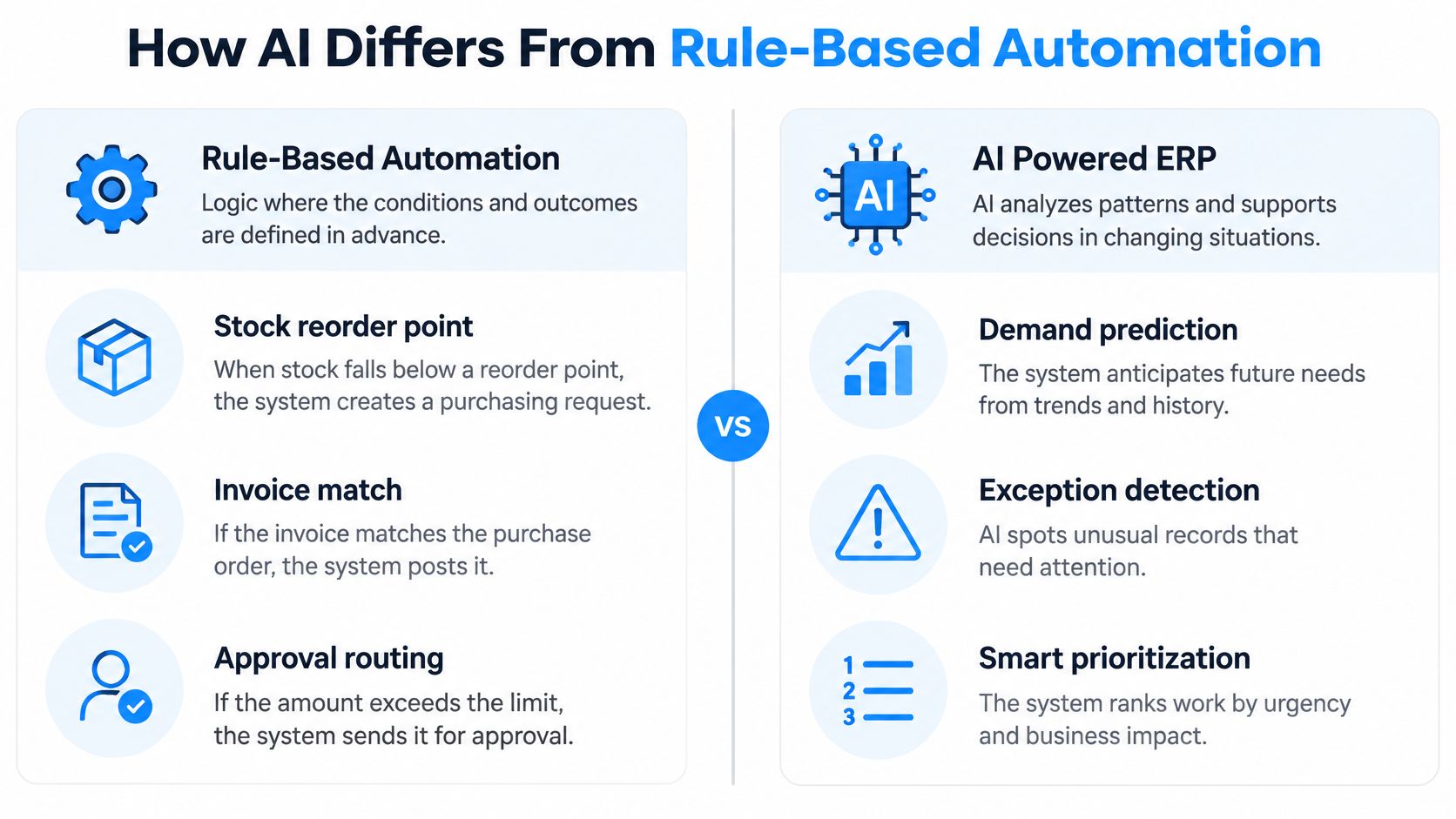
Use a simple test when evaluating a proposed feature: if the outcome is fixed in advance, a rule is usually sufficient. If the task involves reading varied information, recognizing patterns, or preparing options, AI may save repetitive effort. Measure that value across the full process, including validation and approval, rather than counting only the task AI performs.
Where AI Helps in Each ERP Area
AI support by ERP area
| ERP area | Repetitive work AI can speed up | What rules still control | Decision that stays with people |
|---|---|---|---|
| Finance | Extracting fields from supplier invoices and receipts | Matching to purchase orders, goods receipts, and VAT rules before posting | Approving unusual or high-value postings |
| Purchasing and inventory | Spotting shortage risk across stock, open orders, and supplier delays | Reorder points and purchase approval limits | Placing orders and choosing suppliers |
| Manufacturing | Flagging schedule conflicts and material gaps before production starts | Bills of material, routings, and capacity rules | Releasing production orders and approving substitutions |
| Sales and proposals | Drafting proposals from customer records, approved prices, and product data | Approved price lists and document templates | Verifying commercial terms and approving the final offer |
| Field service | Summarizing job history and suggesting parts or schedule options | Service request rules, scheduling logic, and asset records | Customer commitments and invoice approval |
Read the table row by row and start where repetitive work consumes the most staff time. A task with frequent, well-documented exceptions is usually a better candidate than an occasional decision whose reasoning nobody has recorded.
For finance, the supplier invoice workflow below shows how document reading can support FinanceFlow without bypassing transaction checks.
Follow information across departmental boundaries
Purchasing and inventory benefit when the analysis combines open orders, supplier delivery history, reservations, and demand. PurchaseFlow handles purchasing records and approvals, while StockFlow holds inventory and warehouse activity. Considering those records together gives a manager more context than a stock balance alone.
Manufacturing adds another dependency. ManufacturingFlow connects production planning and execution with bills of material, or BOMs, which list the components needed to make a product. An apparent material surplus may already be committed to production, while an available substitute may fail the product specification.
Sales proposal preparation is a different kind of opportunity. SalesFlow can provide customer order context, approved pricing, and product information for an AI-assisted draft. Employees still need to check scope, exclusions, delivery promises, and commercial terms before sending an offer.
Save searching and drafting, not just typing
For field service, an employee may need to review an asset’s history, previous repairs, parts used, and customer requests before planning a visit. AI assistance can help summarize that context or prepare a service description. The planner must still confirm technician suitability, parts availability, and the commitment made to the customer.
These are connected workflows, not independent AI buttons. A service recommendation affects parts reservations. A proposal can become an order that affects purchasing or production. A production adjustment can change delivery dates and expected cash receipts.
For SIX implementations, specific AI availability depends on the customer’s configured workflows, data sources, integrations, and AI services. Treat the table as a process map for evaluation, not a promise that every configurationConfiguration sets up software using its existing options. In an ERP system, it adapts workflows, roles and other settings to the company's business processes. includes every use case.
The working boundary is simple: if the human decision has financial, operational, or legal consequences, the AI output remains a recommendation until the appropriate person approves it.
Invoice Processing From Arrival to Posting
A payable record should reach approval without the clerk retyping details already held in purchasing and receiving. AI can extract invoice data, while ERP records and configured rules help check it before posting.
Keep each stage visible
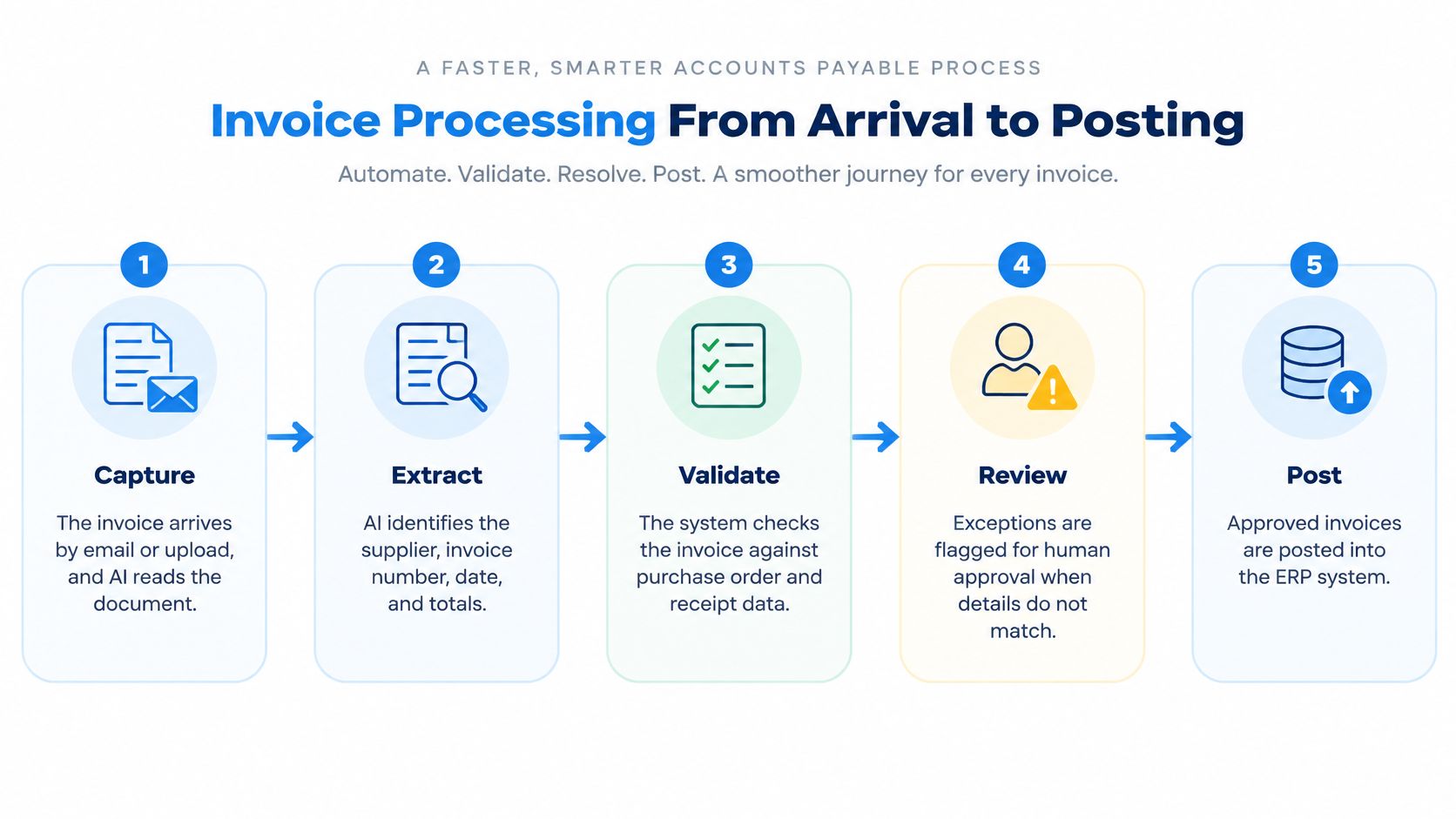
Capture. An invoice arrives by email or upload. Retain the original file and its arrival record so staff can investigate unreadable attachments or duplicate submissions.
Extract. AI identifies the supplier, invoice number, line items, amounts, and VAT information across different document layouts. Staff should check for misread decimal places, a subtotal mistaken for a total, or variations in how a supplier’s name is recorded.
Match. ERP rules compare extracted values with supplier records, the purchase order, and the goods receipt. A price difference, incorrect VAT treatment, or invoiced quantity above the received quantity should create an exception for review.
Flag. Route missing or inconsistent information to a review queue rather than posting it automatically. Assign each exception a reason and an owner; otherwise, the queue can become another email backlog.
Approve. An authorized employee resolves discrepancies and approves the invoice according to configured responsibilities and value limits. Accurate extraction does not resolve a commercial or accounting issue.
Post. Record the approved invoice in the ledger and retain links to the document, purchase order, receipt, and approval history. Duplicate checks help prevent the same invoice from being posted twice.
The diagram groups matching and exception handling into validation and review.
Count correction work as processing work
A quick scan saves little time if staff spend longer correcting its output than they would have spent entering the invoice manually. Track exception rates, manual correction time, and total invoice cycle time, including approvals and rework.
Use the accounts payable automation guide to map handoffs before choosing what to automate. For another perspective on reducing invoice processing costs with AI, review how document handling contributes to the process.
Service billing also depends on connected records. SIX ServiceFlow connects service requests, appointments, technician work, customer approval, and invoicing, keeping office and field teams aligned around current information.
Aim to reduce repeated data entry and keep the review queue manageable. If exceptions build up, address their causes before increasing the volume of invoices processed.
Shortage Risk and the Options Managers Weigh
A furniture manufacturer holds 14 days of specialized fabric while its main supplier normally delivers in 10 days. Recent deliveries have taken 14 to 19 days. The minimum-stock alert stays silent because inventory remains above its threshold, even though the fabric could run out before the next delivery arrives.
A risk assessment should account for demand, reservations, incoming stock, production needs, and delivery uncertainty. A delayed receipt or increase in customer demand could change the outlook.
Build a risk statement from connected records
StockFlow provides current inventory, reservations, incoming stock, and warehouse movements. PurchaseFlow adds open purchase orders, lead times, and delivery history. ManufacturingFlow contributes bills of materials (BOMs) and production requirements; SalesFlow adds confirmed orders and delivery commitments. FinanceFlow provides purchasing costs and working-capital considerations.
The output should be a risk statement supported by records. It should name the material and exposed orders, estimate when coverage may fail, and state the assumptions behind that estimate. Treat an unconfirmed supplier delivery as uncertain, not as a firm receipt date.
Responses to a fabric shortage risk
| Response | Main benefit | Main cost or risk | Approval needed |
|---|---|---|---|
| Order earlier | May reduce the gap before stock runs out | Ties up more working capital | Purchasing manager |
| Use an alternative supplier | May shorten delivery time | Could raise unit costs | Purchasing manager and finance |
| Use an approved substitute | May keep production running | Must meet the product specification | Engineering or quality owner |
| Reschedule production | Protects the most urgent customer order | May delay another customer order | Production planner and sales lead |
| Hold the plan and monitor | Avoids added cost today | A further delay could still cause a shortage | Purchasing manager |
Compare consequences before committing
Ordering earlier helps only if the supplier can deliver sooner. The buyer should confirm the date, and finance should assess the added inventory commitment. For another supplier, check specifications, quantities, terms, and delivery credibility.
A substitute material changes the product, so engineering or quality must sign off. Rescheduling also needs production and sales input: protecting one order may delay another.
SIX ManufacturingFlow connects customer orders, material and BOMA Bill of Materials (BOM) lists the materials and components, and their quantities, needed to make a product. management, production planning, work steps, quality checks, and progress through to finished products. With those processes connected, teams can assess how a proposed change affects production and customer commitments.

The guide to predicting manufacturing material risks explores how ERP information can support risk prediction and controlled actions. For a distributor, the same reasoning can help protect customer fulfillment.
AI can flag risk and compare possible responses. People still decide whether to place an order, approve a substitute, or change a customer commitment. The purchasing manager approves the response, with other responsible owners signing off where needed.
Data Quality and Governance Come First
A more capable model doesn’t make bad master data correct. Master data means the shared records used throughout the business, including items, suppliers, customers, BOMs, units of measure, prices, and accounting dimensions such as departments or cost centers.
A duplicate supplier can split delivery history. A carton recorded as a single unit can distort purchasing and availability. A study of AI-enabled master-data management in ERP identifies inconsistent information from multiple sources as a persistent threat to data integrity and business decisions.
Validate inputs before asking for predictions
Place controls before model inference, the stage when AI produces a result:
- Schema validation: Check required fields, formats, and allowed values.
- Duplicate detection and entity resolution: Identify records that represent the same supplier, customer, or item.
- Unit normalization: Reconcile purchasing, stocking, and production units.
- Referential-integrity checks: Confirm that linked items, suppliers, accounts, and BOM components exist.
- Anomaly scoring and quarantine: Route unusual or low-confidence records to an owner before use.
The guide to ERP system data provides context for organizing these shared records. Assign a business owner who can resolve each type of defect, rather than leaving all cleanup to IT.
Make governance an operating responsibility
The EU AI Act, Regulation (EU) 2024/1689 provides a European reference for AI governance. Its requirements for risk management, logging, and human oversight apply to systems classified as high-risk, not automatically to every ERP assistant. Assess each use case before assigning legal obligations. The U.S. NIST Artificial Intelligence Risk Management Framework, AI RMF 1.0, January 2023 can remain a supplementary, voluntary reference rather than the main framework for an EU deployment.
Regardless of classification, assign roles and accountability, record intended use and data sources, and track accuracy, exceptions, overrides, and stockout outcomes. When results drift, require review or suspend the affected AI-assisted action. Risk work continues after deployment.
For each use case, document an owner, acceptable error range, and escalation path. Log the model version, input snapshot, prediction, confidence level, user override, resulting transaction, and business outcome. Require human approval for high-impact actions such as production release, supplier changes, unusual journal entries, and material write-offs.
Ekipa’s discussion of operational controls for responsible AI offers another perspective on turning policy into daily practice. The practical test is whether a reviewer can trace a suggestion to its source records and the person who accepted it.
Protect access and traceability
AI must respect existing role-based permissions. An employee who can’t open payroll records mustn’t retrieve them through a natural-language question. When AI processes personal data, apply the EU’s GDPR principles, including data minimization and purpose limitation. Bulgaria’s Commission for Personal Data Protection offers local guidance for controllers and processors.
SIX customers operate in separate managed instances, but isolation alone doesn’t settle AI-service risks. Document which data leaves the ERP, where it is processed, retention periods, and contractual protections. Customers with stricter requirements may ask about private model endpoints and customized deployment options.
For EU food businesses, Article 18 of Regulation (EC) No 178/2002 requires traceability through production, processing, and distribution. Businesses must be able to identify their immediate suppliers and business customers and provide that information to competent authorities on demand. In Bulgaria, keep supplier, batch or lot, and customer records connected where relevant, and confirm any additional product-specific or national requirements before implementation. For readers operating in the United States, the FDA Food Traceability Rule, 21 CFR Part 1, Subpart S remains a separate jurisdiction-specific reference. Software supports the records; the company remains responsible for determining and meeting its legal obligations.
Measuring Value and Evaluating Platforms Realistically
The useful question is which complete process improves, against which baseline, and after how much correction and review. Measure the work from the first input to the final business outcome, including time spent resolving exceptions or re-entering information.
The 2025 World Quality Report found that only 15% of organizations in its GenAI quality-engineering findings had reached enterprise-scale deployment, while 50% reported lacking AI or machine-learning expertise. These figures are not ERP adoption rates. They do show why a successful pilot alone cannot establish that a process will scale.
Request evidence beyond the demo
Evaluation criteria for an AI powered ERP platform
| Criterion | Question to ask | Evidence to request |
|---|---|---|
| Permissions | Does AI respect existing role-based accessRole-based access controls what users can see and do according to their responsibilities. In an ERP system, it helps protect sensitive information and manage permissions consistently.? | Written access rules and a test with a restricted user |
| Data sources | Which modules and external services does AI read? | Data flow diagram listing each source |
| Validation | How are AI-extracted values checked before posting? | Sample exception queue and the list of validation rules |
| Human approval | Which actions need sign-off before they affect records? | Approval matrix for each AI action |
| Audit trailAn audit trail records who created, changed or approved information and when. In an ERP system, it helps trace transactions, investigate errors and support audits. | Can we see which records influenced a recommendation? | Sample log showing model version, inputs, and outcome |
| Measurement | Which KPIs are tracked against a baseline? | Baseline report from a pilot process |
| IntegrationIntegration connects systems so they can exchange information or coordinate actions. An ERP integration helps link business tools and reduce manual transfers between them. | Does it connect to our accounting, portals, and machines? | Integration list and a connection test |
Test failure conditions as well as routine cases. Include an unreadable invoice, an outdated price, and a missing goods receipt in acceptance testing.
Measure the full workload
Choose measures that reflect the full process:
- Finance: Invoice cycle time, exception rate, manual entry effort, and correction minutes.
- Sales: Proposal turnaround and effort through review and final approval.
- Supply chain: Material-related interruptions, emergency purchase orders, on-time delivery, and shortage-resolution time.
For each measure, record the baseline and compare the same stages after AI is introduced. Count time spent checking suggestions, correcting errors, and handling exceptions. The aim is less repetitive effort across the process, not a faster step that shifts work to another team.
SIX ERP can connect with existing accounting tools, portals, machines, and specialist systems through its Integration & Configuration & CustomizationCustomization changes or adds software functionality beyond standard settings. In an ERP project, it can meet specific business needs while adding development and maintenance work. service. Include these connections in the evaluation: check document references, update timing, failed transfers, and who handles integration exceptions.
Include data cleanup, integration, staff training, ongoing monitoring, and review effort in total cost of ownership. A smaller business may favor a narrow workflow with predictable support needs, while a larger manufacturer may need testing across plants and production conditions. Expand only when the measured reduction in human effort outweighs the work required to maintain the process.
Investment test: Expand only when the process saves human effort without moving hidden work to another team.
Choose One Process to Pilot First
Choose a process with clear data, a named owner, and a measurable baseline. Supplier invoice processing or shortage alerts for a critical material group gives the team a more manageable starting point than broad autonomous purchasing.
A proposal-drafting pilot can also work when customer records, prices, and templates are controlled. SIX CustomerFlow connects customer conversations, leads, opportunities, and next steps, providing relevant relationship context when the selected workflow needs it.
Define the pilot before enabling it
Confirm the baseline. Record the chosen process measures before introducing AI. Include correction work, approval delays, and unresolved exceptions so the comparison reflects the actual workload.
Map the sources and their owners. Identify every record and integration the pilot reads. Give supplier data, item data, financial rules, and document templates an owner who can correct problems.
Set the approval matrix. Document which actions the assistant may prepare and who can authorize them. Separate internal drafts from transactions or communications that create an external commitment.
Run under supervision. Set the evaluation period in advance and record human overrides with reasons. Give reviewers a way to report missing evidence, incorrect interpretation, and recommendations that are technically possible but operationally unsuitable.
Review before expanding. Compare results with the baseline and examine why exceptions occur. Expand only when employees can handle the review workload and the measured benefit holds.
AY Automate’s description of a governed enterprise AI agent pilot is a useful planning resource for framing scope, controls, and evaluation. Keep the pilot focused on a business outcome rather than the number of agents or prompts involved.
Train the people who own the outcome
Owners need training in validation, escalation, and failure handling, not only how to ask questions. They should know when to reject a recommendation, when to request more evidence, and how to continue the process if AI assistance is unavailable.
SIX AIFlow connects AI with ERP business information and rules to analyze activity, identify patterns and risks, explain results, and prepare recommendations or draft actions. Staff review important decisions, and availability depends on the customer’s configured workflows, data sources, integrations, and AI services.
Discuss the chosen process with a SIX expert and confirm support terms, instance setup, and applicable service levels in writing. Software can support execution and evidence, but the company retains its decision-making and legal responsibilities.
AI provides intelligence. ERP provides structure and control. People remain accountable.
References
- European Union: AI Act, Regulation (EU) 2024/1689; General Food Law traceability, Regulation (EC) No 178/2002, Article 18; and GDPR, Regulation (EU) 2016/679.
- Bulgaria: Commission for Personal Data Protection, guidance for controllers and processors.
- NIST: Artificial Intelligence Risk Management Framework, AI RMF 1.0, United States, January 2023, as a supplementary reference.
- U.S. FDA: Food Traceability Rule, 21 CFR Part 1, Subpart S, for U.S. operations.
- Business & Information Systems Engineering: Systematic review of AI-powered ERP systems.
- World Quality Report: Enterprise deployment and AI expertise findings.
SIX ERP connects operational records, workflows, approvals, and reporting so AI assistance can support the work around real business transactions.