
The inbox looks calm until the end of the week. Then a supplier calls about a missing payment, a manager is hunting for an approvalAn approval is a formal decision that allows a request or action to proceed. An ERP system can route approvals and record who made each decision. in email, and APAP is the money a business owes suppliers for goods or services received but not yet paid for. is trying to prove whether an invoice was already entered, matched, or paid. That’s usually the moment a team realizes the accounts payable automationAutomation uses software or equipment to carry out tasks according to defined rules. An ERP system can automate routine business steps and highlight exceptions for review. process is not a back-office cleanup project, it’s a control system that protects cash, auditability, and supplier trust.
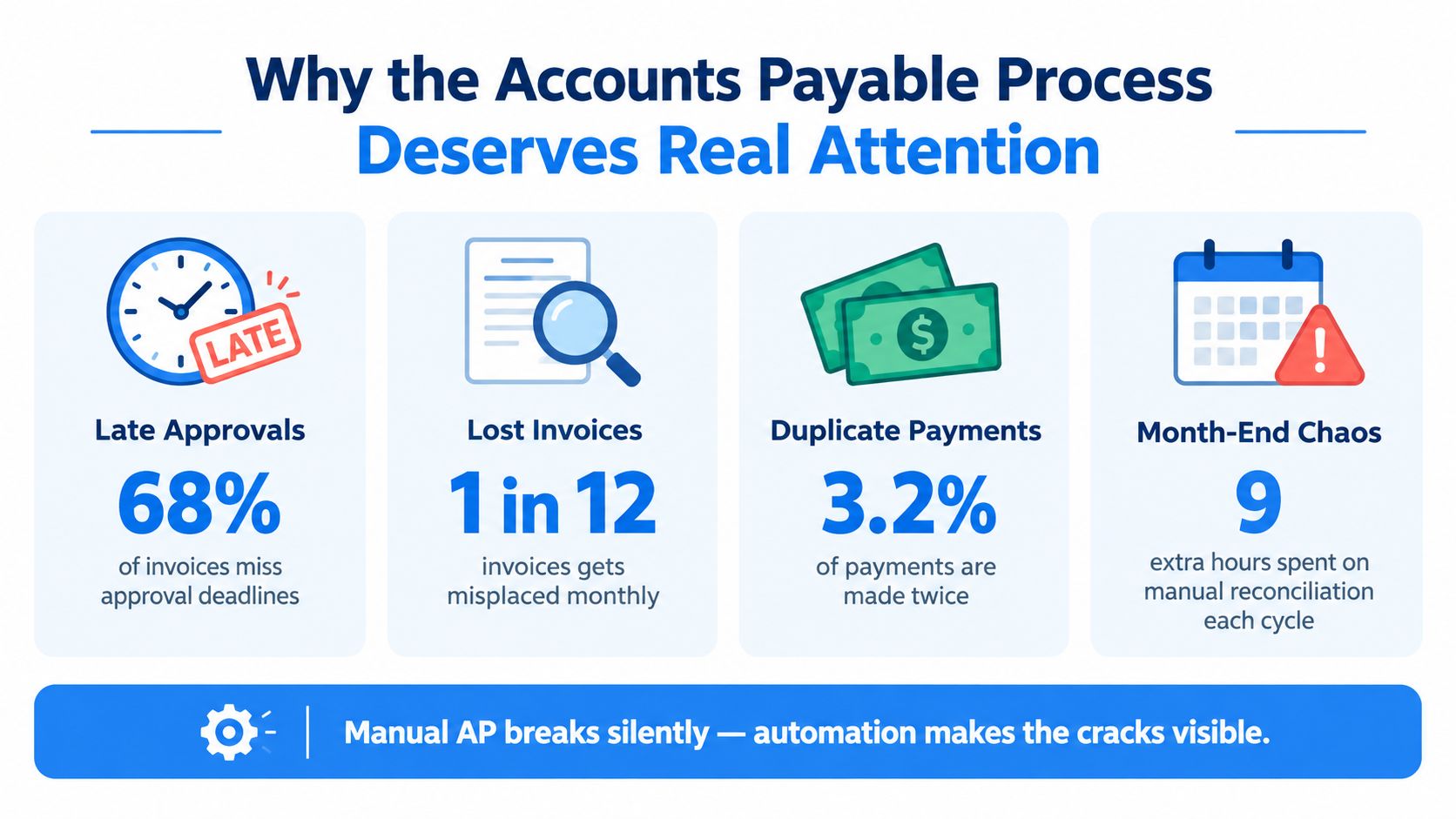
Why the Accounts Payable Process Deserves Real Attention
A payment cycle can look stable right up until it starts failing in small, expensive ways. Invoices sit in inboxes, approvers are out of office, duplicates slip through, and month-end becomes a hunt for missing receipts and unanswered questions. Once the process depends on people forwarding files and checking spreadsheets, AP spends more time recovering from exceptions than preventing them.
The gap is still wider than many teams expect. In a benchmark of more than 200 AP and finance executives, only 24% of invoice processes were fully automated, while 60% were somewhat automated, and just 17% reported fully automated invoice receipt (Hyland, Ardent Partners benchmark). That is where most organizations really are. They have isolated automation, but not a controlled end-to-end flow.
What the process has to do well
A solid AP process connects receipt, data capture, validation, approval, exception handling, payment authorization, and reconciliation into one traceable chain. Each handoff has to answer a different question about accuracy, ownership, and payment readiness. If any one step is weak, the rest of the workflow inherits the problem.
Practical rule: automate the handoff, not just the document image. If the invoice still needs three people to interpret it, the process is not automated yet.
The cost difference matters just as much. One benchmark places the average invoice-processing cost at EUR 9.40, including labor, overhead, technology, and related expenses, while best-in-class organizations reduced that by EUR 6.62 (Hyland, Ardent Partners benchmark). Another benchmark reports an average cost of about EUR 10.18 per invoice, with best-in-class AP teams down at EUR 2.36 per invoice, and bottom-quartile organizations at EUR 25 or more (Medius, Ardent Partners benchmark). Those savings turn AP from a clerical queue into a finance control point.
The End-to-End Accounts Payable Automation Process
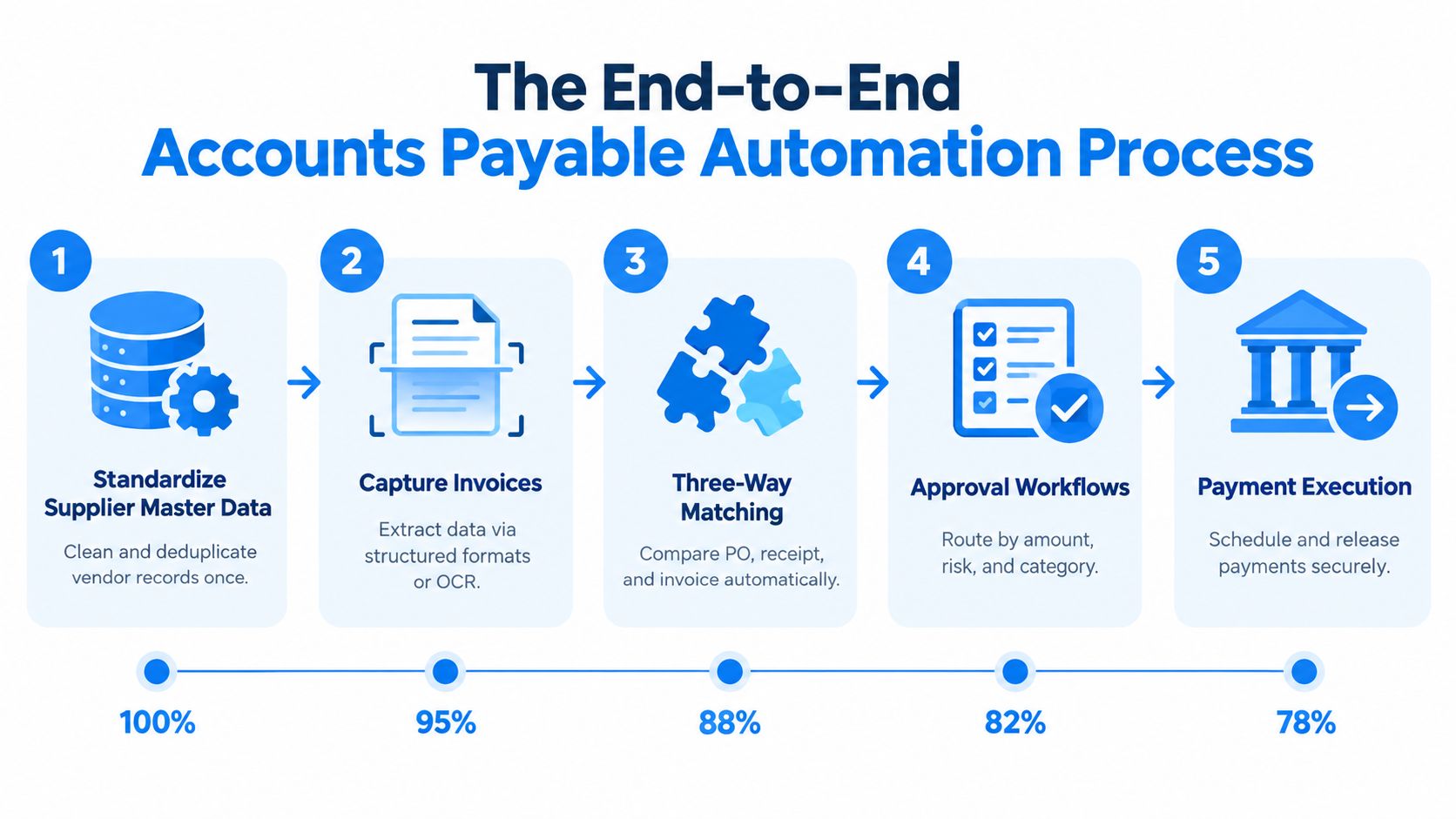
A strong accounts payable automation process follows a controlled chain, not a pile of disconnected tools. Each step answers a different question about invoice accuracy, ownership, and whether the bill is ready to move.
A practical rollout starts upstream, with supplier master hygiene. Clean vendor names, bank details, tax fields, currency rules, and invoice requirements keep the workflow from automating bad data. For a companion view of the purchasing side, see purchase management done right.
Invoices then need to enter in a structured form. That can happen through OCR, structured formats, or APIAn API (Application Programming Interface) allows software systems to exchange information. Connected to an ERP system, it helps transfer business data and reduce manual entry. intake, but the goal stays the same, turn paper, PDF, and electronic inputs into usable invoice data that AP can validate without retyping. For a practical walkthrough of the intake side, how to automate AP invoice processing is a useful reference.
Validation comes next. The system checks supplier identity, tax fields, totals, duplicate risk, and other basic controls. If master data is weak, the process will either reject valid invoices for the wrong reason or let the wrong invoice through.
Purchase-based invoices then get matched against purchasing records. The invoice should line up with the purchase order, and, where it matters, the receipt record as well. That removes a lot of manual checking, but only when purchasing and receiving data are current and reliable.
Exceptions should be routed to the person who can resolve them. A price mismatch may need procurement input. A missing receipt may need warehouse confirmation. A non-PO invoice may need a separate approval path. Routine invoices should not wait in the same queue as disputed ones.
Good AP automation does not remove judgment. It reserves judgment for the invoices that need it.
Approved invoices then post to the finance system without rekeying. That keeps the AP record aligned with the general ledger and cuts out one more manual transfer point.
Payment timing still needs policy. Due dates, discounts, cash planning, and segregation-of-duties controls should govern release. If the system pays outside those rules, the workflow has speed without control.
The process closes with reconciliation and monitoring. Finance needs to see whether invoices are clearing as designed, where exceptions are clustering, and whether the controls still hold after the rollout.
Connected purchasing and service flows help keep that control chain intact. SIX PurchaseFlow keeps purchase requests, approvals, purchase orders, and incoming deliveries tied together, while SIX ServiceFlow keeps work orders, parts, and billing linked across field-heavy operations. In practice, that kind of record continuity is what lets AP validate invoices against the right upstream events.
Benchmark evidence points in the same direction. Significant automation, defined as at least 70% of invoices received electronically, supports roughly 23,000 invoices per AP professional annually (ACARP benchmark). The gain comes from connected data and disciplined exception handling, not from invoice imaging alone.
How Matching Policies Decide What Gets Paid
Matching is where payment control gets real. It decides whether an invoice moves forward or lands in exception review. The choice usually comes down to a two-way match or a three-way match.
A two-way match compares the purchase order and the invoice. It fits better when the order itself carries most of the control and receipt risk is low. A three-way match adds the receiving document, so the invoice must align with what was ordered and what was received.
That distinction matters because it changes what the system will pay without intervention. The Washington State Auditor describes comparing quantity and price across the purchase order, receiving document, and supplier invoice as a standard control for avoiding payment on goods that were not ordered, not received, or billed at the wrong amount. Microsoft’s documented policy follows the same logic in its three-way matching process, where invoice prices are checked against purchase-order lines and invoice quantities against product-receipt lines, with approval required before posting an invoice that fails those rules (Microsoft).
| Match Type | Records Compared | Best Fit For | Key Risk Addressed |
|---|---|---|---|
| Two-Way Match | Purchase order and invoice | Services, recurring spend, and lower-risk purchasing | Billing at the wrong price or for the wrong order |
| Three-Way Match | Purchase order, receiving document, and invoice | Goods, stocked items, and receipt-sensitive purchases | Paying for goods not received or billed incorrectly |
A connected inventory flow like SIX StockFlow matters because the receipt record has to be dependable. If receiving is late or incomplete, three-way matching should expose the gap instead of letting it disappear into AP.
If the receiving record is weak, the match policy will not fix it. It will surface the weakness.
Use two-way match where receipt adds little control value. Use three-way match when physical receipt is the proof that the spend happened as ordered. The right policy depends on the transaction, not on a blanket preference for more rules.
Clean matching also depends on clean supplier and finance data. Teams that are tightening controls for e-invoicing and reporting often pair matching rules with SIX ERP’s guide on SAF-T, e-invoicing, and ViDA, because exceptions become harder to manage when master data is sloppy or inconsistent.
Approval Workflows, Thresholds, and Segregation of Duties
Matching tells you whether an invoice is accurate. Approval logic tells you whether it should be paid.
A flat approval list looks tidy on paper, but it falls apart once supplier profiles, invoice sizes, and spend risk start to vary. A better setup routes invoices by amount, supplier risk, and category, then sends each item to the person with authority over that type of spend.
The main control point is broader than the approve button. It includes who can create a supplier, change bank details, approve the invoice, and release the payment. Those duties should stay separate. If one person controls the full chain, automation can speed up fraud as easily as it speeds up payment.
Mid-market finance teams have already seen the problem. A 2025 survey found broad concern about invoice fraud and overpayment, and many respondents said they require more than one approver before payment (NetSuite survey). That matches what AP leaders see in practice. Approval design protects the process, and it also protects the audit trailAn audit trail records who created, changed or approved information and when. In an ERP system, it helps trace transactions, investigate errors and support audits..
A practical approval model usually includes a few layers.
- Amount thresholds: smaller invoices can follow a simpler path, while larger ones need senior review.
- Risk-based routing: new suppliers, bank changes, and unusual invoice patterns should trigger tighter checks.
- Category controls: capital spend, recurring services, and non-PO invoices often need different approvers.
- Segregation of duties: invoice entry, approval, payment release, and reconciliation should stay in separate roles.
Changed bank details are the kind of issue that role-based controls catch better than a flat approver list. If a supplier master update and a payment request land close together, the workflow should force verification before payment goes out, not after.
A connected purchasing flow helps here too. When purchase requests, supplier offers, approvals, purchase orders, and incoming deliveries live in one controlled process, AP can see whether an invoice matches approved demand instead of guessing after the fact.
Approval rules should slow down risk, not routine work.
The audit trail matters just as much. Every approval, override, and exception needs a record of who acted, when they acted, and what they reviewed. Without that record, automation creates speed but weak evidence.
Risk-Adjusted Automation Instead of Maximum Touchless
A lot of AP automation messaging pushes the same idea, more touchless is always better. That sounds efficient, but it ignores how fraud and exception handling work in finance operations.
The better model is risk-adjusted automation. Stable suppliers, recurring invoices, and clean PO-backed spend should move with minimal friction. New suppliers, changed bank details, unusual amounts, non-PO invoices, and higher-risk jurisdictions should trigger stronger review.
That trade-off matters because digital workflows change where risk sits. They reduce keying errors, but they also concentrate authority in vendor-master data, approval settings, and payment-release controls. Clean process design still needs to account for supplier-master hygiene, exception governance, and a defensible audit trail, because those are the places where bad data or weak controls can slip through.
Where manual review still earns its keep
- New vendor setup
- Bank-account changes
- Unusual invoice amounts
- Non-PO invoices
- High-risk countries or jurisdictions
- Exceptions with weak supporting evidence
AI-enabled impersonation and altered invoices make visual review less reliable than it used to be. A smart-looking PDF can still be fake. That is why duplicate detection, supplier verification, immutable logs, and exception-based review matter more than ever.
Don’t automate trust. Automate verification.
The strongest AP teams do not try to eliminate judgment. They reserve it for the invoices that need judgment. Put people where risk is highest, and let routine invoices flow.
ERP Configuration Choices That Make the Process Stick
Automation breaks when configurationConfiguration sets up software using its existing options. In an ERP system, it adapts workflows, roles and other settings to the company's business processes. is loose. The invoice screen can look fine in testing, but if supplier records, matching rules, and payment controls do not line up, the process will fail as volume grows.
Start with supplier master data. Each record should carry the fields AP relies on, including legal name, tax details, payment method, bank account, currency, and invoice requirements. Then define the intake channels you will accept, such as email, portal, structured e-invoice formats, OCR capture, or API-based intake.
The configuration work matters more than the software label. If the system does not force clean data at the front end, AP turns into a rekeying and exception-chasing function.
Configuration settings that deserve finance ownership
- Duplicate-check logic: compare supplier, invoice number, amount, date, and currency.
- Tolerance bands: define when a small variance can pass and when it must stop.
- Approval hierarchies: set authority by amount, supplier type, and invoice category.
- Payment terms and discount handling: make sure due dates and discounts follow policy.
- DashboardA dashboard brings key figures and status information together on one screen. An ERP dashboard helps teams monitor performance and identify issues that need attention. metrics: track exceptions, cycle time, touchless rate, and duplicate rate.
- Audit logs: keep a durable record of approval, override, and release actions.
A connected finance layer also helps. SIX FinanceFlow keeps financial records, billing, and controls in one operating flow, which matters when AP has to stay aligned with purchasing and the general ledger. For teams evaluating ERPAn ERP system connects a company’s core processes—such as sales, finance, inventory, manufacturing, and service—in one place so teams can work with shared information. options, SIX ERP ties purchasing, inventory, and finance into shared workflows rather than isolated tools, which can reduce handoff gaps across the process.
The common mistake is spending too much attention on the easy path and too little on the exception path. If the system cannot show why an invoice stopped, who owns the next action, and what evidence supports the decision, the automation will not stick. Suppliers will still get paid, but finance will spend its time untangling avoidable exceptions instead of controlling them.
Metrics, Next Steps, and Where Connected Finance Helps
AP automation is on track when the numbers move together in the right direction. The metrics worth watching are touchless rate, cost per invoice, cycle time, exception rate, duplicate rate, and on-time payment percentage. If one improves while another slips, the workflow may be pushing work into a different queue instead of removing it.
Start small. Pilot one supplier group and one PO-backed invoice population first, then expand after the approval logic, matching rules, and audit trail hold up in practice. That gives finance a chance to see where exceptions cluster before the same problem spreads across the process.
Connected finance helps most when AP has to match invoices to procurement records and cash position without losing context. Invoices arrive with the data they need, so exception handling is faster and audit review is easier. For a broader view of how connected records support finance operations, SIX ERP’s finance overview is a useful reference.
A good checkpoint is simple. Every invoice should trace from supplier record to approval to payment without someone digging through email. If that trail breaks, the process still needs work.