


An invoice sits in accounts payable because no one can prove the goods arrived. The warehouse says the pallets came Tuesday, the buyer is chasing an approvalAn approval is a formal decision that allows a request or action to proceed. An ERP system can route approvals and record who made each decision. by email, and the supplier is calling about payment. The work itself didn’t take long. The waiting between handoffs did. That’s what a disciplined procure to pay process fixes. It makes every handoff leave a record, gives every record an owner, and lets you see where time goes.
Procure to Pay Stages at a Glance
The seven stages below show the full chain. Read across each row and you’ll see who owns the work, what record proves it happened, and what control stops it moving forward half finished.
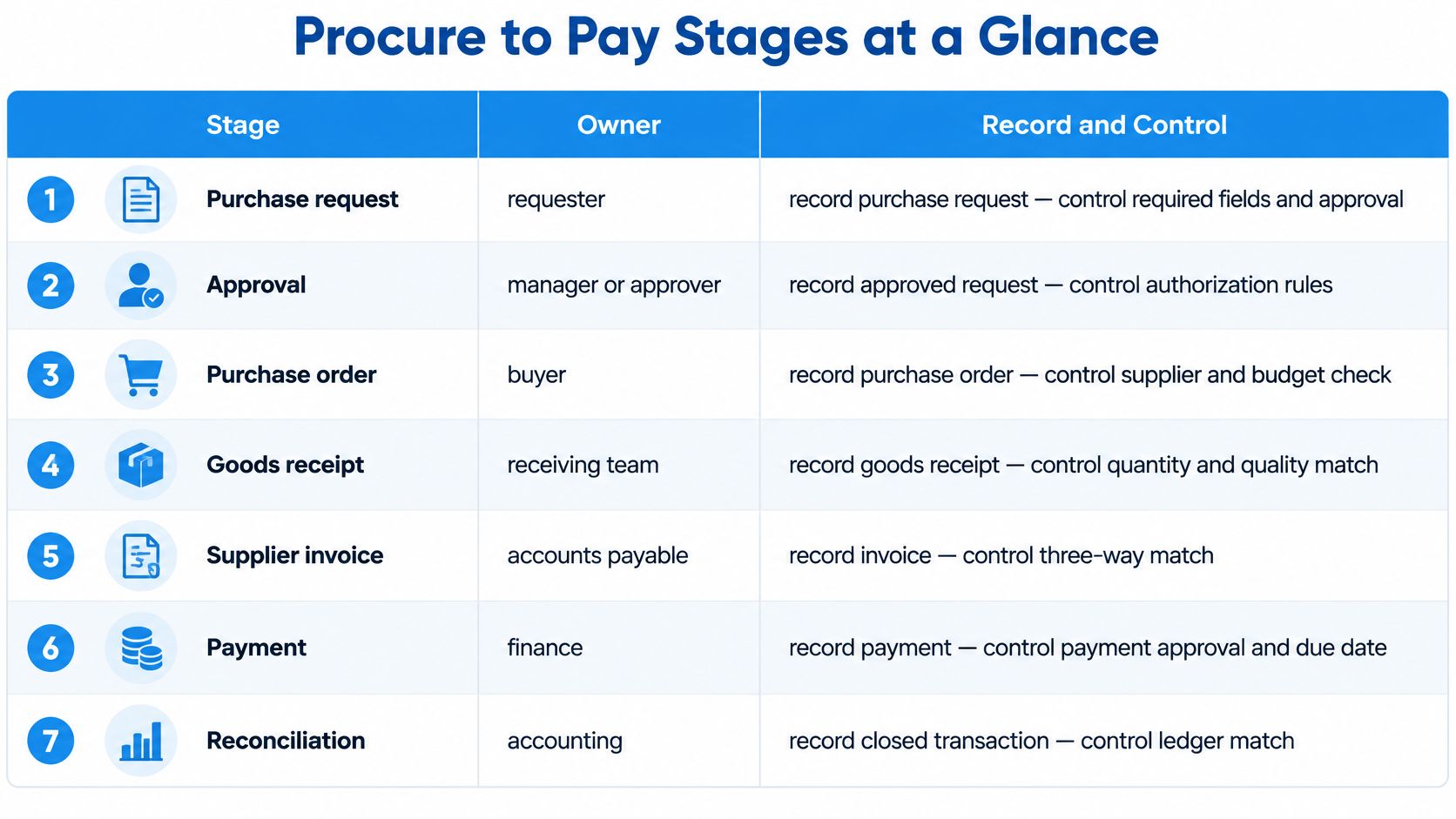
| Stage | Owner | Record created | Control point |
|---|---|---|---|
| Purchase request | Requester | Purchase request with item, quantity, cost centre, needed-by date | Mandatory fields before submission |
| Stock and incoming supply check | Buyer or warehouse | Stock and open-order check note | Avoids buying stock already on order |
| Requirement approval | Budget owner | Approved requisition | Budget available before sourcing |
| Sourcing | Buyer | Compared supplier quotations | Quotation count set by purchase value |
| Purchase order approval | Approver | Approved purchase order | No PO sent before approval |
| Goods receipt | Warehouse or receiver | Goods receipt with counted quantities and inspection result | Receipt matched to PO line |
| Invoice matching and payment | Accounts payable | Matched invoice and payment record | Match within set tolerances before payment |
Service purchases follow the same chain, with one change. A service confirmation replaces the goods receipt, and the person who requested the work confirms scope, hours, or completion. Without that confirmation, a service invoice has nothing to match against.
Say a maintenance team requests 40 spare bearings, as a hypothetical example. The stock check shows 10 already on an open order, so the buyer orders 30. One check at stage two prevents duplicate stock and duplicate spend at stage seven.
Where the Official Clock Starts
The APQC measure definition defines procure-to-pay cycle time as the number of calendar days required to pay a supplier, beginning when a purchase order is placed and ending when payment is complete. That measure includes waiting time, not only active processing. The request and approval stages sit outside it, yet they often decide whether the PO goes out today or next week. Measure them anyway.
Every stage should leave a timestamped record that links to the stage before it. If a stage leaves no record, it will become a chase later.
How to Run a Purchase from Request to Payment
The sequence below works for routine goods and, with a service confirmation, for services too. Each step names the reason it exists and the slip that usually breaks it. If you’re setting this up for the first time, the detail in this guide from business need to supplier delivery covers how demand becomes an order.
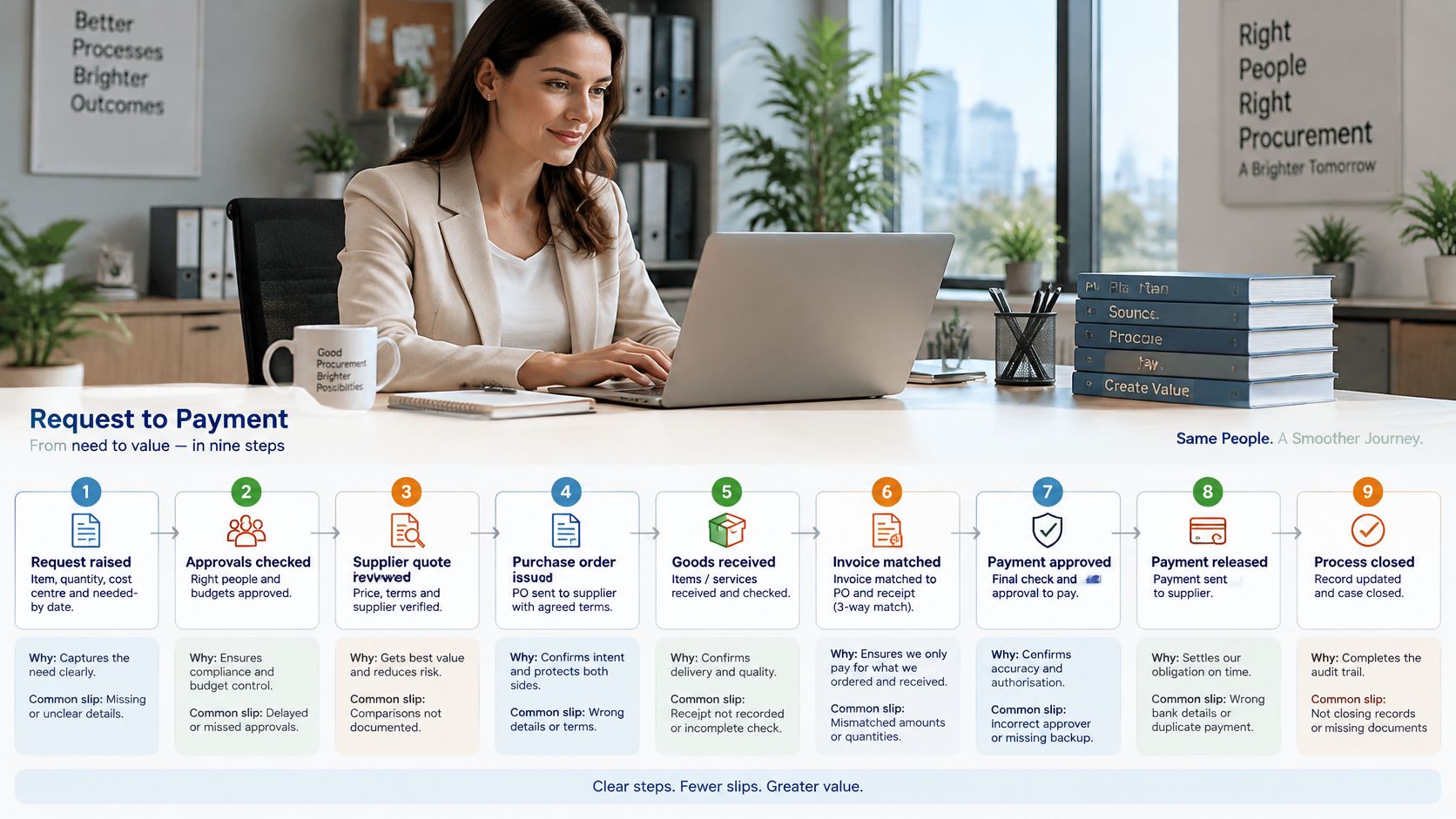
Raise the request. Capture item, quantity, cost centre, and needed-by date at intake. A missing field is the first delay in the chain, because the buyer has to return to the requester before doing anything else.
Check stock and open orders. Look at stock on hand and incoming supply before you buy. Buying what’s already on order is one of the most common sources of duplicate spend, and it’s invisible without this check.
Get budget approval before supplier contact. The budget owner confirms funds first. A quotation gathered without an approved budget creates pressure to approve after the fact, which turns approval into a rubber stamp.
Source the item. Use the contracted supplier for catalogue items, where price and terms are already agreed. For new or high-value buys, request two or three quotations and keep them on the record so the choice can be defended later.
Issue and approve the purchase order. The PO states supplier, unit price, tax code, delivery date, and payment terms, and it’s approved before it is sent. A PO sent without approval is where most unauthorised orders start. In SIX, SIX PurchaseFlow connects purchase requests, supplier offers, approvals, purchase orders, and incoming deliveries in one controlled process, so purchasing, warehouse, manufacturing, and finance share the same view of what’s ordered and what’s arrived.
Confirm and track delivery. Ask the supplier to confirm the delivery date in writing, then track the order against that promise. An unconfirmed date is a guess, and production plans built on guesses fail.
Receive against the PO. Count the goods, check condition, and record the inspection result against the PO line. The goods receipt, not the invoice, is the record that proves the goods arrived. In a connected setup, posting the receipt in SIX can update stock in StockFlow, so the warehouse sees inbound goods without a separate handover note.
Match the invoice. Compare quantity, price, and tax on the invoice against the PO and the receipt, within the tolerances your company sets. A clean three-way match means no one needs to touch the invoice before it’s ready to pay.
Resolve, approve, and pay on time. Clear any difference, approve the invoice, and schedule payment before the due date. Paying on the agreed date protects supplier terms and avoids late fees and status calls.
The Link Back Test
Pick any paid invoice and trace it backward. You should reach the receipt, the PO, the approval, and the original request without leaving the system. If you need an email thread to complete the chain, that link is your next fix.
Roles, Approvals and Fraud Controls
Seven roles carry the process. The requester states the need, the budget owner confirms funds, the buyer sources and orders, the PO approver authorises the commitment, the receiver confirms delivery, the accounts payable clerk matches the invoice, and the finance controller releases payment. In a small company one person may hold two roles, but the pairings below shouldn’t be combined.
Separation of duties means no single person can create a supplier, buy from it, confirm receipt, and pay it. The person who creates or edits a supplier record shouldn’t approve payments to that supplier. The person who confirms receipt shouldn’t also approve the matching invoice alone.
Approval Tiers by Risk
Set tiers as policy, not habit. As a hypothetical example, routine catalogue purchases below EUR 500 might need only the requester’s manager. Mid-value purchases go to a department head with two quotations. High-value or new-supplier purchases go to finance with three quotations and a contract check. The point is proportionality, not the exact numbers.
What the Three-Way Match Misses
Matching checks documents against each other. It can’t check whether the documents themselves are honest. Cover these gaps separately:
- Changed bank details: Verify every change by calling a known contact on a number you already hold, never the number printed on the change request.
- Duplicate vendors: Check tax ID and bank account when a supplier is created, so the same supplier can’t exist twice under two names.
- Split purchases: Review total spend per supplier per month to catch orders broken apart to stay under approval thresholds.
- Emergency buying: Allow it when production needs it, but set a deadline for retrospective approval so the exception doesn’t become the routine.
- Unverified receipt: Block payment where goods were signed for without counting or inspection.
Role-based permissions, audit trails, and an exception dashboardA dashboard brings key figures and status information together on one screen. An ERP dashboard helps teams monitor performance and identify issues that need attention. make these controls visible instead of relying on memory. I would reserve deep review for high-value, unusual, cross-border, or master-data-changing transactions. Routine purchases should stay fast, or people will route around the system.
Delivery Quality Checks and Supplier SLAs
Quality control begins at the dock, before accounts payable sees the invoice. Set the inspection level by supplier and item category before the first delivery arrives:
- Full inspection for new suppliers and safety-critical parts.
- Sampling for proven suppliers with a stable record.
- No inspection for low-risk consumables where a defect costs little.
Record pass or fail on the receipt itself, with a timestamp. That timestamp starts two clocks: the SLA clock on the supplier’s response and the payment clock on the invoice. Failed goods go on a quality hold that blocks payment until a return or credit is agreed, so the money doesn’t leave while the dispute is open. Mobile receipt confirmation at the dock helps here, because the inspection result enters the system at the moment of receipt rather than from a paper note later. The handoff described in this walkthrough from goods receipt to final delivery shows why that timing matters.
The delay is rarely the inspection itself. It is the days a disputed pallet sits in the hold area waiting for a decision. Give each hold a named owner, usually the buyer for that supplier, and a deadline for the return or credit call.
SLA Terms You Can Measure
A service level agreement, or SLA, only works if each term is a field in the supplier record that the scorecard updates from receipts and invoices without manual tallies. Define “on time” in the contract first. As a hypothetical example, the term might read: delivered within two days of the agreed date.
| SLA term | What the contract defines | Breach action |
|---|---|---|
| Delivery window | Which lines count as on time and which count as late | Scorecard flag on the supplier record |
| Fill rate | What counts as a complete delivery per order line | Credit claim linked to the open invoice |
| Accepted quality | The inspection standard a received line must pass | Quality hold and agreed return or credit |
| Quality claim response time | Days allowed from claim raised to supplier reply | Escalation to the buyer’s manager |
| Invoice accuracy | What an invoice must match before it can be paid | Supplier review at the next scheduled meeting |
These rows define what the supplier signed up for. How fast the whole cycle runs, and where the waiting time accumulates between stages, is measured separately in the metrics section.
A supplier that misses three delivery windows in one quarter gets flagged on the scorecard, the buyer escalates, and the next purchase in that category requires a second source. Start narrow: one measurable SLA for each critical supplier, one inspection rule for each item category.
Invoice Exceptions and How to Clear Them
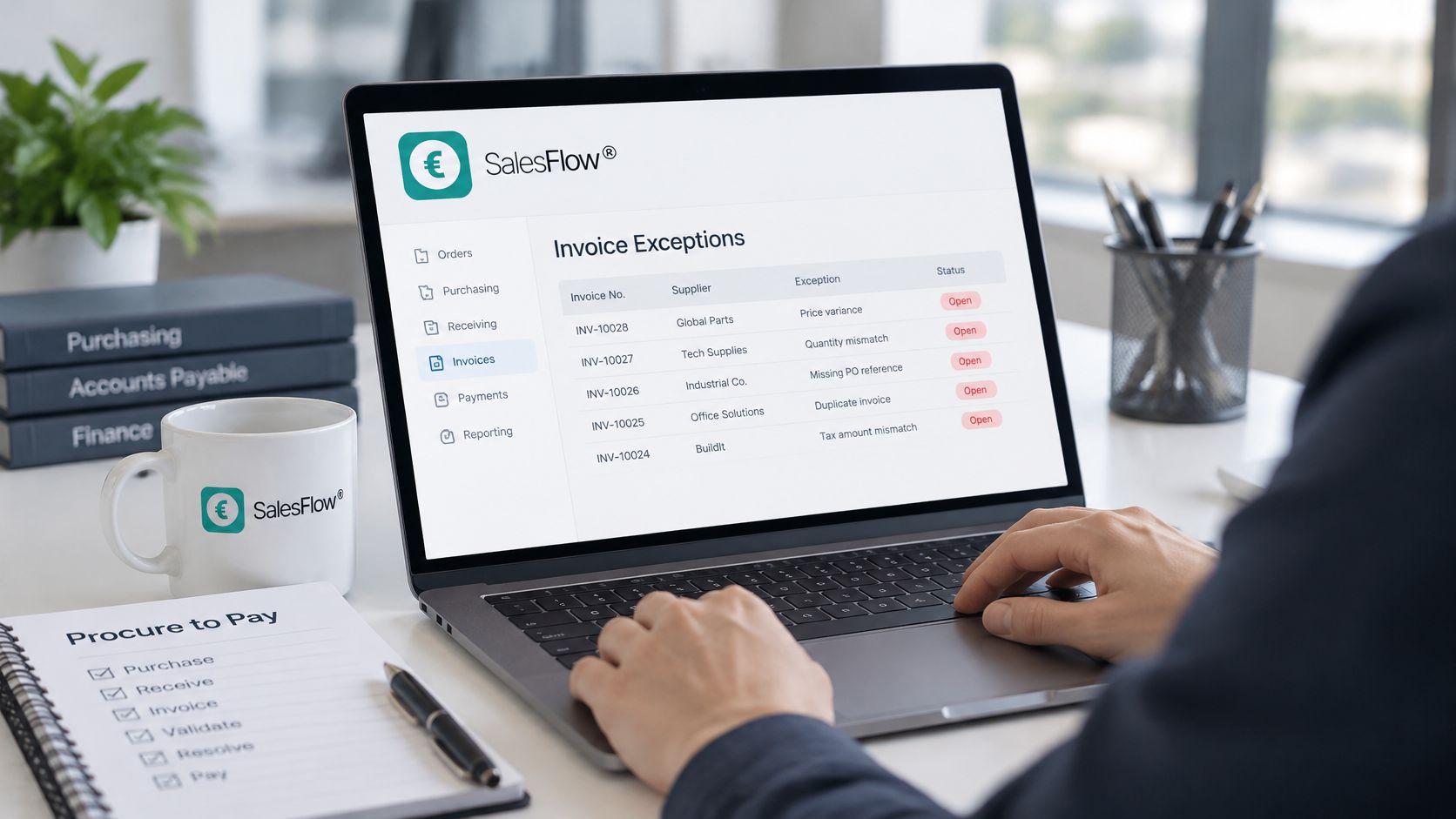
Clearing exceptions takes more effort than processing clean invoices, and each type needs a named owner and a fix that stops it recurring. The delay rarely sits in the matching itself. It sits in the handoffs: an invoice parked while someone confirms a receipt, a buyer chasing a contract price, a controller verifying bank details before payment. The timestamp on each stage shows where the queue formed.
| Exception | Likely cause | Resolution | Owner |
|---|---|---|---|
| Price mismatch | Price changed after PO or wrong price list | Check contract price, correct PO or request credit note | Buyer |
| Quantity over-billed | Invoice bills more than was received | Hold invoice, match to receipt, request credit | Accounts payable clerk |
| Missing goods receipt | Receipt not confirmed in the system | Confirm delivery and post receipt | Warehouse or receiver |
| Duplicate invoice | Same invoice sent twice or keyed twice | Block by supplier and invoice number | Accounts payable clerk |
| Unknown supplier or changed bank details | Master data error or impersonation attempt | Verify through a known contact before any payment | Finance controller |
| Tax mismatch | Wrong tax code on supplier or item record | Correct master data and reissue invoice | Accounts payable with master data owner |
Master Data Is Usually the Root Cause
A wrong tax code on a supplier record repeats on every invoice until someone corrects the record itself. The Ardent Partners source-to-pay research summary reports that only 63.9% of master data is accurate, complete, and current, and that data quality and access was cited by 47% of respondents as a barrier to achieving value from procurement AI, behind insufficient budget at 53%. Automating on top of wrong supplier identities, item records, and tax fields speeds up wrong decisions.
So assign ownership. One named person approves supplier changes, new records are validated before first payment, and duplicate records are checked at creation. The same discipline sits behind SIX SalesFlow, which connects customer orders, stock availability, production or purchasing, picking, delivery, invoicing, payment status, and follow-up in one process. Shared records only help if they are right. When an exception pattern points back to a system fault, SIX investigates the wider business process around the issue, tracing the upstream steps and records that lead to the screen where the error appeared.
A new unit price appears on a supplier invoice. The buyer checks the contract, finds no agreed price change, holds the invoice, asks for a credit note, and logs a reason code so the same mismatch can be counted next month. The stepped approach in this accounts payable automation process guide follows the same logic. Automate the invoices that pass, and route each failed invoice to a named owner with a deadline.
Metrics That Show Where Cycle Time Goes
Using the cycle-time definition set in the stages table, APQC benchmarking data reported a median of 25 days, top performers at about 14 days, and bottom performers at approximately 46 days, a spread of roughly 32 days. Use these as comparison points, and set your own target from your payment terms and purchase mix.
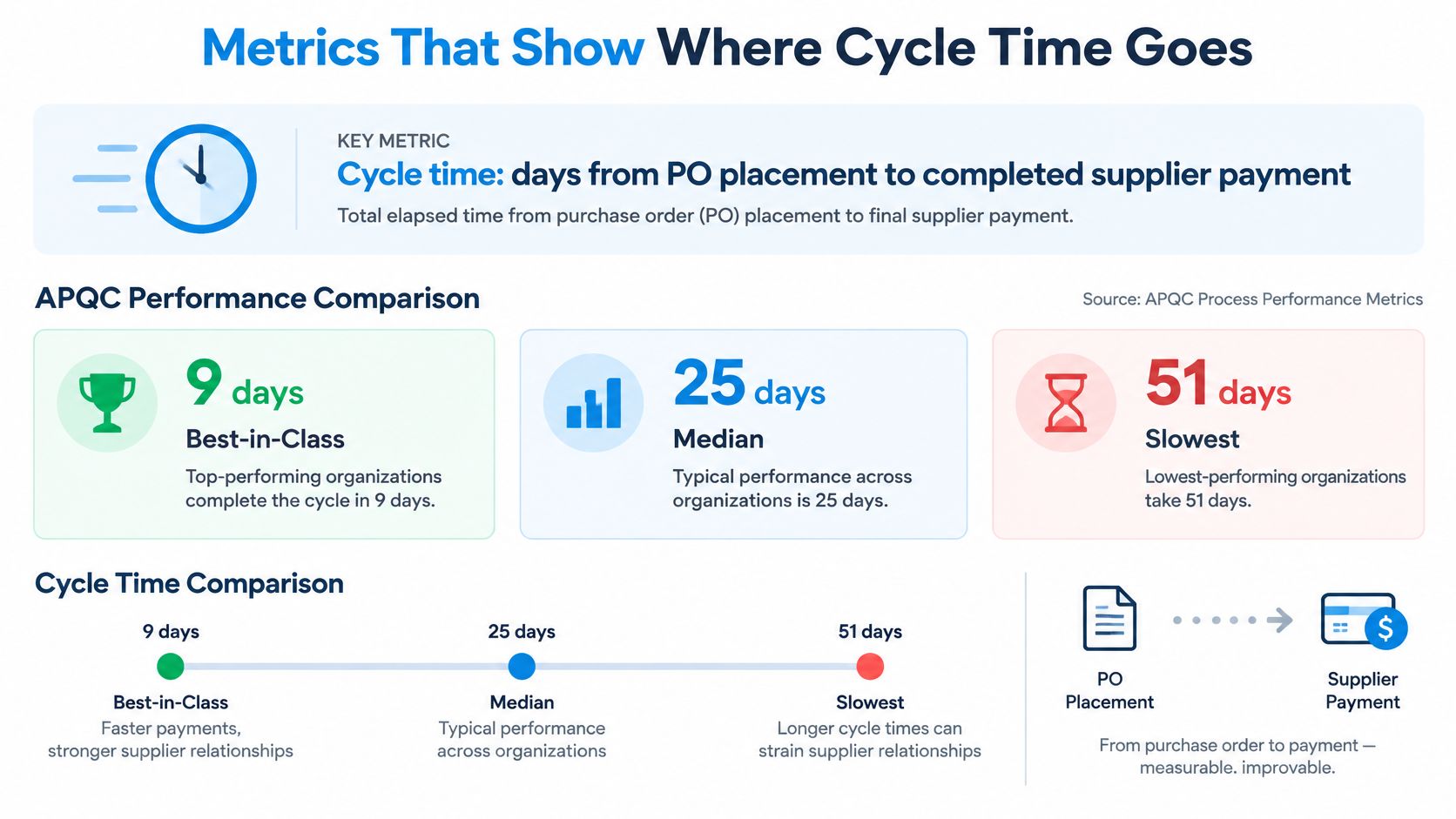
The supporting measures tell you where the days sit. Each one is the distance between two timestamps at a handoff, so record the timestamp at each stage before you trust the metric.
| Metric | Calculation | What it reveals |
|---|---|---|
| Procure to pay cycle time | Days from PO placement to completed supplier payment | Overall speed of the full cycle |
| Approval cycle time | Days from requisition approval to PO approval | Delay before supplier contact |
| Touchless rate | Invoices passing matching with no manual handling divided by total invoices | Readiness for invoice automationAutomation uses software or equipment to carry out tasks according to defined rules. An ERP system can automate routine business steps and highlight exceptions for review. |
| Match exception rate | Invoices with a mismatch divided by total invoices, by supplier and category | Master data and delivery quality |
| On-time delivery rate | Same formula as the delivery checks section | How much of the wait sits with the supplier |
| Price variance rate | Same count as the price exception queue | How much delay disputed prices create |
| Duplicate payment count | Number of payments made more than once against one invoice | Control failure |
The Ardent Partners accounts payable metrics report puts best-in-class invoice approval at 4.1 days versus 15.4 days for other organisations, with a 55.2% touchless rate versus 31.4%. That gap comes from invoices that clear matching on the first pass.
Take a hypothetical 25-day baseline where approvals take nine days and receipt confirmation takes six. Fifteen of your 25 days are waiting time, spent between stages rather than inside them. Segment exceptions by supplier, company, purchase category, price variance, and missing receipt, and the longest wait names itself.
Choose the First Step to Automate
Start where volume is high and the records are clean. Catalogue orders within approved limits can generate POs automatically once a requisition is approved, and repeat buys of contracted items can run on a schedule. Receipt confirmations can update stock and close the warehouse handover without anyone re-keying a delivery note.
Keep a human in four places. Bank-detail changes, new suppliers, unusual prices, and mismatched receipts all need a person to look, because those are the points where speed costs money.
Staging rule: Automate one stage, measure it, then move to the next. Automating everything at once just hides which change worked.
That measurement discipline is what makes staging work. If you automate approvals and receipt capture in the same quarter and the cycle gets faster, you still cannot say which change earned it. Run the same calculation on the stage you touched, against the same baseline, and compare the wait before you claim the win.
Connected demand matters more than speed at any single stage. In SIX, ManufacturingFlow connects production demand with inventory and purchasing to prevent avoidable delays, which cuts the rush buying that bypasses every control you’ve built.
Five Steps to Decide
- Map the current cycle with timestamps at each handoff.
- Measure the baseline using the metrics above.
- Choose the stage with the longest wait, not the most visible annoyance.
- Confirm the master data behind that stage before you automate it.
- Automate that one stage, then measure again with the same calculation.
With SIX ERP, your purchase requests, approvals, orders, receipts, invoices, and payments sit in one connected process with a traceable record at every handoff. Bring your stage timestamps to a conversation with a SIX expert and map your procure to pay process together, starting from the longest wait. You can book through the Plan your next step button and tell us whether you’re planning, implementing, or already running an ERPAn ERP system connects a company’s core processes—such as sales, finance, inventory, manufacturing, and service—in one place so teams can work with shared information. environment, and our consultants will help identify the right service path.