
Managed ERPAn ERP system connects a company’s core processes—such as sales, finance, inventory, manufacturing, and service—in one place so teams can work with shared information. providers take over hosting, updates, backups and support for your ERP so your team can run the business instead of the servers. For a multi-entity company, the comparison that matters isn’t price per user. It is how well each provider handles consolidation, intercompany flows, permissions and local processes across companies, sites and currencies.
Here is how to compare them without getting lost in feature lists.
What Managed ERP Actually Means
A managed ERP is software plus a service. The provider runs the environment, applies updates, takes backups and supports your users after go-live.
That’s different from simply renting cloud software. With plain SaaS, you get the application. With managed ERP services, someone is also accountable for how it runs, how it changes and how it is fixed.
Most offers bundle some mix of:
- Hosting — public cloud, private cloud or an isolated environment per customer
- Implementation — process mappingProcess mapping documents the steps, people and decisions involved in business work. In an ERP project, it helps define workflows and identify improvements before system setup., configurationConfiguration sets up software using its existing options. In an ERP system, it adapts workflows, roles and other settings to the company’s business processes., data migration, testing and training
- Operations — updates, backups, monitoring and maintenance
- Support — a named team that answers when something breaks or a process changes
Outsourced ERP hosting alone covers only the first line. Don’t sign a hosting contract merely because it says “managed.” Ask what happens on the day a workflowA workflow defines the steps, responsibilities and decisions needed to complete work. An ERP system can guide tasks through these stages and show progress. needs to change.
If you want the hosting side in more depth, see how managed cloud ERP works for a growing business.
Why Multi-Entity Companies Need a Different Comparison
A single-company ERP problem is a process problem. A multi-entity ERP problem is a governance problem.
Picture it. Sales in one subsidiary books an order. Purchasing in another buys the materials. The warehouse in a third ships the goods. Finance at group level then spends the first week of the month reconciling intercompany balances in spreadsheets.
Who owns the stock? Which entity carries the margin? Why don’t the numbers match?
The software has to answer those questions by design. That means:
- Separate legal entities with their own ledgers, currencies and local rules
- Intercompany transactions that post on both sides automatically
- Group-level consolidation and reporting
- Permissions and data isolation, so each entity sees only what it should
- Shared workflows where you want standardization, local ones where you need them
A provider that is strong on hosting but weak on these points will hand you a stable system that still needs spreadsheets.
How the Main Managed ERP Providers Compare
The common shortlist for midmarket multi-entity companies includes Oracle NetSuite, Microsoft Dynamics 365 Business Central, SAP Business One, Sage X3 and Odoo. Each is usually delivered through a mix of the vendor and certified partners, so the “managed” part depends heavily on who implements and supports it.
That’s the first correction. You are rarely comparing vendors. You are comparing vendor-plus-partner combinations.
| What to compare | Why it matters for multi-entity groups |
|---|---|
| Who runs the environment | Vendor cloud, partner hosting or a dedicated private environmentA private environment is a software environment set aside for one customer. It separates that customer’s data and settings while supporting agreed access, maintenance and backup arrangements. changes control and data isolation |
| Who implements and supports | A partner model adds a second contract and a second point of failure |
| Consolidation and intercompany | Determines whether month-end closes in the system or in spreadsheets |
| Licensing model | Per-user and per-module pricing grows with every entity and every new role |
| Configuration depth | Generic workflows force workarounds when subsidiaries operate differently |
| IntegrationIntegration connects systems so they can exchange information or coordinate actions. An ERP integration helps link business tools and reduce manual transfers between them. approach | Existing accounting platforms, shops, portals and machines must keep working |
Use the table as a scoring sheet. Fill it in for each shortlisted option with the provider’s written answers, not the demo.
For a closer look at how these platforms differ, read the SIX ERP comparison with Odoo, Oracle and others.
What to Look for in an ERP Support Provider
An ERP support provider is judged after go-live, not before. Most implementation problems surface in the first months, when real transactions meet configured processes.
Check these points in writing:
- Single accountability. One team responsible for hosting, configuration and support. Split responsibility turns every incident into a debate about whose fault it is.
- Process knowledge. The support team should know how your purchasing, warehouse and finance flows were configured, not just how the software works in general.
- Change handling. New entity, new warehouse, new approvalAn approval is a formal decision that allows a request or action to proceed. An ERP system can route approvals and record who made each decision. rule. How is it requested, scoped and delivered?
- Updates and backups. Who schedules them, who tests them and how you are told.
- Data control. Where your data lives, who can access it and how it is isolated from other customers.
- Training. Not only at go-live. New hires in a subsidiary need it too.
Support isn’t a ticket queue. It is the part of the contract you will actually use for years.
Hidden Costs in Managed ERP Services
The license is the visible cost. The rest arrives later.
In multi-entity setups, the usual sources are:
- Per-user fees that rise each time a subsidiary adds staff or occasional users
- Per-module fees when one entity needs manufacturing and another needs field service
- Partner hours for every configuration change after go-live
- Integration work billed separately for each connected system
- Workarounds — the internal hours your team spends compensating for generic workflows
Total cost of ownership isn’t the year-one quote. It is year one plus every change you will need as the group grows. Ask each provider to price a realistic second year: one new entity, two new integrations, a revised approval process.
How SIX ERP Handles Multi-Entity Operations
SIX ERP is a configurable, fully managed ERP platform. It runs sales, CRM, purchasing, inventory, manufacturing, field service, projects, people and finance in one private environment.
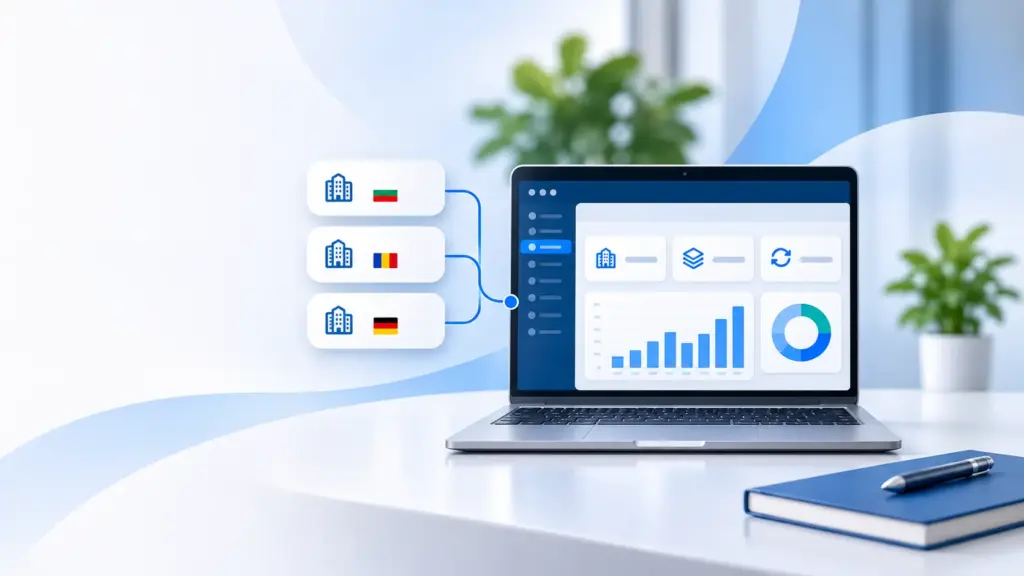
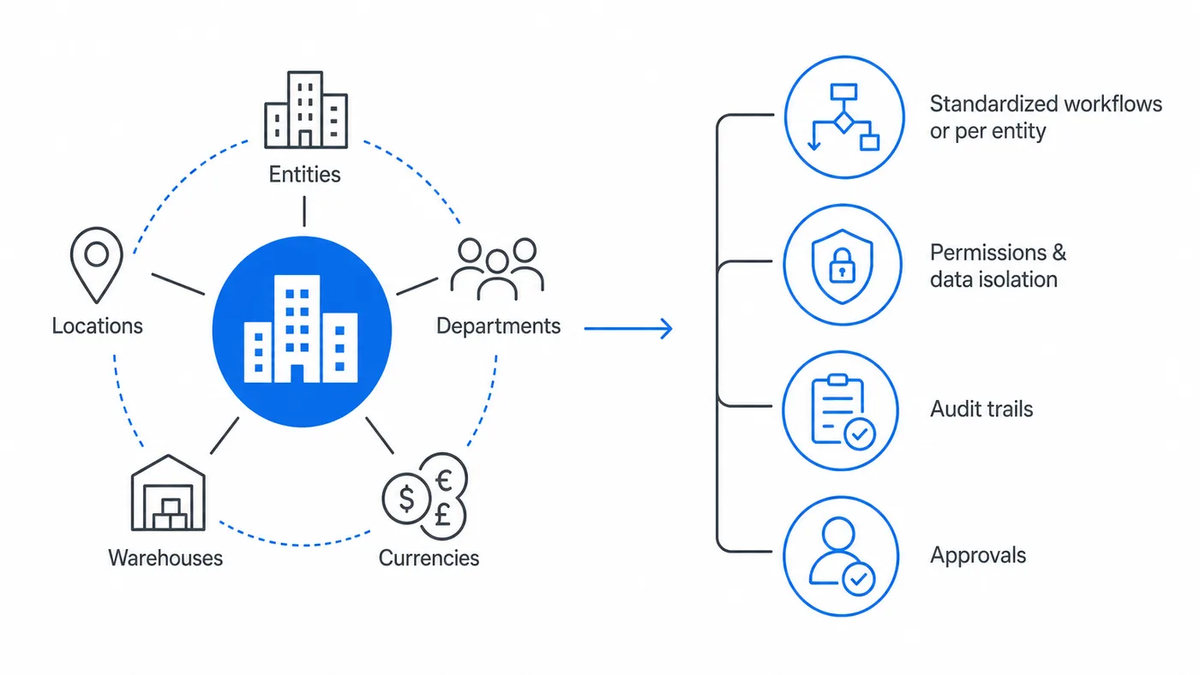
For multi-entity groups, that means you can operate several legal entities, locations, departments, warehouses and currencies in one controlled environment. Workflows can be standardized across the group or configured per entity. Permissions, data isolation, audit trails and approvals are part of the setup, not an afterthought.
The service side is one package. SIX handles consulting, process analysis, configuration, data migration, testing, training, hosting in isolated environments, updates, backups, maintenance and post-go-live support. Integrations with existing accounting platforms, online shops, supplier portals, payment services, production equipment and barcode devices are built through APIs and custom development.
Licensing is annual, with unlimited use across modules and implementation scoped separately. That keeps total cost of ownership predictable as entities and users are added.
To see how this works in practice, review the business value of SIX ERP in real operations, based on implementations in manufacturing and sales.
How to Run the Comparison
Keep the process short and evidence-based:
- Map your group. List entities, locations, currencies and the processes that differ between them.
- Write your scenarios. Three or four real flows that cross entities, such as an order sold by one company and fulfilled by another.
- Ask for a scripted demo. Each provider runs your scenarios, not their standard tour.
- Price two years. Include the changes you already expect.
- Check the support model. Who answers, how fast and with what knowledge of your setup.
A spreadsheet can establish the ranking. Only the scenarios will tell you which system closes the month without one.
Next Step
If your group is closing the month in spreadsheets, the problem isn’t effort. It is the system. Talk to the SIX ERP team at six.ms and walk through your own multi-entity scenarios.

Frequently Asked Questions
Frequently asked Questions about Managed ERP Providers for Multi-Entity Companies
What is managed ERP, and how does it work?
Managed ERP combines enterprise resource planningAn ERP system connects a company’s core processes—such as sales, finance, inventory, manufacturing, and service—in one place so teams can work with shared information. software with ongoing technical and operational services. Depending on the provider’s agreement, these services may include hosting, software updates, security monitoring, backups, maintenance, and user support. A managed ERPAn ERP system connects a company’s core processes—such as sales, finance, inventory, manufacturing, and service—in one place so teams can work with shared information. provider helps businesses operate and maintain their ERP environment while internal teams focus on daily operations.
What are the best managed ERP providers for multi-entity companies?
Common ERPAn ERP system connects a company’s core processes—such as sales, finance, inventory, manufacturing, and service—in one place so teams can work with shared information. platforms considered by multi-entity companies include Oracle NetSuite, Microsoft Dynamics 365 Business Central, SAP Business One, Sage X3, Odoo, and SIX ERP. Each offers different capabilities, licensing models, and implementation approaches. The best choice depends on the number of legal entities, financial consolidation requirements, intercompany transactions, operational complexity, and the level of managed support required.
What is the difference between managed ERP and outsourced ERP hosting?
Outsourced ERPAn ERP system connects a company’s core processes—such as sales, finance, inventory, manufacturing, and service—in one place so teams can work with shared information. hosting primarily covers infrastructure, including servers, availability, and backups. Managed ERP services extend beyond hosting to include software maintenance, updates, technical support, and potentially configurationConfiguration sets up software using its existing options. In an ERP system, it adapts workflows, roles and other settings to the company's business processes., implementation, and ongoing process improvements. Businesses should verify exactly which services are included in their agreement rather than assuming every managed ERP provider offers the same level of support.
What features should multi-entity companies look for in managed ERP software?
Multi-entity companies should prioritize separate legal entity accounting, financial consolidation, intercompany transactions, multi-currency management, role-based permissions, and centralized reporting. The ERPAn ERP system connects a company’s core processes—such as sales, finance, inventory, manufacturing, and service—in one place so teams can work with shared information. should also support shared processes across subsidiaries while allowing local accounting rules, workflows, and operational requirements. Reliable integrations, audit trails, and ongoing support are equally important.
Should a company choose an ERP vendor directly or work with an implementation partner?
The decision should depend on accountability, expertise, and support arrangements. Some ERPAn ERP system connects a company’s core processes—such as sales, finance, inventory, manufacturing, and service—in one place so teams can work with shared information. vendors provide software while certified partners handle implementation and ongoing services. Others offer a more integrated delivery model. Companies should establish who is responsible for configurationConfiguration sets up software using its existing options. In an ERP system, it adapts workflows, roles and other settings to the company's business processes., hosting, updates, integrations, and incident resolution before signing an agreement.
How should businesses compare managed ERP providers before making a decision?
Begin by documenting the company’s legal entities, operational processes, accounting requirements, integrations, and future growth plans. Ask each provider to demonstrate real scenarios involving multiple companies, such as intercompany sales, stock transfers, or financial consolidation. Compare implementation responsibilities, support agreements, security arrangements, and total ownership costs. A structured Business Blueprint can help establish these requirements before selecting the solution.
How does SIX ERP support multi-entity companies and centralized business management?
SIX ERPAn ERP system connects a company’s core processes—such as sales, finance, inventory, manufacturing, and service—in one place so teams can work with shared information. connects multiple legal entities, locations, departments, and business processes within one configurable business management environment. Its integrated modules cover CRM, sales, purchasing, inventory, manufacturing, field service, projects, HR, and finance. Group-wide workflows can be standardized while individual entities retain their specific operational requirements. SIX ERP also provides managed services such as updates, monitoring, backups, and system maintenance.
How does managed ERP support security and regulatory compliance across multiple companies?
Managed ERP can support security and compliance through role-based permissions, audit trails, data access controls, backups, updates, and monitoring. Multi-entity companies also need to consider local accounting requirements, GDPR, financial reporting obligations, and country-specific regulations. The provider should explain which controls are included and which responsibilities remain with the customer.
How long does it take to switch managed ERP providers?
Switching ERPAn ERP system connects a company’s core processes—such as sales, finance, inventory, manufacturing, and service—in one place so teams can work with shared information. providers can take several months or longer, depending on the number of companies, data quality, existing integrations, and process complexity. A successful transition typically involves business process analysis, data migration, configurationConfiguration sets up software using its existing options. In an ERP system, it adapts workflows, roles and other settings to the company's business processes., testing, employee training, and a controlled go-live. A phased implementation can reduce operational disruption, particularly for companies managing multiple subsidiaries.
How much does managed ERP cost for a multi-entity business?
Managed ERP costs depend on the number of legal entities, users, business processes, required modules, hosting arrangements, and implementation complexity. Providers may charge per user, per module, per company, or through a negotiated licensing agreement. Businesses should request a detailed proposal covering implementation, licensing, integrations, maintenance, support, and expected future changes.
What are the hidden costs of managed ERP services for multi-entity companies?
Potential hidden costs include additional user licenses, company or module fees, integrations, data migration, customizationCustomization changes or adds software functionality beyond standard settings. In an ERP project, it can meet specific business needs while adding development and maintenance work., training, and ongoing configurationConfiguration sets up software using its existing options. In an ERP system, it adapts workflows, roles and other settings to the company's business processes. changes. Companies should also consider the internal cost of manual workarounds and maintaining disconnected systems. Comparing total cost of ownership over several years provides a more realistic picture than comparing annual license fees alone.
Do multi-entity companies need a private ERP environment?
Not necessarily. Both shared cloud environments and private ERPAn ERP system connects a company’s core processes—such as sales, finance, inventory, manufacturing, and service—in one place so teams can work with shared information. deployments can support multiple companies. A private or isolated environment may offer greater control over infrastructure, update schedules, and data separation. Businesses should evaluate security requirements, regulatory obligations, availability, scalability, and total ownership costs before choosing a hosting model.
Can one ERP system manage multiple companies, countries, and currencies?
Yes. Multi-entity ERPAn ERP system connects a company’s core processes—such as sales, finance, inventory, manufacturing, and service—in one place so teams can work with shared information. platforms can support several legal entities, business locations, and currencies within one managed environment. Each company may maintain its own financial records, permissions, and operational workflows while group management receives consolidated information. The exact capabilities depend on the ERP solution, licensing, configurationConfiguration sets up software using its existing options. In an ERP system, it adapts workflows, roles and other settings to the company's business processes., and country-specific compliance requirements.
How does managed ERP handle intercompany transactions between subsidiaries?
Multi-entity ERPAn ERP system connects a company’s core processes—such as sales, finance, inventory, manufacturing, and service—in one place so teams can work with shared information. systems can connect transactions between related companies, such as sales, purchases, inventory transfers, and internal charges. Properly configured workflows help ensure that transactions are recorded consistently in the relevant legal entities. This improves reconciliation, supports intercompany reporting, and reduces errors caused by entering the same transaction in different systems.
How does multi-entity ERP software simplify financial consolidation?
Multi-entity ERP software brings financial information from several legal entities into a coordinated reporting environment. Depending on the system, it can support currency conversion, intercompany eliminations, consolidated financial statements, and group-level reporting. This reduces the need to combine separate accounting files manually and gives management a clearer view of financial performance across the organization.