As a business grows, daily work becomes harder to control. More customers create more orders, invoices, warehouse movements, supplier deliveries, employee tasks, and reporting needs.
At first, a company may manage this with local software, shared files, and a small IT setup. Over time, systems need updates, servers need maintenance, backups need checking, and employees need access from different locations.
A managed cloud solution — a cloud based ERPAn ERP system connects a company’s core processes—such as sales, finance, inventory, manufacturing, and service—in one place so teams can work with shared information. operated by a provider — gives the company access to its cloud ERP system through the internet while the provider manages the technical environment. The business can focus more on customers, products, processes, and growth, and less on servers and software maintenance.
How We Evaluated These ERP Hosting Models
We compared SaaS, self-hosted, and managed cloud against five criteria: total cost of ownership over three to five years; customer control; customizationCustomization changes or adds software functionality beyond standard settings. In an ERP project, it can meet specific business needs while adding development and maintenance work. and integrationIntegration connects systems so they can exchange information or coordinate actions. An ERP integration helps link business tools and reduce manual transfers between them. flexibility; security and continuity responsibilities, including backups, recovery, and data location; and support and SLA commitments.
Company size matters too. A five-person company without IT staff may struggle with self-hosting, while a 200-person manufacturer with an IT department may find multi-tenant SaaS too restrictive. We treat a serious mismatch with a company’s needs as a disqualifier, not just a trade-off.
What Is a Cloud ERP?
A cloud ERP is an Enterprise Resource PlanningAn ERP system connects a company’s core processes—such as sales, finance, inventory, manufacturing, and service—in one place so teams can work with shared information. system that runs in remote hosting rather than only on a server inside the company office. Authorized employees access it over a secure internet connection, including office staff, warehouse users, managers, service technicians, and teams at different locations. The benefit is one connected system for functions such as sales, CRM, purchasing, warehouse, production, finance, HR, projects, and service.
The provider provisions the ERP environment on data-center servers. Users connect through a browser or mobile appA mobile app is a software application designed to run on a smartphone or tablet. Connected to an ERP system, it helps employees access business information and complete tasks while away from their desks., and a centralized database keeps teams working from the same information. Depending on the service, updates, patches, and capacity management are handled by the provider.
Managed cloud ERP describes a specific division of responsibility: the provider operates the technical layer, such as servers, monitoring, backups, and updates, while the customer controls its business processes, data, and access rights.
One industry estimate puts the global cloud ERP market at USD 65.89 billion in 2025 and projects USD 207.59 billion by 2034; Mordor Intelligence’s cloud ERP market report gives further detail. Gartner’s cloud ERP reviews hub offers another reference point, while F1Group’s site discusses ERP in SMEs.
Cloud ERP Is Not Always the Same
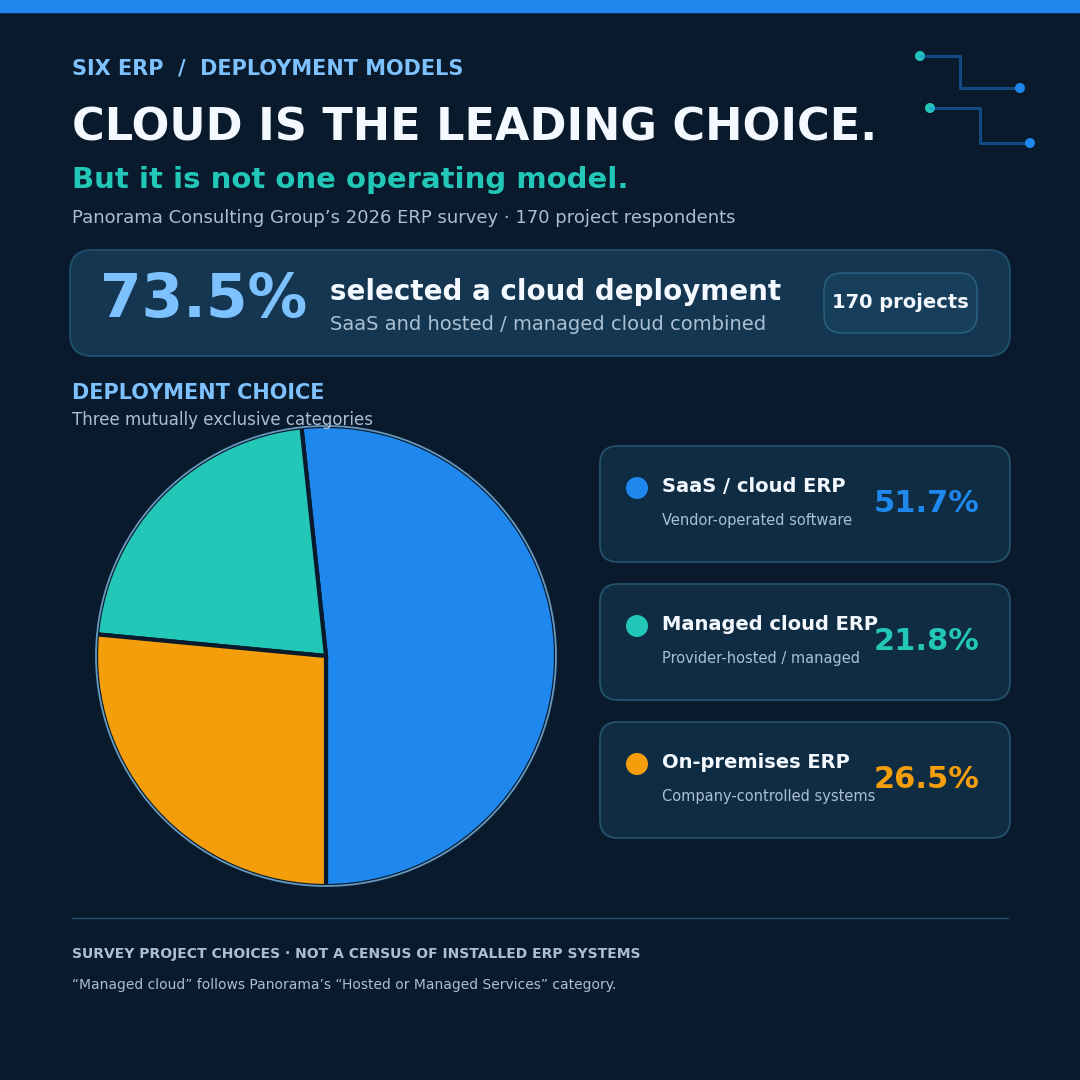
The term “cloud ERP” covers different hosting approaches, and understanding the differences helps buyers choose a suitable model.
SaaS ERP is sold as a subscription, with the provider hosting the software and managing the environment and updates. Examples include SAP S/4HANA Cloud, SAP’s public-edition ERP and Microsoft Dynamics 365, Microsoft’s cloud ERP and CRM suite. It can be simple to start with, but compare how user, module, storage, and usage charges may change as the business grows. Customization and integrations also vary.
Self-hosted ERP runs on servers the company controls, on its own premises or in a cloud of its choosing. Odoo, the open-source modular ERP, is one example that can be installed on company infrastructure or partner servers. This offers control and customization, but the company is responsible for server management, updates, backups, security, monitoring, recovery and maintenance.
Managed cloud ERP sits between these models: a provider or hosting partner runs the technical operation, while the customer retains ownership of its processes and data. The service may include a dedicated or clearly separated environment, monitoring, updates, backups, and support under an agreed SLA. Zoho is primarily known as a CRM-first provider, though its broader suite includes ERP-style business applications.
The Real Question Is Total Cost, Not Monthly Price
The subscription or license is only part of ERP cost. Total cost of ownership (TCO) can include infrastructure, backups, security, updates, support, employee time, training, integrations, and recovery planning.
A typical range for small and midsize business cloud ERP subscriptions is $50–$300 per user per month, depending on vendor, modules, and complexity; actual pricing varies. Self-hosting instead requires staff and hardware, among other costs. One 2025 survey found that 90% of German companies with at least 20 employees used cloud computing, while 44% ran ERP in the cloud, according to ERP Software’s compiled ERP statistics.
Cloud services are common across EU businesses, but ERP adoption is a separate measure: Axis Intelligence’s ERP statistics summary estimates that 46.45% of EU enterprises with at least 10 employees used ERP software in 2025, up 3.07 percentage points from 2023.
A managed cloud ERP can suit a company seeking predictable technical responsibility without building a large internal IT operation. The best model depends on company size, IT skills, security needs, growth plans, and customization requirements.
Managed Cloud ERP Gives Teams More Flexibility
Modern businesses do not always work from one office. Sales teams visit customers, warehouse staff use mobile devices, and employees may work from home or across company locations.
A managed cloud ERP lets authorized users access current customer information, stock levels, orders, reports, and tasks through a secure internet connection. Access should be protected with individual accounts, strong passwords, role-based permissions, encrypted connections, and, where possible, multi-factor authentication.
Better Maintenance Means Less Disruption
ERP systems need updates, monitoring, checked backups, security patches, and tested recovery procedures. If these tasks are neglected, businesses may face slow performance, outages, security risks, or data loss.
With managed cloud ERP, specialists handle technical operations as part of the agreed service. The company still manages users, data quality, processes, approvals, and training, but need not carry the full burden of server administration and infrastructure maintenance.
Customization and Integration Still Matter
Cloud does not have to mean a rigid system. Manufacturers may need production workflows, distributors may need customer-specific pricing and warehouse scanning, and service businesses may need mobile work orders or appointment scheduling.
A good managed cloud ERP should support configurationConfiguration sets up software using its existing options. In an ERP system, it adapts workflows, roles and other settings to the company's business processes. around real processes and secure integration with tools such as e-commerce platforms, barcode scanners, payment systems, e-invoicing, and specialist software. The goal is not to copy every old habit into a new system, but to improve processes where needed.
Real-Time Data Supports Faster Decisions
A connected ERP can give users current information about sales, stock, costs, invoices, production, and purchasing without waiting for someone to combine spreadsheets. With the right permissions, employees can check the information relevant to their work and respond sooner to risks or opportunities. Data supports sound decisions; it does not replace experience or judgment.
Business Continuity Must Be Planned
Businesses should plan for server failure, inaccessible premises, damaged hardware, and cyber incidents. Continuity planning helps operations continue or recover; disaster recovery defines how systems and data are restored after a serious disruption.
A managed cloud ERP may support this through monitored infrastructure, backups, recovery procedures, and technical support. Before choosing a provider, ask where data is hosted, how often backups are made, expected recovery times, how access is protected, and what incident support is included. Agree the details in writing.
Managed Cloud ERP Is About Peace of Mind
A provider can take responsibility for the technical environment, but the company remains responsible for keeping its data accurate, training employees, and managing access rights. Clear ownership on both sides helps prevent assumptions about who maintains the platform and who governs its use. The benefit is peace of mind without giving up responsibility for the business itself.
Frequently Asked Questions
What is the difference between cloud ERP and managed cloud ERP?
Cloud ERP runs on remote infrastructure. With managed cloud ERP, the provider also operates the technical layer, including server administration, monitoring, updates, and backups under an agreed service level. The customer retains control of its processes and data.
What are the top 5 ERP systems?
Prominent names include SAP S/4HANA Cloud, Microsoft Dynamics 365, Oracle NetSuite, Odoo, and SIX ERP. The right choice depends on company size, industry, and processes; fit matters more than a general brand ranking.
Is Zoho a CRM or ERP?
Zoho is best known for CRM, while Zoho One and related products offer ERP-style modules for areas such as finance, inventory, and HR. Businesses with deep manufacturing or production needs should assess whether those capabilities fit their requirements.
How much does a cloud ERP system cost?
A typical small and midsize business range is EUR 50–EUR 300 per user per month, depending on modules, storage, and support. Larger deployments may also have implementation costs. Compare total cost of ownership, not just the per-user price.
Final Thoughts
In our comparison, the key difference was responsibility: SaaS provides a vendor-hosted environment, self-hosting leaves the technical operation with the company, and managed cloud ERP places that operation with a provider under an SLA. Managed cloud can suit growing businesses that need configurable processes but do not want to run server infrastructure themselves.
SIX ERP offers a managed cloud approach connecting CRM, sales, purchasing, warehouse management, production, finance, HR, service, projects, and Business Intelligence. For companies seeking a balance of control and technical support, it is a practical option to consider.