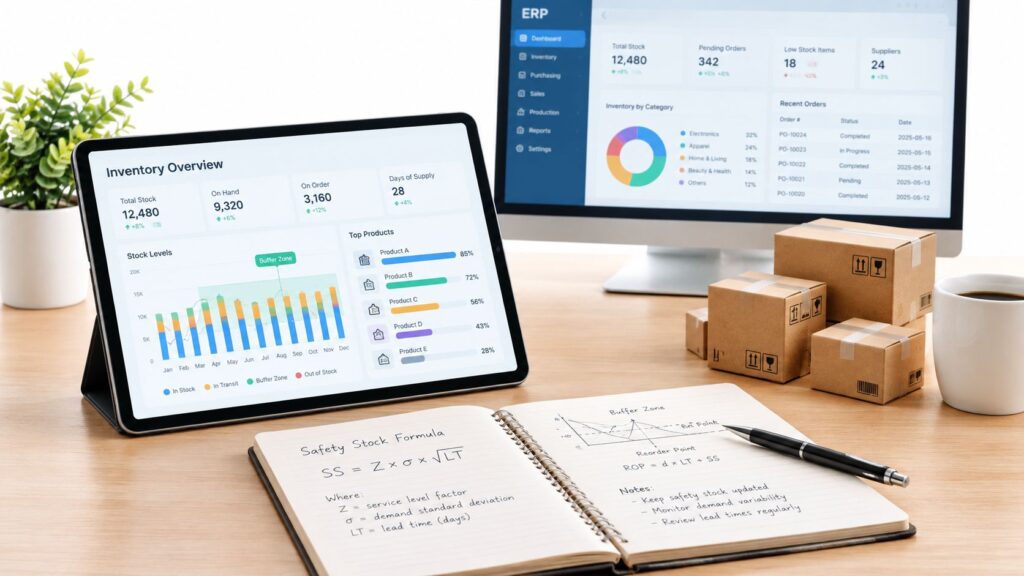
Your dispatcher has a spreadsheet open, a technician on the phone, and a customer asking when someone will arrive. The calendar shows an available appointment, but nobody knows whether the technician has the right part. Meanwhile, yesterday’s completed repair is still waiting for paperwork before finance can invoice it.
Field servicesField service is work performed at a customer’s site, such as installation, maintenance, repair, or technical support. management software should solve more than the scheduling problem. The true test is whether work recorded in the field reaches inventory, customer records, approvals, and billing without someone typing it again.
What Field Services Management Software Does
Field service management, or FSM, coordinates work performed at customer locations. It connects the service request, technician assignment, appointment, work order, materials, customer confirmation, and billing information.
Consider a hypothetical equipment repair. A customer reports an intermittent fault at a remote site. The dispatcher needs to identify the equipment, check the service agreement, understand the likely problem, and assign someone qualified to investigate it.
A disconnected process turns those decisions into phone calls. The technician asks for the previous repair notes. Someone checks stock in another application. After the visit, an administrator interprets handwritten material records before preparing the invoice.
A work order should carry the context
In a connected process, the work order becomes the shared operational record. It tells the technician what needs attention and gives office staff a reliable place to check progress.
The record should carry:
- Customer context: Site details, access instructions, contacts, and service entitlement.
- Technical context: Equipment identity, symptoms, maintenance history, and approved instructions.
- Execution evidence: Work performed, time recorded, parts consumed, and customer confirmation.
- Commercial status: Chargeable work, approvals, billing readiness, and unresolved questions.
Businesses that handle both workshop repairs and customer-site visits should distinguish those workflows. BenchKey’s repair shop management software is a relevant resource when evaluating the workshop side. For field operations, also test travel planning, mobile access, technician qualifications, and vehicle stock.
Practical rule: A job isn’t operationally complete just because the technician has left the site.
The useful buying question is what happens next. Can the service administrator see what remains unresolved? Can inventory staff trust the recorded consumption? Can finance prepare the invoice without reconstructing the visit?
That’s the difference between a digital appointment book and an operational system. Strong FSM keeps people working from the same job context while making handoffs explicit.
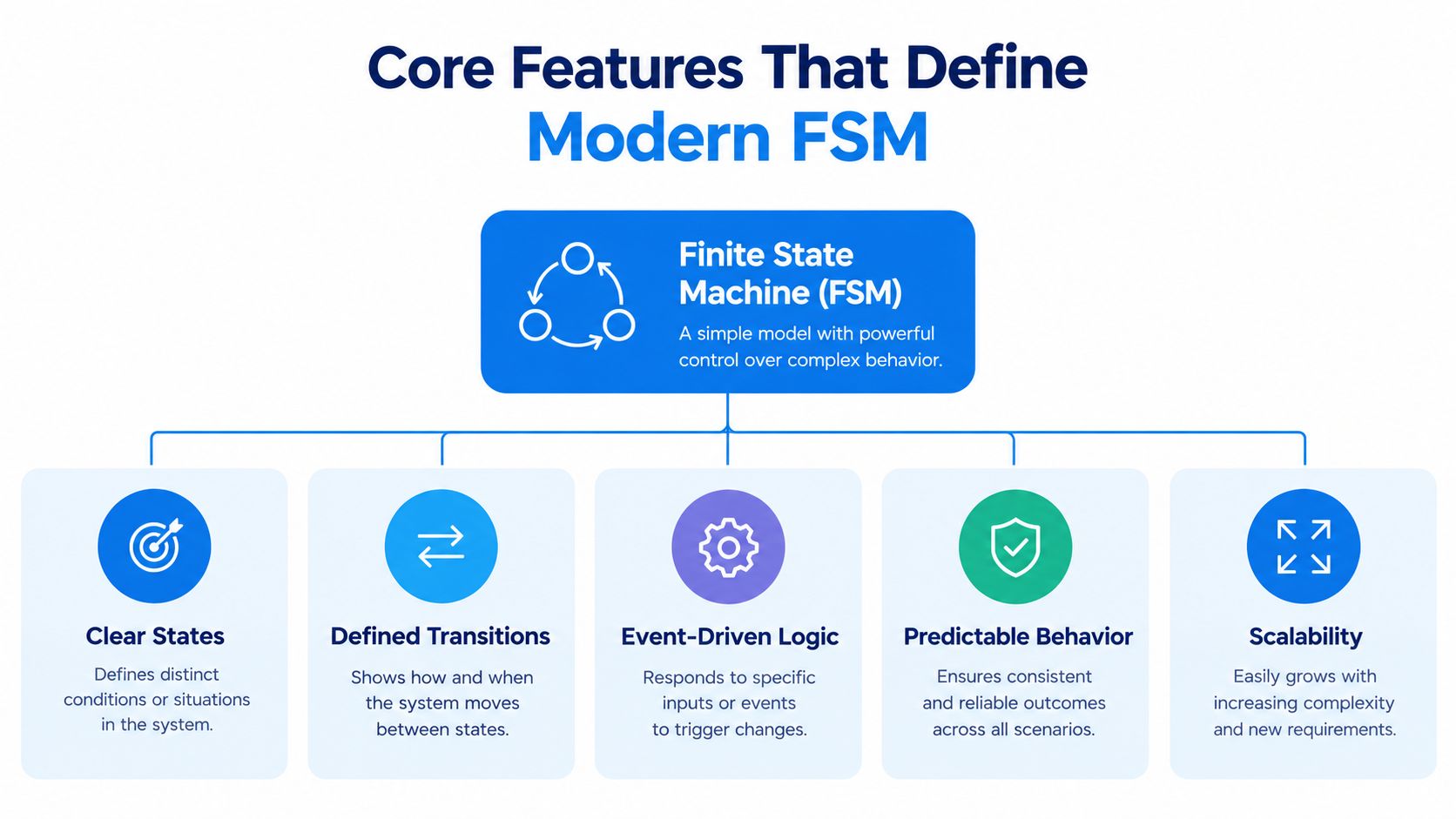
Core Features That Define Modern FSM
A feature list matters only when the capabilities work together. A scheduling screen can look impressive while sending a technician to a job with incomplete instructions or unavailable materials.
The essential capabilities belong around a shared service record.
Scheduling must consider readiness
Scheduling and dispatching should match job requirements with qualifications, location, appointment windows, workload, and parts readiness. Assigning the closest technician isn’t useful if that person lacks the required certification.
For a hypothetical machine repair, the dispatcher should be able to distinguish an available technician from an available, qualified technician whose vehicle carries the required component. The system should also expose constraints that prevent assignment rather than ignoring them.
Asset and equipment tracking supplies the technical context. A technician needs the specific asset’s history, not just the customer’s general account notes. Previous failure codes, replaced components, and approved procedures can change the diagnosis.
Mobile execution must fit the worker
Eurostat’s digitalisation reporting tracks how businesses provide portable devices with mobile internet access for work. For field teams, the practical requirement is to test the workflow on the devices technicians actually use, including how it behaves when connectivity is poor. A 2021 Service Council survey of more than 725 field-service technicians provides a non-EU comparison: 99.5% used mobile devices at work, with 42% preferring laptops, 29% smartphones, and 29% tablets. Those preferences should not be treated as an EU benchmark.
A mobile application should make it straightforward to:
- Record labor: Capture work and travel against the correct job.
- Document findings: Add structured fault information, notes, and relevant images.
- Record materials: Identify what was installed, removed, returned, or left unused.
- Confirm completion: Capture customer acknowledgment and flag outstanding work.
Don’t assume a phone is suitable for every task. Reviewing a detailed manual and recording a quick completion status impose different demands.
Inventory and billing need usable records
Parts visibility should distinguish stock on a shelf from stock available for the job. Reservations, vehicle locations, and pending replenishment matter.
Billing integrationIntegration connects systems so they can exchange information or coordinate actions. An ERP integration helps link business tools and reduce manual transfers between them. should preserve the distinction between warranty work, contract-covered labor, and additional chargeable work. Analytics should let managers open the underlying record when a dashboardA dashboard brings key figures and status information together on one screen. An ERP dashboard helps teams monitor performance and identify issues that need attention. shows an exception.
For manufacturers, production context can matter too. SIX ManufacturingFlow connects customer orders, manufacturing planning, materials, production work, quality checks, and delivery. Where service depends on manufactured equipment or replacement assemblies, evaluate how those records support the repair process rather than treating production and service as unrelated activities.
How FSM Improves Field Operations
Better field operations come from removing specific obstacles, not digitizing existing paperwork. A technician needs a feasible assignment, useful technical information, and the materials required to finish the work.
The pressure to coordinate skilled work is relevant across Europe. Cedefop’s EU labour and skills shortage analysis identifies growing shortages across Member States, including in sectors that depend on technical and vocational skills. An industry article citing U.S. Bureau of Labor Statistics projections reports employment of approximately 6.49 million in the U.S. installation, maintenance, and repair group in 2024, but that broad U.S. occupational figure should not be used to estimate the EU field-service workforce.
Remove avoidable interruptions
Dispatchers can use current job status to revise assignments when work overruns, customers cancel, or materials fail to arrive. Technicians can access instructions without waiting for someone in the office to locate a document.
These changes should be tested against operational outcomes:
- Less unnecessary travel: Check whether assignments reflect geography and appointment constraints.
- More productive technician time: Track whether administrative work and waiting decline.
- Better initial preparation: Review repeat visits caused by missing information or materials.
- Faster billing readiness: Measure whether completed jobs reach finance with usable supporting records.
The mechanism matters more than a general productivity claim. If technicians still call the office for every equipment history lookup, issuing mobile devices hasn’t removed the interruption.
Preserve knowledge in a usable form
Knowledge capture is another practical benefit. A note saying “fixed as usual” doesn’t help the next technician. A structured record of symptoms, diagnosis, corrective action, and verification gives a less-experienced colleague something usable.
Service managers should define which observations belong in searchable fields and which need free-text explanation. Overly rigid forms can hide nuance; unrestricted notes can make recurring problems difficult to analyze.
Capture enough detail for another qualified technician to understand the decision, not just the outcome.
For manufacturers, the value extends beyond the visit. The discussion of warranty, repair, and spare-parts data as a manufacturing advantage is relevant when deciding which service findings should reach product, production, and commercial teams.
The operational objective is clear: make skilled work easier to complete and make its results available to the people who need them.
Key KPIs and What They Tell You
Key performance indicators, or KPIs, need agreed definitions before they become dashboard tiles. Otherwise, dispatch, service management, and finance can report different versions of the same outcome.
First-time fix rate measures whether the reported problem is resolved during the initial visit, with a defined follow-up window for repeat visits. Set that window and the rules for planned follow-up work before comparing teams. A cross-market benchmark covering 145 service organizations, more than 24 million work orders, and 6.6 million assets reported a median of 71.9%, but it does not establish an EU-specific target. Compare your own asset classes and service agreements first.
Read the measures together
| KPIA KPI (Key Performance Indicator) measures progress towards a business goal. An ERP system can calculate KPIs from business records and show changes in performance over time. | What it reveals | What to investigate |
|---|---|---|
| First-time fix rate | Resolution without a qualifying repeat visit | Diagnosis, materials, skill matching, workmanship |
| Technician utilization | Share of available time assigned to defined productive activity | Workload balance, waiting, administrative burden |
| Wrench time | Time spent performing hands-on service | Preparation, interruptions, access delays |
| Travel time | Time spent moving between assignments | Territory design, routing, appointment constraints |
| SLA compliance | Performance against service-level agreement commitments | Priority rules, response deadlines, exceptions |
| Work orders per technician-day | Completed workload relative to technician capacity | Job complexity, staffing, completion rules |
| Invoice-cycle time | Delay between the agreed completion event and invoice issue | Missing evidence, approvals, billing exceptions |
Utilization and wrench time aren’t interchangeable. A technician can be assigned throughout the day but spend much of it traveling or waiting. Likewise, more completed work orders don’t necessarily mean better performance if the job mix becomes simpler.
Measure the handoffs as well as the visit
Total workflow latency is the elapsed time across the complete service process, including queues between teams. Keep stage timestamps for request acceptance, scheduling readiness, field completion, verification, billing readiness, and invoice issue.
Break results down by asset class, technician, failure code, region, and parts-shortage reason. A global average can conceal a recurring fault affecting a specific equipment family.
Measurement caution: Don’t reward fast closure if staff must reopen jobs to correct incomplete records.
Use a documented starting event and ending event for every measure. Keep exclusions visible, including customer-caused delays and planned follow-up work. That makes the reports useful for operational decisions rather than arguments over definitions.
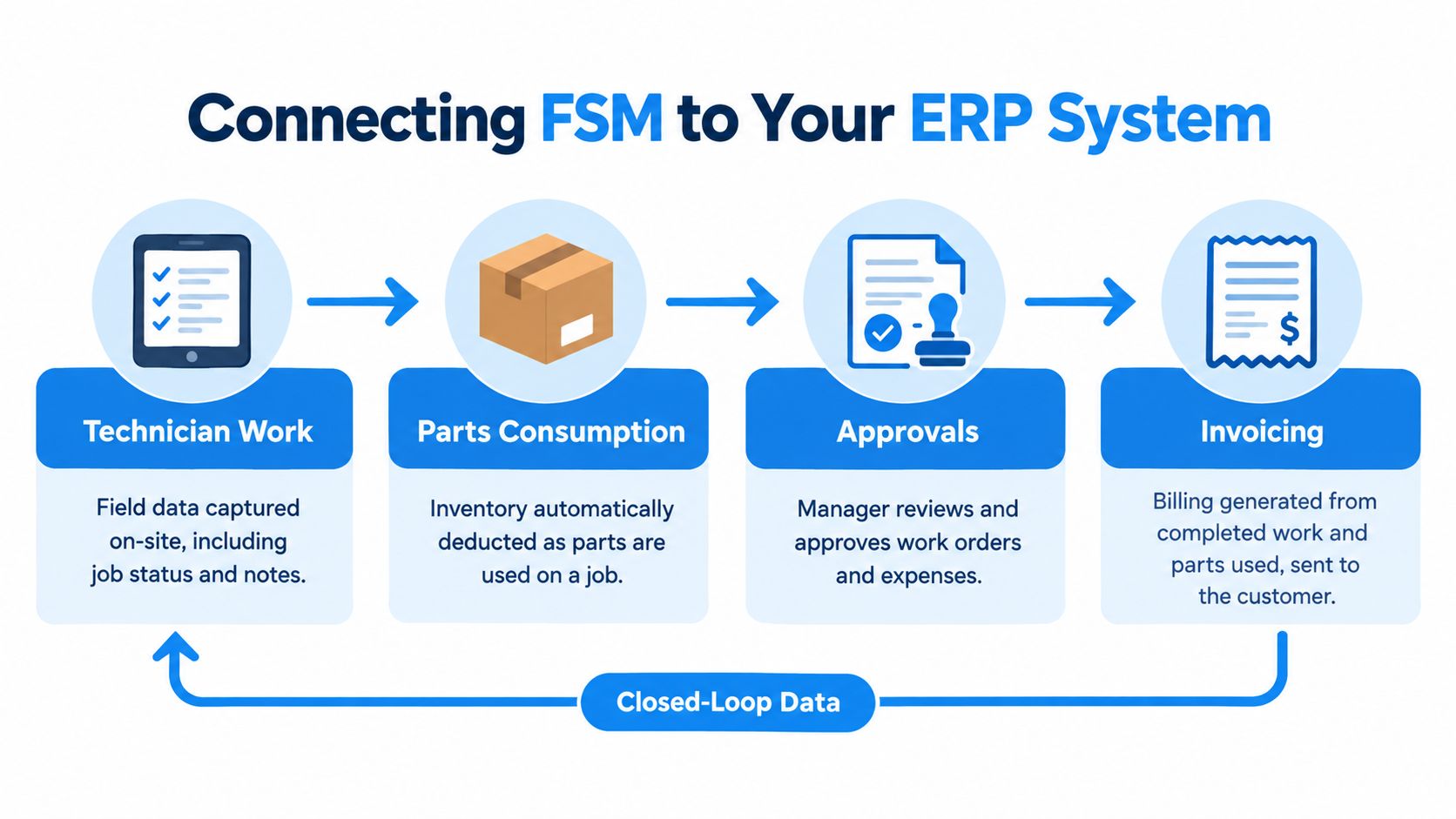
Connecting FSM to Your ERP System
Enterprise resource planningAn ERP system connects a company’s core processes—such as sales, finance, inventory, manufacturing, and service—in one place so teams can work with shared information., or ERPAn ERP system connects a company’s core processes—such as sales, finance, inventory, manufacturing, and service—in one place so teams can work with shared information., connects operational and financial processes. Customer relationship management, or CRM, holds customer relationships and interactions. Field service needs dependable connections to both.
The integration challenge is substantial, especially when customer, asset, and billing records cross systems. For EU operations, European Commission guidance on data-protection obligations makes the handling of personal data an additional consideration. Define who controls customer information, which vendors process it, and how access and retention work across FSM, ERP, and CRM. Specialist tools can be attractive, but buyers still need to resolve ownership and synchronization.
Decide where each transaction belongs
A parts entry isn’t merely a note on a work order. Depending on the process, it must affect vehicle stock, job cost, replenishment, and the chargeable amount. A customer signature may confirm attendance without authorizing additional charges.
Define those distinctions before connecting applications.
The architecture determines how teams maintain them. A shared data model can reduce mapping between systems. APIs, which let applications exchange data, can connect specialist products. Middleware can coordinate those exchanges and monitor failures. File exports may suit controlled batch tasks, but they require clear timing and reconciliation.
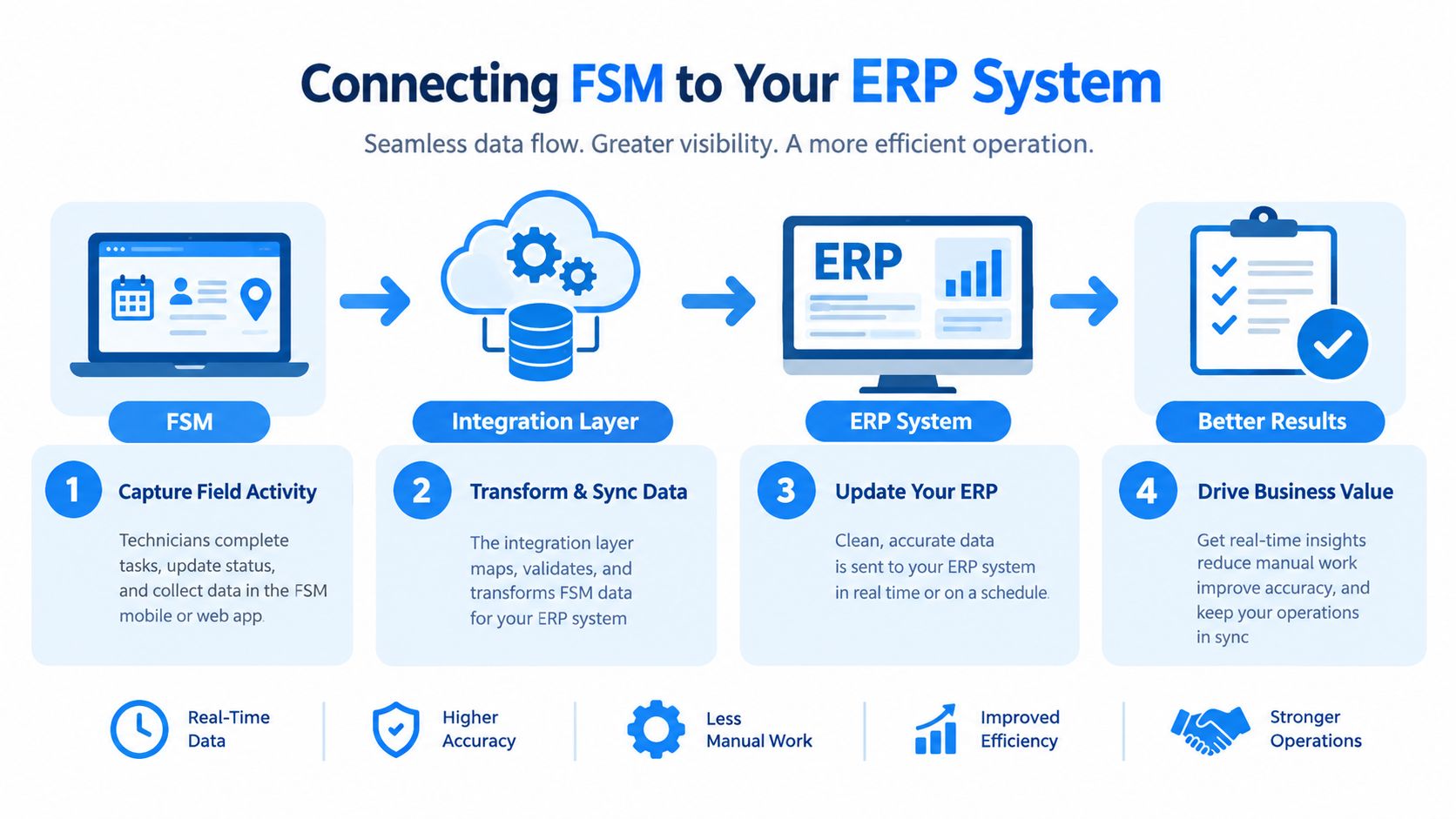
The practical ERP integration decision should include failure handling. Ask who sees rejected transactions, how retries avoid duplicates, and which system owns customer, asset, stock, and pricing records.
Integration checklist for buyers
Use a representative job to verify the full path from request to invoice. Ask the vendor to show:
- APIAn API (Application Programming Interface) allows software systems to exchange information. Connected to an ERP system, it helps transfer business data and reduce manual entry. availability: Which required systems expose the records and actions you need? Are there access, licensing, or rate limits?
- Record ownership: Which system is authoritative for customers, assets, parts, prices, and service agreements? What happens when records disagree?
- Transaction flow: Can work orders, time, parts usage, approvals, and billing details move in the required direction and at the right time?
- Failure handling: Who sees rejected updates, how are they corrected, and how do retries prevent duplicate stock movements or charges?
- Offline reconciliation: What can technicians record without connectivity, and how are conflicting changes resolved after synchronization?
- Security and retention: Who can access personal and commercial data across systems, and how are retention and deletion handled?
- Operating ownership: Who monitors connections, handles API changes, and supports users when a handoff fails?
Request a demonstration that includes a parts shortage, an approvalAn approval is a formal decision that allows a request or action to proceed. An ERP system can route approvals and record who made each decision. exception, and a failed update. If a required system does not expose the necessary API, ask what manual step remains and who owns it.
Follow the service stages into business records
SIX ServiceFlow provides a practical example of a connected approach, supporting appointments, technician assignment, available-parts visibility, on-site work recording, customer confirmation, and information needed for billing and follow-up.
A configured lifecycle should make these stages explicit:
- Request intake and qualification: Identify the customer, equipment, reported issue, required skills, and applicable service terms.
- Scheduling: Match qualified technicians with availability, location, and appointment constraints.
- Mobile execution: Give the technician the assigned work and capture findings on site.
- Time and parts recording: Associate labor and material use with the job and relevant stock location.
- Customer verification: Record acknowledgment and separate unresolved work or commercial exceptions.
- Invoicing preparation: Pass complete, authorized information into billing.
Dashboards should reflect responsibility. Dispatchers need open work and assignment constraints. Technicians need actionable job details. Managers need progress, exceptions, recorded costs, verification, and billing status.
Shared workflows don’t remove the need for controls. Configure permissions, approval rules, transaction timing, and drilldown so that each role can act without losing the connection to the complete service record.
Choosing the Right FSM Software
Choose field services management software by testing representative jobs, not by counting features. Include a routine visit, an urgent breakdown, a parts shortage, disputed extra work, and a visit with unreliable connectivity.
Scheduling deserves a realistic test. Ask vendors to demonstrate how the system handles qualifications, travel, appointment windows, and parts readiness using your own service territories. A 2024 Aberdeen research brief summarized by AINFORMAT reported 23% higher travel time per job and 18% lower technician utilization among organizations using manual dispatch than among those using automated scheduling. Treat that comparison as a vendor-evaluation prompt, not as evidence of the outcome an EU operation will achieve.
FSM Evaluation Criteria
| Criterion | Standalone FSM | Integrated ERP Platform |
|---|---|---|
| Workflow fit | Test specialist service depth and external handoffs | Test service depth within broader business workflows |
| Data ownership | Identify the master system for each record | Confirm shared records and remaining external dependencies |
| Integration | Inspect APIs, mappings, monitoring, and retries | Inspect cross-process transactions and exception handling |
| Mobile work | Test device usability and synchronization | Test field usability alongside central business updates |
| Reporting | Check whether finance and stock data require imports | Check drilldown across service and financial records |
| Total ownership cost | Include connectors and reconciliation work | Include configurationConfiguration sets up software using its existing options. In an ERP system, it adapts workflows, roles and other settings to the company's business processes., migration, training, and process change |
A standalone application may suit an organization that needs specialist service functionality and already has mature integration support. An integrated platform may fit better when service, stock, purchasing, and finance need common records. Neither architecture excuses a weak technician experience.
Make the vendor demonstrate exceptions
Ask vendors to show the actual workflow rather than answer yes-or-no questions.
- Skills and certifications: Can dispatch distinguish missing qualifications from simple unavailability?
- Inventory and finance: What records change when a technician submits material usage, and what happens if billing is blocked?
- Offline work: What remains accessible without connectivity, and how are conflicting changes resolved?
- Approvals: Can customer acknowledgment, internal authorization, and charge approval remain distinct?
- Reporting depth: Can a manager open the transaction behind an overdue-job indicator?
- Operating responsibility: Who maintains integrations, fixes rejected updates, and supports mobile users?
Offline support deserves particular care. A cached job list isn’t equivalent to completing forms, recording materials, and synchronizing safely after reconnection.
Include administrators, dispatchers, technicians, warehouse staff, and finance in evaluation. The strongest fit is the system they can use to complete the whole process, including exceptions, without creating another unofficial spreadsheet.
Implementation Roadmap and Common Pitfalls
Implementation should begin with the service process, not the calendar screen. Establish how requests become authorized work, what technicians must record, and what finance needs before billing.
Knowledge transfer belongs in that plan. TrueContext’s field-service workforce overview reports that 46% of North American technicians are over 50, while 47% don’t plan to remain in field service long term or are uncertain; among those expecting to leave, 47% anticipate departure within three years. Those findings support involving experienced technicians in procedure design and onboarding.
Use readiness gates instead of assumed deadlines
There’s no defensible standard rollout duration without knowing data quality, integrations, locations, and workflow scope. Estimate the schedule after discovery, then tie progress to observable acceptance criteria.
- Map responsibilities. Document intake, dispatch, execution, verification, and billing ownership. Include rejection and rework paths.
- Clean master data. Resolve duplicate customers, unclear asset identities, inconsistent part codes, and outdated qualification records before migration.
- Configure and test. Validate permissions, approvals, stock movements, billing rules, and mobile synchronization.
- Pilot real work. Use representative technicians and jobs. Reconcile field entries with inventory and financial outputs.
- Train and expand. Teach each role its normal tasks and exceptions, then review agreed KPIs after rollout.
A structured ERP implementation planning approach helps coordinate those dependencies without treating configuration as the entire project.
Avoid deployment without operational ownership
The common failure is implementing dispatch while leaving everything after the visit unchanged. Assign an owner to each handoff and require a visible reason when a job stops progressing.
Don’t migrate poor data and expect users to repair it during live service. Don’t replace technician training with a demonstration. Ask users to complete realistic tasks themselves, including corrections and failed synchronization.
Audit preparation also needs deliberate design. Define which assignment, work, material, approval, and invoicing records must remain traceable. Software can support that evidence trail, but the organization remains responsible for validating applicable requirements.
Successful deployment leaves a connected operation with clear responsibilities, reliable records, and measurable improvement. A populated schedule alone isn’t enough.
Key Findings
SIX ServiceFlow can connect to third-party systems, but what it can exchange depends on those systems’ available APIs and the data they expose. Before committing to an integration, verify that the required records, updates, and error-handling options are supported.
Where a full move is feasible, switching to SIX ERP is the preferred approach for automating the service process end to end. Service, inventory, customer, and financial teams can work from shared records rather than maintaining a chain of connections between separate applications. That can mean fewer mismatched customer or part records, less duplicate entry, and fewer handoffs where a failed update goes unnoticed. It also makes it easier to trace a job from dispatch through parts usage, approval, and invoicing without reconciling competing versions of the same transaction.
A connected set of specialist tools can still be the right choice when a full switch isn’t practical. The important distinction is operational ownership: with third-party integrations, someone must maintain the connections and resolve exceptions; with a unified workflow, there are fewer system boundaries to manage.
SIX ERP offers connected service, inventory, customer, and financial workflows with role-based accessRole-based access controls what users can see and do according to their responsibilities. In an ERP system, it helps protect sensitive information and manage permissions consistently. and operational reporting. Visit SIX ERP to discuss a representative service job, including its parts movements, approvals, and billing exceptions, and assess how the complete process could work in your organization.