
The Monday morning calls always sound the same at first. A customer is waiting, a technician is already on the road, and the part that should’ve been loaded into the van is sitting in a different stock location or not reserved at all. By the time the office, the field, and finance all agree on what happened, the work order is still open and the customer is still waiting.
That is what field servicesField service is work performed at a customer’s site, such as installation, maintenance, repair, or technical support. look like when the process is fragmented. The problem usually isn’t effort, it’s coordination, because one job touches scheduling, parts, approvals, completion notes, and invoicing. When those pieces live in separate tools or on separate paper trails, the delays show up where customers can see them.
The Day a Service Coordinator Dreads
A service coordinator can feel the breakage long before anyone else does. The phone rings again because the technician needs a part, the dispatcher is trying to reshuffle the day, and the customer wants to know why the visit is running late. Meanwhile, the office still doesn’t have a clean record of what was done, so billing can’t move forward.
This is why field operations are really a coordination problem, not just a scheduling problem. The technician may do the work correctly, but the job still stalls if the job record, parts record, and customer approvalAn approval is a formal decision that allows a request or action to proceed. An ERP system can route approvals and record who made each decision. never line up. In a connected process, the work order should move cleanly from planning to execution to billing, with each step feeding the next.
Practical rule: if the office has to chase the field for basic job facts, the process is already leaking time.
The hidden cost is that every handoff creates a chance to lose context. A missed note on a repair, an unrecorded part, or a customer signature that never makes it back to the office can all leave the job half-finished from a system point of view. That’s why field service teams need a structured workflow, not just faster replies.
What Field Services Actually Mean
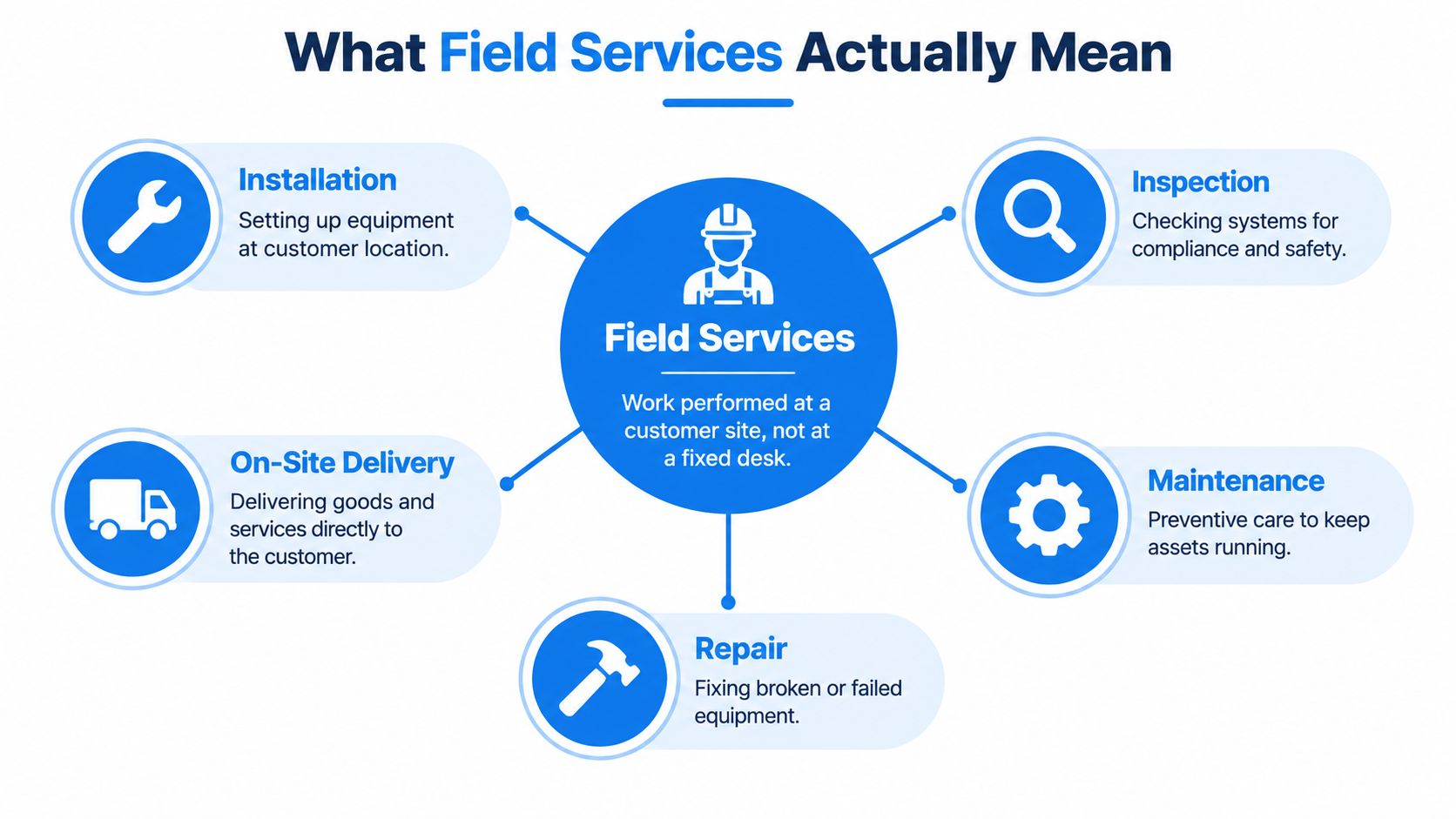
Field services means work done at the customer site instead of at a fixed desk or plant. That includes installation, inspection, maintenance, repair, and on-site delivery. The work may be routine or urgent, but it always depends on a technician, a schedule, the right parts, and accurate job records.
The core roles are easy to map once you name them. The service coordinator or dispatcher decides when the job goes out and who gets it. The field technician does the work and records what happened. The parts or warehouse contact makes sure the needed stock is available. The customer approves access and completion. The finance or billing owner turns the finished job into an invoice and tracks payment.
A simple role map helps teams stop mixing up related functions. Field service is not the same as field sales, because the goal is to complete technical work, not sell new business. It’s also different from remote support, because the technician is physically present and the job often depends on what they find on site.
In Europe, the labor picture points to the same operational challenge from a different angle. Eurostat reported an EU job vacancy rate of 2.1% in Q1 2026, while Bulgaria recorded 0.9%, one of the lower rates in the bloc. At the same time, EURES highlights persistent shortages in Bulgaria across roles closely tied to field service, including electricians, mechanics, fitters, technicians, welders, machine operators, and assemblers. That combination helps explain why standard workflows, skill-based dispatch, and better knowledge capture matter so much in service operations. Eurostat job vacancy data and EURES labour market information for Bulgaria
The End-to-End Service Workflow
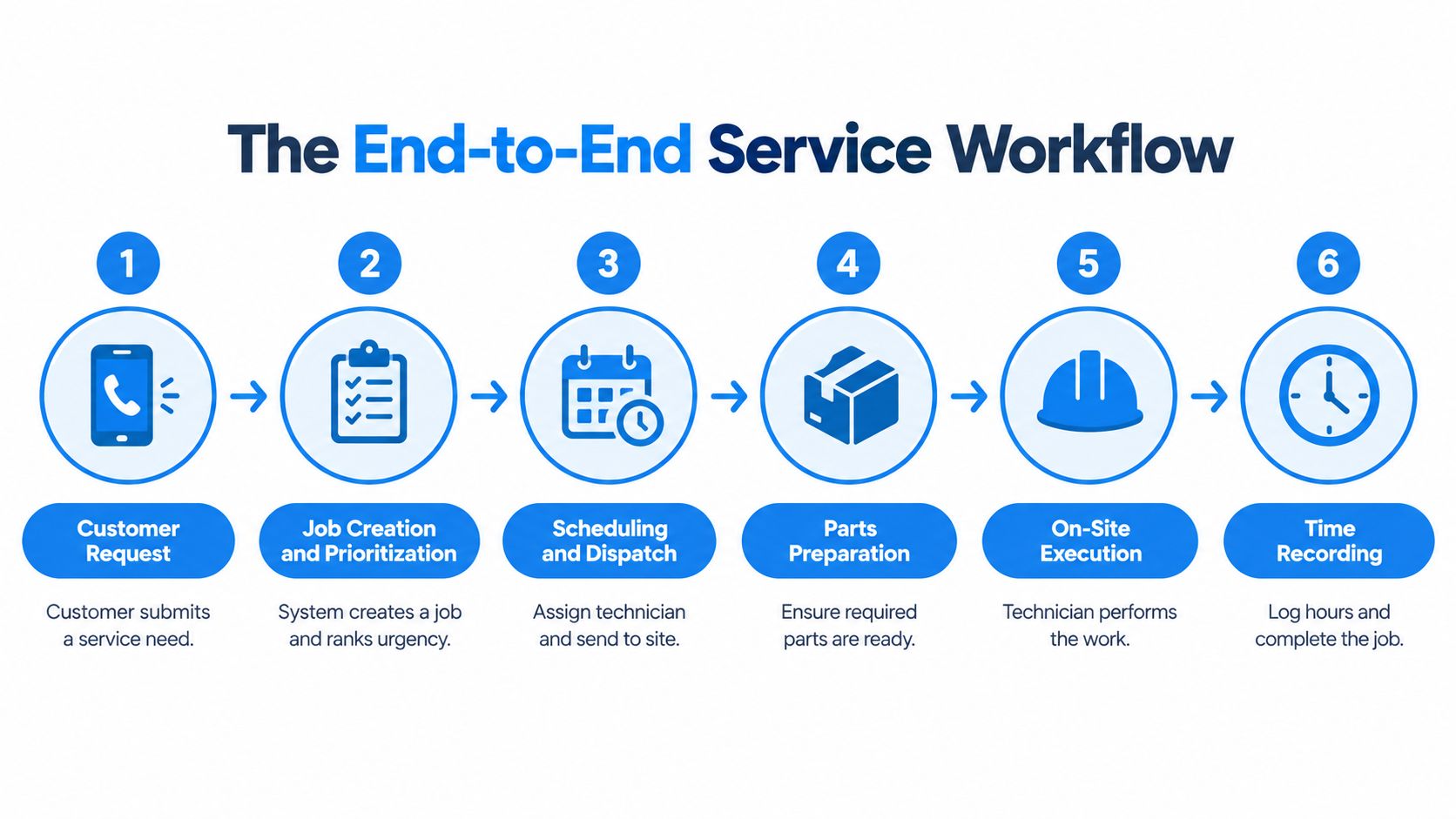
A clean workflow starts before the technician leaves the yard. The customer request becomes a job record, the job gets prioritized, and the dispatcher assigns it based on urgency, skill, and availability. At that point, the system needs enough detail to answer one question clearly, what must be on site for this visit to end the right way.
From request to dispatch
The request should carry the customer name, asset or site location, issue type, and any service history that might affect the visit. If the system also knows the technician’s skill set and the parts likely needed, dispatch can make a better call before the job is released. That matters because a bad assignment can turn one visit into two.
From the truck to close-out
Once the technician accepts the work, the mobile record should hold the job notes, elapsed time, parts used, and completion status. If the customer signs on site, that approval becomes part of the same record instead of a loose paper trail. Then the office can close the work order, trigger invoicing, and carry the outcome into finance and follow-up service.
Keep one record moving through the whole job, not separate records that need to be reconciled later.
Field service connects to the rest of the business this way. Inventory changes when parts are consumed, purchasing may need replenishment, and finance needs the completed work to bill correctly. When those flows share the same data, the operation stops guessing.
Where Field Service Operations Quietly Break
The failure usually starts before anyone notices a service problem. A job lands with the wrong technician, the right part is sitting in inventory but not on the right van, or someone closes the work order by phone before the site visit is fully documented. Each gap leaves a different scar in the process, and each one shows up later as rework, delay, or incomplete billing.
The clearest warning signs are already well documented. Benchmark evidence from a large cross-industry group found that a failed first visit led to an average of 2.75 total visits to resolve the issue and about 13 additional days in mean time to resolution. FTFR also needs a defined 30-day window, otherwise quick repeat failures and unrelated later incidents get mixed together. FTFR benchmark report
Common Field Service Gaps and Their Operational Signal
| Operational Gap | Metric That Reveals It | Control That Reduces It |
|---|---|---|
| Wrong technician assignment | Repeat visits or delayed completion | Skill-based dispatch with live availability |
| Missing part on site | Additional visits after the first call | Vehicle stock visibility and parts reservation |
| Phone-only close-out | Late invoices or incomplete records | Mobile completion capture with site approval |
| Lost service history | Low first-time fix performance | Linked asset and work-order history |
| Retiring expert leaves undocumented know-how | Inconsistent outcomes across similar jobs | Structured knowledge capture in job records |
Part availability is one of the biggest causes of repeat visits, which is why warranty, repair and spare-parts data are becoming a manufacturing advantage. After-the-sale service data and spare-parts visibility also shape how well teams handle replenishment and traceability once the truck rolls out. The Service Council summary cited part unavailability as the reason for 51% of additional visits, followed by insufficient technician experience at 25% and lack of time to complete the task at 13%. Service Council repeat-visit summary
Retiring technicians create a quieter risk. Their shortcuts, fault patterns, and parts substitutions often live in memory, not in the job record, so the next person repeats avoidable mistakes. That is why the fix is usually process design, not more reminders. If the schedule does not know the technician’s skills, if inventory does not know what is on the truck, and if close-out waits for paperwork, the same problems keep coming back.
The Technology Stack Behind Modern Field Operations
A service day falls apart fast when each system is guessing about the same job. The field service management module should own job creation, schedules, dispatch rules, and service commitments. The mobile application should carry the live work order into the field. The ERPAn ERP system connects a company’s core processes—such as sales, finance, inventory, manufacturing, and service—in one place so teams can work with shared information. layer should remain the source for customer records, stock, purchasing, and finance. The integration layer moves data between them in real time so the office is not working from yesterday’s version, as laid out in the guide to ERP integrations to do or not to do.
CustomerFlow fits into that stack when customer history and open opportunities affect service planning. It keeps conversations, leads, opportunities, and next steps in one connected journey, which helps when service and account management overlap in the same business.
What each layer should own
- FSM module: job creation, dispatch logic, service commitments, and status changes.
- Mobile app: time, parts usage, notes, photos, and customer sign-off.
- ERP core: stock, purchasing, invoicing, and financial traceability.
- Integration and analytics: shared IDs, live sync, drill-down reports, and exception alerts.
Dashboards only hold up when they read the same transactional records the team uses to do the work. If the numbers come from a separate export, they will look neat and still miss what happened on site. Role-based views matter too. Coordinators need queue health, technicians need today’s job details, and finance needs clean completion data.
For teams comparing dispatch tools, routing logic and schedule rules deserve close attention, especially when jobs depend on skill, geography, and parts readiness. The Routelink guide for dispatch teams is a practical reference for that operational layer without treating dispatch as a simple calendar.
How SIX ServiceFlow Connects the Chain
A connected service scenario only works when the office and the field are reading the same job. With SIX ServiceFlow, a customer request enters the system, the appointment is scheduled, and the technician is assigned based on skill and availability. The mobile app then delivers the work order, so the technician sees the job, records the parts used, and captures the customer’s signature on site.
That same record keeps moving when the job ends. The completion status returns to the office, the work order can close, and invoicing can begin without rekeying the same details into a separate system. That’s the practical difference between a field app and a connected service process, the office doesn’t wait for scattered updates, it receives structured job data as the work happens.
In the STILL implementation referenced in the source material, appointment scheduling and finding the right technician became 90% faster, work-order processing became 80% faster, the work-order-to-invoice process became 100% faster, invoice payments by clients became 40% faster, and mobile client approvals reached 100%. Those figures describe one implementation, not a universal promise, but they show what changes when the workflow is closed instead of fragmented.
The connection points matter as much as the screens. Shared data, role-based dashboards, and open APIs keep the office, field, and finance functions aligned. If a job overruns, a part is missing, or a higher-priority issue appears, the record can update without breaking the rest of the chain.
If you’re comparing service tools, the HVAC software picks from HomeProBadge are a useful way to look at what different field teams prioritize when they choose operational software.
[Suggested image after this section: a service technician completing a job on a mobile screen while the office dashboardA dashboard brings key figures and status information together on one screen. An ERP dashboard helps teams monitor performance and identify issues that need attention. updates the work order and invoice status.]
An Implementation Checklist for Connected Field Service
Start with the full service path, not just dispatch. Map the steps from request through invoicing, and name the person who owns each handoff. That gives you a baseline for where the record breaks today.
Then define the field data that has to be captured on every job. At minimum, that usually means work performed, time, parts used, and customer approval. If inventory matters, treat the technician’s van as a tracked stock location, not an informal storage bin.
Pilot the mobile workflow with a representative team before you roll it out everywhere. Measure scheduling time, work-order processing time, and invoice turnaround while the pilot runs, then review adoption and exceptions before expanding. A practical bookkeeping comparison, such as the checklist for HVAC business finances, can help finance and service leaders align on what the job record must contain before billing starts.
A few controls worth locking in early
- Site Signature: Capture approval on the device before the technician leaves.
- Vehicle Stock: Reconcile van inventory against job consumption.
- FTFR Review: Break first-time fix down by asset, failure code, and parts constraint.
- Exception Review: Track jobs that overrun, need a return visit, or wait on stock.
For rollout planning, it helps to pair the service design with your broader ERP project method. A useful reference is a step-by-step guide to planning your ERP implementation, especially if service is only one part of a wider systems change.
Bringing It All Together and Choosing Your Next Step
Field services work best when one job record follows the work from request to close. The gain isn’t a new app on its own, it’s the removal of manual handoffs between office, technician, inventory, and finance. That’s what keeps scheduling, parts, approvals, and invoicing tied to the same facts.
If you’re reviewing your own process, start with the next job that still depends on email, phone calls, or paper close-out. Then compare that flow with the structure in SIX ServiceFlow and decide where the record should live, who should update it, and what has to happen in real time.
If your field team is still stitching together schedules, parts, signatures, and invoices by hand, SIX ERP & ServiceFlow can help you connect those steps in one workflow. Explore SIX ERP to see how ServiceFlow and the wider platform support field operations, stock, and finance from the same current record.