

TL;DR - Project Management Software for Small Businesses
The right project management software does more than organize tasks. It helps small businesses manage resources, track costs, and deliver profitable projects.
A four-person fitting crew finishes a kitchen on a Friday. The client signs off, the team loads the van, and everyone moves to the next site on Monday. Somewhere between those two days, the job’s actual cost disappears: the installer’s extra hours sit in a phone note, the replacement hinge lives in a supplier email, and the invoice gets built from the original quote rather than from what happened on site.
That gap can steadily erode a small firm’s margin. The challenge is especially relevant in Bulgaria, where 38.3% of SMEs had reached at least a basic level of digital intensity in 2025, compared with 71.4% across the EU. That measure covers digital adoption broadly, not project management software specifically. But it puts the decision in context: for a small fitting crew still working from phone notes, supplier emails and spreadsheets, the first useful step is a reliable record of each job’s hours and costs.
The question worth asking isn’t which tool has the prettiest board view. It’s which one keeps the plan, the cost and the invoice in the same record, so nobody has to rebuild the story from memory at month end. Project management software for small business earns its price when it closes that loop, not when it adds one more place to type the same job number.
Core Features Small Businesses Need First
Six capabilities decide whether the software survives a normal week: task ownership and deadlines, dependencies and milestones, time tracking, budget versus actual, a document workspace, and role-based accessRole-based access controls what users can see and do according to their responsibilities. In an ERP system, it helps protect sensitive information and manage permissions consistently.. Get those right and the tool becomes the shared record of who does what, what it costs and where the paperwork lives. Miss any of them and you’ve bought a calendar with extra steps.
| Capability | What it tracks | What breaks without it |
|---|---|---|
| Task ownership and deadlines | Who owns each task, its priority and due date | Work slips because no one owns it |
| Dependencies and milestones | Which tasks block others and the key dates | One late task delays the whole job unseen |
| Time tracking | Hours logged against each project and task | Labor cost is guessed when invoices are prepared |
| Budget versus actual | Planned hours, materials and costs compared with actuals | Overruns appear only after the job closes |
| Document workspace | Specifications, agreements and notes in one place | Staff search email chains for current files |
| Role-based access | Which records each person can see and edit | Staff see pricing or data they should not |
Start with ownership, because unclear owners cause most of the slippage you can prevent. A task needs one named person, one due date and one priority. Shared ownership between three people works out to no ownership in practice, and it’s the reason a fitting date drifts two days without anyone raising a hand.
Dependencies do the heavier lifting. Say a joinery shop is fitting a kitchen: the cabinet delivery blocks the worktop template, which blocks the plumber, which blocks the final invoice. A tool that can’t show a blocked task lets that chain break, and you hear about it from the customer instead of from the plan.
A task with no owner and no date isn't a plan. It's a note.
Time tracking and budget versus actual carry the financial argument. A study of 39 project managers found that project-management information systems improved planning, scheduling, monitoring, control and decision speed, with direct effects on budget control and deadline adherence. Record hours as the work happens, so the comparison with planned effort means something while the job is still open.
The document workspace and role-based access are quieter features that decide daily friction. Specifications, agreements and notes belong beside the tasks they support, and each person should see only the records their job needs, not the full pricing sheet for every client.
Resource Scheduling Is a Constraint Problem
Beyond those six, small firms need resource scheduling, because the same installer, van or installation crew is usually booked across two jobs at once. Treat scheduling as an optimization check rather than a view. A 2026 benchmark of multi-project scheduling tested Microsoft Project 2024 on 140 instances and found makespan overruns of roughly 25 to 35 percent for portfolios of 2, 5 or 10 projects against best-known academic solutions. Small portfolios aren’t automatically easy.
Shortlist only tools that show budget against actual on one screen. SIX ERPAn ERP system connects a company’s core processes—such as sales, finance, inventory, manufacturing, and service—in one place so teams can work with shared information. serves small and medium-sized businesses as well as enterprises, and its project module keeps planning, tasks, time and cost tracking in one record.
How Project Work Connects to Quotes, Stock and Invoices
A project is a chain: quote, purchase, stock, work, invoice. Every link hands information to the next one, and every handoff is a place where a figure can be mistyped, delayed or dropped entirely. This is why project tools that stop at task cards rarely fix the underlying problem.
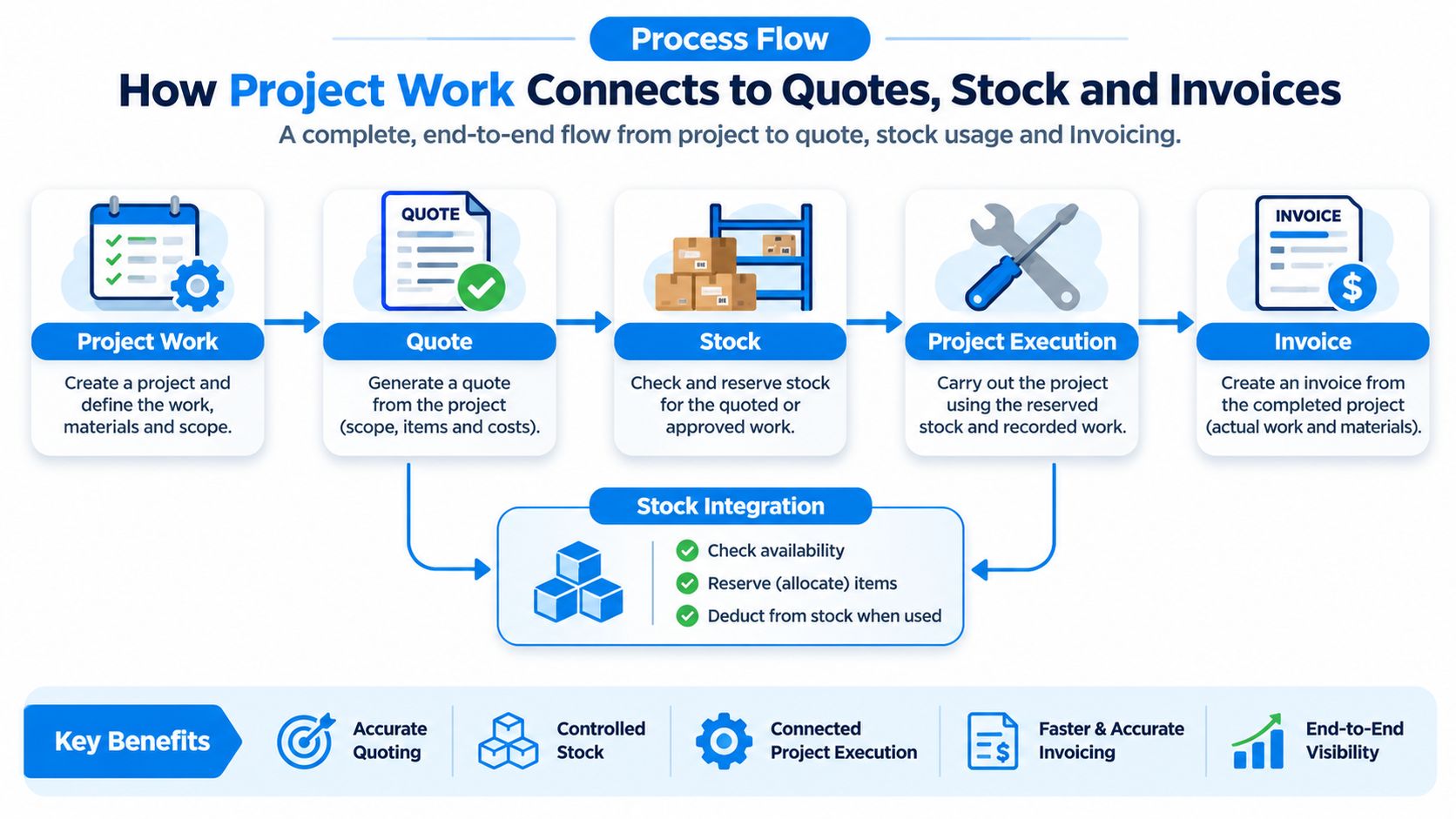
The financial size of those dropped handoffs is not trivial. Project Management Institute research summarized by Höttler reports that organizations waste approximately 9.9% of their project investment because of poor project performance. You don’t need a portfolio of fifty projects to feel that. You need three jobs running at once with costs spread across four tools.
Plan and Structure
The first stage fixes scope before anyone lifts a tool. Phases, measurable milestones, task dependencies, planned start and completion dates, assigned employees or subcontractors, and a financial baseline of planned hours, labor, materials, purchases and expenses. Without that baseline there’s nothing to compare later, which is why skipping it is the most expensive shortcut in the whole process.
Execute and Collaborate
The second stage is where records go stale. Timesheets captured as work happens, documents kept in one workspace, and mobile entry from the site rather than a Friday batch. Every day between the work and the entry is a day the plan and reality disagree.
Control and Complete
The third stage compares actual hours and costs with the baseline, then passes verified results into invoicing and finance without retyping. That’s the difference between an invoice built from what happened and an invoice built from optimism.
Take a hypothetical three-person kitchen-refit firm. An approved sale opens the project with a baseline of 120 planned labor hours, €3,200 of materials and a €1,800 subcontracted electrician. Purchasing orders the hardware against that baseline and stock is reserved. A supplier delivers a worktop late, the installer’s tasks slip, and dependency tracking shows the fitting-date impact before anyone calls the customer. Technicians log 138 hours on their phones, so labor reaches the project the same day.
| Cost line | Planned (€) | Actual (€) | Variance (€) |
|---|---|---|---|
| Materials, cabinets, hardware and fittings | 3,200 | 3,650 | +450 |
| Labor, 120 planned hours against 138 worked at €45 per hour | 5,400 | 6,210 | +810 |
| Subcontracted electrician | 1,800 | 1,800 | 0 |
| Total | 10,400 | 11,660 | +1,260 |
The manager sees a €1,260 overrun before the final invoice leaves the office, and the invoice itself is built from verified hours. Two failure points deserve attention. If the quote and the plan live in different tools, the baseline drifts the first time someone edits a price. If timesheets wait a week, the overrun appears only after billing, when the only lever left is a discount.
If the quote and the plan live in different tools, the baseline drifts the first time someone edits a price.
One test settles the whole question: can you trace a single record from the approved quote to the paid invoice without retyping anything? Taking a project from idea to profitable delivery walks through that handover step by step. SIX ProjectFlow connects planning, tasks, teams, working time, budgets, costs, documents and milestones in one system, so verified results reach invoicing instead of being rebuilt in a second tool. In the same platform, information is entered once and used wherever it’s needed, from stock levels and customer details to costs, schedules and documents.
Selection Criteria Worth Testing in a Trial
The buying question isn’t which tool has the best feature list. It’s which tests show the tool still works after three months of real use, when the novelty has worn off and the busy weeks arrive.
| Criterion | Question to ask in the demo | Red flag |
|---|---|---|
| Adoption | Can a new team member create and update a task in under ten minutes? | Training needs a full day before first use |
| IntegrationIntegration connects systems so they can exchange information or coordinate actions. An ERP integration helps link business tools and reduce manual transfers between them. | Can an approved quote create a project without re-keying? | Data moves only by manual export and import |
| Mobile access | Can field staff log hours and completion from a phone? | Updates wait until the technician returns to the office |
| Seat pricing | Which users need a paid seat, and how is the plan priced? | Occasional users are billed the full seat rate |
| Support and rollout | Who runs onboarding, and what training is included? | Support is limited to a help page |
| Exportability | How do we export all project and cost records, and in what format? | Data export is restricted or costs extra at contract end |
Adoption comes first because a system nobody opens produces no reliable data. A G2 survey of project management adoption found that 39.46% of small-company respondents reported full utilization of their project management software, and the same report noted that project managers commonly run CRM and accounting systems alongside it. Half-utilized software still bills full price.
Integration is the second test, and it’s where most demos get vague. Ask directly whether project records reach the customer file, purchase orders and accounting without a manual step. Then make the vendor do it live: hand an approved quote into project delivery during the call and watch what has to be typed twice.
Mobile access matters the moment a technician is in a basement with no signal. Ask what happens to the record when the connection drops, and whether the entry syncs later without overwriting someone else’s edit. Seat pricing deserves the same bluntness. Occasional users, subcontractors and client contacts shouldn’t all need the full seat rate, so ask which roles need a paid licence and what the plan counts.
Rollout support separates a tool from a project. Request a named onboarding owner and a training schedule with dates in it. Finally, ask how data leaves: format, scope and cost at contract end.
Practical rule: score every criterion pass, partial or fail before you compare prices, or the cheapest quote will win an argument it shouldn't.
If you also evaluate tools outside project delivery, this comparison of cloud event management platforms applies the same integration and mobile-access criteria, which is useful for calibrating what a fair answer sounds like. Run one real project through the trial rather than a sample, and score it before the sales call ends. We offer a free demo for exactly that kind of test.
Costs Beyond the Monthly Subscription
The most common buying mistake is comparing per-user subscriptions and stopping there. The subscription is one line on a longer list, and on small implementations it’s often not the largest one.
| Cost line | Question to put to the vendor |
|---|---|
| Licence or subscription | Is the price per user or per project? |
| Seats for occasional users | Which roles need a paid seat? |
| Setup and configurationConfiguration sets up software using its existing options. In an ERP system, it adapts workflows, roles and other settings to the company’s business processes. | Is it included or billed separately? |
| Data migration from spreadsheets | Who moves the data, and at what cost? |
| Integrations with accounting or CRM | Which connectors are included? |
| Training and rollout | Is a named onboarding plan included? |
| Internal admin time | How many staff hours per month will the tool need? |
Costing isn’t a side issue for this buyer. In a QuickBooks small-business survey, 49% of respondents said poor financial or resource management was holding their business back, while project costing and price estimates were the most common operational challenge, named by 19%. A tool that can’t compare an estimate with actual usage misses the need that sent the buyer looking.
Schedule adherence hides three money leaks at once: underestimated materials, unbilled work and excess labor. A job can finish on time and still lose money on all three, and only a cost record tied to project activity shows which one bit you.
The twelve-month check: list every cost line, put a figure or a question mark beside it, and make the vendor fill the gaps in writing before you sign.
Note where maintenance sits, too. A managed serviceA managed service gives an external provider responsibility for agreed services, such as software maintenance and support. It helps companies plan technical work and ongoing system care. moves patching, updates and environment upkeep to the provider, which lowers internal effort but changes what you’re buying. How ERP pricing models work explains the difference between subscription, seat and managed-service pricing so you can compare like with like. Then compare the total over one year and over three, not the monthly fee.
Security and Data Controls to Check Before You Buy
Most small firms treat security as a checkbox on the way to the signature, which is odd given that project software holds client contracts, pricing and staff details in one place. The UK Government’s Cyber Security Breaches Survey 2025 found that 42% of small businesses reported phishing attacks, while adoption of two-factor authentication stood at only 40% across businesses. Basic account protection still isn’t standard.
So test the controls in plain terms, not in vendor adjectives:
- Multi-factor sign-in: required for every user, including administrators, with no shared logins.
- Role-based permissions: separate customer data from employee data, and restrict who can edit a budget.
- Audit logs: show who changed a rate, deleted a task or approved an invoice, and when.
- Backup and recovery: ask when recovery was last tested, not whether backups exist.
- Mobile device controls: remote wipe for a lost phone that still holds site photos and client addresses.
- APIAn API (Application Programming Interface) allows software systems to exchange information. Connected to an ERP system, it helps transfer business data and reduce manual entry. tokens: integrations need scoped keys that can be revoked without breaking everything else.
- Exit terms: breach notification, retention periods and what you can export.
A hosted platform removes patching and backup work, and it also concentrates your operational data and adds vendors to the chain. Map the whole access chain: the project app, its accounting and CRM integrations, mobile apps, subcontractor logins, and staff who left last month.
Run one offboarding test during the trial. Remove a user and confirm access stops immediately everywhere, including the mobile appA mobile app is a software application designed to run on a smartphone or tablet. Connected to an ERP system, it helps employees access business information and complete tasks while away from their desks. and any connected integration.
Ask for evidence in writing: a permissions matrix, a recovery test date and an export sample.
SIX ERP can be provided as a managed service where the provider maintains the agreed environment and supports its operation, while your company manages its users, business processes and data responsibilities. Each customer runs in a separate, managed instance. Software supports compliance; it doesn’t take over your legal duties.
Rollout Mistakes That Stall Project Software
Most failed rollouts blame the tool for a decision made before the tool arrived. Five mistakes account for a large share of them:
- Buying before mapping the process: the software ends up copying today’s confusion, just faster.
- No named owner for project data: records go stale because updating them belongs to everyone.
- Too many custom fields at launch: data entry slows, and staff invent workarounds.
- Parallel spreadsheets that never retire: two sources disagree, and the tool loses authority.
- Training once, never revisited: new starters inherit a tool nobody taught them.
The fix is a short, disciplined sequence:
- Map one project type from quote to invoice, including who touches which record.
- Pilot the tool on two or three real jobs for four to six weeks.
- Retire the old spreadsheet on a fixed date, not “when we’re comfortable”.
- Review adoption and cost variance weekly during the pilot.
- Extend to other project types only once the pilot passes.
Success at the end of the pilot looks specific. Task status is current without anyone asking, budget variance is visible each week, and invoices are built from project records rather than reconstructed. If you’re moving off spreadsheets, how to move from Excel to ERP covers the sequencing and the data cleanup that has to happen first.
Confirm the Fit Before You Choose a Tool
Three questions decide the purchase. Do the core capabilities cover the projects you run, including dependencies, hours and budget versus actual? Can a record travel from quote to paid invoice without re-keying? And does the total three-year cost fit inside the margin those projects earn? A yes to all three is worth more than any feature comparison chart.
Then take one concrete action this week. List your last three projects and note where each one hurt: a budget that drifted, materials ordered twice, hours nobody recorded, an invoice that went out late or short. Those notes are your requirements list, and they’re far more useful in a demo than a generic checklist.
The right tool keeps project records and money records in step. Everything else is presentation.
For teams that want planning, tasks, time, budgets, documents and milestones in one system, SIX ProjectFlow is built for that scope. SIX ERP includes SIX ProjectFlow and SIX FinanceFlow as part of its flows, so the same project records feed sales, purchasing, stock and finance rather than stopping at the project boundary. Request a free demo or talk through your quote-to-invoice process with a SIX specialist and see where the handoffs currently break.
Small businesses don’t lose money because their project software has too few features. They lose it when the plan, the stock and the invoice live in different tools and someone rebuilds the truth by hand every month. SIX ERP connects project planning, cost tracking, sales, purchasing, stock, service and finance in one system with shared records, mobile entry and role-based dashboards, so a project’s numbers stay together from the approved quote to the paid invoice. Visit SIX ERP to see how the flows fit your operation or book a free demo and test it on one of your own jobs.