

A useful distribution ERPAn ERP system connects a company’s core processes—such as sales, finance, inventory, manufacturing, and service—in one place so teams can work with shared information. comparison doesn’t start with vendor logos. It starts with the order you shipped late last week and the four systems it passed through. Oracle NetSuite, Microsoft Dynamics 365 Business Central, Infor CloudSuite Distribution and SAP S/4HANA can all be configured for distributors. The question is which one handles your order-to-cash, replenishment and warehouse flow with the fewest workarounds.
This guide gives you a comparison method, the criteria that matter for distributors, and the questions to put to every vendor in a scripted demo.
Why Most ERP Comparisons Mislead Distributors
Sales promises a delivery date. Purchasing doesn’t know the stock is already reserved. The warehouse finds out at picking time. Finance invoices a partial shipment by hand.
That is the real problem. Not a missing feature.
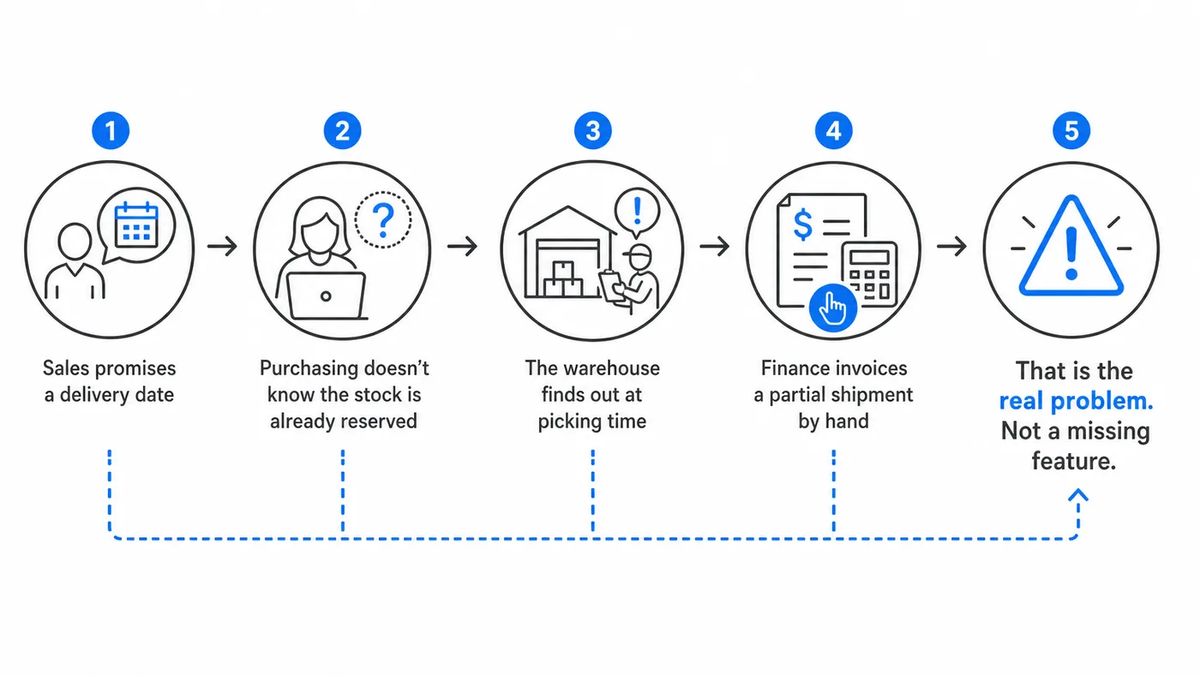
Most ERP comparisons rank platforms on feature checklists. Every serious platform ticks the same boxes: inventory, purchasing, sales orders, financials. A checklist can tell you a module exists. It can’t tell you whether stock reservations, pick lists and invoices update each other without someone re-keying data.
For distributors, the gap between “has the feature” and “runs the process” is where projects fail. Compare flows, not features.
The Criteria That Actually Separate Distribution ERPs
The criteria that separate ERP for distributors are the ones tied to stock moving and money moving at the same time. Use these as your scoring rows:
| Criterion | What to test in the demo |
|---|---|
| Order-to-cash | Quote, sales order, availability check, delivery, invoice and payment status in one record |
| Stock visibility | Live available stock across warehouses and locations, net of reservations |
| Replenishment | Purchase requests and orders triggered from real demand, not a nightly spreadsheet |
| Warehouse execution | Receiving, putaway, picking, packing, batches and serial numbers |
| Finance link | Invoices, costs and margins posted from operational events, not re-entered |
| Integrations | Online shops, supplier portals, accounting tools, barcode devices |
| Multi-entity | Separate companies, warehouses and currencies under one set of permissions |
| Total cost | Licensing model, implementation, integrations and support over several years |
Weight the rows by where your team loses time today. A distributor with one warehouse and many sales channels’ scores differently from one with five warehouses and a single channel.
Real-Time Inventory Visibility Across Sales Channels
Distributors rarely sell through one channel. Orders may arrive from sales representatives, online shops, B2B portals, marketplaces, and direct customer requests. Every channel competes for the same inventory. A distribution ERP must therefore show more than the physical quantity in a warehouse. It must distinguish between available stock, reserved quantities, incoming deliveries, and goods already committed to customers. Otherwise, a product may appear available online even though another customer has already ordered it. When comparing NetSuite, Business Central, Infor, SAP, or SIX ERP, test how quickly inventory changes become visible across all connected sales channels. With SIX StockFlow and SIX SalesFlow, warehouse inventory and customer orders operate within connected business processes, helping distributors maintain consistent stock information and avoid unnecessary overselling.
Warehouse Management ERP: Built In or Bolted On
Warehouse management ERP is not one thing. It is a decision about where warehouse logic lives.
Some platforms run warehouse processes inside the core ERP. Others rely on a separate warehouse module, an add-on, or a partner product connected through an integrationIntegration connects systems so they can exchange information or coordinate actions. An ERP integration helps link business tools and reduce manual transfers between them.. Both can work. The difference shows up in exceptions.
A short pick. A damaged pallet. A batch that fails inspection. Who updates the order? Does the customer service screen show it? Does finance see the adjusted invoice before it goes out?
Ask every vendor to walk through one exception live, from the scanner to the invoice. If the answer involves an export, a sync job or “the partner handles that,” write it down. That is your future support ticket.

If you are scoring this area in depth, the checklist in ERP features warehouses and distributors need breaks warehouse requirements into testable items.
Handling Backorders, Partial Deliveries, and Customer Returns
The real test of a distribution ERP begins when an order cannot be fulfilled exactly as planned. A customer orders 100 units, but only 65 are available. Can the system reserve those 65 units, create a partial delivery, track the remaining 35 as a backorder, and update the customer order without manual corrections? What happens when returned goods arrive damaged or must be inspected before they can be sold again? These exceptions reveal whether sales, warehouse operations, purchasing, and finance are genuinely connected. A reliable distribution ERP should maintain accurate order quantities, inventory movements, delivery status, and financial records throughout the process. When evaluating vendors, ask them to demonstrate a complete backorder and return scenario using your own products and warehouse rules. A system that handles exceptions correctly is often more valuable than one that only processes perfect orders.
How to Run NetSuite vs Business Central Distribution Demos
The fair way to judge NetSuite vs Business Central distribution fit is to give both vendors the same script and the same data. Don’t let either vendor choose the demo story. They will choose the one that flatters the product.
Build the script from your own operation:
- Take three real orders from last quarter, including one with a backorder and one with a split shipment.
- Give each vendor your item master sample, warehouse layout and pricing rules.
- Ask them to run each order from quote to cash, live, without switching to slides.
- Record every point where a user re-enters data or leaves the ERP.
- Ask who configures each step: the vendor, a partner, or your own team.
Run the same script for Infor CloudSuite Distribution and SAP S/4HANA. Larger platforms often need a partner to configure distribution processes, so meet the partner, not only the vendor. The partner’s team is who you will work with after go-live.
Score every demo against the same table. Count the workarounds. The platform with the most impressive dashboardA dashboard brings key figures and status information together on one screen. An ERP dashboard helps teams monitor performance and identify issues that need attention. isn’t automatically the one with the fewest workarounds.
Comparing Total Cost Without Getting Surprised
Total cost of ownership is not the license line. It is everything you pay to keep the system running the way your business works.
The usual hidden costs for distributors look like this:
- Per-user licensing that grows every time a warehouse picker or driver needs access
- Add-ons for warehouse execution, EDI, shipping or e-commerce connectors
- Partner fees for configurationConfiguration sets up software using its existing options. In an ERP system, it adapts workflows, roles and other settings to the company's business processes. changes after go-live
- Integration maintenance when a connected system updates its APIAn API (Application Programming Interface) allows software systems to exchange information. Connected to an ERP system, it helps transfer business data and reduce manual entry.
- Upgrade work when customizations break on a new release
Ask each vendor for a multi-year cost view that includes implementation, integrations, support and the users you will actually add. Then ask what happens to that number when you open a second warehouse or a new legal entity.
Don’t select a platform merely because it is the familiar name. Familiar is not the same as fitted.
Measure Distribution ERP Performance With Real KPIs
A distribution ERP should improve measurable business results, not simply replace old software. Before selecting a vendor, establish your current performance in order fulfillment, inventory accuracy, purchasing, warehouse operations, and invoicing. Track indicators such as On-Time In-Full (OTIF) delivery, order processing time, inventory turnover, picking accuracy, backorder frequency, and cost per order. Then ask every ERP vendor how its system helps measure and improve these indicators. For example, reducing the time between order confirmation and warehouse picking may improve delivery speed, while more accurate stock reservations can reduce backorders. A dashboard showing impressive charts means little if the underlying information is incomplete or updated too late. The best distribution ERP is the one that gives management reliable numbers and helps employees improve them.
Replenishment Planning: Can the ERP Prevent Tomorrow’s Stockouts?
Inventory visibility tells a distributor what is available today. Replenishment planning determines what will be available next week or next month. This distinction matters because even an accurate warehouse system cannot prevent shortages if purchasing reacts too late. A distribution ERP should connect customer demand, sales history, reserved stock, supplier lead times, minimum order quantities, and incoming purchase orders. Consider a distributor that sells 500 units weekly but depends on a supplier with a four-week delivery time. The system needs to identify future shortages early enough for purchasing to act. During your ERP comparison, change a supplier’s delivery date and ask the vendor to demonstrate how this affects expected stock availability, customer commitments, and purchasing requirements. SIX PurchaseFlow and SIX StockFlow connect procurement and inventory information, providing a foundation for coordinated replenishment decisions. Knowing your stock position is important. Knowing when that stock will run out is even more valuable.
ERP Features on Paper vs. Working Processes After Go-Live
An ERP vendor may demonstrate advanced inventory management, automated purchasing, warehouse scanning, and financial reporting. That does not mean these capabilities will work together in your company without additional configuration, integrations, or changes to existing processes. Ask every vendor to separate standard functionality from optional modules, third-party extensions, and custom development. Then request a written explanation of who implements each requirement, who maintains it after go-live, and what happens when the software is updated. This is particularly important when comparing larger ERP platforms that depend on implementation partners. A function available through an additional module may be perfectly suitable, but its cost, maintenance responsibility, and operational dependencies must be understood before signing. The real comparison is not what the software could theoretically do. It is what your company will receive, how it will work, and who will keep it running.
Where SIX ERP Fits in a Distribution Shortlist
SIX ERP is worth adding to your shortlist when the core problem is disconnected tools rather than a missing feature. It connects sales, CRM, purchasing, inventory, warehouses, delivery and finance in one private environmentA private environment is a software environment set aside for one customer. It separates that customer's data and settings while supporting agreed access, maintenance and backup arrangements., configured to your process instead of forcing a generic workflowA workflow defines the steps, responsibilities and decisions needed to complete work. An ERP system can guide tasks through these stages and show progress..
For a distributor, the relevant modules are:
- SalesFlow and CustomerFlow for leads, quotations, sales orders, availability checks, delivery, invoicing and follow-up
- PurchaseFlow for purchase requests, supplier offers, approvals, purchase orders and incoming deliveries
- StockFlow for multi-location stock, reservations, picking, packing, fulfillment, batches and serial numbers
- FinanceFlow for invoicing, payments, budgets, accounting and profitability reporting
SIX also integrates with existing accounting platforms, online shops, supplier portals, payment services and barcode devices through APIs and custom development. It runs as a managed serviceA managed service gives an external provider responsibility for agreed services, such as software maintenance and support. It helps companies plan technical work and ongoing system care., so process mappingProcess mapping documents the steps, people and decisions involved in business work. In an ERP project, it helps define workflows and identify improvements before system setup., configuration, data migration, training, hosting, updates and post-go-live support are part of the delivery. Licensing is annual, with implementation scoped separately, and use is unlimited across modules.
To see how this plays out in actual operations, read the business value of SIX ERP in real operations, which covers implementations in manufacturing and sales.
Pick the Process, Then the Platform
The right distribution ERP is the one that runs your order, stock and invoice flow without side spreadsheets. Map that flow first. Then make every vendor prove they can run it. If disconnected sales, warehouse and finance tools are what’s slowing your team down, talk to our specialists about mapping your distribution process before you commit to a platform.