

To automate business processes, map how work moves between people and departments, pick the processes where delays and re-keying cost the most, and run them in one connected system instead of separate tools and spreadsheets. An ERPAn ERP system connects a company’s core processes—such as sales, finance, inventory, manufacturing, and service—in one place so teams can work with shared information. (enterprise resource planningAn ERP system connects a company’s core processes—such as sales, finance, inventory, manufacturing, and service—in one place so teams can work with shared information.) platform is built for this: sales, purchasing, inventory, finance and field work share one set of data, so each step triggers the next without anyone copying numbers. This guide covers what to automate, in what order, and how to check that it worked. It is written for small and medium businesses, manufacturers and service organizations that want to grow without rebuilding their systems every two years.
Process automation versus task automation
Task automationAutomation uses software or equipment to carry out tasks according to defined rules. An ERP system can automate routine business steps and highlight exceptions for review. removes one manual action: a macro that fills in an invoice template, an email that fires when a form is submitted. It saves minutes, but the surrounding process stays manual, and the output still has to be checked, forwarded and re-entered somewhere else.
Business process automation covers the whole chain. Take a customer order. A quote is accepted, the order is created, stock is reserved, a purchase request is raised if stock is short, the warehouse picks and ships, the invoice is issued and the payment is matched. Each handover is where work stalls in a manual setup: someone has to notice the status changed, find the right file and type the data again.
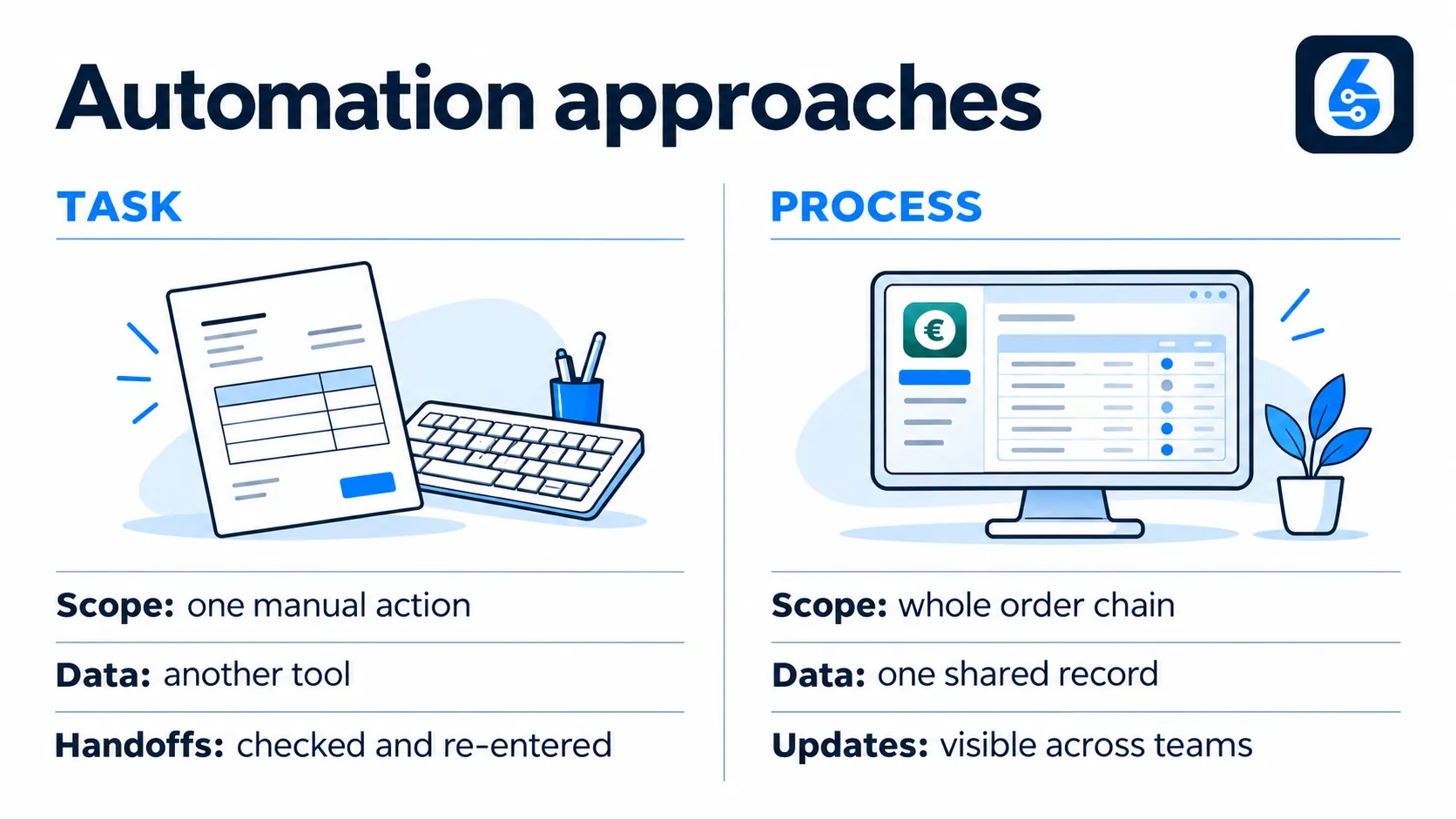
The practical difference is where the data lives. Task automation tends to add another tool to the pile. Process automation depends on one shared record, so that a change in sales is immediately visible to purchasing, the warehouse and finance. That is why the first question is rarely “which tool?” and almost always “how does this process actually run today?”
Why connected data matters more than more tools
Many Bulgarian companies still run on a mix of spreadsheets, accounting software and email. Eurostat’s 2025 digitalisation report found that only 50% of SMEs in Bulgaria reached a basic level of digital intensity, against 90% in Denmark and 93% in Finland (the figures are for 2024). Basic digital intensity means using at least a few of twelve measured digital technologies, so the gap shows how much room there is for companies that connect their operations properly.
Local business bodies point in the same direction. The Ruse Chamber of Commerce and Industry’s July 2026 article on SME digitalisation recommends digital workflows for documents and approvals, ERP integration of sales, production, warehouse and accounting, and the use of operational data in management decisions. That is the same logic this guide follows: workflows first, one integrated systemAn integrated system connects business functions or applications so they can share information. An ERP system uses this approach to link operations and reduce repeated data entry. second, decisions based on live data third.
Step 1: Map the process before you touch any software
Mapping means writing down, step by step, who does what, in which system, with which document, and how long it waits between steps. Do it with the people who do the work, not only with managers. Managers describe the process as designed; the team describes the process as it runs, including the workarounds.
For each process, capture:
- Trigger: what starts it (a customer order, a low stock level, a signed contract, a new hire).
- Steps and owners: each action and the person or role responsible.
- Inputs and outputs: the data and documents that enter and leave each step.
- Handovers: every point where work moves from one person, department or file to another.
- Exceptions: partial deliveries, returns, rush orders, price overrides, missing approvals.
The exceptions are where automation projects most often go wrong. A process that is mapped only for the normal case will be automated for the normal case, and the team will return to spreadsheets the first time an order does not fit. This is why we follow a no-gap approach at SIX: we map company processes in detail before configuring the ERP, so exceptions are designed in, not discovered after go-live.
Step 2: Choose what to automate first
You cannot automate everything at once, and you should not try. Score each mapped process on four questions:
- Volume: how many times a week or month does it run?
- Manual effort: how many people touch it and how many times is data re-entered?
- Error cost: what does a mistake cost in money, stock, customer trust or compliance?
- Rule clarity: can you describe the decision rules in plain language?
Processes that score high on volume and manual effort, and have clear rules, are the best starting points. Processes with unclear rules need to be defined before they can be automated, otherwise you automate the confusion.
In practice, the usual first candidates in SMEs, manufacturers and service companies are these:
| Process | What is automated | Who benefits most |
|---|---|---|
| Quote to order to invoice | Order creation from an accepted quote, invoice generation from delivery, payment matching | Distributors, manufacturers, service firms |
| Purchasing | Purchase requests from low stock or production demand, approvals, supplier order tracking | Manufacturers, distributors |
| Inventory control | Real-time stock levels, reservations, movements between locations | Manufacturers, warehouses |
| Production planning | Work orders, material requirements, links to purchasing and costs | Manufacturers |
| Field service | Job assignment, scheduling, work reports, parts used, billing | Service organizations |
| Employee onboarding | Checklists, document collection, approvals, access requests | Any growing company |
| Financial close | Postings generated from operational transactions, reporting | Finance teams |
Start with one flow that hurts, prove it, then add the next. A platform that lets you begin with essential flows and expand later makes this sequencing possible without migrating to a new system at each stage. SIX ERP is organized this way, as separate flows such as SalesFlow, PurchaseFlow, StockFlow, ManufacturingFlow, ServiceFlow, FinanceFlow, ProjectFlow, CustomerFlow and PeopleFlow, which connect teams through shared real-time data.
Step 3: Automate the core processes
Sales to invoice
The most common leak is between the sale and the invoice. A salesperson agrees terms, the order is retyped by an administrator, the warehouse gets a separate message, and finance builds the invoice from a spreadsheet. Each retyping is a chance for a wrong price or quantity.
Automated, the quote becomes an order, the order reserves stock, the shipment triggers the invoice, and the payment closes the receivable. The data is entered once. SalesFlow handles the sales side of this chain, and FinanceFlow takes the financial side, so a document created in sales is the same one finance posts.

Lead handling at the front of the funnel can be automated too. Tools such as AI lead qualification software engage website visitors, ask qualifying questions and pass qualified leads on, which feeds cleaner opportunities into the sales process.
Purchasing and inventory
Inventory errors are usually process errors: a receipt booked late, a transfer nobody recorded, a purchase made because the shortage was noticed on the shop floor and not in the system. When purchasing and stock share the same data, minimum levels can trigger purchase requests, approvals follow defined rules, and goods receipts update stock and the payable at once.
For manufacturers, the connection goes further: planned production consumes materials, shortages raise purchase demand, and costs flow to accounting. We describe this chain in detail in how to connect production planning, purchasing and accounting in ERP. If stock accuracy is your main concern, look at StockFlow for warehouse and inventory management and PurchaseFlow for the buying side. Manufacturers can see how planning, work orders and traceabilityTraceability follows a product or material through its history, from origin to use or delivery. An ERP system connects the records needed to investigate issues and track affected items. fit together on our ERP for manufacturing page, and distributors can read about inventory, orders and fulfilment.

Field service
Service organizations lose time between the office and the technician: a job is booked by phone, written on paper, reported late, and billed days afterward. Automating it means the request creates a job, the job is scheduled and assigned, the technician records work and parts in a mobile appA mobile app is a software application designed to run on a smartphone or tablet. Connected to an ERP system, it helps employees access business information and complete tasks while away from their desks., and the completed report feeds billing. ServiceFlow is our flow for field service management, and SIX includes web and mobile apps so the data is captured where the work happens.
Employee onboarding
Onboarding is a checklist process with many owners: contract, equipment, accounts, training, payroll data. Automating it means each task is assigned when the hire is confirmed, each owner sees what is pending, and nothing depends on one person remembering to send an email. It is a good second-wave candidate because the rules are clear and the volume grows with the company.
Step 4: Set up approvals, rules and dashboards
Automation is not only about moving data; it is also about moving decisions to the right person at the right time. Define:
- ApprovalAn approval is a formal decision that allows a request or action to proceed. An ERP system can route approvals and record who made each decision. thresholds: for example, purchase requests above a set amount go to a manager, below it they proceed.
- Alerts: low stock, overdue invoices, jobs without an assigned technician.
- Status visibility: each department sees where an order, purchase or job stands without asking.
- Dashboards: a small set of indicators per role, such as order backlog, stock coverage, days to collect payment, jobs completed on time.
Keep the indicator list short. Dashboards with forty metrics are not read. For ideas on turning operational records into usable information, see our guide on data management and better decisions.
Step 5: Clean the data, test, and cut over
Automation multiplies whatever data it receives. Duplicate customers, inconsistent item codes and outdated price lists will produce wrong invoices faster than a human would. Before go-live:
- Clean master data: customers, suppliers, items, units of measure, price lists, bills of materials.
- Decide the opening balances: stock quantities, open orders, open invoices, and the date from which the new system is the only source of truth.
- Test with real scenarios: run full cycles including the exceptions you mapped in step 1, such as partial deliveries and returns.
- Train by role: each person practices their own tasks, not a general demonstration.
- Cut over deliberately: choose a low-volume period and retire the old spreadsheets so two versions of the truth do not coexist.
Implementation succeeds or fails on adoption. People keep using the tools they trust, so involve them early and show them what disappears from their workload. Our article on why ERP implementation is a people project first goes through planning in more detail. Our services cover consulting and pre-integration support, integration, configuration and customization, and ongoing support and updates, so each phase has an owner.
Step 6: Measure results and expand
Decide on measures before launch, so you have a baseline. Useful measures for most businesses:
- Cycle time: from order to invoice, from request to purchase order, from job request to completed job.
- Error rate: corrected invoices, stock count differences, rework.
- Touches per transaction: how many people handle one order.
- Working capital indicators: days of stock, days to collect payment.
- Time to report: how long it takes to produce monthly figures.
Review them monthly for the first quarter, then quarterly. When a flow is stable and its numbers move, add the next one. This is the sequence that lets a company grow without overhauling its systems.
Risks to plan for
The most common risks are manageable when you plan for them:
- Data quality: assign an owner for each master data set and agree on naming and coding rules.
- Integrations: list every system that must exchange data with the ERP, such as e-commerce, banking and payroll, and agree who maintains each connection. Starting with a platform whose departments already share one database reduces the number of connections to build.
- Security and access: give each role only the permissions it needs and keep a record of who approved what.
- Cost: budget for the subscription, implementation and training, not only the license.
- Team adoption: name a process owner in each department and review use after go-live.
What it costs to start
SIX ERP is licensed by subscription. The plans published on our licensing page are SIX Start at €999 per year, SIX Growth at €2,499 per year and SIX Business at €4,999 per year. SIX Enterprise has no published price, and SIX AIFlow is listed at €99 per month. Implementation services are scoped to the business and have no published price, which is why mapping your processes comes first: it defines what needs to be configured.
A starting plan for the first 90 days
A realistic first quarter does not try to automate the company. It proves the method on one chain, with a small group of people who will benefit from it.
- Weeks 1 to 3: map two or three processes with the people who run them, including exceptions, and score them on volume, effort, error cost and rule clarity.
- Weeks 4 to 6: choose the first flow, define the data owners, clean master data and agree on indicators and baselines.
- Weeks 7 to 10: configure, test with real scenarios, train by role and cut over in a quiet period.
- Weeks 11 to 13: review the indicators, collect feedback from users, fix friction and decide which flow comes next.
The plan is deliberately modest. A company that finishes one flow with clean data and clear ownership is in a better position than one that has started five and finished none.
Our perspective
Most companies that come to us for automation already have tools. What they lack is a shared picture of how work flows between those tools. A sales system, a separate warehouse file and an accounting package can each be efficient on their own and still leave people retyping data all day.

That is why we insist on mapping first. Our no-gap approach means we describe the process in detail before configuring anything, including the exceptions, the approvals and the handovers. It is slower in the first weeks and faster for every month after, because the system matches how the business actually works.

We also believe a business should not have to choose between starting small and growing. You can begin with the flows that matter most, such as sales, purchasing or stock, and add manufacturing, field service, projects or people management when you are ready, on the same platform and with the same data.
Start with the flows your business needs
SIX ERP connects sales, purchasing, inventory, finance, manufacturing, field service, projects and people in one platform, with web and mobile apps, dashboards and configurable workflows. You start with the essential flows and expand as the business grows, and our consulting and pre-integration support begins with mapping your processes.

See the SIX ERP plans and subscription options, or explore SIX ERP to see which flows fit your operation.
Start With Your Processes, Not With Software
Every business operates differently, and successful automation starts with understanding those differences. At SIX ERP, we don’t believe in forcing companies into predefined workflows. Instead, we begin with a detailed Business Blueprint that examines how your departments work, where information gets lost, which tasks create unnecessary manual effort, and how processes depend on each other. From there, we define a practical automation roadmap, identify the SIX Flows your business actually needs, and establish a clear scope for configurationConfiguration sets up software using its existing options. In an ERP system, it adapts workflows, roles and other settings to the company’s business processes., integrationIntegration connects systems so they can exchange information or coordinate actions. An ERP integration helps link business tools and reduce manual transfers between them., and customizationCustomization changes or adds software functionality beyond standard settings. In an ERP project, it can meet specific business needs while adding development and maintenance work.. Whether you want to automate one process or connect your entire organization, the objective remains the same: fewer manual handoffs, reliable information, and measurable improvements in daily operations.