Home » ERP » What Drives Multi-Entity ERP Pricing and Total Cost in 2027
What Drives Multi-Entity ERP Pricing and Total Cost in 2027
See what drives multi-entity ERP pricing: entities, users, modules, integrations and support, plus a five-year TCO example and a cost evaluation checklist.
Multi-entity ERPAn ERP system connects a company’s core processes—such as sales, finance, inventory, manufacturing, and service—in one place so teams can work with shared information. pricing is driven less by the license and more by how your group is built: how many legal entities, users, currencies and intercompany flows the system has to carry. The license is the visible number. Implementation, data migration, integrations and support decide what you actually pay over five years. This guide breaks down each cost driver, compares the main pricing models, and walks through a five-year total cost example you can reuse with your own quotes.
The Quote Is Not the Cost
Picture a typical budget meeting. Finance has a license quote for three companies. Operations has a separate estimate for warehouse setup. IT has a number for connecting the online shop. Nobody has added them together.That is how most multi-entity ERP projects go over budget. Not because a vendor hid something. Because the group never listed what it needed.A license price tells you what it costs to use the software. It doesn’t tell you what it costs to make the software fit three companies, two currencies and one consolidated report. Those are different numbers.
The Cost Drivers That Move Multi-Entity ERP Pricing
Every multi-entity ERP quote is built from the same set of drivers. Some raise the license. Most raise the work around it.
Cost driver
What it changes
Why it matters in a group
Number of legal entities
License tiers, setup work, chart of accounts
Each company needs its own books, rules and permissions
Users
Per-user license fees, training
Shared staff across companies can be counted twice
Modules
License scope
Finance, stock, sales and production may each be priced separately
Locations and warehouses
Setup, stock rules
More sites mean more transfer and inventory rules
Currencies
Setup, revaluation rules
Every currency adds exchange-rate and reporting logic
Intercompany transactions
ConfigurationConfiguration sets up software using its existing options. In an ERP system, it adapts workflows, roles and other settings to the company’s business processes., testing
Sales between your own companies must post on both sides
Consolidation
Reporting setup
Group reports need matching accounts and elimination rules
Integrations
Development, maintenance
Each connection must be built, tested and kept working
Data migration
Consulting hours
Old data must be cleaned, mapped and moved per entity
CustomizationCustomization changes or adds software functionality beyond standard settings. In an ERP project, it can meet specific business needs while adding development and maintenance work.
Development, upgrades
Custom code costs once to build and again to maintain
Hosting
Annual fee or internal IT cost
Cloud, private or on-premise each shift cost differently
Support
Annual fee
Post-go-live help, updates and backups
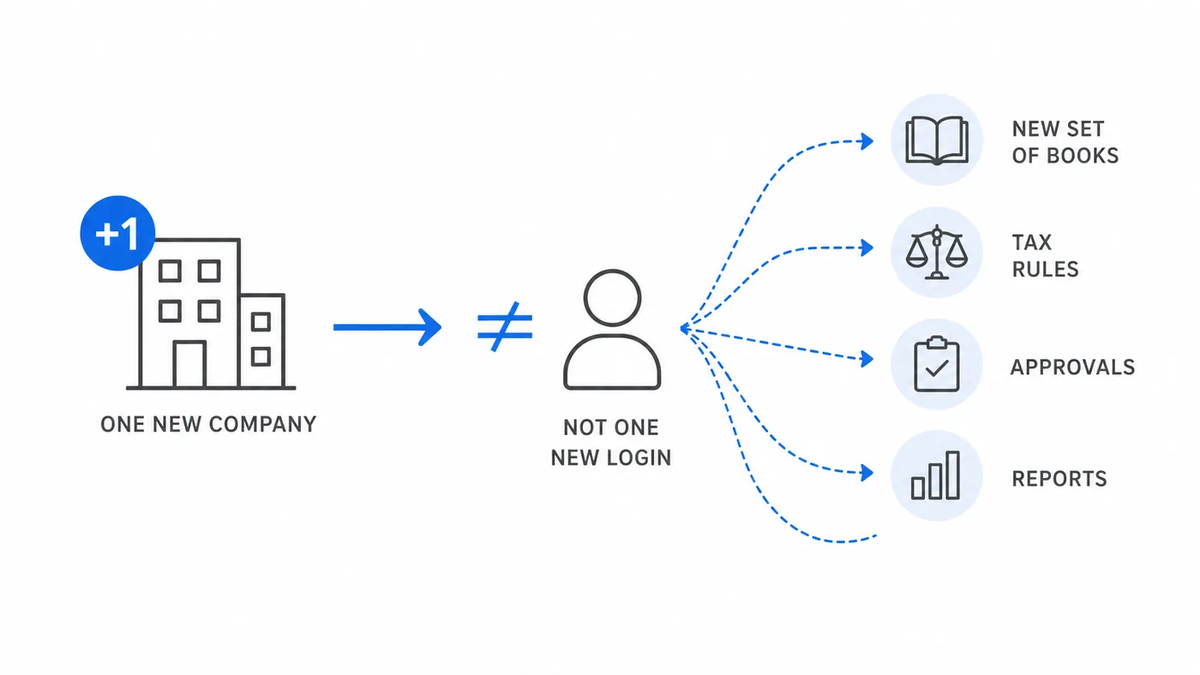
Entities and intercompany flows are the drivers most buyers underestimate. One new company is not one new login. It is a new set of books, tax rules, approvals and reports.
Licensing Models Compared
The licensing model sets how your cost grows when the group grows. Pick the model that matches how you expect to expand, not the one with the lowest first-year number.
Licensing model
How you pay
Where it gets expensive
Per-user subscription
A fee per named user, per month or year
Shared staff and part-time users across entities
Per-entity pricing
A fee per company or subsidiary
Adding companies through acquisitions
Module-based pricing
A fee per functional area
Adding production, service or projects later
Perpetual license
A large upfront purchase plus annual maintenance
Upgrades and older versions that drift from support
Annual license with unlimited use
One yearly fee covering agreed scope
Scope that was not defined before signing
Per-user pricing looks simple. It isn’t, once warehouse staff, technicians and managers in several companies all need access. For a deeper look at how each model behaves over time, see this guide to choosing ERP pricing models.Common alternatives in this market include Odoo, Oracle NetSuite, Microsoft Dynamics 365 Business Central, SAP Business One and Sage X3. Each publishes or quotes pricing in its own structure. Compare them on the same five-year basis, not on headline license fees.
Implementation, Migration and Integration Costs
ERP implementation cost is usually the largest one-time expense in a multi-entity project. It covers the work of making the system match how your companies actually operate.Implementation typically includes:
Process analysis. Mapping how each company sells, buys, stores, produces and invoices.
Configuration. Setting up entities, accounts, currencies, roles and approvalAn approval is a formal decision that allows a request or action to proceed. An ERP system can route approvals and record who made each decision. rules with existing options.
Data migration. Cleaning and moving customers, suppliers, items, open orders and balances.
Customization. Building functions the standard system doesn’t cover.
Testing and training. Running real scenarios, including intercompany sales, before cutover.
Configuration and customization are not the same thing. Configuration uses settings the system already has. Customization adds new code. The second one costs more now and more at every upgrade.Don’t customize merely because your old system worked a certain way. Change the process first. Write code only when the process truly can’t change.
Ongoing Costs After Go-Live
The ERP total cost for a multi-entity group keeps running after go-live. These recurring costs repeat every year for the life of the system:
License or subscription fees, which may rise as you add users, entities or modules
Hosting, whether paid to a provider or carried by your own IT team
Support and maintenance, including updates, backups and fixes
IntegrationIntegration connects systems so they can exchange information or coordinate actions. An ERP integration helps link business tools and reduce manual transfers between them. upkeep, because connected systems change their own interfaces
New entity onboarding, each time the group adds a company
Ongoing training, for new hires and new processes
Internal staff time is a cost too. If your finance team spends days each month reconciling intercompany balances by hand, the system isn’t finished. It’s just live.
A Five-Year TCO Example
Total cost of ownership (TCO) is everything you pay to buy, implement and run the system for a set period. Five years is a common window because it covers the heavy first year and several normal years after it.The example below uses hypothetical numbers to show the math. They are not SIX ERP prices or market averages. Replace them with your own quotes.Assumptions for an illustrative group: three legal entities, two currencies, one warehouse per entity, finance, sales, purchasing and stock modules, two integrations.
Cost line (hypothetical, in thousands)
Year 1
Year 2
Year 3
Year 4
Year 5
5-year total
Annual license
40
40
40
40
40
200
Implementation and configuration
60
0
0
0
0
60
Data migration
15
0
0
0
0
15
Integrations (build, then upkeep)
20
4
4
4
4
36
Customization (build, then upkeep)
10
2
2
2
2
18
Hosting and support
10
10
10
10
10
50
Training
8
2
2
2
2
16
Total
163
58
58
58
58
395
Read the table the way a CFO would. In this example, the license is about half of the five-year cost. Year 1 is close to three times a normal year. And most of the first-year spend is work, not software.Now add a fourth company in Year 3. The license line may rise. You also pay for new setup, migration and training for that entity. A quote that only shows the license line will miss most of that.
How SIX ERP Handles Multi-Entity Management
SIX ERP is a configurable, fully managed ERP platform built to run multiple legal entities, locations, departments, warehouses, currencies and local processes within one controlled environment.For a multi-company group, that means:
One environment, separate companies. Each entity keeps its own data, permissions and processes, with data isolation where you need it.
Centralized reporting. Role-based dashboards and cross-module KPIs give management one view across companies, sites and warehouses.
Financial control. FinanceFlow covers invoicing, payments, budgets, accounting, reporting and profitability, connected to sales, purchasing and stock.
Integrations. Existing accounting platforms, online shops, supplier portals, payment services and specialist tools connect through APIs and custom development.
Managed serviceA managed service gives an external provider responsibility for agreed services, such as software maintenance and support. It helps companies plan technical work and ongoing system care.. Hosting, updates, backups, maintenance and post-go-live support are part of the managed model.
SIX ERP uses annual licensing with unlimited use across modules, and scopes implementation and customization separately. You can review the options on the SIX ERP packages and licenses page to see which modules fit your group.
Why a Business Blueprint Comes Before the Price
A Business Blueprint is a written map of how each of your companies works: its processes, entities, users, currencies, integrations and reports. SIX ERP builds it through process mappingProcess mapping documents the steps, people and decisions involved in business work. In an ERP project, it helps define workflows and identify improvements before system setup. before configuration starts.The blueprint is what makes a price accurate. Without it, every quote is a guess about scope. With it, licensing, implementation and customization are priced against the same agreed picture of your group. That is how you get a predictable total cost of ownership instead of a surprise in Year 2.
Multi-Entity ERP Cost Evaluation Checklist
Use this checklist before you sign any ERP contract. If you can’t answer a line, the quote is incomplete.
[ ] How many legal entities do we run today, and how many do we expect in five years?
[ ] How many users need access, and which ones work across several companies?
[ ] Which modules does each entity need now, and which later?
[ ] How many locations, warehouses and currencies must the system handle?
[ ] Which intercompany transactions happen, and how are they reconciled today?
[ ] What does group consolidation require, and who produces it?
[ ] Which systems must be integrated, and who maintains those connections?
[ ] How much data must be migrated per entity, and how clean is it?
[ ] Which requirements need customization rather than configuration?
[ ] What do hosting, support, updates and backups cost per year?
[ ] What does it cost to add one more entity after go-live?
[ ] Is there a written blueprint that the price is based on?
A lower license fee won’t fix a scope nobody wrote down. Get the structure of your group on paper first, then ask for prices against it. If you want to see how SIX ERP would map and price your companies, start a conversation with the team at six.ms.
Frequently Asked Questions
Frequently Asked Questions About Multi-Entity ERP Pricing
What is the biggest hidden cost in multi-entity ERP?
Usually it is the work around the software, not the software itself. Implementation, data migration, intercompany setup and integrations often add up to more than the first-year license. These costs grow with each legal entity, because every company needs its own accounts, rules, data and testing. Ask every vendor to price these lines separately so you can compare them.
How does ERP licensing cost change when we add a company?
It depends on the licensing model. Per-entity pricing adds a fee for each new company. Per-user pricing adds cost for every new user. Annual licenses with unlimited use may change less on the license line. In every model, though, the new entity still needs setup, migration and training, so budget for that work too.
Is a perpetual license cheaper than a subscription over five years?
Not automatically. A perpetual license moves cost to the start and then adds yearly maintenance. A subscription spreads cost evenly. The right answer depends on your hosting, upgrade and support costs over the full period. Put both options into the same five-year TCO table and compare the totals, not the first-year payment.
How long should a TCO calculation cover?
Five years is a practical window for most groups. It includes the heavy first year of implementation and several normal years of licenses, hosting and support. Shorter windows make high upfront options look worse than they are. Longer windows add too much guesswork about growth, new entities and changing systems.
What factors determine multi-entity ERP pricing?
Multi-entity ERPAn ERP system connects a company’s core processes—such as sales, finance, inventory, manufacturing, and service—in one place so teams can work with shared information. pricing depends on the number of legal entities, users, modules, warehouses, currencies, and business processes the system must support. Intercompany transactions, financial consolidation, integrations, and reporting requirements also influence the implementation scope. For example, adding a subsidiary may require a separate chart of accounts, tax configurationConfiguration sets up software using its existing options. In an ERP system, it adapts workflows, roles and other settings to the company's business processes., approvalAn approval is a formal decision that allows a request or action to proceed. An ERP system can route approvals and record who made each decision. workflows, and reporting rules. Companies should distinguish recurring software license costs from one-time implementation expenses and ongoing maintenance when comparing ERP proposals.
How much does it cost to implement ERP for multiple companies?
Implementation costs depend on the number of companies involved, their operational differences, and the complexity of shared processes. Typical expenses include business analysis, entity configurationConfiguration sets up software using its existing options. In an ERP system, it adapts workflows, roles and other settings to the company's business processes., data migration, financial setup, integrations, customizationCustomization changes or adds software functionality beyond standard settings. In an ERP project, it can meet specific business needs while adding development and maintenance work., testing, and employee training. A group with three companies using similar workflows may require less configuration than three companies operating in different industries or countries. Request a detailed implementation proposal that separates each cost category and defines measurable acceptance criteria before approving the project.
Why does multi-entity financial consolidation increase ERP costs?
Financial consolidation requires an ERPAn ERP system connects a company’s core processes—such as sales, finance, inventory, manufacturing, and service—in one place so teams can work with shared information. to combine financial information from different legal entities while preserving their individual accounting records. This may involve mapping charts of accounts, handling multiple currencies, reconciling intercompany balances, and eliminating transactions between group companies. The complexity increases when subsidiaries follow different local accounting requirements or reporting structures. Implementation costs depend on how much consolidation functionality is standard, which processes require configurationConfiguration sets up software using its existing options. In an ERP system, it adapts workflows, roles and other settings to the company's business processes., and whether additional integrations or reporting tools are needed.
Why is a Business Blueprint important before selecting a multi-entity ERP?
A Business Blueprint documents the business processes, legal entities, users, accounting structures, currencies, integrations, reporting requirements, and operational dependencies that the ERPAn ERP system connects a company’s core processes—such as sales, finance, inventory, manufacturing, and service—in one place so teams can work with shared information. must support. It identifies differences between subsidiaries and establishes which processes should be standardized or remain company-specific. This information allows the implementation team to distinguish standard configurationConfiguration sets up software using its existing options. In an ERP system, it adapts workflows, roles and other settings to the company's business processes. from customizationCustomization changes or adds software functionality beyond standard settings. In an ERP project, it can meet specific business needs while adding development and maintenance work. and provide a more reliable project estimate. For multi-entity organizations, a Business Blueprint reduces the risk of overlooked requirements, unexpected implementation costs, and expensive changes after the project has started.
How does SIX ERP approach multi-entity licensing and implementation?
SIX ERPAn ERP system connects a company’s core processes—such as sales, finance, inventory, manufacturing, and service—in one place so teams can work with shared information. supports managing multiple legal entities, locations, currencies, warehouses, and business processes through a configurable ERP environment. Its FinanceFlow solution connects financial management with sales, purchasing, inventory, and other operational modules. SIX ERP uses annual licensing based on the selected package and applicable scope. Implementation, data migration, integrations, and customer-specific customizationCustomization changes or adds software functionality beyond standard settings. In an ERP project, it can meet specific business needs while adding development and maintenance work. are evaluated separately. Companies can review available options on the SIX ERP licensing page and establish a detailed implementation scope through a Business Blueprint.
Does managed cloud ERP reduce the total cost of ownership?
Managed cloud ERPAn ERP system connects a company’s core processes—such as sales, finance, inventory, manufacturing, and service—in one place so teams can work with shared information. can reduce internal infrastructure and maintenance responsibilities by transferring agreed hosting, monitoring, updates, backups, and technical support activities to the provider. However, it does not automatically guarantee a lower total cost of ownership. Businesses must compare recurring managed serviceA managed service gives an external provider responsibility for agreed services, such as software maintenance and support. It helps companies plan technical work and ongoing system care. fees with the costs of operating their own infrastructure and supporting staff. Implementation, integrations, employee training, and application customizationCustomization changes or adds software functionality beyond standard settings. In an ERP project, it can meet specific business needs while adding development and maintenance work. may still require separate budgets. The financial benefit depends on the provider’s contract, service coverage, and the company’s internal IT requirements.
What is the difference between configuration and customization in ERP pricing?
ERPAn ERP system connects a company’s core processes—such as sales, finance, inventory, manufacturing, and service—in one place so teams can work with shared information.configurationConfiguration sets up software using its existing options. In an ERP system, it adapts workflows, roles and other settings to the company's business processes. uses existing software settings to establish companies, user permissions, workflows, approvalAn approval is a formal decision that allows a request or action to proceed. An ERP system can route approvals and record who made each decision. rules, currencies, and reporting structures. CustomizationCustomization changes or adds software functionality beyond standard settings. In an ERP project, it can meet specific business needs while adding development and maintenance work. involves developing additional functionality or changing software behavior beyond the standard configuration options. Configuration is generally easier to maintain, while customization may require additional development, testing, and maintenance during software upgrades. Businesses should evaluate whether an existing process can be improved before commissioning custom development. A Business Blueprint helps distinguish standard functionality from requirements that genuinely need customization.
How do intercompany transactions affect ERP implementation costs?
Intercompany transactions introduce additional accounting and operational requirements because both sides of a transaction must be recorded consistently. For example, when one subsidiary sells goods to another, the ERPAn ERP system connects a company’s core processes—such as sales, finance, inventory, manufacturing, and service—in one place so teams can work with shared information. may need to manage a sales order, purchase order, inventory movement, corresponding invoices, and financial postings. These processes require agreed transfer pricing rules, permissions, account mappings, and testing. The more frequently companies exchange goods, services, or financial balances, the more important it becomes to define intercompany workflows before implementation.
Read the SIX Business Brief
See how connected ERPAn ERP system connects a company’s core processes—such as sales, finance, inventory, manufacturing, and service—in one place so teams can work with shared information. workflows improve manufacturing, field service and sales, with measurable results from everyday operations.
Every business works differently. Talk with a SIX expert about your goals, processes, and where connected workflows could make a difference. Together, we’ll explore a practical next step for your company.
Learn more about the SIX Business Management solutions
SIX brings every part of your business into one connected environment. Explore our solutions for customer management, sales, service, manufacturing, inventory, purchasing, people, finance, and intelligent automation. Start with the processes you need today and add new capabilities as your business grows, without creating disconnected systems or duplicate data.
Learn how to automate business processes end to end: map them, pick what to automate first, connect departments in one ERPAn ERP system connects a company’s core processes—such as sales, finance, inventory, manufacturing, and service—in one place so teams can work with shared information., and measure the results.
Discover the 10 best ERPAn ERP system connects a company’s core processes—such as sales, finance, inventory, manufacturing, and service—in one place so teams can work with shared information. systems for supply chain management in 2026, including SIX ERP, SAP, Oracle, Microsoft Dynamics 365, NetSuite, Infor, Epicor, Acumatica, Sage X3, and Odoo. Compare their strengths, limitations, pricing models, and capabilities across procurement, inventory management, manufacturing, warehousing, and logistics. Learn why connected workflows, real-time visibilityReal-time visibility gives teams a current view of business activity as it is recorded. An ERP system helps share updates across operations, inventory and finance., and integrated financial data matter more than feature lists when choosing the right ERP for your supply chain.
EDI labels link each carton and pallet to its electronic shipping data. Learn what they contain, how SSCC works and how to generate them from your ERPAn ERP system connects a company’s core processes—such as sales, finance, inventory, manufacturing, and service—in one place so teams can work with shared information..
We use cookies to enhance your browsing experience, serve personalised ads or content, and analyse our traffic. By clicking "Accept All", you consent to our use of cookies. You can change or withdraw your consent at any time by clicking the consent preferences icon.
Customize Consent Preferences
We use cookies to help you navigate efficiently and perform certain functions. You will find detailed information about all cookies under each consent category below.
The cookies that are categorised as "Necessary" are stored on your browser as they are essential for enabling the basic functionalities of the site.
We also use third-party cookies that help us analyse how you use this website, store your preferences, and provide the content and marketing materials that are relevant to you. These cookies will only be stored in your browser with your prior consent.
You can choose to enable or disable some or all of these cookies but disabling some of them may affect your browsing experience.
Always Active
Necessary cookies are required to enable the basic features of this site, such as providing secure log-in or adjusting your consent preferences. They are not used for advertising or to track you across other sites. The consent cookie stores a random identifier that lets us keep a record of the choice you made.
Cookie
fazcookie-consent
Duration
6 months
Description
Stores the visitor's cookie consent choices and a random consent identifier used to keep a record of that choice.
Always Active
Functional cookies help perform certain functionalities like sharing the content of the website on social media platforms, collecting feedback, and other third-party features.
No cookies to display.
Always Active
Analytical cookies are used to understand how visitors interact with the website. These cookies help provide information on metrics such as the number of visitors, bounce rate, traffic source, etc.
Cookie
_ga
Duration
Description
Google Analytics cookie used to distinguish users.
Cookie
_gid
Duration
Description
Google Analytics cookie used to distinguish users.
Cookie
_ga_*
Duration
Description
Google Analytics 4 cookie used to persist session state.
Cookie
_gat
Duration
Description
Google Analytics cookie used to throttle request rate.
Cookie
_gat_*
Duration
Description
Cookie
__utmz
Duration
Description
Google Analytics (Classic) cookie that stores the traffic source or campaign.
Cookie
__utmb
Duration
Description
Google Analytics (Classic) cookie used to determine new sessions.
Cookie
__utmt
Duration
Description
Google Analytics (Classic) cookie used to throttle request rate.
Cookie
__utmc
Duration
Description
Google Analytics (Classic) cookie used with __utmb to determine new sessions.
Cookie
__utma
Duration
Description
Google Analytics (Classic) cookie used to distinguish users and sessions.
Always Active
Performance cookies are used to understand and analyse the key performance indexes of the website which helps in delivering a better user experience for the visitors.
No cookies to display.
Always Active
Cookies that have not yet been categorized.
No cookies to display.
Always Active
Marketing cookies are used to provide visitors with customised ads based on the pages you visited previously and to analyse the effectiveness of the ad campaigns.
Cookie
datr
Duration
Description
Cookie
fr
Duration
Description
Cookie
sb
Duration
Description
Cookie
_fbc
Duration
Description
Facebook click identifier cookie.
Cookie
_fbp
Duration
Description
Facebook Pixel cookie used for advertising and analytics.