
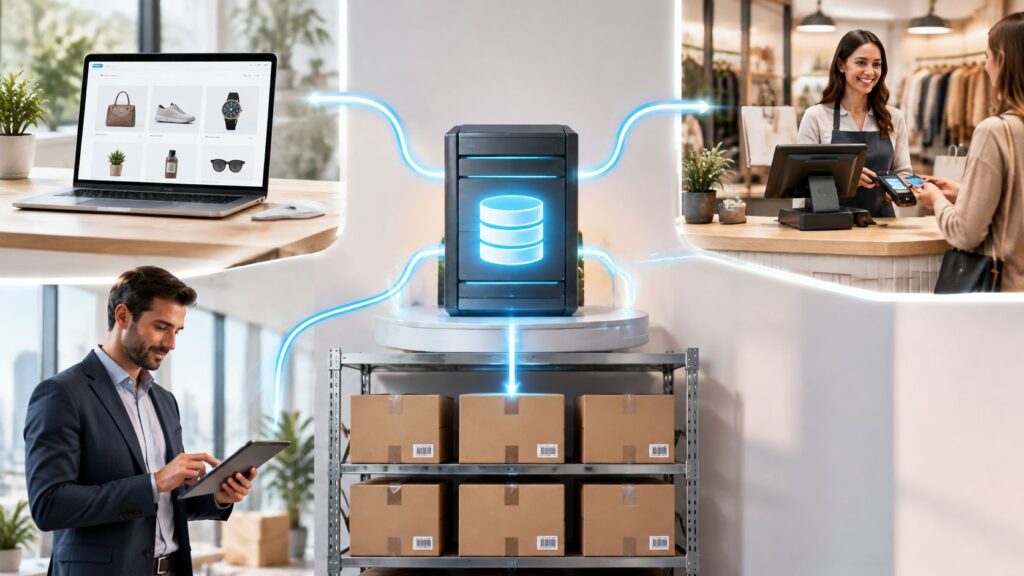
Picture a hypothetical Bulgarian outdoor gear retailer called Planina Ekipirovka, or “Mountain Gear.” The name uses екипировка, the Bulgarian word for equipment. It sells one waterproof jacket through three doors at once. The web shop lists two left in stock. The shop on the high street shows two. A sales representative quoting a corporate client also sees two. All three screens are correct at the moment they were cached, and all three are wrong by lunchtime. The jacket sells three times, one customer is told to wait, and someone in the warehouse spends the afternoon apologizing.
This is the everyday problem OmniSales ERPAn ERP system connects a company’s core processes—such as sales, finance, inventory, manufacturing, and service—in one place so teams can work with shared information. integrationIntegration connects systems so they can exchange information or coordinate actions. An ERP integration helps link business tools and reduce manual transfers between them. solves. OmniSales is the practice of bringing many sales channels into one system: an eCommerce shop, point-of-sale (POS) terminals, a customer-facing store or account panel, and pre-sales work such as quotes and proposals. Enterprise resource planningAn ERP system connects a company’s core processes—such as sales, finance, inventory, manufacturing, and service—in one place so teams can work with shared information. (ERP) is the software that holds the core records behind all of them, customers, products, stock, orders and invoices, in one shared database.
Without a single owner, every channel becomes its own small truth. With one, the channels become windows onto the same truth. Airport departure boards work the same way. Every gate screen shows a flight, but passengers trust the central board. When a gate screen disagrees with the board, the board wins, because that’s the record the airport maintains and updates.
The rule this whole article rests on: Channels are the front doors. The ERP holds the record that decides what's true.
Get that hierarchy right and integration becomes a series of clear engineering tasks. Get it wrong, and you’ll spend years building connectors that faithfully transport disagreements between systems.
Why Multichannel Sales Need One Point of Truth
The double-sold jacket was an ownership problem: three systems held a stock number, and nobody had decided which one was authoritative. Each screen looked reliable at the moment it was refreshed, but every channel was treating its own cached number as a fact.
Fixing it means deciding, in writing, that stock lives in the ERP. Channels may display availability and request reservations, but they do not hold stock. When the web shop sells the last unit, it sends an order to the ERP, the ERP reserves the unit, and the new availability flows back out to every door.
I would make that a governance decision before treating it as an integration task. Your integration work then becomes a narrower question: which system creates or changes each fact, and which systems are allowed to read it? That framing exposes the failure points early. A connector can move data accurately and still spread the wrong answer if two systems think they own the same record.
The same rule governs the first customer mention. SIX CustomerFlow belongs in the customer-side picture, where leads and customer details enter the process. The ERP still has to be the place where the records that drive fulfilment, stock and finance are reconciled. Otherwise a sales conversation can progress against details that operations cannot trust.

Channels own their presentation. The ERP owns the substance. A channel decides how a product looks, what the banner says, and which bundle appears first. It does not decide what the product costs, whether it is in stock, or who the customer is. Those are shared facts, and shared facts need one home.
NielsenIQ’s Omnisales platform applies the same principle at market-measurement scale. It combines retail point-of-sale, e-commerce and consumer data into one deduplicated view of total sales, using machine learning to harmonize the data and eliminate double counting, per NielsenIQ’s Omnisales product documentation. The goal there is one consistent sales measure across channels. Inside your own business, the equivalent goal is one canonical order event that carries everything the ERP needs.
The same logic holds whether you sell B2C or B2B. A consumer buying a jacket online and a procurement officer ordering 200 units against a contract both need to see availability that is true, prices that are current, and an invoice that matches what was agreed. The practical test at launch is simple: for each order, prove one financial outcome and one stock outcome. If the channel map cannot support that test, the integration is not ready.
Which System Owns Each Record
Every field has exactly one owning system, and only that system changes it. Not two, not “mostly the ERP but sometimes the shop.” One.
This sounds bureaucratic until you’ve debugged a price that nobody can explain. The web shop shows one figure, the ERP shows another, and each is “correct” according to its own edit log. Two systems that can both edit a price will eventually disagree, and there is no tiebreaker. One owner removes the argument before it starts.
Here is the ownership matrix I’d put in front of any team planning an OmniSales ERP integration. Treat it as a contract between systems.
| Record | Owner | Other systems may | Sync direction | Timing |
|---|---|---|---|---|
| Product master data | ERP | Read and display; cannot change master fields | ERP to channels | Scheduled and on change |
| Prices | ERP | Display published price; cannot override | ERP to channels | Scheduled price list plus on change |
| Stock levels | ERP (StockFlow) | Show availability; create reservations | ERP to channels; channels to ERP for reservations | Near real time |
| Customer master | ERP (CustomerFlow) | Create leads or accounts; cannot merge | Channels to ERP on creation; ERP to channels on update | Near real time |
| Orders | Accepted in ERP | Capture and submit orders | Channels to ERP | Real time |
| Order status | ERP | Display status only | ERP to channels | Real time on each change |
| Invoices and payments | ERP (FinanceFlow) | Show invoice reference | ERP to channels | On posting |
| Pre-sales quotes | ERP (SalesFlow) after acceptance | Create draft quotes | Pre-sales tool to ERP on acceptance | On acceptance |
Walk the rows in order
Prices and product data flow out. The ERP publishes, channels display. A channel that caches a price list is fine, as long as the cache carries a version number and refreshes when a new list is published. A stale cache is a data problem with an owner, and that owner is still the ERP.
Orders flow in. Channels capture and submit. They don’t approve, reserve stock indefinitely, or decide fulfillment. Those are ERP decisions with ERP consequences for purchasing and finance.
Stock flows out as availability and back as reservations. This is the two-way street, and it fails the same way a doubly editable price fails: two writable copies and no tiebreaker. Publishing a stock number alone isn’t enough. A channel needs to tell the ERP “I’m holding one for the next fifteen minutes,” or two carts check out the last unit and one customer loses.
That matches what a practitioner should expect from the two sides. The ERP pushes pricing and order status outward, while each channel pushes orders inward for fulfillment. Each connected system stays independently maintainable for the fields it owns, and every row of the matrix should be provable in testing: one change in the owning system, one outcome everywhere else.
The governance questions the matrix creates
A matrix settles direction. It doesn’t settle people. Four questions need named answers before anyone writes a mapping file, and each answer depends on how your ERP system data is structured and shared across modules.
- Who may create a customer record? A shop assistant at a trade counter and a web checkout both produce customers. If both can create, you’ll get duplicates within a week. Decide which is allowed to create and which must search first.
- Who merges duplicates? Merging is destructive and needs an owner with authority, plus an audit trailAn audit trail records who created, changed or approved information and when. In an ERP system, it helps trace transactions, investigate errors and support audits. showing what merged into what.
- Who resolves a conflict? When a channel claims a price the ERP doesn’t recognize, someone must decide within hours. A sprint cadence is too slow for a live storefront.
- Which channel keeps its own content? Product descriptions, images, SEO copy and promotions usually stay in the channel. Say so explicitly so nobody tries to sync marketing copy through the ERP.
The matrix itself needs an owner as well. Someone has to approve a new field, a changed sync direction, or a fifth channel joining the model, and that approvalAn approval is a formal decision that allows a request or action to proceed. An ERP system can route approvals and record who made each decision. should be a decision recorded against the matrix rather than a side conversation in a project channel.
Practical rule: If two systems can both edit a field, the disagreement is already scheduled.
Confirm the scope before the matrix means anything
“Omnisales” isn’t one product. A LinkedIn company profile for one Omnisales organization describes a privately held firm founded in 2008 with roughly 11 to 50 employees, focused on custom enterprise solutions for B2B and B2C, order management, CRM, helpdesk, marketing intelligence and master-data management. Other ventures trade under the same or similar names, so the name alone doesn’t identify a continuous product or a particular integration capability.
Before you accept any claim about integration maturity, user numbers or implementation time, get five things in writing on a vendor call:
- The exact product and deployment model, including whether it’s hosted or on-premise.
- The channels it supports today, with roadmap items listed separately.
- APIAn API (Application Programming Interface) allows software systems to exchange information. Connected to an ERP system, it helps transfer business data and reduce manual entry. and webhook documentation, with authentication, rate limits and error codes.
- The data objects it exposes, and which it only reads.
- Required sync frequency per object, in seconds or minutes.
Never apply figures from a differently named Omnisales product to your project. Integration failures are usually governance failures, and bad scoping is the first one. Decide ownership first, then design the automationAutomation uses software or equipment to carry out tasks according to defined rules. An ERP system can automate routine business steps and highlight exceptions for review. around it.
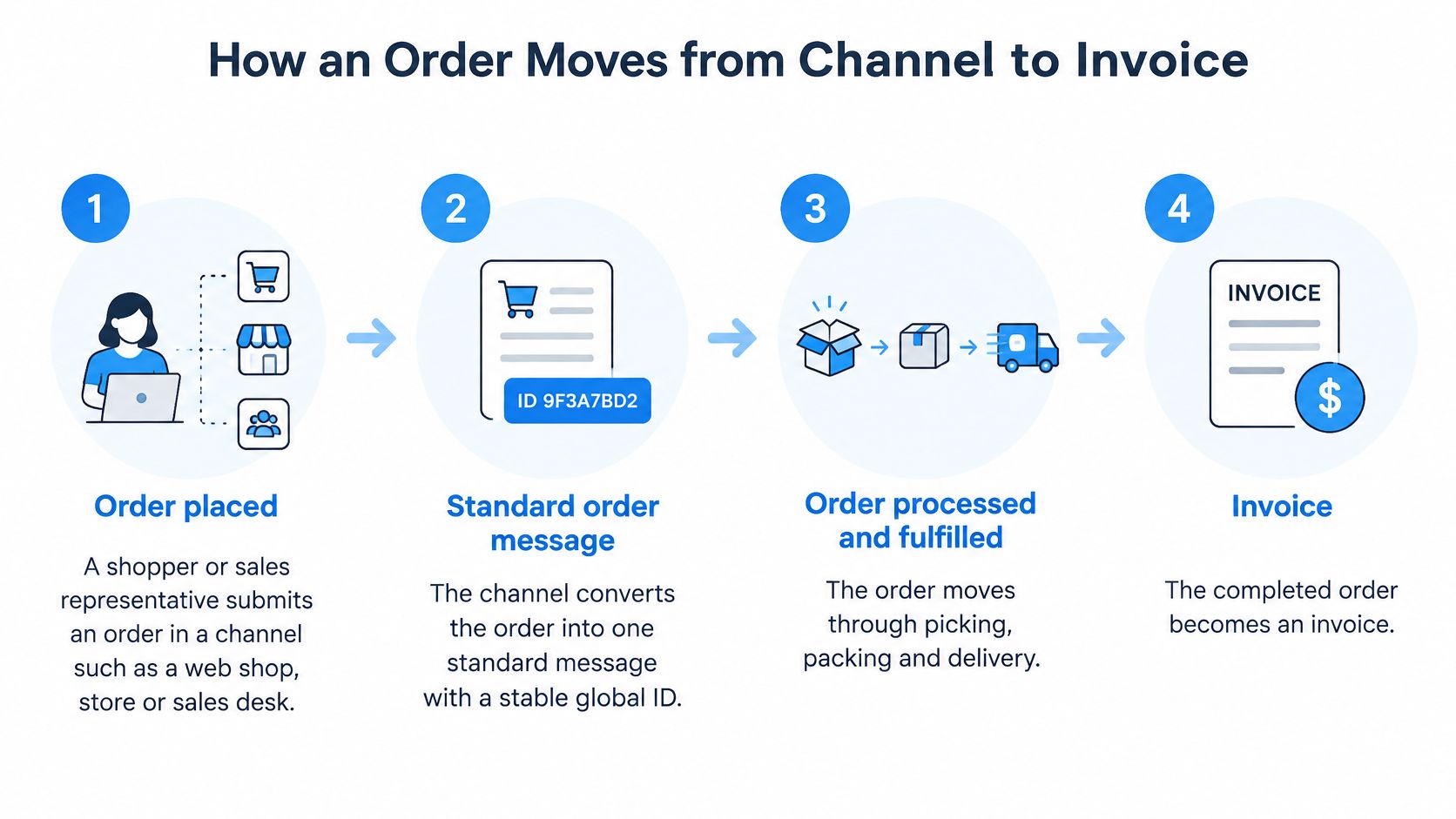
How an Order Moves from Channel to Invoice
Follow one order through the integration before designing the wider flow. Seven steps, one canonical order event, and written tests that prove one financial outcome and one stock outcome per order.
- The order is placed. A shopper checks out on the web shop, a cashier rings up a sale at the POS, or a sales representative converts an accepted quote.
- The channel builds one standard order message. It carries a stable global identifier, customer and product references, quantities, prices, tax context, fulfillment location, timestamp, version number, and idempotency key.
- The ERP validates. Customer, product, price, and tax data are checked. The order is accepted or rejected with a reason code the channel can display.
- SalesFlow confirms and StockFlow reserves. The reservation is published as an event so every channel shows current availability.
- Short stock triggers replenishment. PurchaseFlow raises the request. The customer sees a realistic date based on the availability and purchasing position.
- Shipment updates stock and status. The ERP pushes the new status outward on each change. Version checks stop an older update from overwriting a newer one.
- FinanceFlow posts the invoice. The invoice reference returns to the channel so the customer can find it without calling anyone. Reconciliation then confirms that the order has one financial outcome and one stock outcome.
That sequence depends on a canonical data model rather than separate point-to-point mappings between sales, inventory, purchasing, and finance. The National Institute of Standards and Technology’s report on enterprise application integration describes enterprise application integration as linking distinct systems to support business processes, with APIs specifying callable operations and their parameters. Map external channel fields into that contract once, then route the normalized transaction to SalesFlow, StockFlow, PurchaseFlow, and FinanceFlow. The practical rule is simple: one owner per record, one canonical order event, and one order identity that survives retries, status changes, and invoice posting.
The four controls that keep the path honest
Each control protects a specific step, and each one exists because something in the actual world will otherwise go wrong.
Idempotency keys protect step 2. Marketplaces retry callbacks. Without a key, a retry becomes a second order, a second reservation, and eventually a second invoice. The key makes the second attempt a no-op. Finance and stock stay aligned because the same order identity carries through to the final outcome.
Version checks protect step 6. An inventory update that left the channel before a newer one arrived must not overwrite it. Compare the version, discard the stale message, and log the event with its order reference. The trade-off is strict sequencing: late data gets rejected, then reviewed, instead of corrupting availability without a trace.
A reconciliation job protects everything. Events get lost. Networks drop. An hourly or nightly job compares totals and flags gaps before a customer finds them. It should check accepted orders, reservations, fulfillments, and invoice references against the same canonical order event.
A dead-letter queue protects your engineers. Messages that fail schema or validation checks land somewhere visible, with the payload attached, instead of vanishing into a log nobody reads. That gives support and integration owners a working queue with reason codes, rather than a mystery gap in the order trail.
What usually goes wrong: Teams test the happy path between two systems and call it done. The failures that hurt are retries, partial shipments and tax adjustments, and none of them appear in a two-system test.
New orders, leads and customer conversations also need a home. SIX CustomerFlow covers CRM, leads and sales relationships, bringing customer conversations, opportunities and next steps into one connected journey that links to analytics, eCommerce and the wider platform. That matters when a pre-sales question becomes a quote, and the quote becomes an order with a history attached. SIX ERP connects lead acquisition, proposals, customer orders, availability, purchasing, fulfillment, delivery, invoicing, and follow-up for sales and distribution.
Connections to existing accounting tools, portals and machines are part of Integration and ConfigurationConfiguration sets up software using its existing options. In an ERP system, it adapts workflows, roles and other settings to the company’s business processes. work. SIX ERP can connect with external applications, e-commerce platforms, accounting tools, logistics services, and other business systems through integrations and APIs. Budget for that work explicitly, and define who owns each record before the first channel goes live.
A Phased Rollout That Keeps Selling
The tempting plan is a big bang: switch everything on over a weekend and hope. It fails because stock accuracy has to improve before order volume arrives, and volume arrives the moment you connect a channel.
Four phases, each with scope, an exit test, and a reason for its position in the queue.
Phase 1. Master data only. Load and clean customer, product, unit of measure, price, tax and warehouse records. Publish product and price data one way from the ERP to every channel. Carry no order traffic at all.
Exit test: every channel displays the same price for the same product, and a spot check of 50 products matches field for field.
Phase 2. Orders in. One channel submits orders using the standard message. The ERP accepts or rejects each one with a reason code. Review every rejection daily for two weeks.
Exit test: a full trading day with zero unexplained rejections, and every accepted order visible in SalesFlow with a matching channel reference.
Phase 3. Stock and fulfillment. Publish reservations and releases as events. Switch on the reconciliation job and the dead-letter queue. Run partial shipments, cancellations and connection-loss scenarios deliberately.
Exit test: stock counts reconcile between channel, StockFlow and physical count at the end of three consecutive days.
Phase 4. Finance. Post invoices and credit notes in FinanceFlow and return references to the channels.
Exit test: a sample of orders traces from channel order to invoice to payment with no manual correction.
The people side is not optional
Name an integration owner in IT who owns the pipe, and a business owner for each record who owns the content. Those are different jobs and they fail for different reasons.
Train store staff and portal administrators before phase 3, not after. A cashier who doesn’t understand why the till queues transactions during an outage will invent a workaround that breaks reconciliation for a week.
Keep a rollback route for every phase. Being able to turn off one direction of sync without stopping trade is what makes a phased plan safe. For a fuller view of sequencing, this step-by-step guide to planning your ERP implementation covers the wider project rhythm that these four phases slot into.
No phase starts until its written exit test passes. That rule is the whole method.
Testing the Full Order-to-Invoice Flow Before Launch
Testing one connector at a time tells you a connector works. It doesn’t tell you an order produces exactly one invoice and one stock movement. Only an end-to-end replay does that.
EU interoperability guidance is direct about why this matters: data quality, structure, authenticity and integrity are what let anyone extract value from connected data, and the guidance recommends explicit data-quality assurance for master data. An integration between clean systems is a project. An integration between dirty systems is a permanent cleanup operation.
| Test scenario | Expected result in ERP | Pass check |
|---|---|---|
| Standard online order | One sales order, one stock reservation, one invoice | Order ID appears once in every system |
| Repeated marketplace callback | No second order is created | Idempotency key matches the first message |
| Partial shipment | Stock reduces only by the shipped quantity; invoice follows policy | Ordered, shipped and invoiced quantities reconcile |
| Cancellation before shipment | Reservation is released; invoice is voided or never issued | Available stock returns to the prior count |
| Return after invoice | Credit note is issued and stock is received back | Financial and stock totals agree |
| Tax adjustment | Tax class applied per rule; posted invoice stays unchanged | Tax totals match the rule table |
| POS sale during connection loss | Sale is queued and posted once after reconnection | No duplicate and no gap in the sales log |
| Price change during checkout | Order keeps the price at checkout; channel shows new price after publish | Price version is stored on the order |
Sign off only when every scenario produces exactly one financial outcome and one stock outcome. One order, one invoice, one stock movement. If a scenario produces two of anything, you have a defect, not a rounding difference.
The data-quality controls that make results trustworthy
Before integration, set owners and validation rules for customer, product, unit of measure, price, tax, warehouse and supplier records. Match on immutable external IDs where they exist. Where they don’t, combine normalized legal name, address, tax identifier and country, and send ambiguous matches to a review queue instead of guessing.
Add contract tests that reject invalid currency codes, unsupported units, negative quantities, missing tax classifications, and products without fulfillment attributes. These tests run in the pipeline, not in a spreadsheet.
Then track six measures continuously: completeness, uniqueness, validity, consistency, timeliness and reconciliation rate. Practical targets worth writing into the plan are 100% uniqueness for customer IDs, 100% valid units of measure, and a daily reconciliation between channel order totals, SalesFlow order totals, StockFlow movements and FinanceFlow postings.
The honest test: Can you pick any invoice from last month and trace it back to one channel order, one stock movement and one customer record, without asking anyone? If the answer is no, the integration isn't finished.
Handling Conflicts, Late Data and Failed Syncs
A double-sold item creates a refund, a support conversation, and sometimes the loss of the customer. That is why conflict handling belongs in the integration design, not in an incident call after orders have already gone wrong. Each exception needs one owner, one rule, and an exit test that proves exactly one financial outcome and one stock outcome.
- Duplicate customers. Match on external ID first, then normalized name, address, tax ID and country. Route unclear matches to a named reviewer. Owner: customer master owner.
- Stock mismatch. The ERP count is authoritative. Channels show reserved availability. Reconcile daily and immediately after any outage. Owner: StockFlow administrator.
- Price mismatch. The ERP price applies at checkout. Channels refresh cached prices on publish. Every order stores the price version it used. Owner: pricing manager.
- Status conflict. The ERP status wins. The channel displays it without editing it. Owner: sales operations.
- Late or malformed data. Quarantine the message, log it, alert a named owner, and resolve it inside an agreed window. Owner: integration owner in IT.
The practical point is to decide which system owns the record before the exception happens. If stock, price, customer identity, and order status all have different owners, write that down and enforce it in the integration rules. Otherwise, each channel will resolve conflicts in its own way, and the same order can produce different answers in sales, warehouse, and finance.
When the connection drops
A POS terminal on a flaky line or a technician’s tablet in a basement will lose connectivity. Design for it: queue transactions locally, attach a client-generated identifier to prevent duplicates, and reconcile on reconnection before the terminal resumes normal flow.
Then answer the business question of how much disruption is tolerable, in numbers. Maximum offline duration. Sync recovery time. Permitted stock variance. Failed-message resolution time. These belong in the acceptance criteria, not in a post-incident discussion. I would also require a written replay test: reconnect the terminal, submit the queued orders once, and confirm that no second invoice or second stock movement appears.
Research published in Humanities and Social Sciences Communications on cloud ERP treats cloud ERP performance in areas of inadequate connectivity as an open question, and reports that data migration can absorb roughly 40 to 60 percent of implementation effort. A review of cloud ERP reports that zero-trust architectures between systems may add an expected 10 to 15 percent performance overhead. That figure should be treated as a resilience cost in the design, not a launch-day discovery.
Every imperfect input needs its own adapter and its own owner: a 3PL feed, a spreadsheet export, a field tablet, a shop-floor machine. They each send data in their own shape, and none of them will politely conform. The governance rule stays the same: one canonical order event carries everything the ERP needs, and every downstream system reads from that event rather than rewriting the facts for itself.
Which Businesses Gain Most from an Integration
Read the table below as a fit test. Integration earns its cost when more than one place can change the same fact, and it adds governance overhead when one system already owns the fact cleanly. The practical question is not whether an integration is possible. It is whether two channels need to share stock, price, customer, or order facts before the next order is accepted.
B2C operations usually gain from one stock count across a web shop and stores, plus controlled returns and promotions. B2B operations gain from contract prices, credit limits and approval steps that stay in the ERP, while portal users map to ERP customer accounts so a buyer sees their negotiated rate and remaining credit before ordering. In both cases, the governance rule stays the same: one owner per record, one canonical order event, and exit tests that prove exactly one financial outcome and one stock outcome per order.

| Business type | Typical channel mix | Main benefit | Main watch-out |
|---|---|---|---|
| B2C retailer with web shop and two stores | eCommerce, POS | One stock count across shop and stores prevents overselling | Store POS may lose connection; plan queues |
| B2B wholesaler with customer portal | Portal, pre-sales quotes, sales representatives | Contract prices and credit limits stay in the ERP | Portal users must map to ERP customer accounts |
| Manufacturer selling direct and through dealers | Dealer portal, direct web orders, pre-sales | Production and stock planning see all demand | Dealer forecasts may be unreliable |
| Brand with event and pop-up sales | POS, web, event tablets | Sales from temporary stands reach stock on time | Intermittent connectivity needs resilience rules |
| Single-channel shop with one till | One POS | Simple sync may be enough | Integration may add cost without enough benefit |
All five are hypothetical examples, chosen to show typical shapes rather than real businesses. The fit test is concrete: list the facts that can change outside the ERP, then decide which system wins when two changes arrive close together. If nobody can answer that, the integration needs an owner before it needs a connector.
When a Single Channel Does Not Need Integration
If you run one shop with one till and one stockroom, a full integration may be premature. A simple daily sync of products and prices, or even a manual process with a weekly check, might serve you better until a second channel appears.
The moment a second channel can change stock, price or customer data, the calculation changes. Two channels sharing one truth is where integration earns its keep. Each additional channel after that can reuse the same controls, provided the record owners and exit tests remain clear.
The trade-off is governance. A broader rollout gives better visibility across sales, purchasing, inventory, finance, projects, people and daily operations, but it also creates more rules to maintain. I would rather add channels in stages, with written ownership and order tests in place, than connect every endpoint before the business has agreed on what each record means.
Confirm Your Channel Map Before You Start
Four preparation actions turn this article into a plan you can hand to someone.
- List every channel that creates orders, quotes or stock changes. Include the POS terminals in each store, every portal, the marketplaces and the pre-sales tools. Channels you forget become exceptions later.
- Name one owning system and one accountable person for each record in the ownership matrix. If a row has two names, the row isn’t finished.
- Draw the order-to-invoice flow with the steps above and mark where each control sits: idempotency, versioning, reconciliation, dead-letter queue.
- Write the acceptance tests and resilience targets the business will sign, including offline limits and permitted stock variance.
SIX ERP connects lead acquisition, proposals, customer orders, availability, purchasing, fulfillment, delivery, invoicing and follow-up for sales and distribution. It connects with external applications, eCommerce platforms, accounting tools, logistics services and other business systems through integrations and APIs, and it monitors and maintains those critical connections after go-live.
The work is sequenced. Pre-Integration Consulting maps processes and requirements. Integration and Configuration aligns the setup with approved workflows. Post-Integration Support monitors the connections once real traffic flows. If you’re weighing how open your endpoints need to be, this explanation of what an open API is covers the access model behind most channel connections.
Teams that also care about how their storefronts and regional offers are discovered in AI-driven search can browse GEO commerce optimization services from Shugert Marketing, which sits alongside channel strategy rather than replacing it.
Before committing to a plan, confirm in writing that each specific channel you depend on is supported. A vendor confirming “eCommerce” in general is not the same as confirming your marketplace, your POS hardware and your portal.
SIX ERP connects sales channels to one set of records, so orders, stock, invoices and customer history stay consistent no matter where a sale starts. If you’re planning OmniSales ERP integration, start with the channel map and the ownership matrix, then let pre-integration consulting confirm what’s standard and what needs configuration. Visit SIX ERP to see how SalesFlow, StockFlow, CustomerFlow and FinanceFlow work from a single order through to the invoice.