

TL;DR - Choosing the Right BOM for Manufacturing
Different BOM types serve different purposes. The right structure connects product design, material planning, and manufacturing execution.
A sofa order comes in with a fabric the plant has never used, a width it builds to order, and a foam density only one supplier stocks. Sales confirms it in minutes. Three weeks later purchasing has bought the wrong timber length, the frame bench is waiting on a bracket nobody put on the list, and the costing sheet shows a margin that won’t survive the month.
Every one of those failures traces back to a bill of materials that didn’t describe the way the business builds the product.
A bill of materials, or BOMA Bill of Materials (BOM) lists the materials and components, and their quantities, needed to make a product., is the structured list of everything that goes into one unit of a finished product, with the quantity of each item and the level where it sits. The definition is easy. Deciding which kind of BOM you need, and how several kinds should coexist for the same product, is where manufacturing teams lose time and money. What follows is a working guide to the main types of bill of materials, how each behaves once it reaches an ERPAn ERP system connects a company’s core processes—such as sales, finance, inventory, manufacturing, and service—in one place so teams can work with shared information. system, and where the handoffs between them break.
Types of Bill of Materials at a Glance
Most articles list the types of bill of materials one after another and stop there. The table below sorts them by what each one describes, which is the only thing that helps you choose.
| BOM type | What it describes | Typical use |
|---|---|---|
| Single-level BOM | Only the direct components attached to one parent item | Simple assemblies and prebuilt subassemblies bought in |
| Multi-level BOM | Full parent-child hierarchy down to raw materials | Make-to-order furniture, machinery and multi-stage production |
| Engineering BOM (EBOM) | Product as designed, grouped by function and design relationships | Design release, CAD linkage and engineering change control |
| Manufacturing BOM (MBOM) | Product as built, grouped by assembly sequence and workstation | Production orders, routings and shop-floor execution |
| Phantom BOM | Intermediate group of parts that is never stocked or produced as its own order | Fastening kits and small groups of parts that flow into a parent item |
| Configurable BOM | Rules that change components based on customer selections | Sofas, cabinets and other option-driven product variants |
| Planning BOM | Percentage-based or forecast structure used for demand planning | Forecasting and planning before firm customer orders exist |
Two axes run through that list. Structure asks how deep the list goes: one level of components, or the whole chain down to raw material. Purpose asks what the list is for: design release, shop-floor work, variant selling, or forecast planning. Every BOM you own answers both questions at once, whether or not you’ve named it.
That’s why a single product carries several labels. A dining chair is a single-level BOM to a kit supplier who ships four legs, a seat and a bag of bolts. The same chair is a multi-level BOM to an upholstery shop that cuts its own foam, welds its own frame and buys timber by the board foot. Neither is wrong. They describe different decisions.
The practical rule: choose a BOM type by the decision it supports. Purchasing decisions want structure and quantities. Shop-floor decisions want sequence and workstations. Design decisions want function and specifications. Sales decisions want options and rules.
Get that ordering right and the naming follows. Get it backwards, by picking a name and then bending the process to fit, and you end up with a system that produces immaculate reports nobody can act on.
Single-Level and Multi-Level BOMs Explained
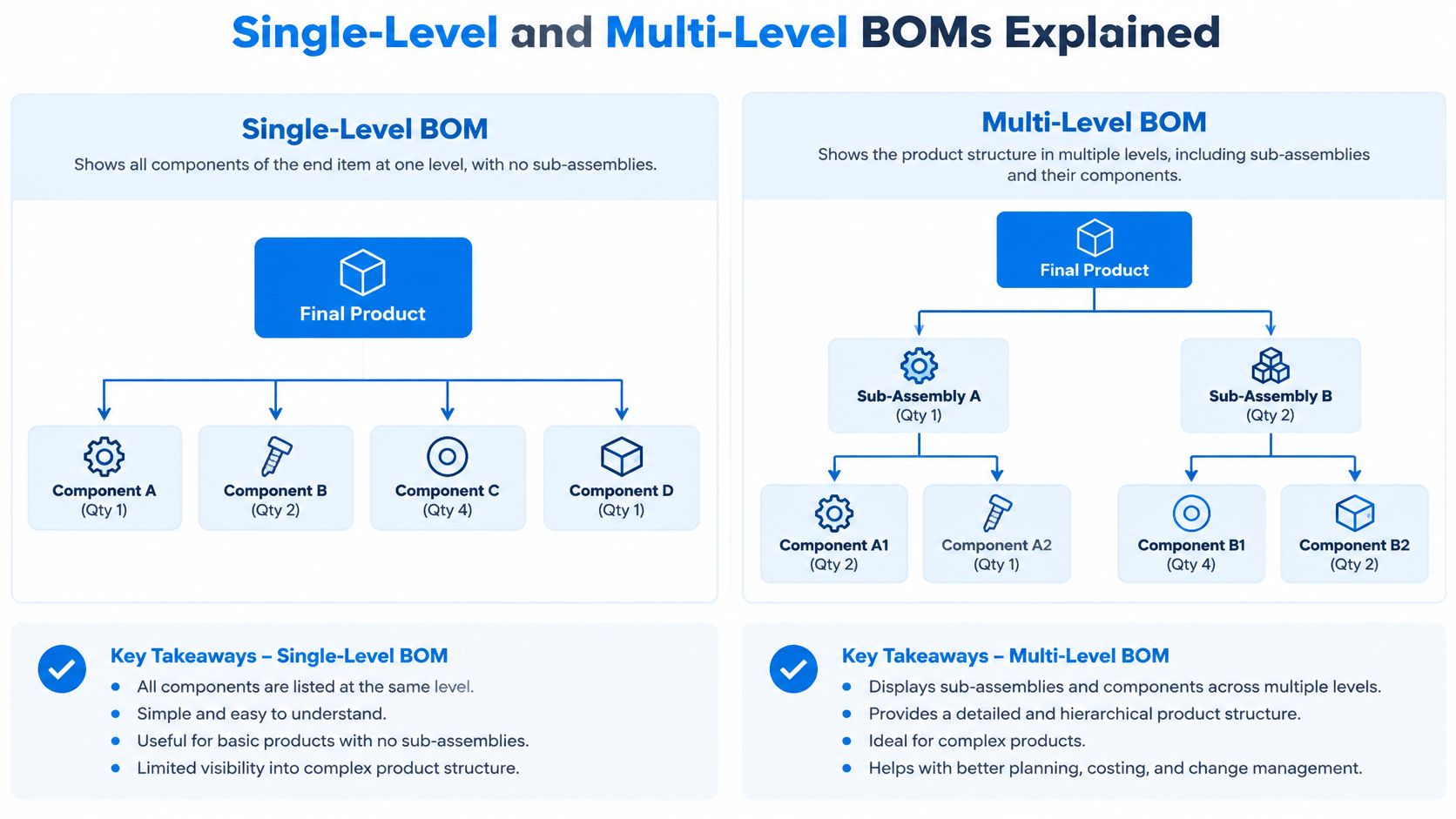
Start with the words, because half the confusion lives there. A parent is the item being built. A child is anything that goes into it. A subassembly is a child that is itself built from other parts, which makes it a parent one level down.
Think of cooking. A single-level BOM is the shopping list for one dish: the ingredients you buy and bring home. A multi-level BOM is the full recipe tree, including the sauce you make from scratch, the stock that goes into the sauce, and the vegetables that go into the stock.
For the first structural contrast, the Oracle documentation on BOM structures is precise: a single-level BOM records only the components directly attached to a parent item and does not expand the contents of subassemblies, while a multilevel structure supports material-requirements planning by “exploding” demand through every dependent level.
A dining chair, built two ways
Picture a mid-range dining chair. The finished chair sits at the top. Under it: a frame subassembly, a seat panel, four legs, and a bag of fasteners. Under the frame: timber lengths, glue, dowels and a finish coat. Under the seat panel: board stock, foam and covering fabric.
A single-level BOM for that chair shows the frame subassembly, the legs, the seat panel and the fasteners. It does not show the timber or the glue, because those belong to the frame, and the frame arrives as a finished item in its own right. That’s fine when the frame is bought in complete. It’s a problem when you cut and weld frames in-house, because the chair-level list can’t tell you that 50 chairs need 50 frame kits, 200 timber lengths and two liters of glue.
A multi-level BOM carries the whole tree, so the system sees every dependency. That is what makes planning possible.
How demand flows down the levels
- Customer order received. Someone confirms fifty chairs for a March delivery.
- Finished product exploded. The system multiplies the chair structure by fifty and drops one level.
- Subassembly demand calculated. Frame demand becomes fifty frames, which explodes again into timber, glue and dowels.
- Raw materials reserved or purchased. Existing stock is reserved, and anything short becomes a purchase requirement with the supplier lead time applied.
That flow is why structure isn’t a formatting preference. A single-level BOM suits parts bought prebuilt, such as a supplied caster wheel. A multi-level BOM suits anything where you own the build, because a quantity error at level three has to travel up three levels before anyone notices it.
Configurable and Phantom BOMs for Product Variants
Two more types solve problems that structure alone can’t touch. The decision rule is short: use a configurable BOM when customer selections change the materials, and a phantom BOM when a group of parts is never stocked or produced on its own.
Configurable BOMs that answer which materials apply
A configurable BOM is a rule-based structure. Selections such as fabric, foam density, width or finish decide which components apply and in what quantity. You keep one structure with rules instead of a hundred near-identical BOMs, one for every combination you’ve ever sold.
Here’s a hypothetical to make it concrete. Say a sofa comes in three widths, five fabrics and two foam densities. Choosing the widest frame doesn’t just change the frame, it changes fabric consumption per meter, the number of seat cushions, and the foam part number. A configurable BOM expresses those relationships once. The order then generates the material list it needs, and the business stops maintaining variants by hand.
ConfigurationConfiguration sets up software using its existing options. In an ERP system, it adapts workflows, roles and other settings to the company’s business processes. also has a time dimension. The NASA-HDBK-1004 parts and materials handbook treats a configuration-controlled BOM as a time-, event-, lot- or serial-effective product definition rather than a static parts list, and it notes that the same finished-product number may legitimately resolve to different component sets depending on revision and effectiveness criteria. That is exactly why a historic order must keep the structure it was built from instead of being recalculated against today’s parts.
Minimum fields worth insisting on: parent revision, component revision, quantity and unit of measure, effectivity date or serial and lot range, substitute policy, approval status, and change-order identifier.
If your current spreadsheet holds four of those eight, you don’t have a configurable BOM. You have a snapshot that drifts the moment someone swaps a supplier.
Phantom BOMs that group parts without a stock item
A phantom BOM is a grouping used for planning that never becomes a stock item and never gets its own production order. Its components pass straight through to the parent.
Illustrative example: a furniture plant defines a standard fastening kit of screws, brackets and connectors. Instead of manufacturing and stocking that kit, the plant marks it as phantom so the individual parts land directly in the parent sofa’s material requirements. The benefit is fewer intermediate orders and simpler maintenance. How much you gain depends on how you tracked those parts before, and no measured figure should be assumed.
The trap is real, though. If a kit is physically bought, counted or issued as its own unit, setting it up as phantom removes it from your stock view. An inventory clerk will look for an item that the system has decided doesn’t exist.
For a deeper look at controlling option-heavy ranges, managing too many product variants without creating chaos walks through how selection logic and production planning fit together.
Engineering and Manufacturing BOMs Across the Product Lifecycle
The split that causes the most expensive arguments in a factory isn’t single versus multi-level. It’s design versus production.
| Criterion | Engineering BOM (EBOM) | Manufacturing BOM (MBOM) |
|---|---|---|
| Owner | Design engineering | Production engineering and planning |
| Organizing principle | Functional and design relationships | Assembly sequence and workstations |
| Typical content | Parts, part numbers, specifications, quantities and sources | Consumables, packaging, process steps, tooling and routings |
| Change trigger | Design revision or engineering change order | Process change, supplier change or production improvement |
| Main users | Designers, engineers and quality teams | Planners, purchasing, warehouse and shop-floor teams |
An engineering BOM represents the product as designed. As the NIST smart manufacturing publication on BOM structures sets out, it captures hierarchical relationships among assemblies, subassemblies, parts, materials, part numbers, quantities, descriptions, material specifications and sources. NIST calls it an “as-designed configuration.”
A manufacturing BOM restructures that view around how the factory builds the product, adding manufacturing-specific groupings, consumables, preparation steps, tooling, workstations and process dependencies.
The critical sentence is this one: an EBOM can be complete from a design perspective and still be insufficient for production planning if it doesn’t describe routing, assembly sequence or shop-floor requirements.
Where the two views drift apart
Take a bracket. In the EBOM it’s one part: a stamped steel bracket, part number and quantity 4. In the MBOM it may appear as a bracket that arrives raw, gets drilled on a specific workstation, then painted with a consumable, each step carrying its own operation and setup time.
Now imagine purchasing works from the EBOM while the shop floor works from the MBOM. Purchasing orders the design part number. The shop floor expects the processed variant. Stock builds up in one code, shortages appear in another, and the finished-goods cost absorbs the difference without anyone noticing.
The production planning module from Worcester Polytechnic Institute puts the reason plainly: engineering and manufacturing work from different views of the product, so the EBOM and MBOM may not match, and an EBOM can carry proposed design changes or prototype information without changing the material requirements used for production planning.
A manufacturing BOM isn't a more detailed engineering BOM. It's a different document with different decisions behind it.
The fix is governance, not reconciliation by email. Maintain one controlled item master, keep engineering ownership distinct from manufacturing execution, and run a governed transformation between the two views, so an engineering change can be checked against stock, open purchase orders, capacity and costing before anyone releases it.
Where drawings drive the EBOM, the people reading those drawings carry real weight in the outcome, and it’s worth brushing up on how estimators review engineering drawings before a change lands in production.
Use each view for its own job. The EBOM belongs to design release and engineering change control. The MBOM belongs to production orders and shop-floor execution.
How ERP Systems Handle Each BOM Type
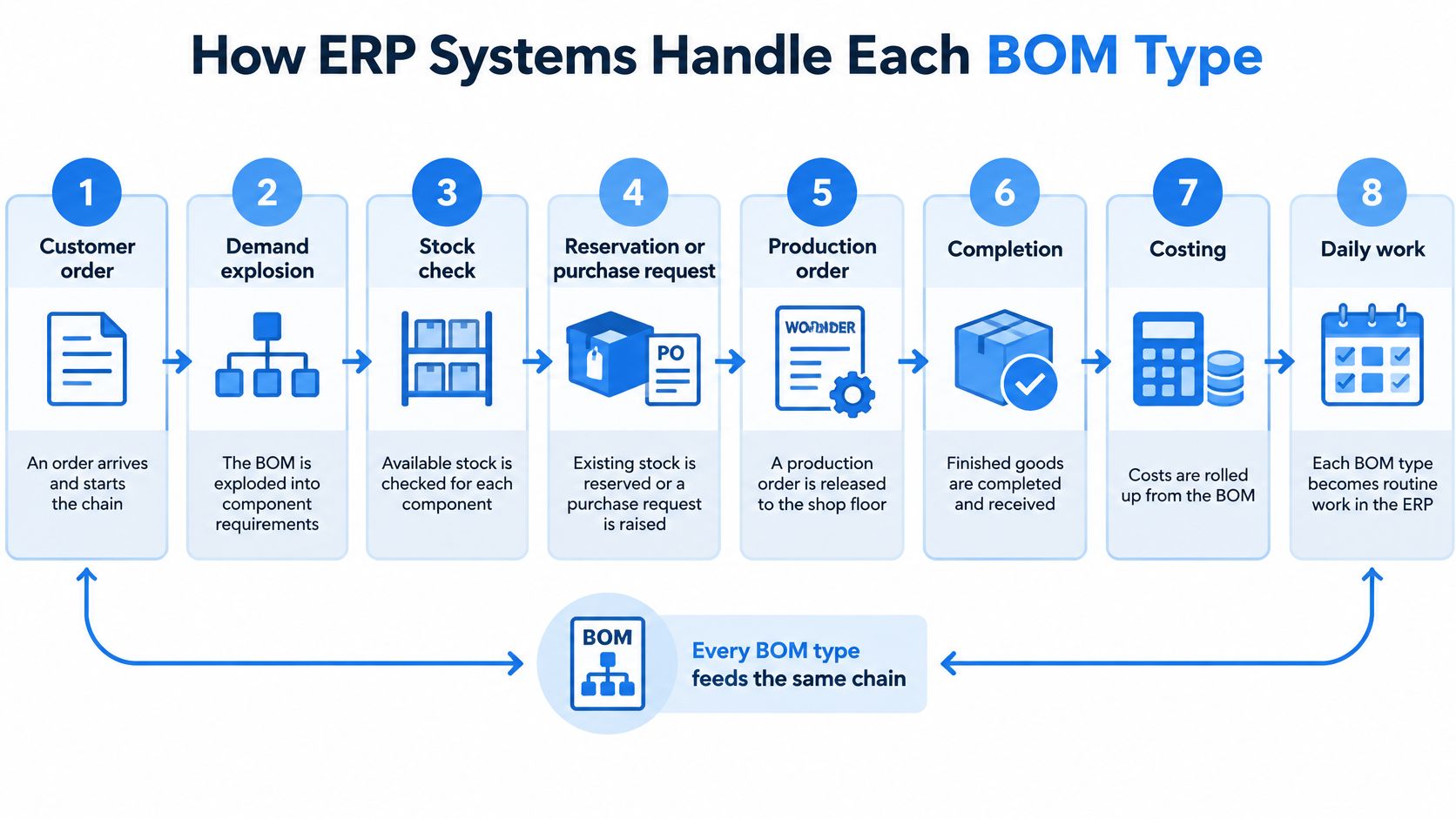
Once BOMs live in an ERP system, each type stops being a definition and becomes a process step. The chain is the same for all of them: customer order, demand explosion, stock check, reservation or purchase request, production order, completion, then costing and invoicing.
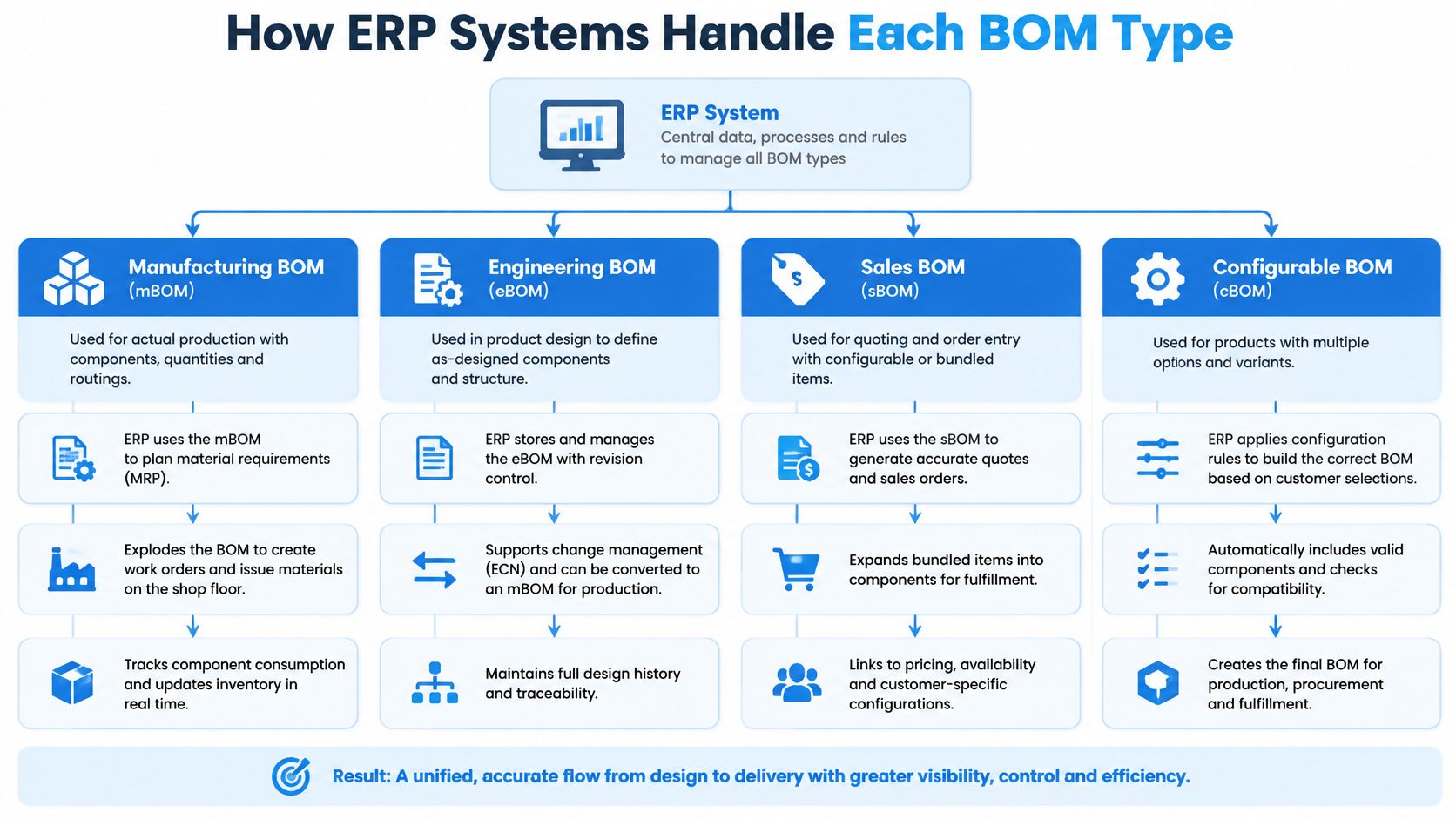
Each BOM type enters that chain at a different point and leaves a different maintenance obligation behind.
| BOM type | How the ERP plans demand | What to maintain carefully |
|---|---|---|
| Single-level BOM | Plans only the direct components of the parent | Stock and status of prebuilt subassemblies |
| Multi-level BOM | Explodes demand through every level to raw materials | Quantities, units of measure and level structure |
| Engineering BOM (EBOM) | Supplies design data for release and engineering changes | Revisions, change approvals and effectivity dates |
| Manufacturing BOM (MBOM) | Drives production orders, routings and work steps | Routing, workstation and operation data |
| Phantom BOM | Passes components straight to the parent order | Stock records of the individual parts, not the group |
| Configurable BOM | Applies selection rules to build the structure for each order | Option codes, rule logic and tested variants |
| Planning BOM | Converts forecast percentages into planned demand before firm orders | Percentage factors and forecast assumptions |
What breaks when the data is wrong
A wrong multi-level quantity is the expensive one. Order 200 sofas and a foam quantity that’s off by half a meter per unit becomes 100 meters of shortage, which becomes a purchase request with a three-week lead time, which becomes a rescheduled production order, which becomes a late delivery and a cost variance nobody can explain at month end. One line, five departments.
Phantom errors look smaller and aren’t. If the group gets counted as stock, the system believes material exists that doesn’t, and the shortage surfaces at the assembly bench rather than at the planning meeting.
In SIX ManufacturingFlow, the manufacturing side of this chain is connected from customer order to finished product. The system checks material availability before production begins, allows reserving required components and identifies shortages early. It also checks material availability, machine capacity, employee skills and work-center workload before production starts, so a structure that looks fine on paper meets a real constraint before the order is released.
Those are product capabilities, not guarantees. Your rules, lead times and stock accuracy still decide whether the answer is right. Inventory and demand sit in the same flow, so stock positions from the warehouse and demand from sales reach the same order rather than two competing spreadsheets.
To see how these steps connect on the production side, managing the manufacturing process in an ERP follows the same order chain in more detail.
How Nachevi Soft Furniture Manufacturing Manages Multi-Level and Configurable BOMs
For this walkthrough, treat Nachevi Furniture Manufacturing as a real upholstered-furniture manufacturer, based in Sliven with around 300 staff. A customer orders a sofa, then selects the fabric, foam density, frame dimensions, leg style and connection hardware. Every selection can change the required materials.
If each variation receives a separate BOM, the product catalogue expands quickly. If one flat BOM contains every possible option, production has to interpret which lines apply to each order. A multi-level BOM shows how the product is assembled. A configurable BOM determines which components belong in the selected variant. BOM type is therefore both a structural choice and a business-purpose choice.

Why the structure matters more in upholstery than in most industries
A practical multi-level structure for the sofa could separate the work into clear stages:
- Finished product: the customer-selected sofa variant.
- Frame assembly: timber components, brackets, fasteners and legs.
- Cushion subassemblies: the selected foam grade, cover material and related components.
- Upholstery and final assembly: fabric, trim, fittings and packaging materials.
The fastening kit can remain grouped for frame assembly while its individual brackets and fasteners still appear as required components. Production receives a practical kit, while purchasing and inventory continue to see the underlying materials.
Configurable rules then connect customer choices to the structure. Frame width selects the correct timber branch. Fabric collection changes the upholstery material. Foam density selects a different cushion component. Leg style changes the fittings added during final assembly. The manufacturer maintains one controlled product model rather than a separate BOM for every possible combination.
Upholstery makes accuracy harder because some materials are measured rather than counted. A missing bracket is obvious during assembly. A small overstatement or understatement in fabric consumption can pass unnoticed until purchasing accumulates surplus stock or production runs short. Foam introduces a similar risk because two sheets can look alike while representing different specifications.
Shared components create another planning problem. Several orders may use the same timber sections, fasteners or standard foam grades. Planning each order in isolation can hide that combined demand. The multi-level structure needs to show where materials are consumed, and the configurable rules need to show which orders consume them.
What connected BOM management delivers
The same sofa can legitimately have more than one BOM view. Engineering may organize fabric, foam, zips and frame parts according to design intent. Manufacturing may group the same items around the frame station, cushion preparation, upholstery and final assembly. Both views serve a different purpose.
Synchronization between those views is where expensive errors begin. An approved foam change in the engineering structure has to reach the manufacturing structure, purchasing requirement and production instruction. If only one view changes, the order can carry the new specification while material planning still reserves the old component.
In SIX ManufacturingFlow, a work order can hold product specifications, BOM, routing, drawings, instructions, required materials and quality requirements in one place. That gives production a single reference for what to build and how to build it. The manufacturer still has to define which BOM view owns design options, which view drives material issue and how approved changes move between them.
For furniture teams whose product data starts in a design system, PLM tools for home goods teams, explains where design data ends and manufacturing data begins.
The practical test is straightforward. Change one approved option, then trace it through the engineering view, manufacturing view, routing and material requirement. Each step should still describe the same product, even when each BOM serves a different business purpose.
Migrating BOM Data Without Carrying Errors Forward
Most BOM projects fail before go-live, in the spreadsheet that gets imported. The pattern repeats across manufacturers, and the failures are predictable enough to list.
| Data problem | Effect on the business | Correction step |
|---|---|---|
| Duplicate material code’s | Same part bought twice and stock split across codes | Merge codes and keep a map of old IDs |
| Outdated BOM versions | Production uses superseded structures | Retire old versions and set effectivity dates |
| Mixed units of measure | Wrong purchase quantities, such as meters versus rolls | Set one base unit and defined conversions |
| Missing components | Shortages discovered at assembly | Compare each structure with a physical build |
| Undocumented variants | Configurable rules cannot build the product | Document each variant and option |
| Wrong subassembly quantities | Errors multiply up to the parent product | Recalculate sample orders by hand |
The assumption that you can copy a design BOM straight into production is worth challenging directly. In 2025, OpenBOM reported that 65% of companies require manufacturing BOMs to differ significantly from engineering BOMs to address production needs. That’s a vendor survey rather than an industry-wide measure, but it points at the same conclusion the workshop shows: the production structure is a separate artefact with separate content.
Copying the design BOM into production doesn't save work. It moves the work to the shop floor, where it costs more.
The validation sequence that holds up is short and sequential. Clean and standardize the master data. Map the existing structures. Validate quantities and production dependencies. Test representative products end to end. Then finalize. Skipping to step five is the usual mistake, and it surfaces as a shortage three weeks into live running.
Multi-level structures deserve the most scrutiny, because each level must reconcile with the level above it. A quantity that’s right at the subassembly and wrong at the parent still produces a wrong purchase order.
For the data foundations underneath all of this, getting ERP system data right before go-live covers the master-data work that BOM migration depends on.
Confirm Your BOM Types Before You Build
You don’t need every BOM type. You need the ones that match your decisions, and you need to know who owns each.
Before starting, gather three things: your current BOM files, your full list of units of measure, and a sample of recent production orders. Working from real orders keeps the exercise honest, because a structure that looks right on paper can still fail against the way your team builds.
- List your products and set the structure. For each one, decide single-level or multi-level, and check that decision against whether you build the subassemblies yourself. Subassemblies you buy stay as single purchased items. Subassemblies you build need their own level, with their own components underneath.
- Mark your variant options. Identify which selections change materials, and whether configurable rules are worth the setup or whether a small number of fixed structures is simpler. A product where a handful of options combine into dozens of saleable variants earns rules. A product with three stable options usually earns three fixed BOMs and a much easier life.
- Separate design from production and name both owners. The EBOM owner signs off design release. The MBOM owner signs off routing, sequence and work steps. On a small team one person can hold both roles, but the sign-offs stay separate because the mistakes are different.
- Review groups that are never stocked alone. Those are phantom candidates, provided nobody counts, buys or issues them as a separate unit. If the warehouse ever puts one on a shelf, it stops being a phantom.
- Clean and test one representative product first. Prove the structure, quantities and conversions on your hardest product before anything else moves. If units of measure disagree anywhere in your range, the disagreement surfaces.
Ask each owner to sign off their own structure before go-live, in writing. It’s the cheapest control you’ll ever install.
The right BOM type matches the decision it supports and stays accurate a year after go-live. Choose the structures your team can maintain, name the people who will maintain them, and build only what you’re ready to keep.
A bill of materials only earns its keep when it drives real work, and that’s what SIX ERP is built for. SIX ManufacturingFlow connects customer orders, BOMs, material availability, purchasing, shop-floor execution and product costing in one traceable flow, so a change in structure reaches everyone who depends on it. If your product range has outgrown the spreadsheets, visit SIX ERP and see how connected manufacturing processes can support the structures you build.