

The technician is at the customer’s site, but the replacement part is still in the warehouse. The dispatcher thought it was in the van. Meanwhile, yesterday’s completed job is waiting for someone to retype the service report before billing can issue an invoice. Everyone is busy, yet the same work keeps passing between people.
Field servicesField service is work performed at a customer’s site, such as installation, maintenance, repair, or technical support. software should remove those handovers, not just put a dispatch calendar on a screen. The useful test is whether a technician’s update becomes a reliable stock movement, an approved service record, and an invoice-ready charge without someone entering it again.
Core Features Field Services Software Must Cover
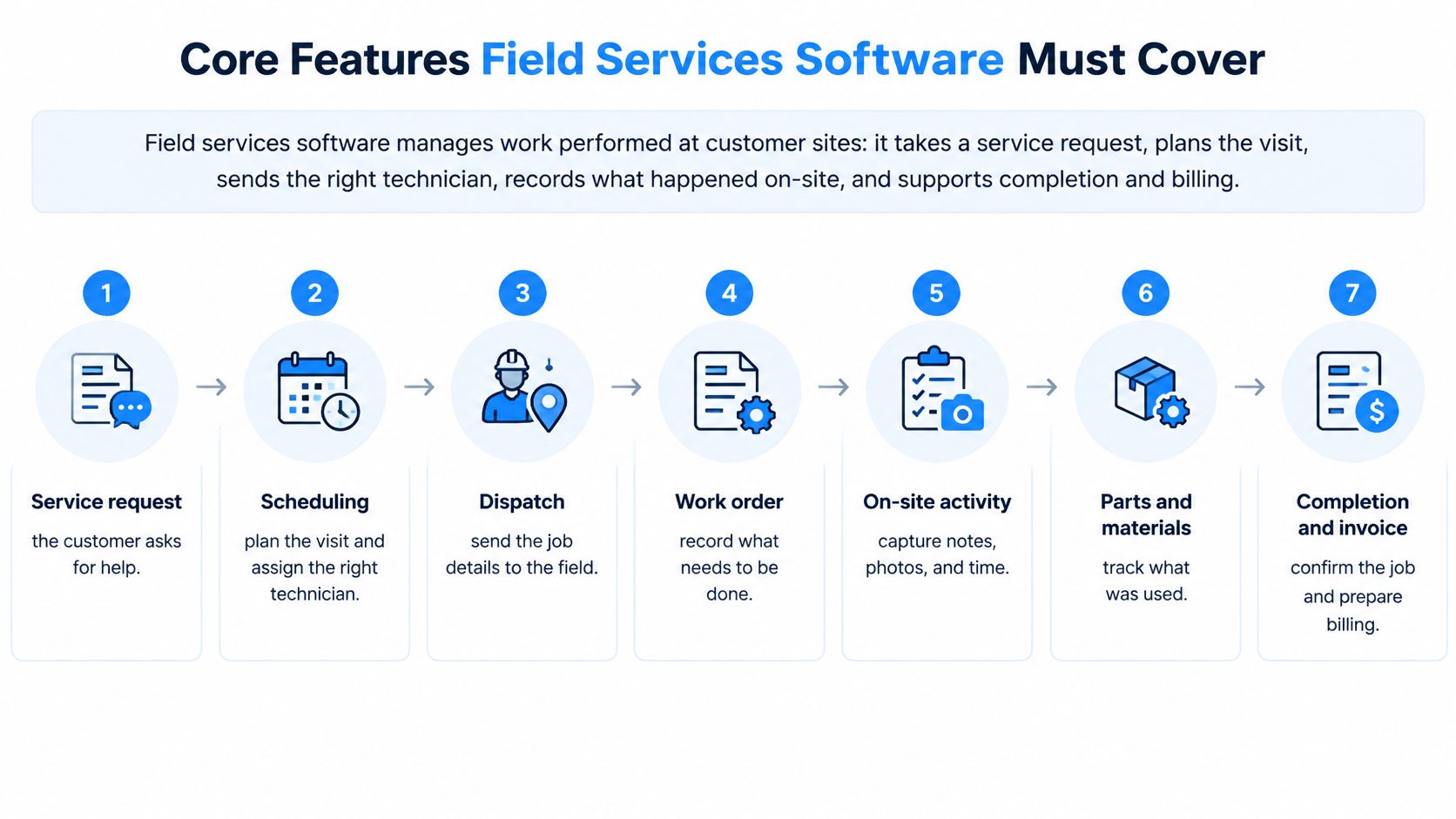
Field services software manages work performed at customer sites. It takes a service request, plans the visit, sends the right technician, records what happened on-site, and supports completion and billing. Instead of separate dispatch boards, spreadsheets, and paper forms, the office and field team work from a connected job record.
Scheduling deserves close attention. In Salesforce’s field service trends survey, 47% of appointments don’t go as planned, scheduling conflicts are the leading productivity blocker, and technicians spend 18% of their working hours on administration such as completing forms and searching for information. A polished mobile interface won’t fix appointments booked without enough time, the right skills, or available materials.
Core field services software features and their role
| Feature | What it does | What breaks without it |
|---|---|---|
| Scheduling and dispatch | Assigns technicians by skill, availability, location, and urgency, with GPS travel planning | Wrong skills on-site, long travel, and failed visits |
| Mobile work-order execution | Shows customer history, checklists, and documents; records time, photos, notes, and signature | Paper notes retyped days later and delayed approvals |
| Asset management | Stores serial number, warranty, installed components, and service history | Technicians diagnose equipment without its maintenance context |
| Parts and inventory | Checks availability, reserves parts, and deducts used parts from van or warehouse stock | Second visits for missing parts and stock counts that don’t match |
| Invoicing | Turns approved labor, travel, materials, and service charges into invoices | Unbilled time, billing errors, and slow payment |
| Reporting and KPIs | Tracks first-time fix, response time, and utilization by technician and asset | Managers judge performance on anecdote |
Judge features by the work they remove
The essential combination is intelligent scheduling, complete mobile execution, and direct links to inventory and invoicing. Scheduling must reflect urgent requests and technician capability. Mobile execution must let the technician finish the record, not merely read instructions. Inventory and billing must accept that record without another round of transcription.
There are trade-offs. Requiring every possible field can improve reporting but slow technicians down. Automatic dispatch can reduce planning effort, but managers still need control over customer commitments, overtime, and unusual jobs.
SIX ERPAn ERP system connects a company’s core processes—such as sales, finance, inventory, manufacturing, and service—in one place so teams can work with shared information. supports appointment scheduling, technician assignment, parts checks, on-site recording, and final invoicing. Its connected service process links requests, customer assets, spare parts, mobile execution, approvalAn approval is a formal decision that allows a request or action to proceed. An ERP system can route approvals and record who made each decision., and billing rather than treating each as a separate task.
Practical rule: For every feature, ask who enters the information, how many times they enter it, and whether the next team can use it without making a phone call.
A feature earns its place when it removes a specific interruption. A parts lookup should replace a warehouse call. A completed mobile report should replace retyping, not become another attachment that billing must interpret.
How a Service Job Moves from Request to Invoice
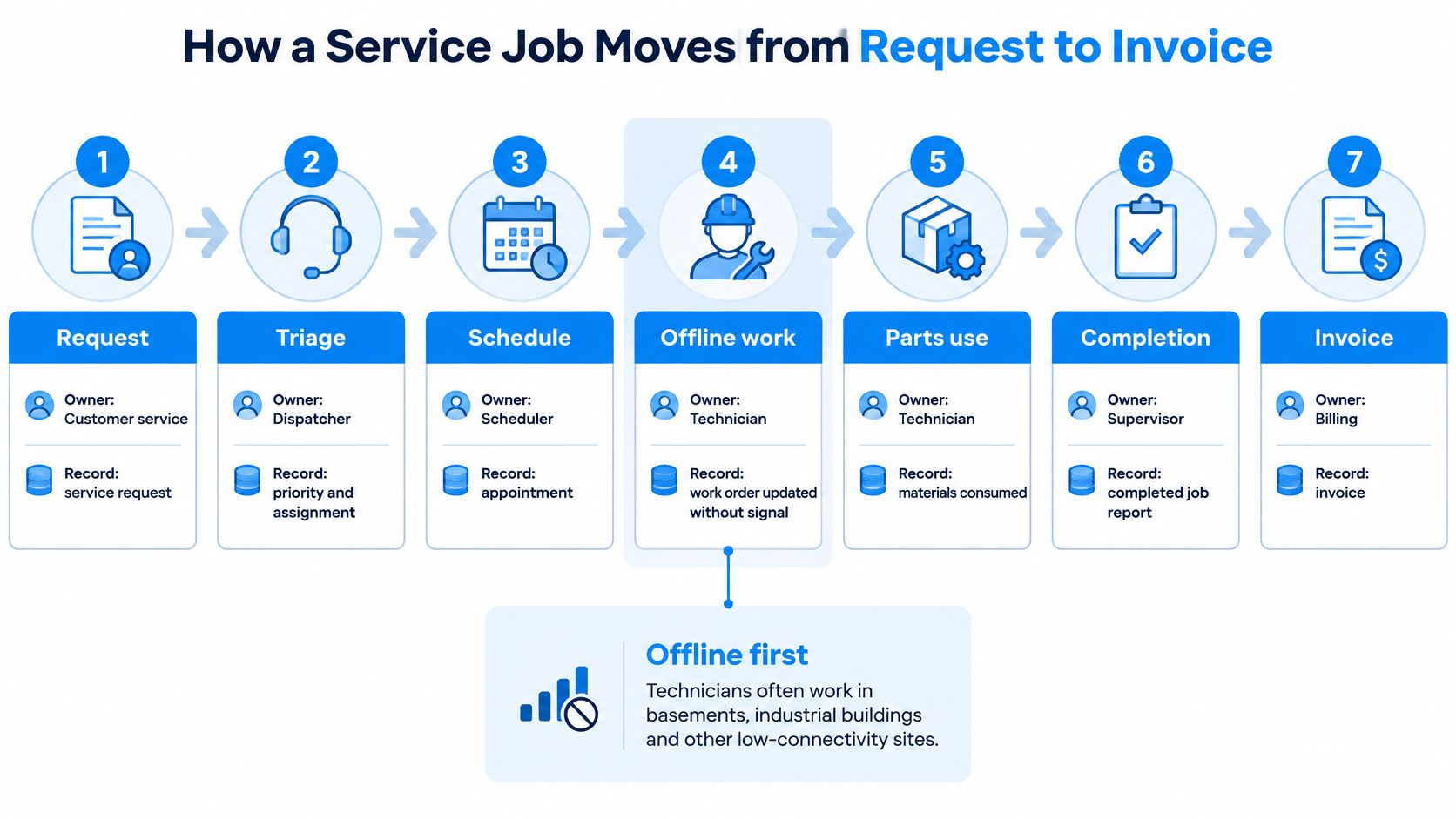
A technician reaches a machine with a recurring hydraulic fault, but the required part is unavailable. The visit fails, travel time is lost, and the office must reschedule. A service workflowA workflow defines the steps, responsibilities and decisions needed to complete work. An ERP system can guide tasks through these stages and show progress. prevents that avoidable handover by connecting the request, parts check, field record, approval, and invoice.
On-site work also has to continue in basements, industrial buildings, and remote locations. Offline-first execution means more than displaying a cached appointment. The device must retain forms, timestamps, GPS information, photos, signatures, labor, consumed parts, and status changes, then synchronize them when connectivity returns.
TrueContext’s guide to offline field service apps describes local capture followed by controlled synchronization. Queued transactions need unique identifiers to prevent duplicate entries after reconnection. If the office changes a work order while the technician is offline, record versions and explicit conflict rules should show which changes need review.
An audit trailAn audit trail records who created, changed or approved information and when. In an ERP system, it helps trace transactions, investigate errors and support audits. should distinguish the time a device captured information from the time the server accepted it, and identify rejected changes. The office also needs to see whether a report is saved on the device or received centrally. Without that distinction, a dispatcher may mistake an unsynchronized record for unfinished work.
Follow the job through its control points
Consider a hypothetical machinery service call. The customer reports a recurring hydraulic fault. The office must turn that request into a prepared visit and a defensible invoice, with each task updating the record the next person needs.
Log the request. Customer service owns the service request. The agent records the customer, site, machine serial number, reported fault, warranty status, and relevant service history. Resolve an uncertain machine identity before selecting parts.
Book a workable appointment. The scheduler owns the appointment record. Match the slot to technician skills, territory, working hours, site access, and a realistic job duration. Allow for travel rather than treating it as spare time between bookings.
Dispatch with reserved parts. The dispatcher owns the dispatch-ready work order and confirms that required materials are reserved before departure. Field-service analysis published through the Microsoft Dynamics community attributes about 51% of additional visits to unavailable parts. A reservation protects the job better than a stock screen another order can change.
Execute and record on-site. The technician owns the mobile work order. They record diagnosis, labor, travel, photos, checklist results, and actual parts used, including substitutions. Unfinished work needs a reason and a next action, not a completion status that hides the delay.
Collect customer approval. The technician owns the signed approval record. The customer reviews the completed scope and signs on the device. Disputed work, extra charges, or a missing authorized signatory should go to an exception queue, not disappear into notes.
Post materials and release charges. The service supervisor owns the approved posting record. Used parts update the correct van or warehouse location, while approved labor, travel, materials, and service charges move to invoicing. Check warranty and contract exclusions before releasing charges.
Issue the documents. Billing owns the final invoice record. The customer receives the signed service sheet and invoice, linked to the work performed. Rebuilding the technician’s report by retyping it adds delay and creates another chance for errors.
Still-Technolift’s connected machinery service workflow
Still-Technolift.bg, an authorized STILL reseller, scaled its service operation to around 50 technicians, according to the company’s owner account. The account describes a move from Excel spreadsheets to an automated workflow covering appointment setting, work-order control, material consumption, time tracking, GPS travel optimization, signed work orders, service sheets, and final invoices.
The connected workflow identifies serialized machines and links them through an application programming interface, or APIAn API (Application Programming Interface) allows software systems to exchange information. Connected to an ERP system, it helps transfer business data and reduce manual entry., to asset history, warehouse and technician stock, documents, and financial processing. The mobile workflow retains work information during unstable connectivity and synchronizes it when a reliable connection becomes available.
Still-Technolift reported results from one implementation with about 40 technicians, according to the company’s owner account.
| Process | Reported change |
|---|---|
| Appointment handling | Approximately 90% faster |
| Spare-parts processing | About 80% faster |
| Completed work order to invoice | About half the previous time |
| Customer approval | Moved fully to the mobile process |
| Payment time | About 40% faster |
These are owner-reported implementation results, not expected outcomes for other companies. The implementation scope differs from the broader technician headcount, and another business needs its own baseline.
SIX ServiceFlow connects service requests, planning, technicians, customer assets, spare parts, mobile execution, customer approval, and invoicing. Its mobile appA mobile app is a software application designed to run on a smartphone or tablet. Connected to an ERP system, it helps employees access business information and complete tasks while away from their desks. and web appA web app is software accessed through a web browser. An ERP web app gives authorized teams access to shared business information from supported devices. let technicians and office teams work from the same current data, from service request through approval and invoicing. The guide to connecting a service call to a business result explains how those handovers affect the business record.
Connecting Field Service Data to ERP Inventory, Finance, Projects and HR
A field report becomes useful when the rest of the company can act on it. Enterprise resource planningAn ERP system connects a company’s core processes—such as sales, finance, inventory, manufacturing, and service—in one place so teams can work with shared information., or ERP, connects operational and financial records so the warehouse, service office, project manager, and finance team don’t maintain conflicting versions of the same job.
The integrationIntegration connects systems so they can exchange information or coordinate actions. An ERP integration helps link business tools and reduce manual transfers between them. question isn’t whether systems can exchange files. It’s whether each transaction has an agreed owner, a clear posting rule, and a way to recover from failure.
ERP areas and the field service data each one needs
| ERP area | Field data it needs | What fails without it |
|---|---|---|
| Inventory (StockFlow) | Stock levels, van stock, serial numbers, and reserved parts | Used parts aren’t deducted, so stock looks wrong and jobs stall |
| Finance (FinanceFlow) | Approved labor, travel, materials, service charges, and payment status | Unbilled work, manual invoice rework, and slow collections |
| Projects (ProjectFlow) | Job costs, project codes, contract limits, and milestones | Project margin is unknown until the job is closed |
| HR (PeopleFlow) | Technician skills, certificates, working hours, and availability | Dispatch assigns unqualified staff and compliance records are incomplete |
The 2023 field-service benchmark report connects first-time resolution with service performance and cost. Operationally, linked job, parts, and technician records let managers distinguish a material shortage from a skills mismatch or an incomplete diagnosis. A completed status alone doesn’t explain why the customer needed another visit.

Agree the records before building connections
SIX ERP’s shared data model lets information entered once support stock, customer details, costs, schedules, and documents. ServiceFlow can connect field execution with StockFlow for inventory, FinanceFlow for financial processing, ProjectFlow for project costs, and PeopleFlow for employee records. Each company should enable the flows its operation needs.
Use this integration checklist before configurationConfiguration sets up software using its existing options. In an ERP system, it adapts workflows, roles and other settings to the company’s business processes.:
- Customer and asset identity: Maintain an authoritative customer record and a stable identifier for each machine.
- Parts ledger: Connect reservations, issues, returns, and consumption to the correct warehouse or van.
- Financial approval: Define which charges can post automatically and which require review.
- Project allocation: Require cost codes where work belongs to a contract or project budget.
- Technician eligibility: Keep skills, certificates, hours, and availability usable by dispatch.
Hypothetical example: A distributor sends an engineer to a pump without the required seal kit. If the report only says work incomplete, the office may discover the inventory failure after the return visit. Linking the failure reason, missing part, reservation, and follow-up job makes the cause visible while someone can still act.
Existing accounting systems, customer portals, machines, and specialist applications may need API connections. Our Integration & Configuration & CustomizationCustomization changes or adds software functionality beyond standard settings. In an ERP project, it can meet specific business needs while adding development and maintenance work. service supports those connections; the ERP integration decision guide helps frame their scope.
Agree permissions, audit trails, retention, and data ownership before go-live. Software supports controlled records, but the company remains responsible for determining and meeting its legal data duties.
KPIs and ROI Measures That Prove Field Service Value
A missed parts check can turn one appointment into two, while a re-typed job report adds office work after the technician has finished. Measure whether service jobs are completed as planned and whether handovers from field to office take less effort. Record current performance before go-live, then compare it using the same definitions and measurement windows.
Service Fusion’s technician scheduling guide places common first-time fix benchmarks around 75% to 80%. Use that range as context: equipment complexity and service scope affect comparisons. In a separate survey, Salesforce reported that U.S. technicians and tradespeople estimated administrative tasks consumed 30% of their average working hours. The 18% figure cited in the Core Features section and this 30% figure come from different surveys with different question wording, so they should not be treated as directly comparable.
Field service KPIs, calculation and reference values
Use consistent definitions and a set measurement window for each KPIA KPI (Key Performance Indicator) measures progress towards a business goal. An ERP system can calculate KPIs from business records and show changes in performance over time.. The external reference values below come from the linked publications; appointment handling and invoice timing need internal baselines.
| KPI | How to calculate it | Reference value |
|---|---|---|
| First-time fix rate | Jobs resolved on the first visit divided by all jobs in the same 30-day window | About 75% to 80%, according to Service Fusion’s technician scheduling guide |
| Repeat visit rate | Jobs needing another visit divided by all jobs in the same window | Reverse of first-time fix rate when outcomes use matching definitions |
| Technician time on administration | Administrative hours divided by total working hours | 30%, estimated by U.S. technicians and tradespeople in Salesforce’s 2025 survey |
| Appointment handling time | Minutes from request to confirmed booking, measured before and after go-live | Your measured pre-launch booking time |
| Invoice cycle time | Days from completed work order to issued invoice | Your measured pre-launch completion-to-invoice time |
Segment results by technician, asset type, region, and failure code. An engineer handling complex breakdowns is not directly comparable with someone completing routine inspections. Decide how planned multi-visit work, reopened faults, and unrelated failures count before calculating results.
Repeat visit rate complements first-time fix only when each job has a matching outcome and the same observation period. Keep unresolved jobs visible rather than excluding them.
Turn recovered time into a business case
Hypothetical calculation: If 20 technicians each spend 30 minutes daily re-keying job information, that equals 10 paid hours each day. Multiply those hours by your loaded hourly labor cost in EUR, including employment overhead, to estimate the administrative burden.
Recovered time has financial value when it reduces overtime, avoids additional administration, or lets the team complete useful work with the released capacity. It does not automatically become cash savings.
Compare those benefits with implementation, integration, training, support, and ongoing operating costs. Track faster invoicing separately from higher revenue: receiving payment earlier improves cash timing but does not create another sale.
Review KPIs monthly during the first year. After definitions and workflows stabilize, move to quarterly reviews, while investigating missing postings or synchronization failures as they occur.
Rolling Out Field Services Software in SMEs and Enterprises
A small or medium-sized business usually benefits from a narrow first phase. An enterprise needs more preparation around regional differences, permissions, and cross-system dependencies. Neither benefits from importing unclear processes into new software.
Use a controlled implementation sequence
Map the current process. Use Pre-Integration Consulting to identify decisions, owners, and exceptions. An SME can start with one depot and service type; an enterprise should map regional differences before deciding which practices must be shared.
Clean master data before import. Resolve duplicate customers, missing serial numbers, obsolete parts, and inconsistent units. Assign an owner to each dataset so cleanup doesn’t end when migration finishes.
Configure the agreed workflow. Integration & Configuration should reflect approval rules and responsibilities. Don’t preserve a spreadsheet workaround merely because staff recognize it, but don’t force an unsuitable standard process either.
Test a complete offline job. Put the device in airplane mode, complete the work, and reconnect. Confirm that notes, photos, signatures, materials, and billable time arrive correctly, including a deliberate office-side change to the same order.
Train office and field roles separately. Dispatchers need rescheduling and exception exercises. Technicians need practical job completion tasks. Billing needs rejected-charge and correction scenarios, not a tour of every screen.
Run the pilot against baseline KPIs. Use a small technician group for an SME and a longer, representative pilot for an enterprise. Close operational gaps before adding locations or service types.
Go live with named support owners. Our Post-Integration Support includes user guidance, issue investigation, performance and integration monitoring, controlled updates, access reviews, and workflow improvements.
Make adoption a workload decision
Ask technicians to name their worst handovers before configuration. Show which steps disappear first, such as rewriting parts lists or returning to the office for signatures. If the app adds work without removing anything, paper will remain the practical fallback.
Let less digitally confident users complete realistic tasks without coaching. Watch where they hesitate, then simplify labels, required fields, and navigation. Don’t mistake attendance at training for readiness to work independently.
Rollout checkpoint: A technician should be able to finish an ordinary job without creating a second record outside the agreed workflow.
SIX ERP can run as a managed serviceA managed service gives an external provider responsibility for agreed services, such as software maintenance and support. It helps companies plan technical work and ongoing system care., with each customer operating in a separate managed instance. The provider maintains the agreed environment and supports its operation; the company manages users, business processes, and data responsibilities. Software supports records, while the company determines and meets its own legal obligations.
Use the step-by-step ERP implementation planning guide to assign those responsibilities before launch.
Choose Field Services Software Against Your Own Process
Choose the system that handles your costly exceptions, not the one with the longest feature list. Bring a missing part, a warranty dispute, an offline visit, and a corrected invoice into the evaluation. A controlled demonstration using your records tells you more than a polished standard scenario.
Use an evidence-based buying checklist
Count handovers. Mark where someone copies, phones, emails, or waits for information. Identify which transfers the software must remove.
Prove offline completion. Require a technician to finish a job without connectivity and synchronize it without re-entry.
Test dispatch constraints. Use a booking that requires specific skills, a realistic route, and reserved materials.
Inspect asset history. Confirm that installed equipment remains identifiable through serial numbers, component changes, and repeat faults.
Trace financial and stock postings. Follow a completed job into inventory, accounting, and project cost records. Include a return or correction.
Examine controls. Establish permissions, audit trails, retention rules, and ownership of exported information.
Compare total cost in EUR over three years. Include configuration, migration, integration, training, devices, support, and internal staff time. For an example of the questions behind service-platform budgeting, DataLunix’s HaloPSA budgeting guide for IT directors provides a useful specialist reference, not a field-service product comparison.
Define ongoing support. Put issue ownership, integration monitoring, update testing, and user guidance into the operating agreement.
Match the platform to operational complexity
A small firm with one depot, straightforward jobs, and simple invoicing may be better served by a lighter field app with strong scheduling. An integrated ERP becomes more compelling when multiple sites share stock, service work affects project margins, and dispatch relies on HR-held skills and working hours. Payroll connections should be evaluated explicitly rather than assumed.
Don’t buy integration depth you won’t use. Equally, don’t select a lightweight tool if staff will immediately rebuild the missing stock and financial connections in spreadsheets.
Set baseline KPIs, run a representative pilot, and use the field service solution page linked earlier as the next reading step before discussing your workflow with a SIX expert. Remove the handover that costs the most time first, then measure it.
References
Publication years are included where established; undated pages are identified accordingly.
- Salesforce, undated: Field service management trends survey.
- TrueContext, undated: Offline field service app guide.
- Microsoft Dynamics community, undated: Field-service analysis of additional visits.
- 2023 Benchmark Report: Field-service performance and cost benchmarks.
- Service Fusion, undated: Best practices for scheduling service technicians.
- Salesforce, 2025: U.S. technician and tradesperson administrative-work survey.
- Still-Technolift, undated owner account: Workflow description and implementation results.
SIX ERP connects service requests, scheduling, mobile work, stock, customer approvals, and invoicing, with consulting and support to align those steps with your operation. Visit SIX ERP to discuss a pilot built around your most expensive handover, using a real work order and your current planning and billing times.