

TL;DR - Smarter Receivables, Better Cash Flow
Discover how connected ERP automation reduces manual work, improves payment visibility, strengthens cash flow, and keeps your financial processes under control.
Accounts receivable automationAutomation uses software or equipment to carry out tasks according to defined rules. An ERP system can automate routine business steps and highlight exceptions for review. works best when it runs inside the same system that holds your orders, stock and general ledger, not as a separate tool that needs its own data feed. If your invoices start in a sales order, the cleanest way to collect on them is a process that follows that order from quote to cash. For small and medium businesses, manufacturers and service organizations in Bulgaria, that means looking at AR automation as one part of an integrated ERPAn ERP system connects a company’s core processes—such as sales, finance, inventory, manufacturing, and service—in one place so teams can work with shared information., then switching on the parts you need first.
What accounts receivable automation is
Accounts receivable (AR) is the money your customers owe you. Stripe describes AR automation as using technology to handle the tasks involved in managing that money: generating invoices, sending payment reminders, reconciling incoming payments and producing receivables reports.
In practice, that covers seven jobs:
- Invoice generation and delivery. Invoices are built from order or contract data and sent by email or a customer portal.
- Payment tracking. Every invoice has a live status: sent, overdue, partially paid or settled.
- Reminders and dunning. Messages go out on a schedule before and after the due date. Stripe’s example is reminders at 7, 15 or 30 days after the invoice date.
- Bank reconciliation. Incoming payments are matched to open invoices by reference, amount or account number.
- Credit management. Customer limits and payment history feed decisions about new orders.
- Reporting. Ageing reports, DSO and collection effectiveness show where cash is stuck. Thomson Reuters lists real-time analytics on DSO and Collection Effectiveness Index among the benefits.
- Recordkeeping and integrationIntegration connects systems so they can exchange information or coordinate actions. An ERP integration helps link business tools and reduce manual transfers between them.. Documents are stored, and postings reach the accounting ledger without manual re-entry.
DSO is the average number of days it takes you to collect after a sale. It is the first number to track, because every other improvement shows up in it.
Why manual receivables get expensive
Most SMEs we meet in this space run receivables across a sales tool, a spreadsheet, an accounting package and an email inbox. Each handoff is a place for an error: a wrong amount copied, a payment left unmatched, a reminder sent to a customer who already paid.
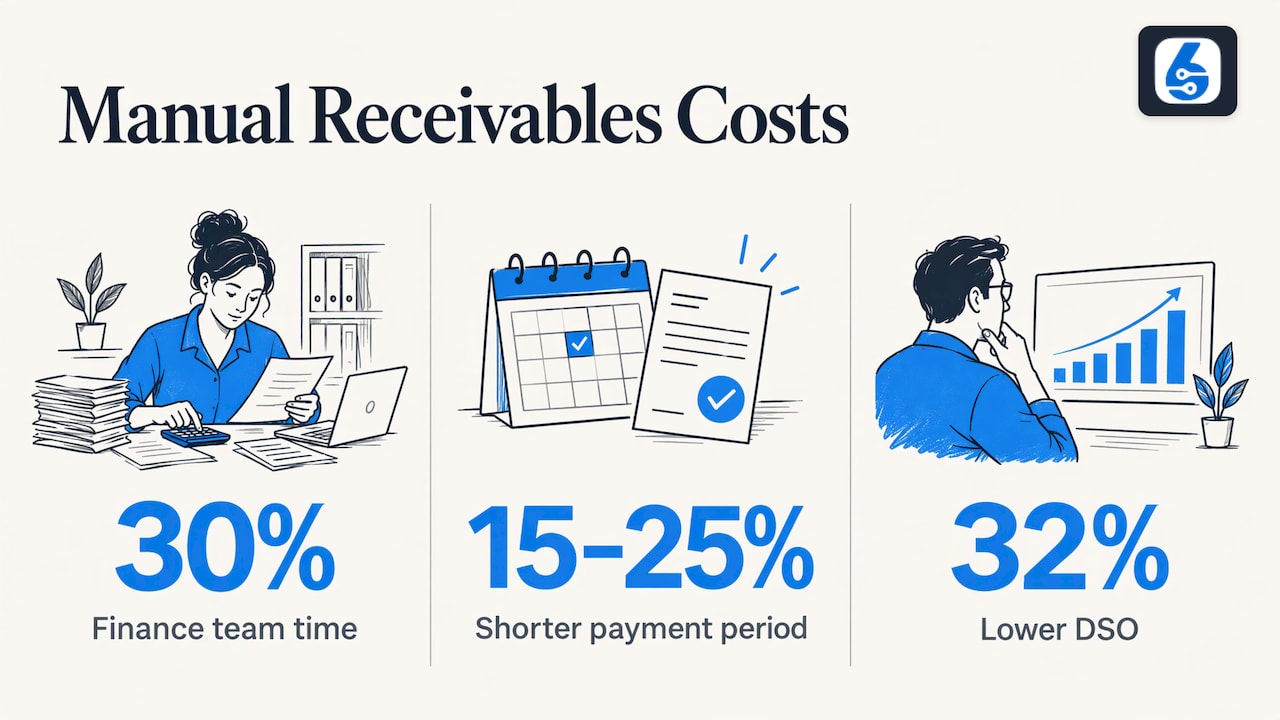
Some published numbers show the scale. A Bulgarian AI accounting provider, FlowexAI, reports that invoice, bank-statement and expense processing takes about 30% of finance team time in Bulgaria, and that automated overdue reminders can shorten the invoice-to-payment period by 15–25% with proper configurationConfiguration sets up software using its existing options. In an ERP system, it adapts workflows, roles and other settings to the company’s business processes.. These are vendor figures, so treat them as a direction rather than a promise. Your own baseline matters more, which is why the rollout section below starts with measuring.
Research cited by Truvio points the same way: businesses that automated more than half of their AR processes saw a 32% reduction in DSO, according to PYMNTS research.
How the automated process runs, step by step
Here is the cycle from order to cash, with what it takes at each step and where it usually goes wrong.
1. Create the invoice from the order
The invoice should come from the sales order, delivery or contract, not be retyped. Errors enter when prices, quantities or customer details are copied between systems. In SIX ERP, SIX SalesFlow covers the path from order to cash, so the invoice draws on the order that created it.
2. Deliver it in the format the customer accepts
Email with a PDF is the common baseline. Bulgarian B2B e-invoicing is voluntary, and Houseblend notes that the supplier needs the buyer’s consent first. Public bodies are different: since 1 November 2019 they must accept EN 16931-compliant e-invoices, per DDD Invoices.
3. Track status in real time
A receivables ledger should show each invoice as open, overdue, partially paid or settled without anyone updating a spreadsheet. The failure to watch for is a status that depends on someone remembering to change it.
4. Send reminders on a schedule
Set the sequence once: a friendly note before the due date, a reminder after it, a firmer message later. Orcha’s documentation describes three dunning levels with late-payment interest, and a pause when a dispute is detected. That pause matters: a reminder sent to a customer who has raised a complaint damages the relationship.
5. Reconcile bank payments
The bank statement is the other half of the story. Matching a statement line to an invoice by reference or amount is repetitive work that software does well. The Bulgarian tool FreeMe.bg describes importing a CSV statement, linking lines to invoices and updating the ageing report, and it blocks over-allocation. Look for partial payments, overpayments and foreign-currency differences, since these are where simple matching breaks.
6. Escalate exceptions to a person
Automation clears the routine cases so your team can focus on the rest. Emagia says automated cash application lets AR staff concentrate on complex disputes, payment negotiations and strategic customers. A managed Bulgarian follow-up service, Digiton Collect, makes the same split explicit: it hands disputed or sensitive cases to a person and promises no outcome.
7. Report and act on the numbers
Ageing, DSO and a short list of the largest overdue balances should be on one dashboardA dashboard brings key figures and status information together on one screen. An ERP dashboard helps teams monitor performance and identify issues that need attention. that the finance lead and the sales lead both see. Collections slow when sales does not know that its customer is 45 days late.
Features to evaluate in AR software
Emagia’s review guide lists the areas buyers compare. Condensed for an SME, the checklist looks like this:
| Area | What to look for |
|---|---|
| Invoicing | Generation from orders, validation, delivery by email or portal, e-invoice formats |
| Collections | Reminder schedules, dunning levels, promises to pay, dispute pause |
| Cash application | Automatic matching, partial payments, exception handling, posting to the ledger |
| Credit | Customer limits, payment history visible when taking an order |
| Analytics | DSO, ageing, cash forecasts |
| Integration | Real data flow with ERP, CRM and banks, plus error handling |
| Security and scale | Access roles, audit trailAn audit trail records who created, changed or approved information and when. In an ERP system, it helps trace transactions, investigate errors and support audits., room to add users and entities |
The integration row decides most outcomes. Emagia advises asking vendors to demonstrate real data flows between the AR platform and your ERP, including how errors are handled. The simplest way to pass that test is to have no gap between them at all.
Why integrated beats bolt-on
A standalone AR tool needs a connector to your ERP or accounting package. Someone has to build it, monitor it and fix it when a field changes. Truvio’s editorial team argues that solutions embedded natively in the ERP share one database, which removes migration and synchronization work and inherits the ERP’s security. This is a perspective rather than a measured result, but the logic is sound: fewer copies of the data means fewer places for numbers to disagree.
It matters even more if you are a manufacturer or a field service business. A manufacturer bills from deliveries tied to stock movements. A service company bills from completed jobs. When the invoice depends on a work order or a shipment, AR automation is only as accurate as the module that feeds it. This is why we treat receivables as part of the order-to-cash flow, not as an isolated finance task. The same logic applies on the other side of the ledger, which we cover in our guide to the accounts payable automation process.
What Bulgarian businesses should know about compliance
Two regimes shape receivables data in Bulgaria.
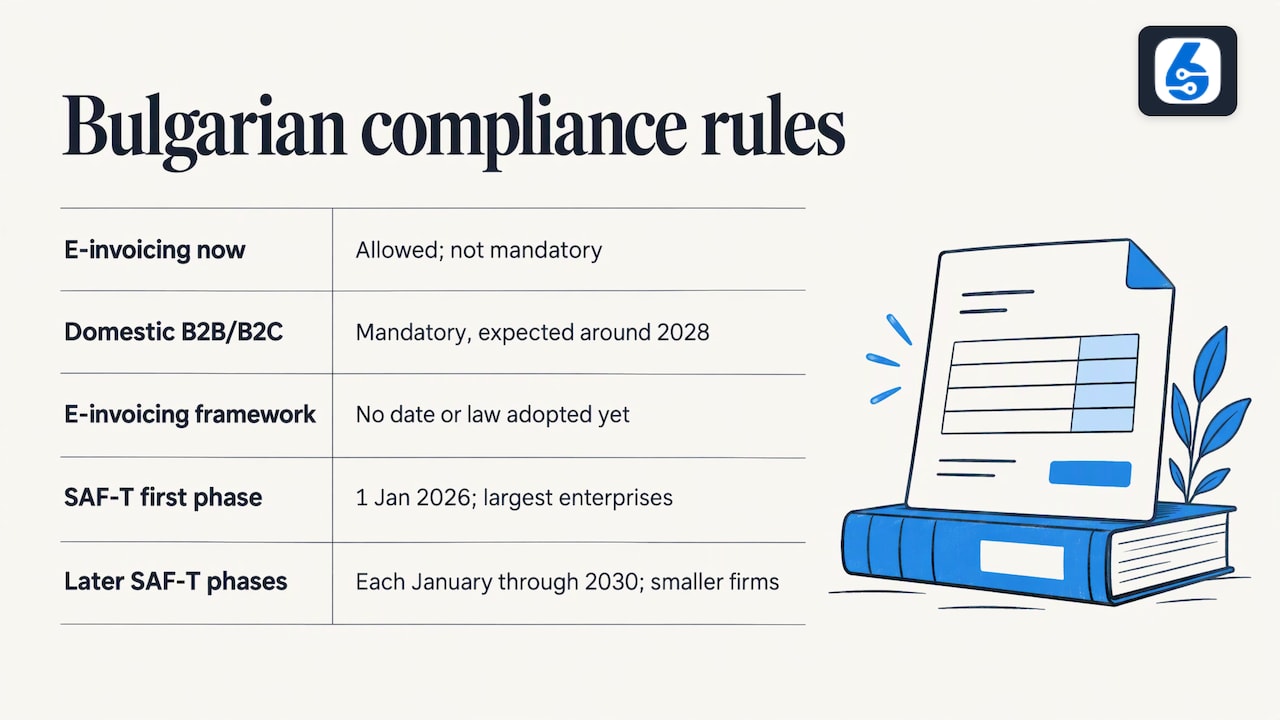
E-invoicing. According to the EY E-invoicing Developments Tracker (12 August 2026), e-invoicing is allowed but not mandatory in Bulgaria, and mandatory domestic B2B and B2C e-invoicing is expected around 2028, with no definitive date or legal framework adopted yet. Plan for it, but do not assume a date.
SAF-T. SAF-T is the standard audit file for tax, an OECD format for sending accounting data to the tax authority. BTA reported that the National Revenue Agency began a phased introduction. According to FlowexAI’s phase guide, based on Art. 71z of the Tax and Social Security Procedural Code, the first phase started on 1 January 2026 for the largest enterprises, with later phases following each January through 2030 and covering smaller companies. Check your own phase with your accountant and the NRA.
The file includes invoices and payments, so inconsistent receivables records become reporting problems. Our articles on SAF-T in Bulgaria and ERP and on clean finance data under SAF-T, e-invoicing and ViDA go deeper on this.
Can AI replace accounts receivable staff?
Not the whole function. AI can read documents, match payments and prioritize which accounts to chase. Tesorio describes three maturity levels: basic automation, workflowA workflow defines the steps, responsibilities and decisions needed to complete work. An ERP system can guide tasks through these stages and show progress. engines with intelligent prioritization, and an emerging stage where AI agents act with little manual intervention. Most SMEs get the larger share of the value from the first two.
People still decide on disputes, payment plans, credit limits for new customers and how to handle a long-standing client who is late. See our overview of AI-powered ERP for where AI helps in the wider system.
How to plan and measure the rollout
Tesorio’s roadmap divides a 90-day rollout into four phases, which is a workable template:
- Days 1–7, assess. Record baseline DSO, ageing buckets and hours spent on invoicing, reminders and reconciliation.
- Days 8–21, configure. Set up integrations, workflows and access controls.
- Days 22–28, test and train. Run user acceptance tests, write short procedures, agree the go-live plan.
- Days 29–90, launch and optimize. Compare against the baseline and add advanced features gradually.
A fixed timeline is a guide. The more reliable factor is process clarity. Before anything is configured, write down who creates an invoice, who approves a credit note, when a reminder goes out and who owns a disputed balance. Our piece on planning an ERP implementation explains why this is a people project first.
Track four numbers monthly: DSO, share of invoices overdue by more than 30 days, percentage of payments matched automatically, and hours of manual finance work.
Where SIX ERP fits
SIX ERP connects sales, purchasing, inventory, finance, manufacturing, projects and field service in one platform, so receivables sit next to the orders and deliveries that create them. SIX FinanceFlow covers financial management, and SIX SalesFlow covers order to cash. You can start with the flows you need and add others as you grow.
Before configuring anything, we map your processes in detail under our no-gap approach, so the invoice, reminder and reconciliation steps reflect how your company actually works. Our plans on the licensing page start with SIX Start at €999 per year, SIX Growth is €2,499 per year and SIX Business is €4,999 per year. SIX Enterprise has no published price. Consulting, integration and support are described on the services page.
If you are comparing providers, our guide to choosing an ERP provider in Bulgaria lists the criteria we would use.
Our view on receivables automation
Receivables problems rarely start in the finance office. They start when an order is entered one way, delivered another way and invoiced a third way. Automating reminders on top of that only makes the confusion arrive faster.
We think the order of work matters. Map the process first, with no gaps between the sale, the delivery, the invoice and the payment. Then connect those steps in one system, so that the people in sales, the warehouse and finance see the same record. Only then does automation pay back, because the rules you automate are the rules your business actually follows.
That is why we build SIX ERP as connected flows that a company can start small and extend. Receivables belong in the same flow as sales and finance, not in a separate tool that has to be reconciled to them.
Sources
- Stripe: Accounts receivable (AR) automation explained
- Thomson Reuters: Accounts receivable automation explained
- FlowexAI: AI accounting and invoice automation
- Truvio: Accounts receivable automation software guide
- DDD Invoices: Bulgaria e-invoicing guide
- Houseblend: Bulgaria SAF-T and e-invoicing guide
- Orcha: Accounts receivable documentation
- FreeMe.bg: Receivables and payments
- Emagia: Benefits of accounts receivable automation
- Digiton Collect: Managed receivables follow-up
- Emagia: Accounts receivable software reviews
- EY: E-invoicing Developments Tracker
- BTA: NRA begins SAF-T introduction
- FlowexAI: SAF-T in Bulgaria 2026-2030
- Tesorio: Complete guide to accounts receivable automation