

It is the fourth working day of the new month, and your managing director wants a straight answer to a simple question: how much free cash will the business have after next week’s supplier run? You open the accounting package, then a warehouse stock export, then a shared spreadsheet of unbilled service jobs, then two bank portals. None of those totals agree, and you spend the afternoon chasing department heads to figure out which invoices were approved, which deliveries left the dock, and which purchase orders still haven’t arrived.
That gap isn’t a bookkeeping problem. It’s what happens when accounting sits at the end of the line, waiting for other teams to send over summaries after the work is already done. Modern financial management systems exist to close that gap by connecting operational events directly to the ledger, enforcing approvals before money moves, and giving finance teams numbers they can verify without rebuilding spreadsheets every month.
What Financial Management Systems Do
Look at a typical mid-sized manufacturer or field-service company at month end, and you’ll often see financial data scattered across five places: customer orders in a CRM, shipping records in a warehouse tool, staff hours in a timesheet app, supplier bills in an email inbox, and final balances in an accounting ledger. Reconciling those five sources by hand turns every close into a detective exercise. A financial management system is the software, policies, and controls a company uses to record, approve, and report every movement of money across those activities.
That scope separates it cleanly from basic bookkeeping tools. Many growing businesses start on cloud accounting software for small businesses, as Stewart Accounting Services outlines for SMEs moving away from desktop ledgers, and that setup handles bank feeds, VAT filings, and straightforward invoicing well in the early years. Once a company adds purchase commitments, multi-step approvalAn approval is a formal decision that allows a request or action to proceed. An ERP system can route approvals and record who made each decision. limits, warehouse stock valuation, or project billing, bookkeeping software runs out of road. A full financial management platform tracks commitments before spend happens, maintains dedicated subledgers, and links every euro on a financial statement back to the delivery, goods receipt, or completed work order that triggered it.
| Function | Question it answers | Core records | Typical owner |
|---|---|---|---|
| General ledger | Where does every euro end up? | Journals, chart of accounts, period balances | Financial controller |
| Accounts receivable | Who owes us, how much and when is it due? | Customer invoices, payment terms, aging, receipts | Credit controller or AR clerk |
| Accounts payable | What do we owe and when must it be paid? | Supplier invoices, purchase orders, payment runs | APAP is the money a business owes suppliers for goods or services received but not yet paid for. clerk with purchasing |
| Billing and invoicing | What should this customer be charged for? | Order-based, milestone and time-based invoices, credit notes | Sales administration or billing |
| Cash and treasury | How much cash is free and how much is committed? | Bank balances, reconciliations, forecasts, payment schedules | Treasurer or CFO |
| Budgeting and commitment control | Are we allowed to spend this? | Budget lines, commitments, variance reports | Budget owner or department head |
| Fixed assets | What do we own and what is it worth now? | Asset register, depreciation schedules, disposals | Finance team |
| Tax and statutory reporting | What must we declare, and by when? | Tax codes, VAT returns, statutory filings | Tax specialist or finance lead |
| Consolidation and reporting | What is the result for the group? | Eliminations, consolidated statements, management dashboards | CFO or group finance |
What Separates a Strong System From Basic Bookkeeping
Having all nine functions on a vendor’s feature list doesn’t mean they work together well. In Lucanet’s 2025 finance automation survey, 28% of surveyed finance teams still relied heavily on manual processes, while only 2% reported fully automated consolidation. The gap usually comes down to four practical capabilities that separate a serious system from a digital ledger.
- Drill-through from ledger to source document: Clicking a line on the profit and loss statement should take you straight down to the journal, the customer or supplier invoice, and the underlying delivery note or receipt.
- Operational invoicing without retyping: Customer bills should generate directly from approved delivery notes, project milestones, or field-service work orders rather than from spreadsheets emailed to billing.
- Commitment control before spend: When a department head raises a purchase order, the system should check the budget line and reserve that amount immediately, not warn you three weeks later when the supplier invoice arrives.
- Structured multi-entity consolidation: If you operate more than one legal entity, the platform should map intercompany eliminations and group reporting inside controlled workflows instead of export tabs.
Before you speak to any vendor, print the table above and mark the four functions your business depends on most today. Circle every one of those four that still relies on spreadsheets or manual email handoffs, and bring that shortlist into your first requirements meeting.
How Operational Events Become Financial Records
Every number on a balance sheet or income statement starts as an operational event. When finance and operations run on disconnected tools, those events lose their paper trail halfway through the month. The diagram below traces how daily operational transactions turn into posted balances and official reports when records stay connected from end to end.
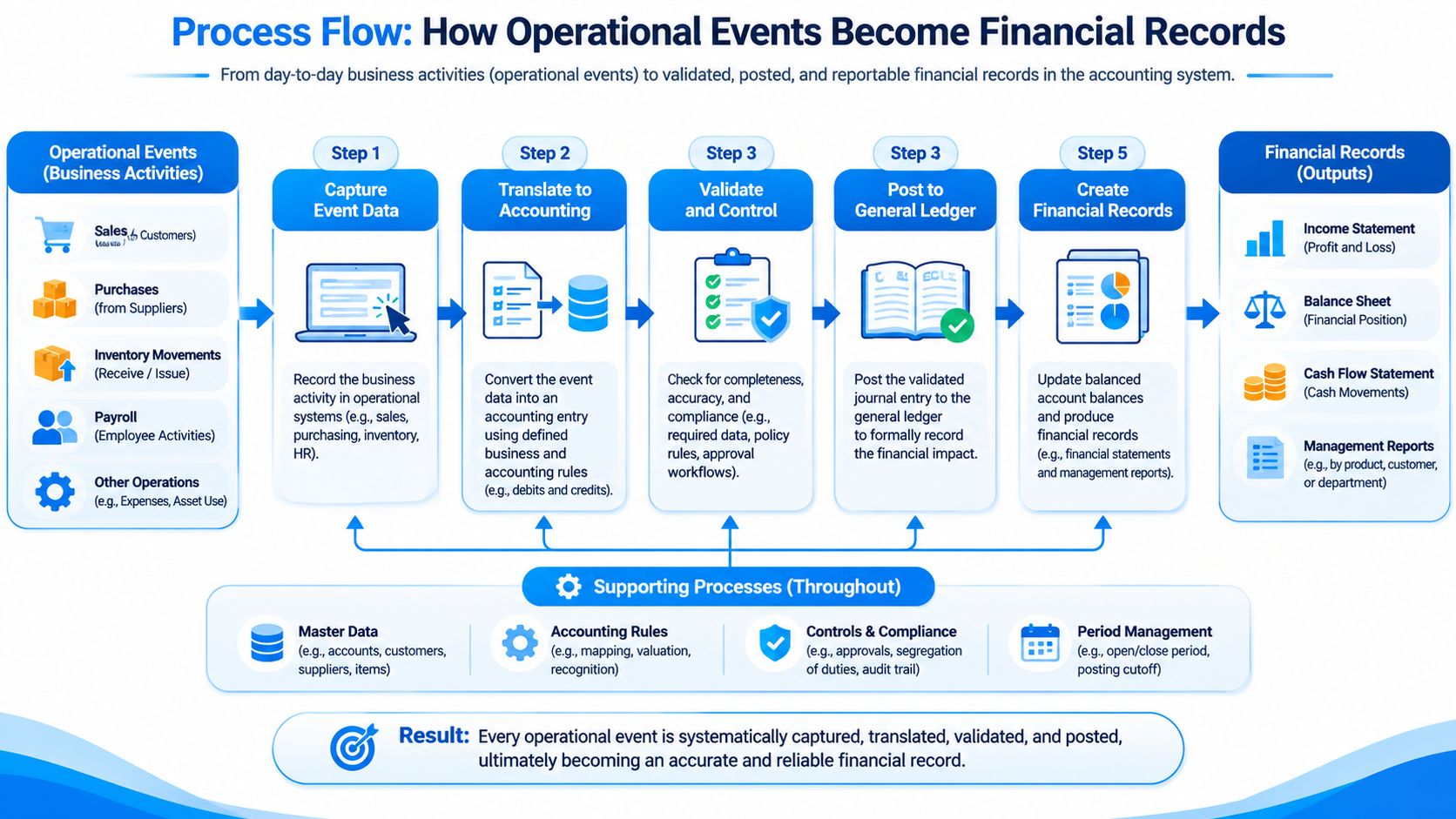
Follow a single customer sale through that chain. Sales confirms an order, the warehouse ships the goods and issues a delivery note, and billing raises the customer invoice directly from that delivery record. Posting the invoice creates an open receivable in the customer subledger and writes a balanced journal to the general ledger, which rolls into the trial balance and profit and loss statement.
Now trace a supplier purchase on the other side of the business. Purchasing raises an approved purchase order, warehouse staff log a goods receipt when the pallet arrives, and accounts payable enters the supplier invoice. A three-way match checks quantities and prices across the purchase order, receipt, and invoice before releasing the payable for payment and posting the expense and settlement to the ledger, which is the backbone of a reliable accounts payable automation process.
At every hop in both chains, the system needs to retain the link to the originating document alongside five pieces of metadata: the user who acted, the timestamp, the accounting period, the approval record, and the period status (open, soft-closed, or locked). For EU businesses, this traceabilityTraceability follows a product or material through its history, from origin to use or delivery. An ERP system connects the records needed to investigate issues and track affected items. supports the EU Accounting Directive’s requirement that annual financial statements give a true and fair view. The directive does not prescribe a specific document-level audit trailAn audit trail records who created, changed or approved information and when. In an ERP system, it helps trace transactions, investigate errors and support audits., so check applicable national accounting and tax rules for recordkeeping and retention requirements. Give every software vendor a simple drill-through test during a demo: pick any revenue or cost total on a management report and ask them to click all the way back to the delivery note or goods receipt behind it without switching applications.
Operational Feeds Ordered by Cash Impact
Not every operational feed affects working capital at the same speed. If you’re deciding where to connect finance first, rank the feeds by how directly they move cash in or out of your bank account:
- Sales orders and deliveries: These trigger customer invoicing and accounts receivable, so delays here slow down cash collection immediately.
- Goods receipts and supplier invoices: Matching receipts against supplier bills governs accounts payable, stops overpayments, and lets you forecast upcoming payment runs accurately.
- Inventory movements and production completions: Stock issues, scrap, and finished-goods receipts feed cost of sales and inventory valuation, preventing margin surprises at month end.
- Project time and expenses: Approved hours and materials move into work in progress and allow milestone billing before unbilled effort piles up.
- Service work-order hours and parts: Field technicians log labor and spare parts on site, feeding directly into service invoices once the customer signs off.
If I had to pick one automationAutomation uses software or equipment to carry out tasks according to defined rules. An ERP system can automate routine business steps and highlight exceptions for review. rule that saves the most time every day, it’s automatic financial document creation from approved operational records. A completed delivery or signed field-service work order already contains the customer, quantities, agreed prices, materials used, and billable hours. In an integrated platform like SIX FinanceFlow, which connects invoicing, expenses, payments, budgets, accounting, and financial reporting in one controlled process, billing and accounting draw directly from SalesFlow (sales and orders), ServiceFlow (field service), PurchaseFlow (purchasing), and StockFlow (inventory and warehouse operations) so finance staff stop retyping information another department already verified.
Practical rule: Automating accounting tasks on top of broken upstream processes just moves the bottleneck. If sales orders, warehouse receipts, and service logs stay in disconnected spreadsheets, finance still spends month end chasing missing context.
European figures show why connecting finance and operations remains a practical challenge. According to Eurostat’s 2025 business software data, 41.08% of EU small enterprises used ERPAn ERP system connects a company’s core processes—such as sales, finance, inventory, manufacturing, and service—in one place so teams can work with shared information. software, compared with 69.93% of medium-sized enterprises. Adoption alone does not establish a cash-flow benefit: check whether connecting sales, purchasing, inventory, and finance actually reduces billing delays and working-capital bottlenecks in your own business. For additional context, a 2025 South African SME study associated strategic use of ERP features with stronger cash-conversion-cycle performance, but its findings should not be assumed to apply to European firms.
To check whether operational links are improving financial performance, track six process-level numbers alongside your ledger reports: order-to-cash cycle time, purchase-to-pay exceptions, inventory days, work-in-progress costs, billing completeness, and margin variance by order or project.
Controls That Keep the Numbers Trustworthy
The control that breaks first in almost every growing company is segregation of duties. Early on, one capable office manager enters supplier invoices, sends the bank file, and adjusts the nominal codes when something looks off. As transaction volume grows, that single role turns into a blind spot for both honest mistakes and internal fraud.
The fix is splitting three conflicting rights across different roles: create, approve, and post. The person who enters a supplier invoice shouldn’t hold permission to approve the payment run or edit the chart of accounts. Within FinanceFlow, a business can assign those rights to separate user roles while automatically logging who created, modified, reviewed, or approved every transaction.
Those permissions work best when they sit inside a broader internal control structure rather than as isolated rules. The COSO Internal Control-Integrated Framework defines five integrated components that financial systems should support: control environment, risk assessment, control activities, information and communication, and monitoring activities, backed by 17 principles. Those 17 principles aren’t 17 checkboxes in a software menu. They describe how management assigns accountability, spots financial risks, runs preventive and detective checks, and verifies that those checks keep working over time.
COSO’s internal control implementation guidance also treats a traceable audit trail as substantive control evidence, capturing processing steps, reviews, and approvals so managers can verify delegated authority and spot unexplained edits. Understanding how an audit log works helps finance leads distinguish a real record of change history from a simple status stamp that gets overwritten on the next save.
Eight Core Financial Controls and Their Evidence
Beyond splitting create, approve, and post rights, a trustworthy finance setup relies on seven additional system controls: tiered approval thresholds by amount, automated three-way matching, duplicate invoice checks, strict period locks that block backdated entries into reported months, master data change control over supplier bank details, exception queues with aging and named owners, and scheduled access reviews.
| Control | Risk it reduces | Evidence the system should keep |
|---|---|---|
| Segregation of duties | One person creates, approves and posts a payment | Role assignment, approver identity, posting timestamp |
| Approval thresholds by amount | Oversized or unusual spend passes without review | Amount bands, approver, approval date, version history |
| Three-way match | Paying for goods never received or priced differently | Purchase order, goods receipt, invoice and match result |
| Duplicate invoice check | The same supplier invoice is paid twice | Duplicate flag, matched reference, override reason code |
| Period lock | Entries land in a month that has already been reported | Lock date, reopening log, user who unlocked the period |
| Master data change control | Supplier or bank details change shortly before payment | Old and new values, requester, approver, effective date |
| Exception queue with aging | Unmatched items age quietly past materiality | Item age, assigned owner, resolution note |
| Access review | Leavers and temporary users keep finance permissions | Review date, reviewer name, decisions, revocation timestamp |
A financial system can generate a spotless audit trail while user permissions remain dangerously wide. Never rely on transaction logs alone; inspect who actually holds approval, bank-detail editing, and period-reopening rights.
Compliance and Data Governance After Go Live
Going live with clean permissions is only half the job. Over the next twelve months, employees change roles, contractors finish projects, new suppliers get added in a hurry, and mobile tablets get handed from one field technician to another. Without recurring governance, a compliant setup drifts into an audit headache.
Start by mapping every place personal data lives inside your finance environment. Finance modules hold far more than anonymous numbers: they store customer and supplier contact details, individual bank account numbers, employee expense claims, and payroll summaries. Under the EU General Data Protection Regulation (GDPR), organizations must apply storage limitation so personal data isn’t kept longer than necessary, set defined time limits for erasure or periodic review, maintain a record of processing activities (covering processing purposes, data categories, recipients, envisaged erasure time limits where possible, and technical and organizational security measures), and enforce data protection by default so only the personal data needed for each task is collected and accessible.
One point trips up companies operating across borders: GDPR sets data-minimization rules, while statutory retention periods for tax invoices, accounting ledgers, and payroll records come from national tax and commercial law. Those deadlines differ by country, so configure your retention schedules with local tax and legal counsel instead of copying a generic template from another jurisdiction. Keeping customer and supplier records accurate across finance and operations also takes ongoing discipline, and the guidance from Matil on data governance MDM lays out practical ways to govern master data so duplicate or outdated records don’t undermine compliance.
A Practical Governance Calendar for Smaller Teams
Most smaller businesses treat security and access governance as a one-off implementation task. In the OECD’s 2026 SME report, only 13% of surveyed SMEs regularly reviewed staff access to information systems, 12% provided formal digital-security training, and 7% conducted an annual cybersecurity assessment with an external expert. You don’t need an enterprise security department to beat those odds; you need six baseline habits tied to fixed calendar dates.
- Last-day revocation and time-bound access: Tie HR offboarding directly to finance user deactivation on a leaver’s final day, and assign automatic expiration dates to temporary cover or external auditor accounts.
- Mobile device and vendor access controls: Require passcodes, remote-wipe capability, and role-scoped screens for field staff entering expenses or work orders on mobile devices, and log every support or vendor login with a ticket reference.
- Monthly exception review: Have the financial controller review aged unmatched items, manual override reason codes, and any period reopenings before signing off the month.
- Quarterly finance access review: Export all active users with create, approve, post, or bank-edit permissions, verify each role against current job duties, and record revocations with dates.
- Annual retention, vendor-access, and backup recovery test: Run a live restore test from backups to verify recovery time, review third-party integrationIntegration connects systems so they can exchange information or coordinate actions. An ERP integration helps link business tools and reduce manual transfers between them. credentials, and archive or delete expired personal records where local law permits.
Keep one clear boundary in mind as you run that calendar. Software provides technical controls, role restrictions, and logs, but no platform automatically makes a business legally compliant. Management stays responsible for setting policies, verifying legal duties in each country, and running the reviews that prove those controls work.
The Financial KPIs That Prove the System Works
If a new financial platform doesn’t improve cash flow or close quality, it’s just an expensive database. The first metric I would start tracking before and after go-live is Days Sales Outstanding (DSO), calculated as (Accounts receivable / Revenue) x Days in period. DSO comes first because it hits working capital directly and tests four habits at once: how fast you issue invoices after delivery, how clearly you enforce payment terms, how consistently you chase overdue accounts, and how quickly you resolve billing disputes.
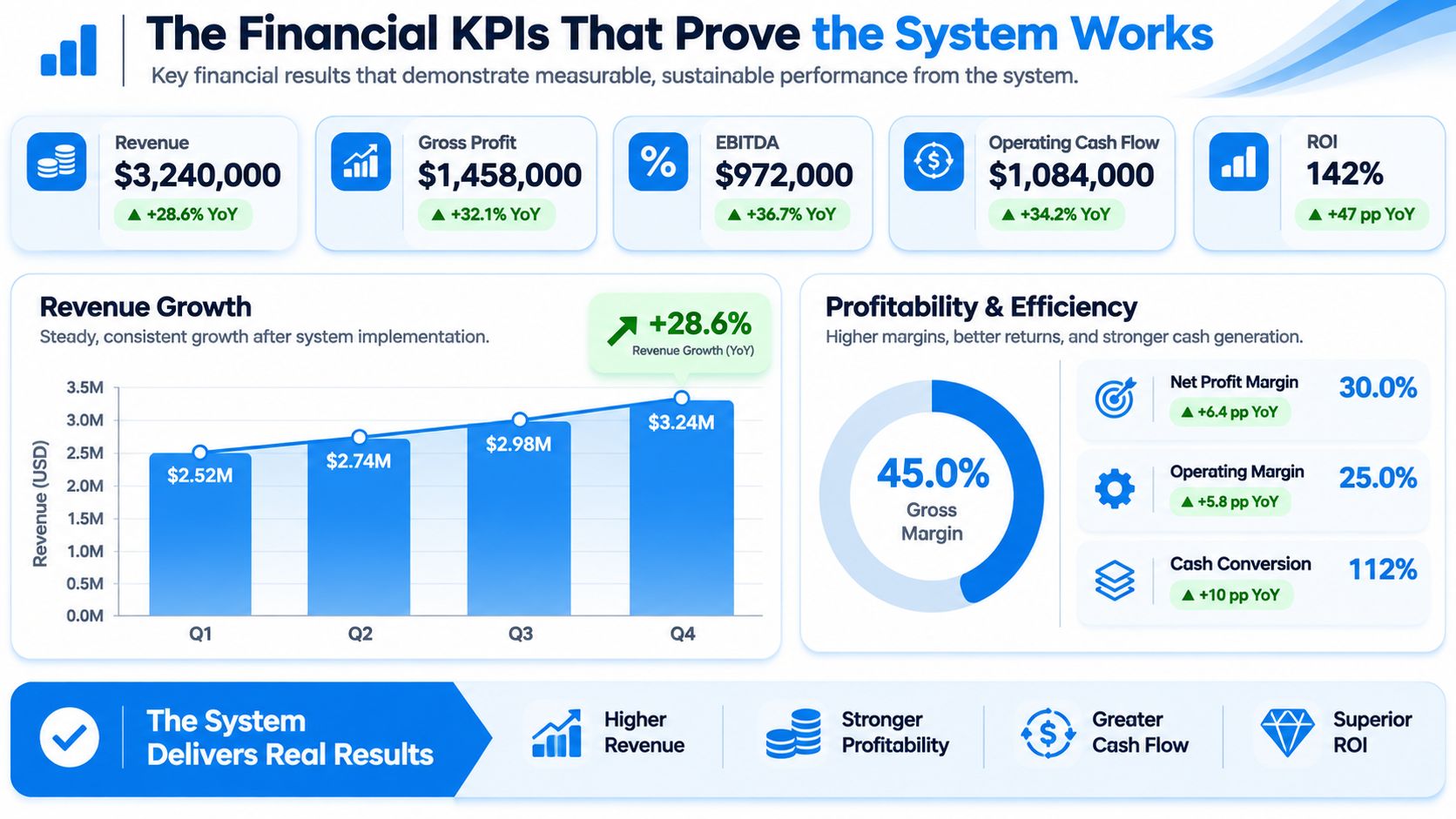
DSO tells you how fast revenue turns into cash, while operational billing and close metrics tell you how much manual effort it took to get there. Pair DSO with invoice preparation time (hours from delivery or work-order approval to invoice dispatch), overdue receivables share, and invoice processing time on the payables side. Then add the close-quality measures that expose hidden spreadsheet work: days to close, manual reconciliation hours, auto-match rate, unreconciled value in euro, and post-close adjustments.
Manual reconciliation is where most close capacity disappears. In Trintech’s 2022 Global Financial Close Benchmark Report, 74% of surveyed finance and accounting professionals remained in basic or developing stages of close automation, and more than half reported that at least 50% of reconciliation and close tasks were manual. Fixing that takes more than importing a bank CSV. A capable system needs to ingest bank, subledger, inventory, payroll, and intercompany feeds, standardize references and dates, run deterministic matching rules (supporting one-to-one, one-to-many, and many-to-one matches with defined amount and timing tolerances), and route ambiguous exceptions to a human reviewer with mandatory override reason codes.
Similarly, Ventana Research’s perspective on modern finance points to automated consolidation with built-in audit trails, alerts, and transaction traceability as core to faster, cleaner reporting. To test whether integration is raising control quality rather than merely moving spreadsheets online, pair your headline metrics with technical close indicators: aged exceptions, manual journal percentage, and the proportion of general-ledger lines traceable to an originating operational record.
The Core Measurement Table
Start recording these eight KPIs using the exact formulas below for at least two full months before you change systems, so your post-launch review rests on real baselines rather than memory.
| KPIA KPI (Key Performance Indicator) measures progress towards a business goal. An ERP system can calculate KPIs from business records and show changes in performance over time. | How to calculate | What it reveals | Direction |
|---|---|---|---|
| Days sales outstanding | (Accounts receivable divided by revenue) multiplied by days in period | How long cash stays with customers | Lower |
| Invoice preparation time | Hours from delivery or work-order approval to invoice sent | Billing friction and re-entry between teams | Lower |
| Overdue receivables share | Overdue receivables divided by total receivables | Collection discipline and dispute backlog | Lower |
| Days to close | Working days from period end to reported results | Quality of the close workflowA workflow defines the steps, responsibilities and decisions needed to complete work. An ERP system can guide tasks through these stages and show progress. | Lower |
| Manual reconciliation hours | Staff hours spent matching records before close | Real automation coverage | Lower |
| Auto-match rate | Records matched by rule divided by records processed | Rule quality and data cleanliness | Higher |
| Unreconciled value | Open unmatched items at period end, in euro | Exposure carried before period lock | Lower |
| Post-close adjustments | Journals posted after the period is reported | Control quality and source data accuracy | Lower |
Baseline discipline: A drop in DSO by itself doesn’t prove your new ERP caused the gain. Customer mix, tighter credit terms, or seasonal demand can move DSO on their own.
Compare DSO before and after implementation on identical calculation rules alongside invoice preparation time, administrative hours, and correction rates. Just as clearly, treat month-end close speed improvements as qualitative until your team records a verified before-and-after baseline under the same reporting standards.
A Hypothetical Month End With Connected Records
To see how connected records change daily close work, consider a hypothetical European soft-furniture manufacturer closing April. All figures and counts below are illustrative rather than measured customer results, and any close-time reduction stays qualitative until a company measures its own baseline.
On working day one of May, the April bank statement imports automatically. Deterministic matching rules clear almost all incoming customer receipts against open receivables, while a small handful of short-paid or unreferenced transfers land in a receivables exception queue showing item age, euro value, and a named credit controller. Nobody has to retype April sales invoices because every standard order invoice was generated directly from confirmed warehouse delivery notes throughout the month.
Meanwhile, installation and on-site repair hours logged by field technicians moved straight from approved service work orders into service invoices. Hours and materials booked by staff on a commercial showroom fit-out rolled from project time logs into work in progress and generated the contracted milestone invoice once the project manager approved completion. On the plant floor, finished-goods receipts and material consumption posted actual production costs and inventory revaluation directly into cost of sales.
The financial controller opens the exception queue, clears the remaining bank and purchase-price variances with documented reason codes, and posts three illustrative adjusting journals (an electricity accrual, a warranty provision update, and a monthly prepaid insurance release). Before locking April, the controller runs a traceability check confirming that every operational ledger line links back to a source record, then locks the period so no backdated entry can slip in.
Contrast that with a disconnected setup at the same factory. Finance staff spend days pulling totals from four separate tools (sales, warehouse, production, and time tracking), pasting them into summary workbooks, and hunting down a material stock valuation discrepancy by hand before management ever sees a draft profit and loss statement.
Records and Owners Behind That Close
A smooth connected close doesn’t happen because finance worked harder in week one; it happens because operational owners kept their records clean all month:
- Delivery notes and stock movements: Owned by the warehouse supervisor, driving customer billing and inventory valuation.
- Approved service work orders: Owned by the service coordinator, capturing billable technician hours and replacement parts.
- Project time logs and milestone sign-offs: Owned by the project manager, controlling work in progress and progress billing.
- Production completions and material issues: Owned by the plant supervisor, feeding actual manufacturing cost of sales.
- Exception queue, adjusting journals, and period lock: Owned by the financial controller, protecting ledger integrity before reporting.
Migrating Data and Passing the First Close
Even well-designed financial management systems fail when cutover is treated as an IT file upload instead of a controlled accounting event. Copy these five sequential steps straight into your project plan before you set a go-live date.
- Map the old ledger to the new chart of accounts: Account for every single nominal code in the legacy system, documenting which accounts stay identical, which merge, and which retire so historical comparisons stay clean.
- Load opening balances and open operational subledgers: Bring in opening trial-balance figures alongside invoice-level aged receivables, open payables, clean customer and supplier master data, verified bank details, tax codes, the fixed asset register, open purchase orders, and outstanding budget commitments. Planning this scope carefully is the core of a controlled ERP data migration.
- Configure roles, approval limits, and posting rights before day one: Build your user roles and segregation-of-duties matrix before the first employee signs in. Fixing overly broad permissions after go-live always meets resistance and leaves an uncontrolled gap during your riskiest month.
- Run one parallel accounting period: Operate the old and new systems side by side for a full month until both produce the same trial balance, and investigate and document every single euro of difference before turning off the legacy ledger.
- Execute a full close rehearsal: Run a practice month-end close in the test environment that ends in a locked period and a complete log of every manual adjusting journal your team had to post.
Cost Drivers and Go Live Checks
When budgeting time and money for cutover, five factors drive almost all of the effort: the number of legal entities and reporting currencies, external integrations (such as banks, webshops, or payroll providers), the state of your existing master data, staff training hours, and how long you run parallel periods. Clean master data cuts migration effort more than any technical shortcut.
Right before opening the live system, run four final checks:
- Duplicate supplier records: Scan supplier names, VAT numbers, and IBANs so accounts payable doesn’t split spend or pay the same bill twice under two vendor IDs.
- Unmatched opening items: Confirm that every open receivable and payable balance ties exactly to its invoice-level aging list with zero unexplained plug figures.
- Permissions wider than policy: Audit every user account against your approval matrix to confirm nobody can both create and approve payments or edit bank details unreviewed.
- End-to-end drill-through verification: Post sample live transactions across sales, purchasing, and inventory, then verify that every resulting general-ledger line clicks back to its source document.
Treat your first live month-end close as a formal control test, not an administrative formality. Both the financial controller and the CFO (or managing director in a smaller company) should sign off that first close only after open exceptions are resolved, bank reconciliations clear, and the period locks cleanly.
Choose the First Finance Process to Connect
Don’t try to rewire every financial workflow in one weekend. Pick the first process to connect using two strict filters: cash impact within 90 days, and whether usable source data already exists in your operations today.
Using those two filters, most manufacturers, wholesalers, and service businesses get the strongest return by connecting processes in this order:
- Billing from delivery or service completion: Start here because it shortens the delay between finished work and cash collected, removes manual invoice retyping, and cleans up your receivables aging right away.
- Purchase-to-pay with three-way matching: Once incoming cash is faster and cleaner, lock down outgoing cash by tying purchase orders, goods receipts, and supplier invoices together so overpayments and duplicate bills stop at the gate.
- Project and production costing: With clean buying and selling records in place, pull labor hours, material consumption, and work in progress into your ledger so order and project margins reflect reality.
- Group consolidation and executive dashboards: Save automated multi-entity reporting and board dashboards for last. Dashboards only help once the upstream transactions feeding them are accurate and traceable.
Before anyone configures a single screen, write down four baseline numbers and date them: Days Sales Outstanding, invoice preparation time, days to close, and corrections after close. Re-measure all four at the 90-day mark using the exact same definitions so you know what improved.
SIX FinanceFlow connects invoicing, expenses, payments, budgets, accounting, and financial reporting in one controlled process, and SIX ERP allows information to be entered once and used everywhere it is needed, including stock levels, customer details, costs, schedules, and documents. As a practical next step, gather your current month-end close checklist, one sample customer invoice, and one month of receivables aging, then sit down with a SIX specialist to map which records already exist in your operations and which ones your team is still retyping by hand.
SIX ERP gives small, mid-sized, and larger businesses a separate, managed ERP instance built around connected flows for sales, purchasing, inventory, production, projects, field service, and finance. If you’re ready to tie daily operational events directly to traceable financial records, stronger internal controls, and faster collections, visit SIX ERP to walk through your current close workflow with our team.