

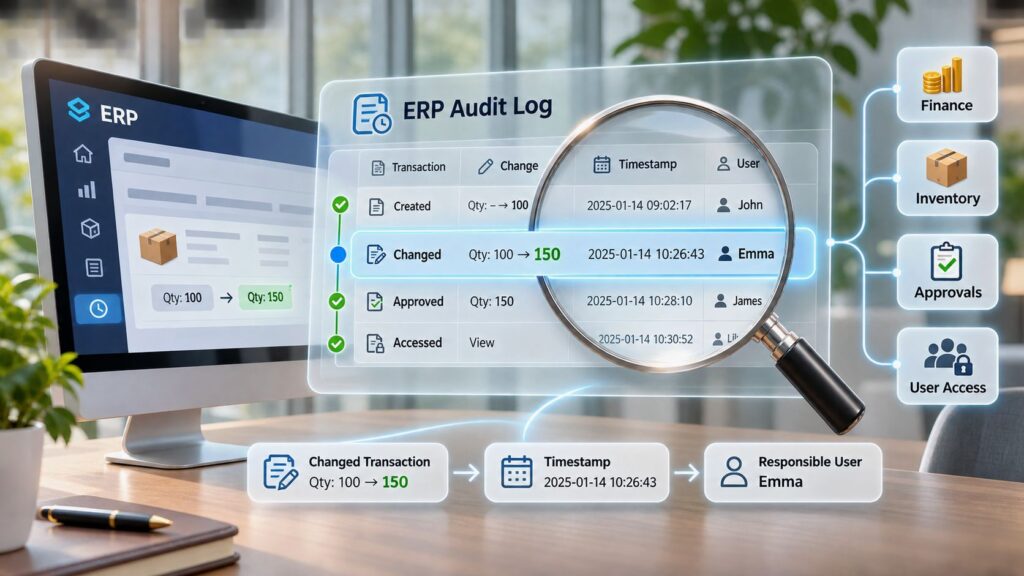
An audit log is a chronological record that shows who did what, to which record, when, and with what result. In an ERPAn ERP system connects a company’s core processes—such as sales, finance, inventory, manufacturing, and service—in one place so teams can work with shared information. system, it helps your team connect a change to the business transaction it affected.
A warehouse count doesn’t match the stock balance. A customer questions an invoice that looks different from the version they received. Before anyone corrects the record, you need to understand what happened, not just what the screen shows now.
What an Audit Log Records and Why It Matters
An audit log is a chronological record that shows who did what, to which record, when, and with what result.
Think of a bank statement. It lists transactions and balances, but it doesn’t usually show which employee approved a correction or which terminal they used. An audit log adds that kind of accountability to system activity.
Enterprise resource planningAn ERP system connects a company’s core processes—such as sales, finance, inventory, manufacturing, and service—in one place so teams can work with shared information., or ERP, is the shared system that runs sales, purchasing, stock, production, service, and finance on connected records. When someone changes a business record, an audit entry should preserve enough context for another person to review the action later.
The NIST Guide to Computer Security Log Management identifies security-relevant events such as successful and failed authentication, file access, security-policy changes, account creation or deletion, and privilege assignments. It treats log management as an organization-wide process, not an isolated application feature.

What a useful entry contains
The OWASP Logging Cheat Sheet organizes investigative information around when, where, who, and what. For ERP audit logs, expect these core fields:
- Timestamp: When the event occurred, with a clear time zone.
- Authenticated identity: The user or service account associated with the action.
- Initiating application or command: Where the request originated.
- Affected record: The invoice, order, stock item, account, or setting involved.
- Requested action: What the person or process attempted.
- Outcome: Whether the action succeeded, failed, or was denied.
An ordinary activity history might say that an invoice was updated. A useful audit entry ties that update to an identifiable actor, a specific record, and a reviewable control event.
That distinction matters when a manager checks whether someone approved their own transaction. It also matters when an investigator needs to separate an attempted change from a completed one.
A log records evidence, not intent. An account name doesn’t automatically prove which person operated the account, especially if credentials were shared or compromised. Every entry should still help answer the essential questions: what changed, who was responsible, and when it happened.
ERP Events Every Audit Log Should Capture
ERP events to log and why
| Event category | Fields to record | Why it matters |
|---|---|---|
| Logins and failed authentication | User ID, timestamp, device or address, success or failure | Reveals possible account misuse and repeated password guessing |
| Permission and role changes | Administrator, target user, old and new role, timestamp | Helps identify privilege creep and segregation-of-duties breaches |
| Invoice creation and corrections | Invoice ID, before and after values, approver, timestamp | Supports financial accuracy and disputed-invoice reviews |
| Inventory adjustments | Stock item, quantity change, warehouse, reason code, user | Explains stock differences and unexplained losses |
| ApprovalAn approval is a formal decision that allows a request or action to proceed. An ERP system can route approvals and record who made each decision. decisions | Approver, decision, amount or threshold, timestamp | Shows whether the approval chain was followed |
| Purchase and sales order changes | Record ID, changed fields, previous values, user | Links changes to downstream stock, cost, and billing effects |
| Supplier bank details and customer credit limits | Record ID, old and new value, editor, timestamp | Helps detect payment fraud and unauthorized credit increases |
| APIAn API (Application Programming Interface) allows software systems to exchange information. Connected to an ERP system, it helps transfer business data and reduce manual entry. and integrationIntegration connects systems so they can exchange information or coordinate actions. An ERP integration helps link business tools and reduce manual transfers between them. activity | Service identity, endpoint, affected record, result | Tracks automated changes made by external systems |
| Critical configurationConfiguration sets up software using its existing options. In an ERP system, it adapts workflows, roles and other settings to the company’s business processes. changes | Setting changed, administrator, old and new value, timestamp | Supports review of control settings and reporting logic |
| Access to sensitive personal data | Requester, purpose, record, recipient where applicable | Supports GDPR accountability and data-subject inquiries |
This is a starting point, not a complete logging specification. Prioritize events that affect security, data integrity, financial accuracy, and business accountability.
Authentication records show access attempts. Permission records show changes in authority. Transaction records show how people or automated processes used that authority.
Financial postings deserve particular attention. Preserve the posting reference, accounting period, actor, result, and any reversal relationship so reviewers can distinguish a correction from a deleted or overwritten history.
Capture the change, not just the latest value
For certain electronic recordkeeping systems under its jurisdiction, the U.S. Securities and Exchange Commission’s 2022 final rule specifies a complete, time-stamped audit trailAn audit trail records who created, changed or approved information and when. In an ERP system, it helps trace transactions, investigate errors and support audits. covering modifications and deletions, action dates and times, actor identities, and information needed to preserve record integrity. This is a scoped regulatory requirement, not a universal ERP duty.
Its underlying properties are useful more broadly: completeness, chronology, attribution, tamper resistance, and retention. For material changes, preserve before-and-after values and the related approval context.
An application programming interface, or API, lets systems exchange requests automatically. An integration can change inventory or financial records without a person opening an ERP screen, so service identities need traceabilityTraceability follows a product or material through its history, from origin to use or delivery. An ERP system connects the records needed to investigate issues and track affected items. too.
The guide to ERP system data provides useful context for understanding how shared business records connect. Those relationships help determine which changes deserve an audit entry and which identifiers investigators will need.
Logging every click creates noise without necessarily improving control. The practical test is more demanding: can an investigator establish who changed a supplier’s bank account, when, from which device, and under whose authority?
How Audit Records Reconstruct an Incident
A single log entry shows an event. An ERP audit trail connects the evidence needed to explain a business outcome.
The NIST audit log glossary distinguishes logs from the wider trail investigators assemble across records. In practice, useful reconstruction depends on related transaction identifiers, consistent timestamps, and identifiable users or processes.
Hypothetical example of an unauthorized inventory adjustment
A warehouse supervisor finds fewer units on a shelf than the ERP balance shows. While reviewing the item’s history, the supervisor discovers an earlier adjustment that increased the recorded quantity.
The investigator asks: Was this an approved count correction, a mistake, or an unauthorized entry? The audit record identifies the account that posted it, the warehouse, the timestamp, and the quantity change. The reviewer then checks the reason code, count sheet, and approval.
The account identifier establishes where to investigate, not whom to blame. A shared warehouse login or an automated import may require additional evidence before the team can attribute responsibility to a person.
Hypothetical example of an unexpected invoice modification
A customer disputes an invoice total after receiving the document. The current record alone can’t explain why the customer’s copy differs.
The investigator compares the original and corrected values, the editor, and the change time. They then check whether the correction followed a price approval, a return, or a delivery discrepancy.
The business sequence may begin with a sales order, continue through a warehouse stock movement, and end with a finance posting. A change that appears in finance may therefore originate in an earlier operational decision.
Hypothetical example of a suspicious login
An account signs in from an unfamiliar device outside its usual working pattern. Soon afterward, someone changes its permissions.
The reviewer connects the authentication event to the role change and checks the administrator account that granted access. An unusual device or time is a reason to investigate, not proof of compromise. Approved travel, support work, or a scheduled integration may explain it.
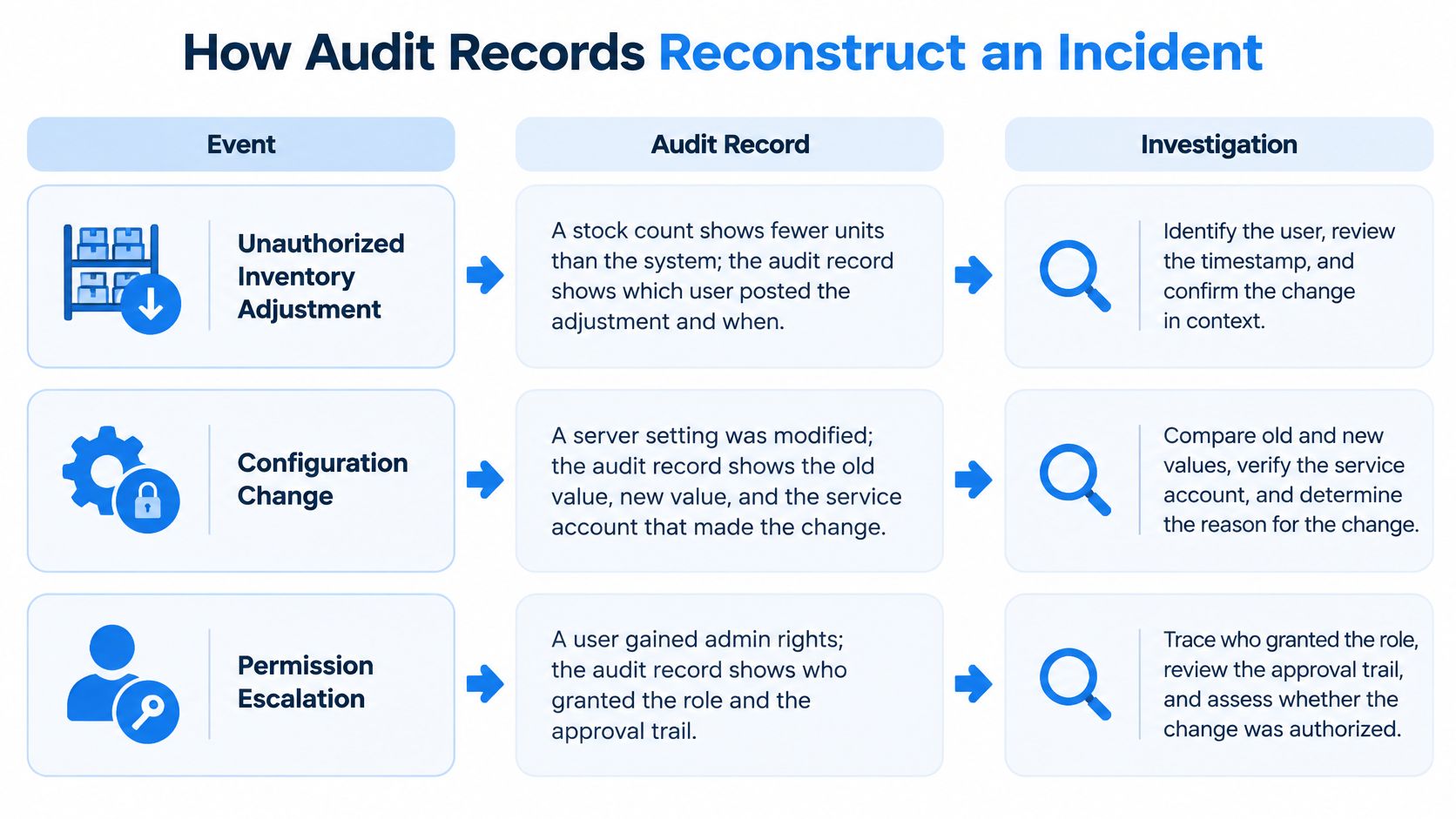
Event → Audit Record → Investigation → Corrective Action
Follow the business transaction beyond the screen where someone noticed the problem.
At SIX, we investigate ERP issues by examining the wider business process around the issue, not only the screen where it appeared. That means checking related operational and financial records before concluding that the visible change caused the problem.
The corrective action should match the evidence. A team might reverse an incorrect adjustment, revoke compromised access, retrain a user, or document a legitimate correction. Where financial records must remain intact, use an authorized reversal or correcting transaction rather than erasing the original entry.
Record the conclusion and its supporting evidence. An unresolved gap should remain visible in the case record instead of becoming an unsupported assumption.
How to Filter and Investigate Audit Records
Start by preserving the relevant evidence before anyone edits the affected business record. Use a controlled export or protected case record, retain its context, and note who collected it.
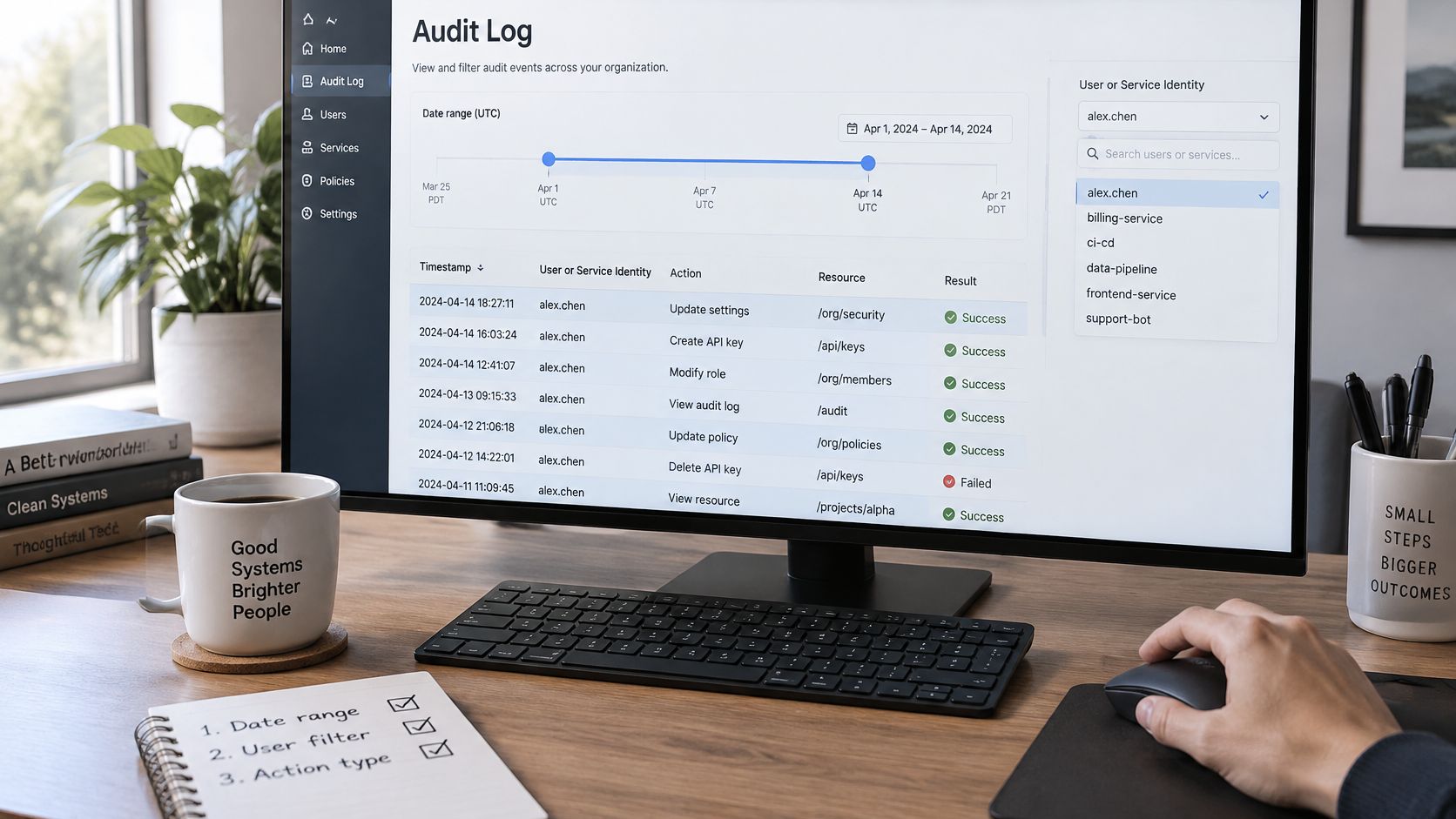
Narrow the search without losing context
Set the date range. Begin around the suspected event, allowing for shift changes, time zones, and delayed synchronization. Check whether the displayed time describes the action itself or when a collector received it.
Filter by user or service identity. Review the activity associated with the account, including automated processes. Don’t assume a service account identifies the person who initiated the wider workflowA workflow defines the steps, responsibilities and decisions needed to complete work. An ERP system can guide tasks through these stages and show progress..
Select the activity type. Narrow the search to stock adjustments, invoice changes, authentication, or permission updates. Keep failed and denied actions available because they may explain what preceded a successful change.
Find the affected record. Search using the invoice number, order reference, stock item, or other stable identifier. Names and descriptions are less reliable because users may edit them.
Open the transaction history. Read the sequence and inspect available before-and-after values. Distinguish a saved change from a rejected request, canceled operation, or later reversal.
Compare related evidence. Check approvals, assigned permissions, and linked records across departments. Combining business records with security logs can show whether a new-device login preceded a financial change.
Classify the finding and document the response. Decide whether the evidence supports a legitimate action, an operational mistake, unauthorized activity, or an unresolved case. Assign an owner to each corrective action and preserve the reasoning.
A search result isn’t automatically a complete incident timeline. Missing events may reflect a filter, an integration boundary, a collection failure, or an action that wasn’t covered by the logging scope.
Investigators should inspect only the personal data needed for the case. Purpose-limited access keeps a payment investigation from turning into an unnecessary review of unrelated employee or customer information.
Questions to answer before closing the case
- Authority: Was the account permitted to perform the action at that time?
- Approval: Did the required person approve the actual change?
- Timing: Does the timestamp align with a known business event?
- Impact: Which transactions, balances, documents, or people were affected?
- Communication: Who needs the finding, and who owns the follow-up?
Close the case when the evidence supports the conclusion and the required actions have owners. If attribution remains uncertain, state that limitation plainly.
How Long to Keep Audit Records Under GDPR
An invoice dispute surfaces eighteen months after the sale. Whether you can answer it depends less on how much you logged than on whether each category in the chain, the order, the stock movement, the payment record, was kept long enough to reconstruct together.
There is no universal audit log retention period. Retention works like an archive room: every shelf gets a label saying what belongs there and when it goes, so the room stays usable instead of filling with unmarked boxes. Set retention by purpose, risk, and the obligations that apply to each category.
For payment-card systems in scope, the PCI DSS logging requirements summary describes the PCI DSS 4.0 industry standard’s minimum of 12 months, with the most recent three months immediately available for analysis. That figure is the floor for one category. The table below shows where each other category takes its schedule.
Audit log retention drivers by category
| Log category | Retention driver | Who sets the period |
|---|---|---|
| Authentication and security events | Incident investigation and risk assessment | The customer’s documented risk review |
| Financial and invoice audit records | Accounting and tax recordkeeping rules in the relevant country | National accounting and tax law |
| Personal-data access records | GDPR storage limitation and accountability | The documented processing purpose |
| Permission and configuration changes | Control evidence and segregation-of-duties reviews | Internal control policy |
| API and integration records | Reconciliation of transactions across systems | Integration agreements and audit requirements |
| Payment-card in-scope systems | PCI DSS logging requirements | PCI DSS (12-month minimum, three months immediately available) |
Keep useful evidence without collecting everything
GDPR pushes against the instinct to keep everything forever. Data minimization means limiting personal data to what the purpose needs. Storage limitation means keeping identifiable personal data no longer than necessary for that purpose, subject to applicable lawful requirements.
More logging is not automatically safer. A category kept longer than its purpose allows creates exposure without adding accountability, and a table full of records nobody can justify is harder to defend than a smaller set with clear reasons.
Accountability requires a defensible explanation of those decisions. The EU legal discussion of personal-data consultation records highlights the importance of recording the operation’s justification, timing, and relevant identities so access can be reviewed. The retention period itself belongs in that explanation.
Avoid copying entire customer profiles, payroll fields, or document contents into an audit entry when an identifier and a protected reference will do. Restrict access to sensitive before-and-after values to the investigators who need them.
The NIST log-management lifecycle guide treats disposal as one stage alongside generation, transmission, storage, and analysis. Deletion belongs in audit log management from the start, scheduled like every other stage.
Retention rule: Keep what you can justify, protect what you keep, and document when it should be removed.
Three situations commonly reshape the schedule. Financial evidence may need to satisfy national accounting and tax rules. A food producer may also need operational evidence for traceability, with obligations set by country and product. An active investigation or dispute can require a legal hold that suspends scheduled deletion for relevant evidence; document the hold’s scope, approval, and release conditions so it stops at the records it covers.
The company determines and meets its legal duties. Software executes them: configurable retention, such as the retention settings in SIX ERP, applies the decisions, and the periods themselves come from legal and tax advisers for each jurisdiction, including rules for access, export, holds, and verified disposal.
Keeping Audit Logs Complete and Tamper Resistant
A log is only as reliable as the path between the original event and the evidence an investigator reads. Collection, forwarding, parsing, transformation, storage, and administrator activity can each introduce gaps or changes.
The CISA logging reference architecture emphasizes preserving provenance and integrity across that path. Provenance means being able to establish where a record originated and how it reached its current form.
Protect the collection path
- Centralize protected evidence. Send security- and control-relevant events to a separately protected repository so investigators can correlate activity across systems.
- Authenticate and encrypt transport. Protect event transmission against unauthorized reading and forged submissions.
- Separate administrative duties. Restrict modification and deletion rights so application administration doesn’t automatically provide unchecked control over its evidence.
- Synchronize clocks. Align servers, modules, and mobile devices so reviewers can interpret event order, while preserving relevant time-zone information.
- Maintain append-only or immutable copies. Protect historical evidence against rewriting, with controls appropriate to the threat and system architecture.
These are recommended design practices, not claims about a particular deployment. Their effectiveness depends on configuration, access control, and ongoing verification.
Consider a hypothetical sequence: an administrator changes permissions in an HR-related workflow, someone later edits supplier bank details in finance, and a mobile user approves a payment-related action. Central correlation helps the reviewer determine whether these events belong to one authorized process or require separate investigation.
Test evidence collection as a business control
Generate known events deliberately in a controlled environment. Confirm that expected fields arrive intact, timestamps remain interpretable, and related identifiers survive forwarding and parsing.
Test alerts and search functions as well as storage. A record that exists but can’t be found by invoice reference or service identity may be of little use during an incident.
Assign named owners for collection failures, access reviews, and control testing. During each scheduled review period, reconcile selected high-value transactions against their audit evidence and investigate missing or inconsistent records.
For a broader explanation of how individual records form reviewable evidence, the Doczen guide to audit trails is a useful companion. The practical distinction is between storing events and maintaining an evidence chain someone can examine.
Organizations assessing wider cybersecurity governance can also consult our guide to NIS2 and how ERP supports preparation. Treat logging as part of controlled operations, with documented responsibilities and reviews, rather than a feature enabled once and forgotten.
Review Your Audit Log Scope Before Go-Live
Settle these decisions before users depend on the system:
- Material events: Identify the actions that need accountable records.
- Personal data: Decide which fields need to appear in logs.
- Access and export: Name who may investigate, administer, and share evidence.
- Retention: Approve category-specific rules with jurisdiction-specific legal and tax advice.
- Testing: Define how the team will prove that required events are recorded.
SIX ERP includes role-based permissions, controlled access, audit trails, secure document handling, and configurable retention. These functions support records management and GDPR principles, but they don’t guarantee legal compliance.
Its connected business records let teams follow transactions across FinanceFlow for financial processes, StockFlow for warehouse activity, PurchaseFlow for procurement, and ManufacturingFlow for production. The investigation scope should reflect the Flows and workflows the company uses, not an assumed standard setup.
Give business users ownership
Assign a business owner who understands both the transaction and its approval rules. Our guide to the power user role explains a useful point of coordination between operational teams and technical support.
When reporting an issue to SIX, include what you were trying to do, what happened, which users or processes are affected, and the steps that reliably reproduce the problem. Include relevant record identifiers and timing without sending unnecessary personal data or credentials.
Reference documents for your control review
The linked documents throughout this article provide the supporting reading:
- NIST: Special Publication 800-92, Guide to Computer Security Log Management.
- SEC: Final rule on electronic recordkeeping systems.
- CISA: Logging reference architecture.
- EU privacy framework: GDPR storage limitation and accountability principles, alongside the linked discussion of access records.
- Payment-card security: PCI DSS logging requirements summary.
A useful go-live review ends with agreed scope, accountable owners, and test evidence. It shouldn’t end with an unchecked assumption that every important action is already covered.
SIX ERP connects operational and financial records with audit trails and configurable retention to support accountable business processes. Visit SIX ERP to review your event list with a SIX expert and map your audit requirements to the transactions, approvals, and handoffs your team needs to trace.