
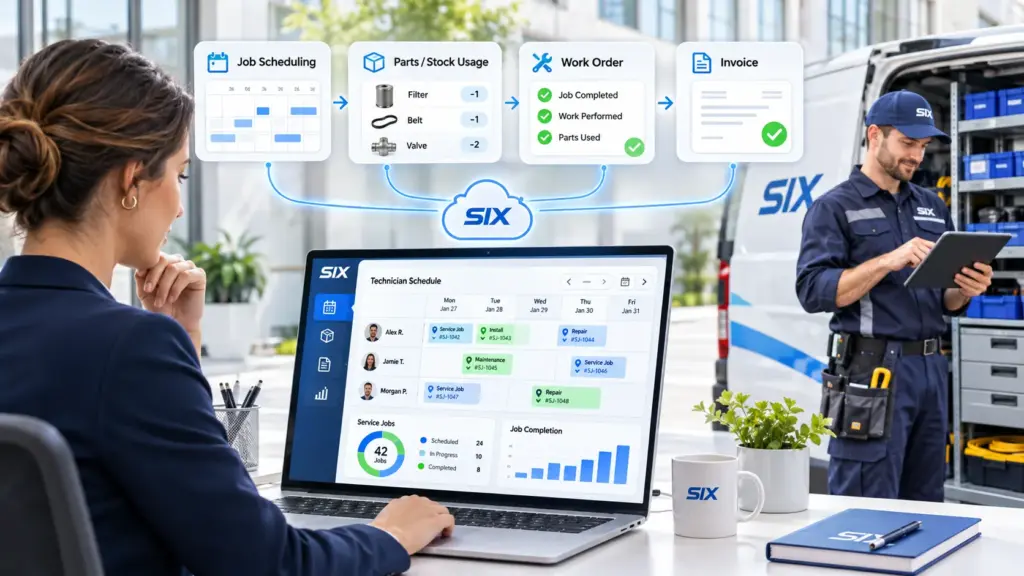
Field service scheduling software works best when it isn’t a separate tool. When scheduling, technician parts tracking and field service invoicing run in one ERPAn ERP system connects a company’s core processes—such as sales, finance, inventory, manufacturing, and service—in one place so teams can work with shared information., the dispatcher sees who has the right skills and parts, the technician closes the job on a phone, and finance bills from the same record. No re-keying. No end-of-week paperwork chase.
This guide explains how that connected flow works, where standalone tools break it, and what to check before you choose a system.
Where Disconnected Field Service Breaks Down
Picture a normal Tuesday. The dispatcher books a repair from a shared calendar. The technician arrives and finds the replacement part isn’t in the van. The warehouse thought it was. Finance gets a paper job sheet three days later and has to guess which parts were used.
Nobody did anything wrong. The systems just don’t talk to each other.
The usual setup looks like this:
- A scheduling app or spreadsheet for dispatch
- A separate inventory list, often updated at the end of the day
- Paper or PDF job sheets for work performed
- An accounting tool where someone types the invoice from scratch
Each handoff is a place where data gets lost or delayed. The cost shows up as repeat visits, missing parts, disputed invoices and slow cash collection.
The problem isn’t the technicians. It is the gaps between tools.
What Field Service Scheduling Software Should Actually Do
Good field service scheduling software matches a job to a technician based on more than an open time slot. It weighs skills, location, the customer’s asset and the parts the job needs.
A calendar can show who is free. It can’t tell you who is free, qualified and carrying the right part.
In an ERP-connected setup, the schedule draws on data that already exists elsewhere in the system:
| Scheduling input | Where it comes from in an ERP |
|---|---|
| Technician skills and availability | People and HR records |
| Customer asset and service history | Customer and asset records |
| Required spare parts | Inventory, including van stock |
| Contract or warranty terms | Customer and sales records |
| Job priority and deadlines | Service request |
When those inputs live in one place, the dispatcher stops making phone calls to confirm what the system should already know. The schedule becomes a decision based on facts, not memory.
Technician Parts Tracking From Warehouse to Van to Job
Technician parts tracking means every spare part has a known location: the central warehouse, a van, or a customer site. Treat each van as a small warehouse, and the system can tell you what each technician is carrying before the job is assigned.
This matters for three reasons:
- First-time fix. The dispatcher can assign the job to a technician whose van already holds the part or reserve the part for pickup.
- Accurate stock. When the technician records a part as used on the job, stock is reduced at that location. No end-of-day reconciliation.
- TraceabilityTraceability follows a product or material through its history, from origin to use or delivery. An ERP system connects the records needed to investigate issues and track affected items.. Batch and serial numbers link a specific part to a specific customer asset. When a part fails or gets recalled, you know where it went.
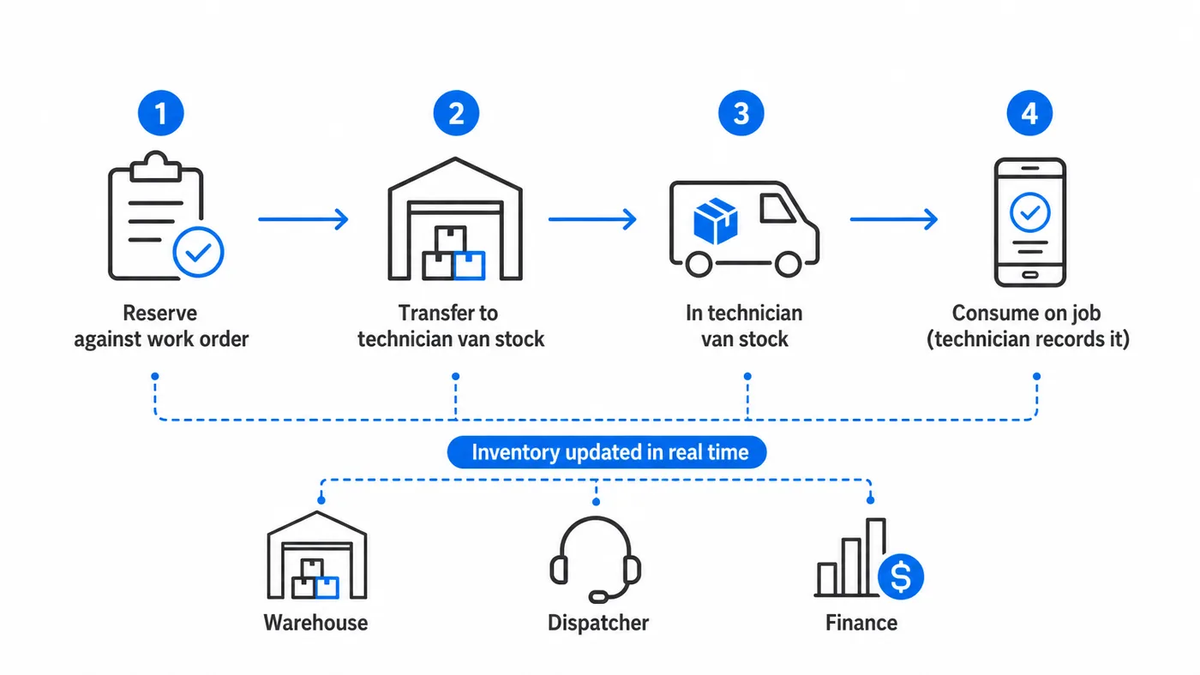
The flow from reservation to consumption follows a fixed sequence. A part is reserved against the work order, transferred from the warehouse to the technician’s van stock, then consumed on the job when the technician records it. Each step updates inventory at that location, so the warehouse, the dispatcher and finance all see the same quantity at the same time.
Van stock that nobody records isn’t inventory. It is a guess.
Work Order Management in an ERP
Work order management in an ERP turns the service request into a single record that carries the job from start to finish. The same work order holds the customer, the asset, the scheduled technician, the parts, the labor time and the customer’s approvalAn approval is a formal decision that allows a request or action to proceed. An ERP system can route approvals and record who made each decision..
That single record is what makes the rest possible. Compare the two approaches:
| Step | Disconnected tools | One ERP work order |
|---|---|---|
| Service request | Email or phone note | Logged against customer and asset |
| Scheduling | Separate calendar | Assigned with skills and parts in view |
| On-site work | Paper job sheet | Mobile update to the work order |
| Parts used | Written down, typed later | Recorded on the job, stock updated |
| Customer sign-off | Paper signature | Digital approval on the device |
| Invoice | Re-typed in accounting | Generated from the approved work order |
The technician doesn’t need the full ERP on a phone. They need the job, the customer history, the asset details and a way to record what was done. Mobile execution gives them exactly that.

Field Service Invoicing Without Re-Keying
Field service invoicing should start the moment the customer approves the work, not when the paperwork reaches the office. If labor, parts and approval are already on the work order, the invoice is built from data that was captured on site.
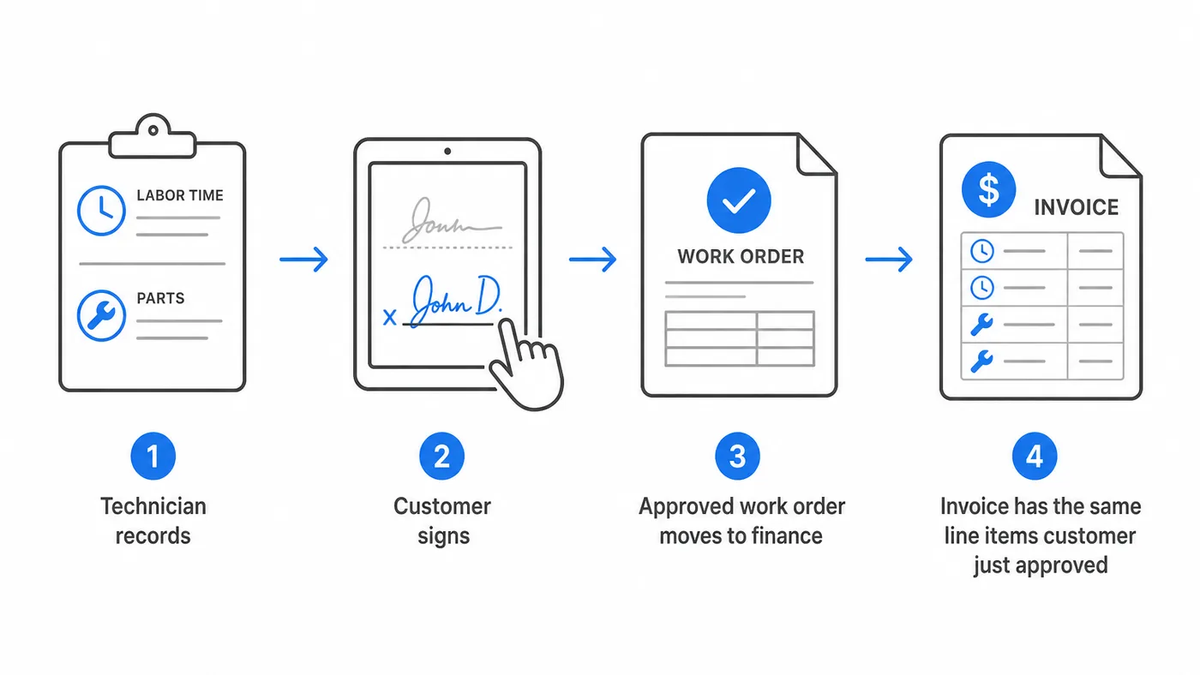
The mechanism is simple. The technician records labor time and parts. The customer signs on the device. The approved work order moves to finance. The invoice carries the same line items the customer just approved.
That removes the most common source of billing disputes: an invoice that doesn’t match what the customer remembers. It also shortens the gap between finishing the job and getting paid.
Don’t treat invoicing as a finance problem merely because the invoice is a finance document. The delay is almost always created upstream, in how the job was recorded.
How SIX ERP Connects Scheduling, Parts and Billing
SIX ERP handles field service through ServiceFlow, which covers service requests, scheduling, technicians, customer assets, spare parts, mobile execution, customer approvals, field updates and invoicing. Because it sits inside the same platform as inventory and finance, the work order isn’t handed between systems. It moves through them.
In practice, that connects the steps above:
- Scheduling draws on technician records and customer asset history.
- Spare parts come from StockFlow, with reservations, multiple locations, batches and serial numbers.
- Mobile execution gives technicians access to jobs and customer records in the field.
- Customer approval is captured on the job and passed to invoicing.
- Invoicing and payments run in FinanceFlow from the approved work.
You can see how the dispatch-to-invoice flow is set up in SIX ServiceFlow field service software. Stock control for warehouses and vans is covered in more detail in warehouse and inventory management.
SIX is a managed ERP. ConfigurationConfiguration sets up software using its existing options. In an ERP system, it adapts workflows, roles and other settings to the company’s business processes. follows your existing service process rather than forcing a generic template. Implementation, data migration, integrations with existing accounting or specialist tools, training and post-go-live support are scoped as part of the service.
What to Check Before You Choose a Field Service ERP
Choosing a field service ERP isn’t about the longest feature list. It is about whether the system closes the gaps between dispatch, stock and billing in your process.
Ask these questions during evaluation:
- Does scheduling use technician skills, asset history and parts availability, or only open time slots?
- Is van stock tracked as its own inventory location?
- Can technicians record parts, labor and customer approval on a mobile device?
- Is the invoice generated from the approved work order, without re-keying?
- Can the system connect to the accounting platform, portals or tools you already use?
- Who handles configuration, migration and support after go-live?
Platforms such as Odoo, Oracle NetSuite and Microsoft Dynamics 365 Business Central also appear on field service shortlists. Compare each on the questions above, using a real job from your own process. A demo built on the vendor’s sample data proves very little.
For a broader view of selection criteria and ERP fit, see this guide to field services software features.
Bring Dispatch, Stock and Billing Into One Record
Field service rarely fails at the job itself. It fails in the handoffs between the calendar, the warehouse and the invoice. Putting scheduling, technician parts tracking and field service invoicing on one work order removes those handoffs.
If your team is still reconciling job sheets against stock lists at the end of the week, talk to SIX ERP about mapping your service process before you configure anything.