


TL;DR - Production Scheduling Software for Manufacturers
A reliable production schedule must reflect what the factory can actually produce, not simply what the planning spreadsheet promises.
Three customer orders are due the same week. One cutting cell handles all three. The fabric for the largest order sits on a truck two days behind schedule, and the sewing team is still working through a changeover nobody planned for. The spreadsheet says everything ships on Friday.
Every plant has a morning like that one. Production scheduling software exists to answer a narrow question: given the orders, machines, people, and materials you have, what can you run, and when? A spreadsheet answers a different question. It records what someone hoped would happen.
What Production Scheduling Software Does for Manufacturers
Take the fabric delivery that arrives two days late. The wall calendar still shows the sofa order starting Tuesday, because a calendar only records intent. A scheduler tests that order against the limits that exist: the sewing line’s available hours, the foam that hasn’t arrived, the two people trained to run the overlocker, and the changeover from the previous fabric.
That difference is the value. Production scheduling software decides when each job runs, on which work center, with which crew, and with which materials, then checks whether the plan can be executed at all. It answers four questions for every order: can we start it, where does it run, who runs it, and what does it push aside.
Four terms carry most of the meaning. A work center is any resource that does work: a cutting table, a CNC router, a sewing line, a paint booth, a packing bench, or a crew. A routing is the ordered list of operations a product passes through, with a standard time for each. The bill of materials lists the components and quantities that must be present before an operation can start. A changeover is everything between the last good piece of the previous product and the first good piece of the next: blade changes, thread swaps, fabric tensioning, first-article checks.
Five problems that force the question
- Machine capacity limits. A cutting cell holds 55 hours of booked work in a 40-hour week, and nobody notices until the plan is measured against real hours.
- Material shortages. Sewing releases while the zip supplier is three days out, so semi-finished covers stack up in front of the machine.
- Production bottlenecks. One work center sets the pace for the plant, often sewing or finishing, and every extra order queues behind it.
- Changing priorities. A salesperson promises a hotel chain a shorter lead time, and the decision lands on the planner with no assessment of what it displaces.
- Missed delivery deadlines. The first warning is usually a customer call, not a message from the system.
None of those is an algorithm problem alone. Each one is a data problem, a priority problem, and a visibility problem at once.
Scheduling is a constraint problem before it’s a software category. Many jobs compete for the same limited resources, and the plan has to respect every limit at the same time. The difficulty is formal: job-shop scheduling is classified as NP-hard, so no known algorithm guarantees an efficient solution for every instance, as the overview of job-shop scheduling theory from Cornell’s optimization program sets out. Add jobs, setups, materials, and due dates, and the number of possible schedules runs past anything a person can enumerate.
It’s also a leadership decision, not only a floor decision. In 2024, 35% of large U.S. manufacturers ranked advanced production scheduling among their first- or second-highest investment priorities, according to Deloitte’s 2025 Smart Manufacturing and Operations Survey of 600 executives.
Core Capabilities Every Scheduling Tool Should Offer
A clean Gantt chart is the easiest thing to show in a demo and the weakest thing to judge a purchase by. The capabilities that matter are the ones that decide whether the plan still makes sense on Thursday afternoon.
| Capability | What It Does | Problem It Solves |
|---|---|---|
| Finite capacity check | Compares order load with machine and crew hours | Stops plans that exceed what the floor can run |
| Material availability check | Compares bill of materials needs with stock and open orders | Flags shortages before a job is released |
| Sequencing with changeovers | Orders jobs to reduce setup time between products | Cuts wasted time between production runs |
| Priority and due-date logic | Ranks orders by deadline, customer, or value | Keeps urgent orders visible and on time |
| Rescheduling and what-if analysis | Re-plans after a delay and shows downstream effects | Limits ripple damage across the plan |
| Shop-floor feedback | Records starts, stops, quantities, and completions | Keeps the schedule current |
| Reporting and exception alerts | Shows running, late, and completed orders | Gives early warning of slipping deadlines |
The two checks that carry the most weight
A finite capacity check compares the load placed on a work center with the hours that work center has, after shifts, breaks, maintenance, and parallel machines are counted. Infinite planning, which assumes a resource can absorb any load, is how a plant ends up with a sewing line double-booked for a week. In SIX ERPAn ERP system connects a company’s core processes—such as sales, finance, inventory, manufacturing, and service—in one place so teams can work with shared information., manufacturing planning checks material availability, machine capacity, employee skills, and work center workload before production begins. Manufacturing orders, routings, operations, setup times, and dependencies sit in one structured schedule, so a sewing operation can’t start before its cutting operation finishes.
The second check is material availability at release, covered in detail further on.
No single solution method handles every plant. A benchmark study of production scheduling methods reports that mixed-integer linear programming produced feasible results only for instances of 10, 15, and 20 jobs in a two-stage hybrid flow-shop setting, while instances of 50 or more jobs needed substantially longer runtimes than heuristic approaches. Other benchmark sets cover job-shop cases from 10 to 100 jobs, 5 to 20 machines, and up to 2,000 operations. Commercial platforms therefore mix exact optimization for small subproblems with heuristics or metaheuristics for fast replanning, and that mix is why rolling-horizon planning, time limits, frozen operations, and quick repair after downtime belong on the requirement list.
Practical rule: A theoretically superior schedule that arrives two hours late, or that reshuffles every job after every shop-floor event, can reduce execution performance rather than improve it.
Judge quality and speed together on makespan, weighted tardiness, changeover effort, and schedule stability. A plan that changes constantly trains operators to ignore it.
Data and Capacity Inputs That Make Schedules Reliable
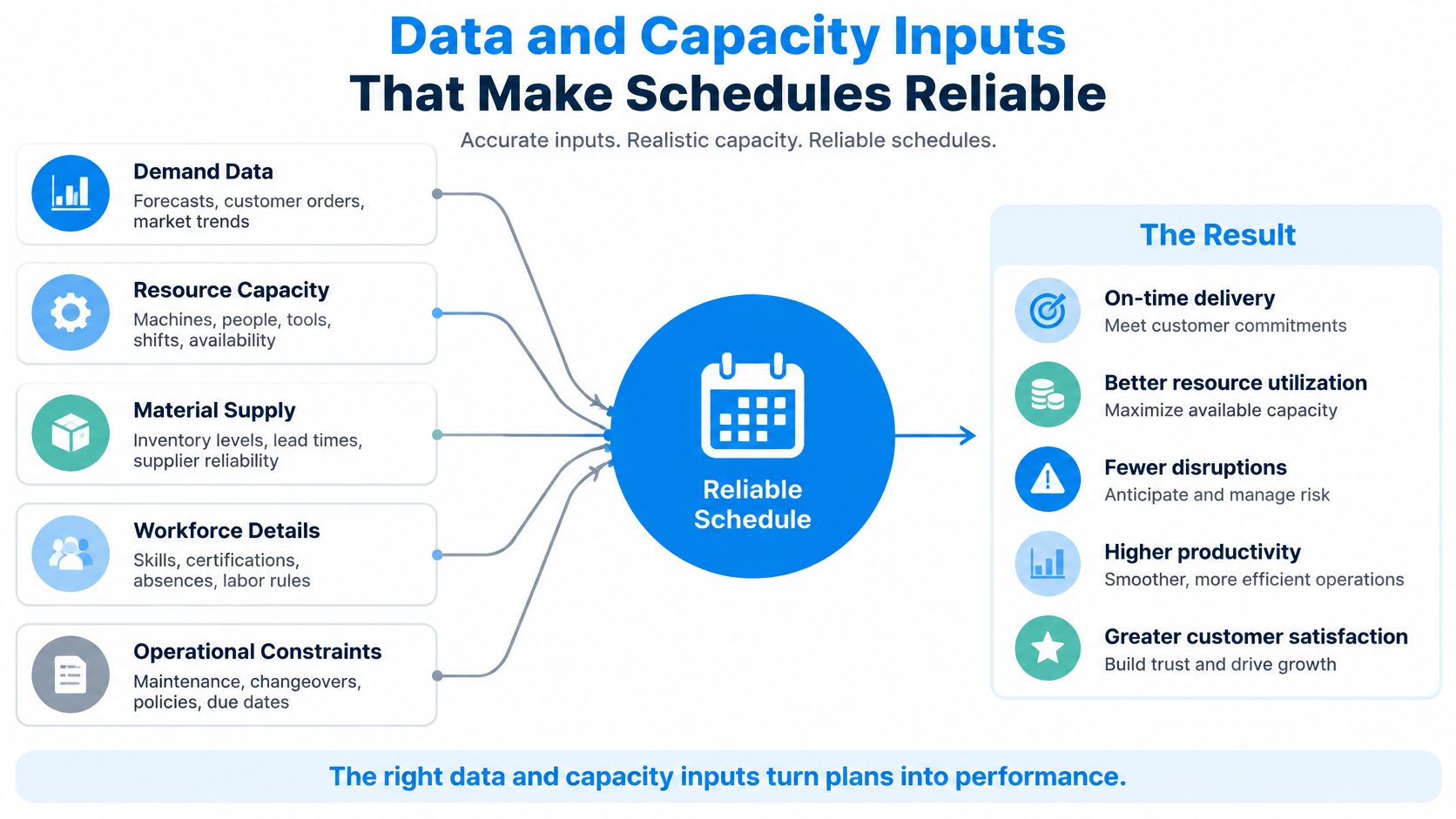
No algorithm fixes bad input. Feed a scheduler a bill of materials that doesn’t match what operators pick, or operation times estimated years ago, and it will return a confident plan built on fiction. The document looks professional. The floor abandons it by Wednesday.
| Input | What It Controls | What Goes Wrong |
|---|---|---|
| Bill of materials | Components and quantities for each product | Missing parts or wrong purchase quantities |
| Routings and operation times | Work steps, their order, and run times | Plans that finish later than promised |
| Setup and changeover times | Time to switch between products or sizes | Capacity overstated on mixed production runs |
| Work-center capacity | Machine hours, shifts, and parallel units | Overloaded machines hidden inside the plan |
| Inventory levels | Stock on hand, reserved stock, and open purchase orders | Jobs released before materials arrive |
| Labor skills and availability | Who can run which machine, and when | Idle machines or unqualified operators |
| Production progress | Actual starts, completions, and scrap | Schedule drifts away from the shop floor |
Where errors hide most often
The most common defect isn’t a blank field. It’s a BOMA Bill of Materials (BOM) lists the materials and components, and their quantities, needed to make a product. that has drifted from practice: an upholstery order that lists four meters of fabric when the cutting team consistently uses five, or a subassembly that now includes a bracket nobody added to the structure. Different product families need different BOM structures, and the guide to types of bills of materials explains which structure suits which production style.
The second defect is material and capacity planned in separate passes. A study of an integrated capacity-analyzer procedure describes finite-capacity planning and lot sizing performed together with the bill-of-materials explosion rather than calculating material quantities first and checking capacity afterwards. The procedure models lot-size multiples and was tested against demand and lot-size fluctuations, and it outperformed a commonly used practical method. For a plant with minimum batches or fixed production quantities, that ordering matters: material and capacity are one decision, not two.
Reading utilization honestly
Take a hypothetical upholstery plant with five work centers and one week of orders. Utilization is the share of available hours already committed.
| Work center | Utilization | What it tells you |
|---|---|---|
| Cutting | 78% | Some slack, enough to absorb a transfer |
| Sewing | 118% | Overloaded, and the constraint for the whole plant |
| Upholstery | 91% | Tight but workable |
| Assembly | 85% | Room for a small urgent order |
| Packing | 54% | Underused |
Sewing is the bottleneck because it limits how fast finished sofas leave the plant, and 118% means the plan already promises more than the line can deliver. That overload is visible only when work-center capacity is recorded accurately. A plant that types “40 hours” into every cell has no bottleneck, and no warning either.
The daily routine that keeps a schedule alive
Feedback decays faster than any other data. When a machine finishes an operation and nobody records it, the remaining schedule drifts further from reality with every hour. Record starts, stops, good quantities, and scrap at the end of each shift, not at the end of the week.
Keep one rule on the floor: an operation is not done until it’s booked out at the terminal or the tablet, with quantity and scrap.
Finally, write down what the senior planner knows. Which machine runs slower on heavy velvet. Which cutter needs an extra pass on bonded foam. How humidity changes the drying time before packing. That knowledge is master data waiting to be captured, and until it lives in the system, it leaves with the person who holds it.
Manual Excel Scheduling Versus ERP-Integrated Scheduling
Excel earns its reputation. A shop with fifteen products, stable routings, and one planner who knows every machine can run a workable schedule from a spreadsheet, and plenty do for years. Trouble starts when the plant grows around the file.
Picture the order flow. A hotel chain emails a furniture order. Sales records it in one system. The planner retypes it into the week’s spreadsheet. Purchasing orders fabric against a BOM tab copied two months ago, and the sewing supervisor hears about the change at the end of a shift. Four copies of the same order now exist, and three of them are wrong.
Each spreadsheet is a separate copy, so an edit in one file never reaches the others. Capacity values are often estimates typed in by feel. Material checks happen by phone. When the planner is on holiday, nobody can explain the logic in the cells.
Basic MRP has a structural limit that makes this worse. Research comparing finite-capacity MRP with conventional MRP notes that traditional MRP calculates material needs without accounting for the finite capacity of machines, labor, or other resources, so it can produce schedules that are impossible to execute. A finite-capacity approach creates capacity-based plans that respect resource limits and avoids costly changes once planned orders reach the floor. In the study’s testing, the finite-capacity system performed better than the existing MRP system.
The pull toward shared data isn’t new. Material requirements planning grew from roughly 150 systems in operation in 1971 to about 700 implementations by 1975, as the history of production scheduling software records, and each generation absorbed more of the plant into one data set.
| Criterion | Excel spreadsheet scheduling | ERP-integrated scheduling |
|---|---|---|
| Data source | Separate copies retyped by hand | One order record with linked master data |
| Capacity check | Estimates typed into cells | Finite capacity pulled from work centers |
| Material check | Phone calls or manual stock counts | Availability checked before release |
| Change handling | Each file updated separately, if at all | One change updates all linked records |
| Visibility | Known mainly to the person holding the file | Shared status updated from the shop floor |
| Audit trailAn audit trail records who created, changed or approved information and when. In an ERP system, it helps trace transactions, investigate errors and support audits. | Little or none | Recorded changes with user and time |
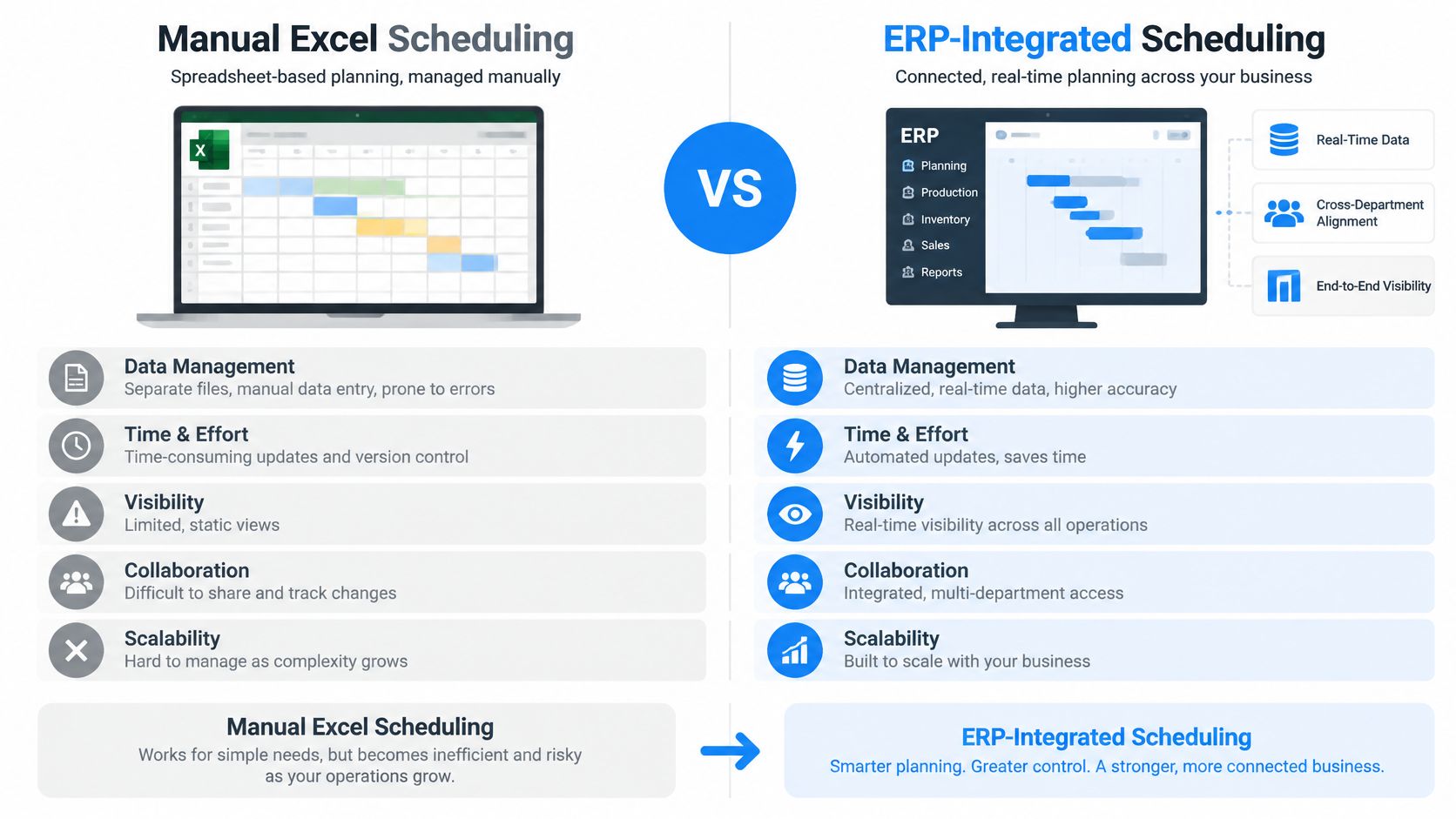
The ERP side reads from the same order, stock, BOM, and work-center records that purchasing and the warehouse already use. A change made in one place is the change everyone sees. That chain is worth examining step by step, because the value sits in the handoffs rather than in the schedule screen.
The tell: ask two people in the plant what is running on machine 4 on Thursday and check whether the answers match.
Here’s the test I’d apply before buying anything. If a machine stops for a full day, can the team answer which orders are affected, which deadlines are at risk, and what moves where, within minutes and without a meeting? If yes, the method works, whatever the tool is called. If the answer requires three people and a fresh export, the method is already failing.
Planning Around Breakdowns, Urgent Orders and Delayed Materials
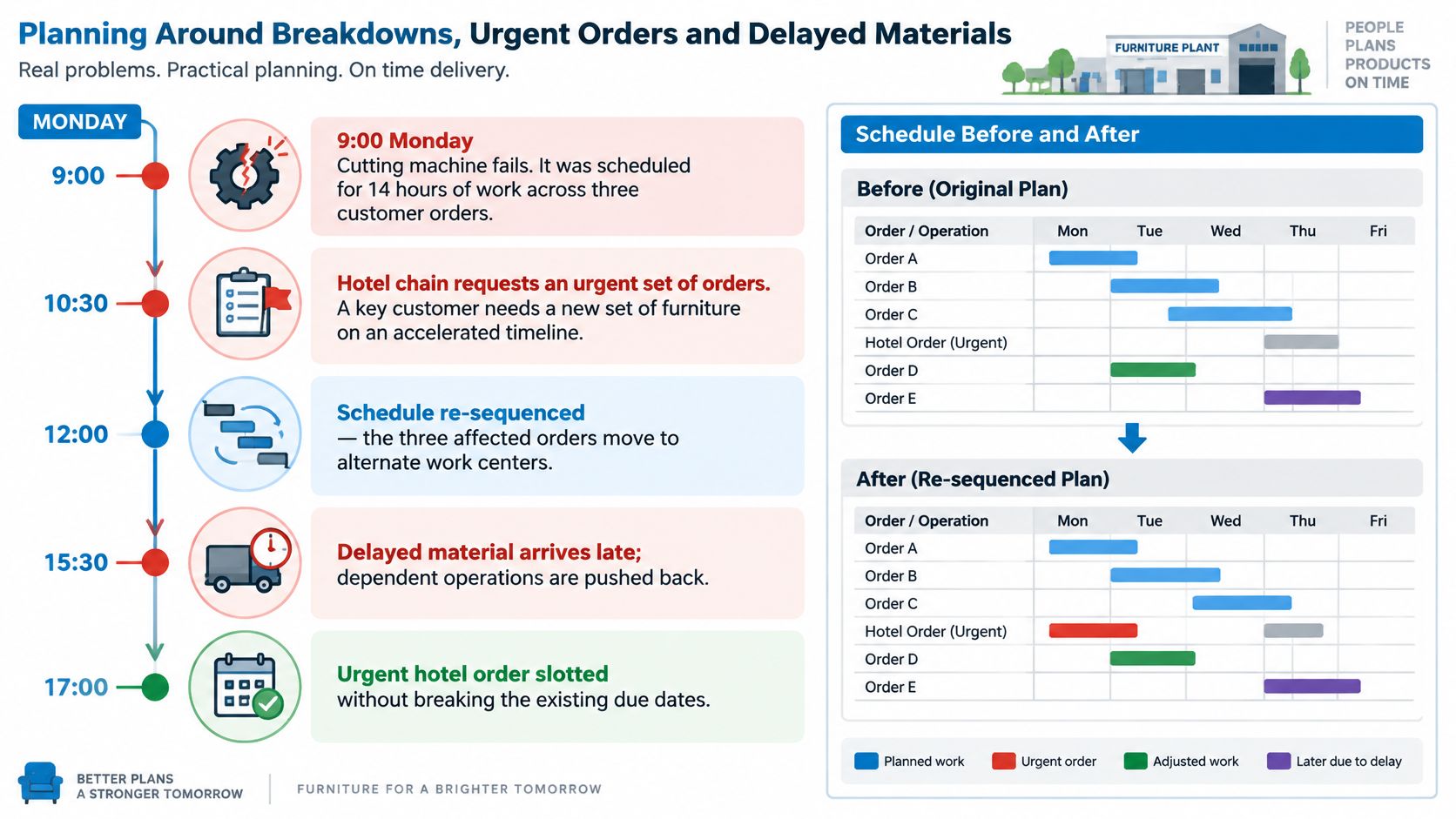
At 9:00 on a Monday, the primary cutting machine in a hypothetical upholstered furniture plant fails. It was carrying 14 hours of work across three customer orders. At 10:30 a hotel chain asks for an urgent set of 40 chairs. At 14:00 the fabric supplier calls to say Thursday’s delivery is now Saturday.
Three disruptions, one plan, and a plant that still has to ship on Friday.
The planner’s six moves
- Identify the affected operations and their due dates. Not the orders, the operations. The three jobs on the broken cutter have different downstream deadlines, and one of them has slack.
- Check alternate work centers for real capacity. Free hours aren’t enough. The second cutter needs the right blade setup, a qualified operator, and the changeover time that a transfer creates.
- Confirm the dependencies still hold. Cutting before sewing, sewing before upholstery, upholstery before packing and inspection. A fast cut that feeds a blocked line buys nothing.
- Verify material availability for every moved job. Pulling an order forward is pointless if its foam arrives Saturday.
- Test the change before committing it. Read the downstream effect: which other orders shift, which promised dates slip, which work center becomes the new constraint.
- Publish the plan to the floor and to purchasing. Both teams act on the change, so both need it at the same moment.
Step five is where most manual methods fail. Moving one order off a broken machine is easy. Knowing the move overloads framing on Wednesday, and that a hotel delivery slips because of it, is what separates a schedule from a guess.
Simulation earns its place here because it prices delivery risk before execution. In a simulation study of scheduling at a high-end case-goods furniture manufacturer, a virtual factory model generated schedules for shop-floor operations and personnel. Of 120 tested problems, 88, or 73.3%, reached the lower-bound tardiness result, and 113, or 94.2%, came within three time units of it. Testing candidate schedules against real machine and labor constraints shows the risk in advance, which is exactly what a planner needs at 10:30 on a Monday.
Recording what happened during the disruption matters as much as replanning it. The guide to turning factory data into higher output covers how downtime records become usable availability figures, so the next plan starts from better numbers. When several assets compete for the same maintenance crew, the same reasoning used for prioritizing critical assets and technician hours applies to deciding which repair unblocks the most production.
In SIX ERP, work can be rescheduled when machines fail, materials are delayed, priorities change, or production takes longer than expected. The system should also record who approved each change, when, and why, because that record is what turns a chaotic Monday into a lesson the plant can reuse.
How ERP Integration Connects Planning to Execution
A schedule that lives outside the order record is a copy, and copies drift. The chain that matters begins when a customer orders and ends when the invoice is issued, and every link needs to read from the same record.
- Order entry. A customer order is entered in SIX SalesFlow, which compares requested quantities with available, reserved, and expected stock.
- Demand creation. When stock is insufficient, the order can create purchasing or production demand while staying connected to procurement and manufacturing, so nothing becomes a separate request someone has to remember.
- Material check. Manufacturing checks availability, reserves the required components, and identifies shortages early, before the job is released.
- Sequencing. The plan places each manufacturing order on a work center with a start and end time, respecting routing, setup, and crew availability.
- Execution feedback. The floor records progress, and management can see what is running, delayed, completed, or needs attention.
- Completion and costing. Finished goods move into inventory, actual material and labor consumption is compared with planned cost, and the order continues through delivery to invoicing.
Who owns which update
- Planner: sequence, priority, and released dates. The planner owns the answer to “what runs next.”
- Purchaser: lead times, confirmed delivery dates, and supplier changes that affect release.
- Warehouse lead: stock accuracy, reservations, and the physical location of components.
- Production supervisor: actual starts, completions, quantities, scrap, and the reason for any deviation.
Three places the chain breaks
Out-of-date stock counts are the first. Unrecorded material consumption is the second, and it inflates the next plan’s available inventory. The third is a purchase order that isn’t linked to a production order, so a late delivery never triggers a reschedule.
Finite capacity doesn’t have to be a correction step bolted on after the material plan runs. One described method for integrating finite-capacity planning into MRP builds resource-based data structures, groups the resources likely to become bottlenecks, and adjusts schedules around those critical resources over a defined horizon. The same principle applies in a connected platform: material and capacity get judged together before release, not after the shop floor discovers the conflict.
For a closer look at how these handoffs run between production, purchasing, and accounting, the guide to connecting production planning with purchasing and accounting follows the same chain. The exact configurationConfiguration sets up software using its existing options. In an ERP system, it adapts workflows, roles and other settings to the company’s business processes. differs by company, and not every customer uses every flow.
What the Nachevi Furniture Case Shows
Nachevi is a Bulgarian upholstered furniture manufacturer. Its production environment carries many customer orders, several furniture configurations, multiple manufacturing steps, and components that must be prepared before final assembly. That combination is exactly where disconnected planning struggles, because a sofa order isn’t one job. It’s a set of dependent jobs across cutting, sewing, frame building, upholstery, and packing.
Nachevi moved from Excel-driven planning to structured production scheduling in SIX ERP and reported three measured results.
| Measure | Reported improvement |
|---|---|
| Production scheduling and execution speed | 40% improvement |
| Purchasing savings from just-in-time purchasing | 25% savings |
| Warehouse space usage | 18% reduction |
The three numbers connect. Linking manufacturing orders to material requirements let purchasing buy closer to actual need instead of against a static reorder habit, which reduced the stock held in the warehouse and freed floor space. Scheduling speed improved because planners stopped rebuilding the plan by hand whenever something changed, and execution sped up because the floor worked from an updated schedule rather than a stale printout.
What the figures do and don’t prove
These are results the customer reported. The baseline, the measurement period, and the method behind each figure aren’t published here, so treat them as direction rather than as a benchmark you can copy.
No separate figure is published for on-time delivery or machine changeover time, and this article doesn’t claim one. Those two metrics matter, but a case study that doesn’t quantify them can’t be used to prove them.
Don’t read 40%, 25%, and 18% as a forecast for your plant. Routings, order volumes, supplier terms, and starting data quality all move the outcome.
The durable lesson is coordination. The gain didn’t come from a better solver. It came from production, purchasing, and inventory working from one set of records, so constraints surfaced earlier and priorities could change without rebuilding everything.
Test Scheduling Software With Your Own Production Scenario
Demos are choreographed. A trial with your own orders isn’t. The test that matters is several customer orders competing for the same machines, employees, and materials, each with a different deadline, plus one urgent order inserted halfway through.
For furniture, that scenario is easy to build. One order needs cutting, edge banding, frame assembly, upholstery, and packing. Another shares the sewing line. A third needs the same foam. Ask the software to schedule all of them, respect machine capacity, account for material availability, and absorb the urgent hotel order without tearing up the rest of the plan. Then ask it to show what moved.
The 2026 benchmark contribution on scheduling evaluation makes the same point about realism. Real schedules depend on sequence-dependent changeovers, limited intermediate buffers, personnel constraints, transport resources, and job release dates, and a plan that’s optimal under a simplified model can be unusable on the floor. Buyers should demand scenarios built from their own bills of materials, routing alternatives, changeover matrices, labor calendars, material-release rules, and transport limits, not generic job-shop examples. The same work argues that software should expose explainable dispatching rules alongside optimization, rather than treating one solver output as universally best.
Seven tests with pass conditions
| Test | Pass Condition | Red Flag |
|---|---|---|
| Competing orders on shared machines | Plan respects every machine’s capacity and crew hours | Machines run above 100 percent without a warning |
| Material check | Shortages flagged before release, with purchase links | Jobs release with missing components |
| Changeover handling | Setup time between product types appears in the plan | Changeovers ignored or fixed at a flat estimate |
| Urgent order insertion | Software shows which orders move and which deadlines change | Plan changes with no impact report |
| Breakdown rescheduling | Affected operations re-planned in minutes | Planner must rebuild the schedule by hand |
| Shop-floor feedback | Starts, stops, and quantities update the plan within the same shift | Progress entered only at week end |
| Explainability | Each scheduling rule can be read and questioned | Schedule accepted as a black box |
Which approach fits which plant
A small shop with few products and stable routings can manage with a well-maintained spreadsheet and clean master data for a while. That’s a real option, not a failure. The break point arrives when materials are shared across orders, routings run through several steps, and priorities change weekly.
At that point, finite capacity scheduling connected to purchasing and inventory is the practical answer, because the plan has to consume the same stock and supplier data that the rest of the business uses. The deciding question isn’t how the Gantt chart looks. It’s whether the tool shows the consequences of a change before the planner commits to it.
What I’d ask the vendor: “Move this order ahead of that one and show me what breaks.”
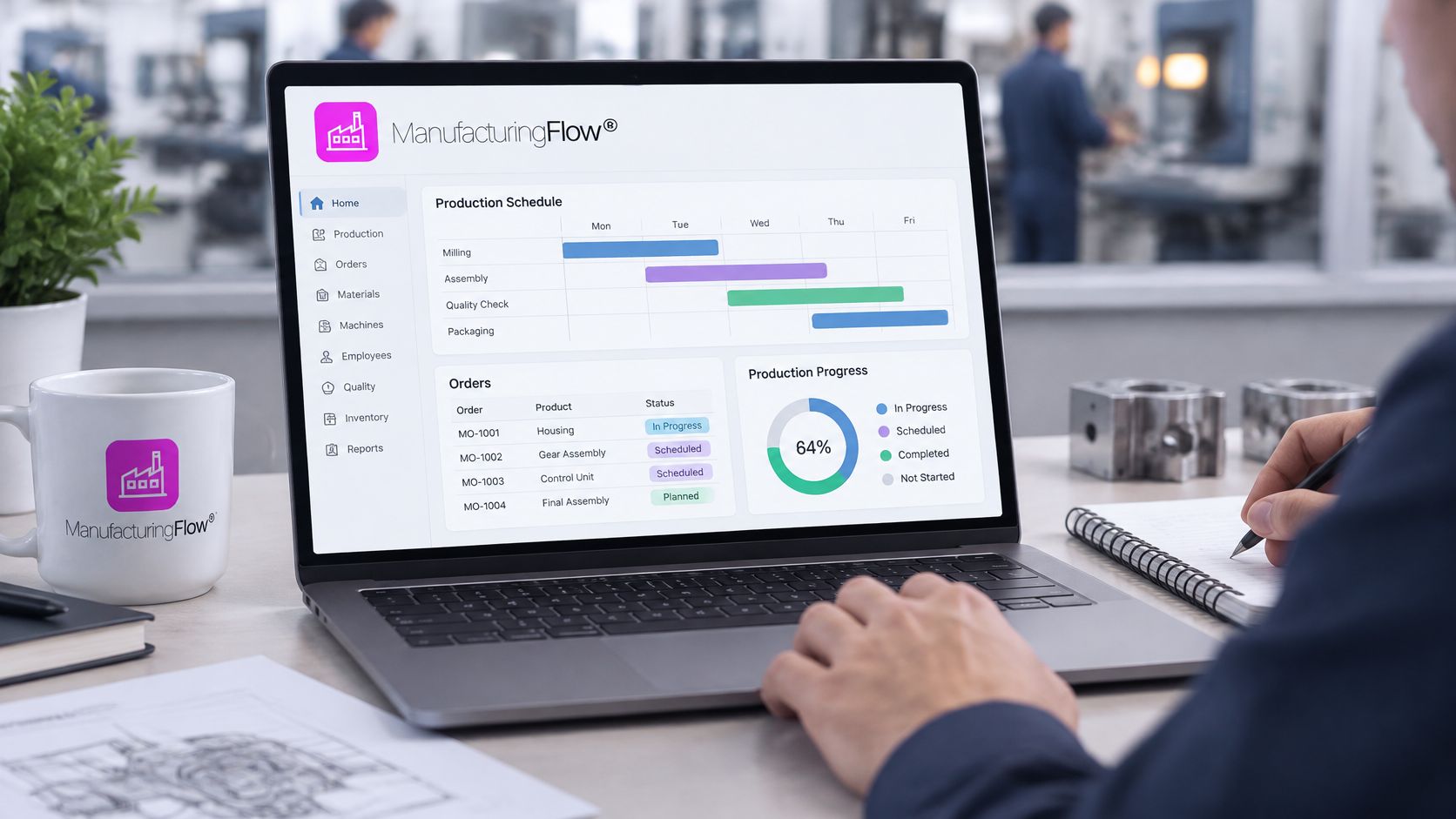
Run the trial with three real orders and one real breakdown, then compare the software’s answer with what an experienced planner says. SIX ManufacturingFlow keeps production connected from customer order to finished product, with manufacturing orders, machines, employees, materials, BOMs, and work steps in one flow.
Choosing the Right Scheduling Approach
A production schedule is only as reliable as its master data, its shop-floor feedback, and its ability to show the consequences of a change before anyone commits to it. Buy the tool that passes that test with your own orders, machines, and materials, not the one with the smoothest demo.
The decision rule is short. A small shop with few products and stable routings can stay on a well-maintained spreadsheet while the master data is clean. A plant with shared materials, multi-step routings, and frequent priority changes generally needs finite capacity scheduling linked to purchasing and inventory.
For related reading, the bill of materials guide covers BOM structures, the production planning and manufacturing process articles explain how orders move through the plant, and the guide on moving from Excel to ERP describes what a migration involves. The Nachevi results show what connected planning changes in practice.
The right tool is the one that answers the awkward question: move this job and show me what breaks.
Production scheduling is where sales promises, purchasing lead times, and shop-floor capacity meet, and SIX ERP keeps all three reading from the same records instead of four copies of a spreadsheet. SIX ManufacturingFlow connects material availability, machine capacity, and production progress, so a planner can test a change before committing it. Visit SIX ERP to see how the flows fit your manufacturing process.