A B2B
ERPAn ERP system connects a company’s core processes—such as sales, finance, inventory, manufacturing, and service—in one place so teams can work with shared information. is one business system that holds your customers, prices, stock, purchasing and accounts in a single data model, so that a customer order moves through reservation, delivery, invoice and payment without anyone retyping it. If your sales team quotes from one spreadsheet, the warehouse works from another and finance reconciles a third at month end, that is the gap it closes. SIX ERP is built around this idea: we map your processes before we configure anything, then connect the departments that touch each order.This guide is for businesses that sell to other businesses and are deciding whether and how to adopt an ERP: small and medium companies that need to grow without changing systems again, manufacturers who need exact inventory control, and service organizations that dispatch technicians.
SIX ERP
Connect Your B2B Operations
Explore how SIX ERP maps business processes and connects sales, purchasing, inventory and finance in one
integrated systemAn integrated system connects business functions or applications so they can share information. An ERP system uses this approach to link operations and reduce repeated data entry..
What a B2B ERP actually is
Enterprise resource planningAn ERP system connects a company’s core processes—such as sales, finance, inventory, manufacturing, and service—in one place so teams can work with shared information. (ERP) software is, in
Gartner’s definition, an integrated suite of business applications. The word that matters is integrated. Accounting software alone records money. A CRM alone records customers. An ERP makes both read from the same records as the warehouse and purchasing, so the item code your salesperson quotes is the item code the warehouse picks and the one finance posts.The B2B part changes what the system has to handle. Selling to businesses usually means:
- Customer-specific terms. Contract prices, volume discounts, payment terms and credit limits differ by account.
- Large, repeating, partial orders. One order may ship in two deliveries, and customers return part of a delivery.
- Approvals. A discount above a threshold, or an order that pushes a customer over a credit limit, needs a person to sign off.
- Receivables. You invoice on terms, so you need to track what is open, what is overdue and what has been collected.
- Documents that must be right. Invoices, credit notes and VAT treatment have to match what was actually delivered.
An ERP that handles these as one chain, rather than as separate files passed between people, is what “
B2B ERP” means in practice.
How common ERP is, and why size matters
ERP is not only for large groups.
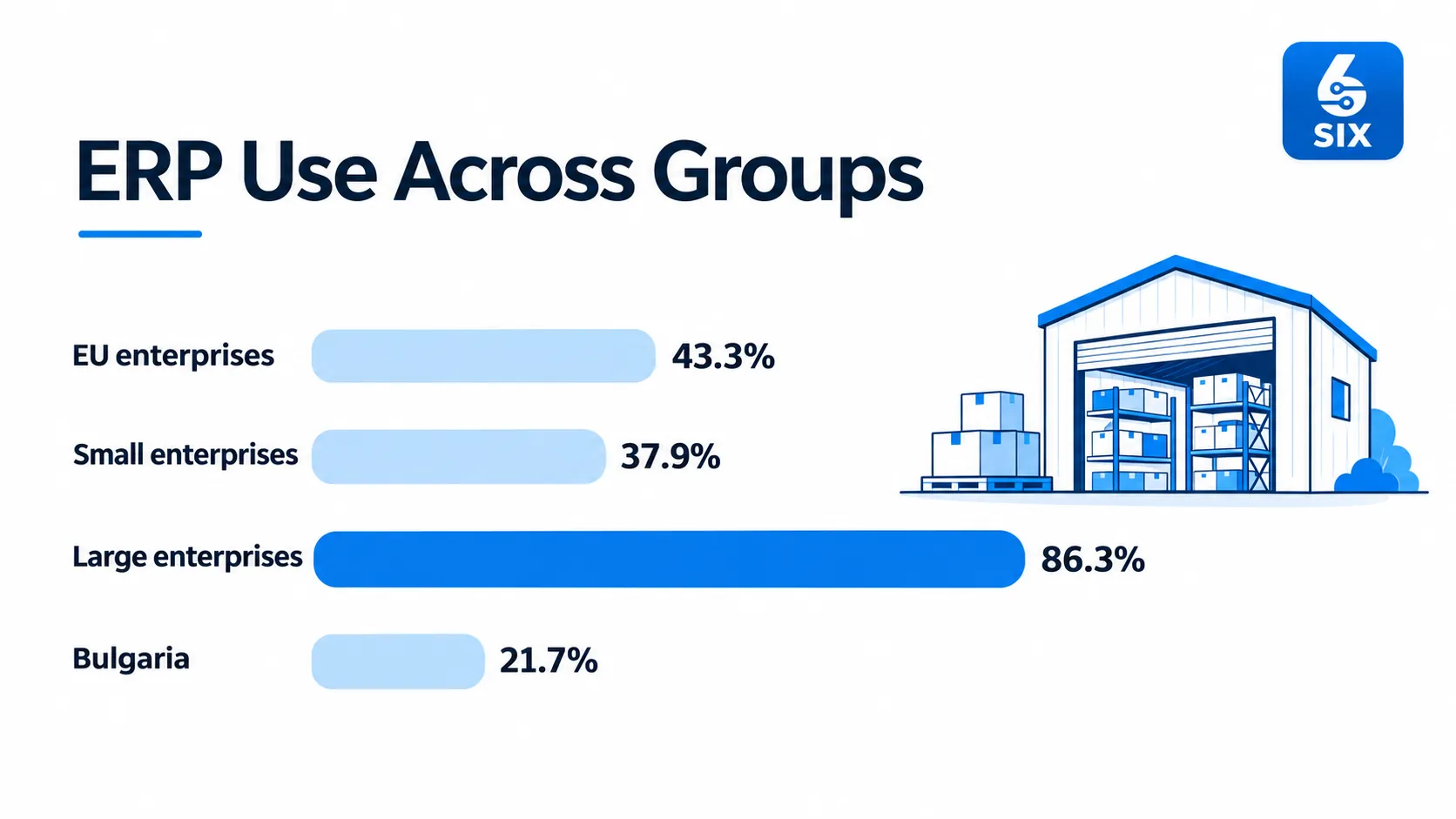
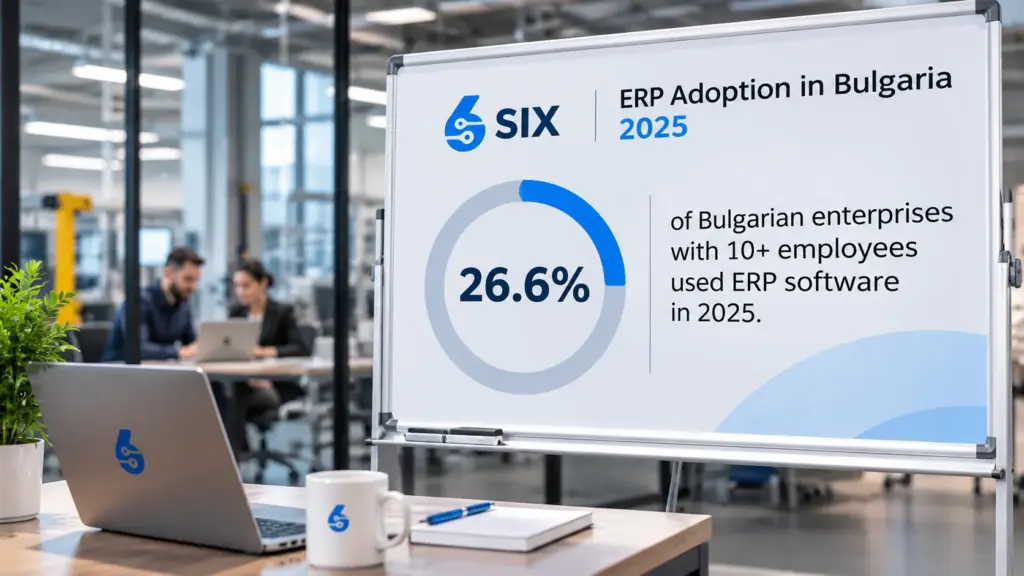
Eurostat’s 2023 survey found that 43.3% of EU enterprises used ERP software, from 37.9% of small enterprises to 86.3% of large ones. In Bulgaria the figure was 21.7%, which is about half the EU average.Two things follow for a Bulgarian SME. First, many of your competitors still run on disconnected tools, so a connected order-to-cash chain is a practical edge in delivery reliability and speed of quotation. Second, the gap between small and large companies in the EU data shows that the cost and complexity of ERP used to scale with company size. A modular system that you start small and extend removes much of that barrier.

The flows a B2B ERP should connect
Every department touches the same order at a different moment. These are the chains to check, in the order most companies feel the pain.
| Flow | What it covers | What goes wrong without it |
|---|
| Quote to cash | Quotes, pricing, discounts, orders, delivery, invoicing, receivables | Wrong prices, orders that exceed credit limits, invoices that do not match deliveries |
| Procure to pay | Purchase requests, supplier orders, approvals, goods receipt, supplier bills, payments | Stock-outs, duplicate orders, bills paid without a matching receipt |
| Stock and warehouse | Locations, transfers, reservations, returns, traceabilityTraceability follows a product or material through its history, from origin to use or delivery. An ERP system connects the records needed to investigate issues and track affected items. | Promised stock that is not there, no trail from supplier to customer |
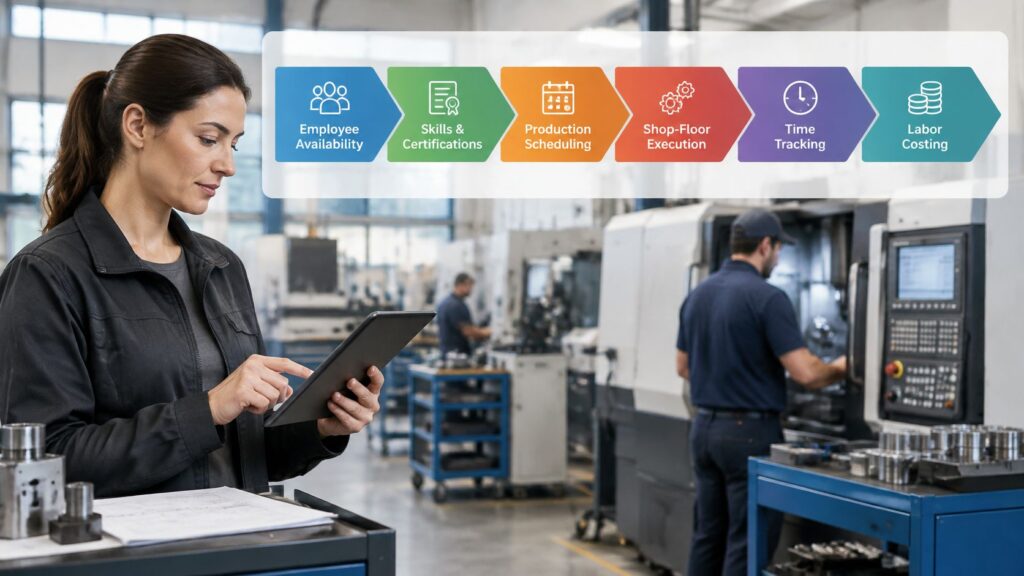
| Production | Bills of materials, work orders, material planning, costing | Late orders, materials bought too early or too late, unknown real cost |
| Finance and reporting | Ledger, VAT treatment, month-end close, management reports | Manual reconciliation, reports that disagree with each other |
| Field service and projects | Service requests, technician scheduling, project tracking, billing | Visits that are not invoiced, no view of project profitability |
The value is in the links between rows. A sales order reserves inventory, a delivery reduces stock, and an invoice posts to the ledger. When each step triggers the next automatically, the number of places where a human can introduce an error falls sharply.SIX ERP covers these chains through separate flows that share one database:
SalesFlow and
CustomerFlow for selling,
PurchaseFlow for procurement,
StockFlow for inventory,
ManufacturingFlow for production,
FinanceFlow for accounts,
ServiceFlow for field work and
ProjectFlow for projects. You can see the full set on the
solutions overview.
For manufacturers: inventory control starts with planning
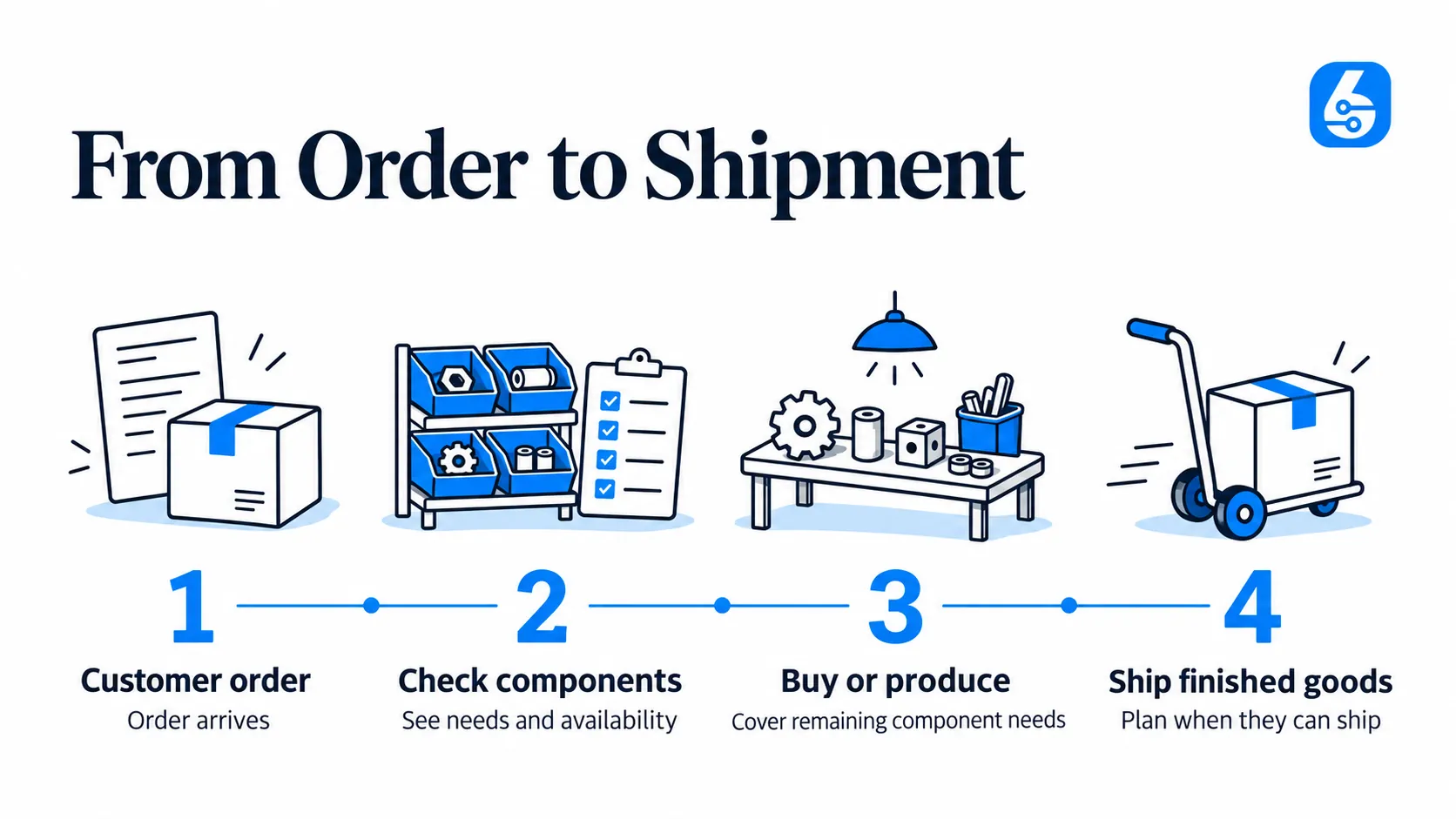
A manufacturer who sells B2B has a harder version of the problem. The promise date you give a customer depends on whether components are in stock, on order or still to be bought, and on whether the production line has capacity.That means the ERP must link demand, stock, purchasing and production in one plan. When a customer order arrives, the system should show what is needed, what is available, what must be bought and when the finished goods can ship. It also has to keep traceability, so that you can follow a batch from raw material to customer.We cover this in more depth in our guides on
how ERP helps manufacturers plan, produce and grow,
connecting production planning, purchasing and accounting and
moving from customer demand to finished goods. The page on
ERP for manufacturing shows how planning, work orders and traceability fit together.
For service organizations: the order is a job
If you sell service rather than goods, the “order” is a job: a request, a visit, parts used, time spent and an invoice. The same logic applies. A technician who closes a job on a mobile device should trigger the stock movement for parts used and the billing line, without a second entry back in the office. Because SIX ERP includes web and mobile apps, field staff and office staff work on the same record.
Connecting the ERP to a B2B webshop or the dealer portal
Many B2B companies add a customer-facing ordering site. The ERP stays the operational source of critical data: customers, items, prices, stock, invoices. The portal or web shop is the customer interface. The risk sits in the connection between them, and four decisions prevent most problems:
- Define the source of truth for every field. A customer’s price must follow one agreed rule, not two independent calculations in two systems.
- Set how often each type of data syncs. Product master data and price lists change slowly and can sync on a schedule. Stock and open balances decide whether an order can proceed, so they need near-real-time reads.
- Prevent duplicates. If a customer submits the same order three times because the page was slow, three submissions should create one order.
- Lock documents once they are final. An order that already has an invoice should not be editable from the portal.
Make the ERP the place where an order becomes a binding document. Then the portal only needs to show the customer accurate status, and the customer’s view never contradicts your accounts.
How to evaluate a B2B ERP
A demonstration where every document completes cleanly proves little. Real B2B trade is full of exceptions, so test those.
Run your own scenarios
Give every shortlisted provider the same scripted cases from your business:
- An order that ships in two deliveries, with an invoice for each.
- A partial return, and what it does to stock and to the customer’s account.
- A customer who is over their credit limit placing a new order.
- A purchase received in part, with a supplier bill that does not match.
- A product with a substitute component, if you manufacture.
For each case, ask to see the document or screen that proves the result, not a description of it.
Check finance and tax line by line
In Bulgaria, check that the system handles your VAT codes, journals, multiple currencies, credit notes and partial deliveries as your accountant needs them. Have your accountant sit in on this part of the evaluation. Check that finance can export what it needs for reporting.
Price the whole project
The license is one line. The full cost also includes implementation, data migration, training, integrations and the time your own staff spend on the project. Compare providers on the total, and on who is responsible for maintaining the system, add-ons and links after launch.
Check that it can grow
Ask whether you can start with the flows you need today and add others later without re-implementing. A company that begins with sales and stock and adds purchasing, production or field service a year later should not have to migrate data again.
How a B2B ERP implementation should run
Most failed ERP projects fail at the start, when processes are assumed rather than documented. Our sequence, which we apply under what we call a no-gap policy, is:
- Map the processes. Document how an order, a purchase, a stock movement and an invoice actually flow today, including the exceptions. Our consulting and pre-integration support covers this step before configurationConfiguration sets up software using its existing options. In an ERP system, it adapts workflows, roles and other settings to the company’s business processes. begins.
- Clean the master data. Customers, items, units, price lists and opening balances move into the new system. Duplicates and wrong codes are cheaper to fix before migration than after.
- Configure and customize. Workflows, approvals and dashboards are set up to match the mapped processes. This is the integrationIntegration connects systems so they can exchange information or coordinate actions. An ERP integration helps link business tools and reduce manual transfers between them., configuration and customizationCustomization changes or adds software functionality beyond standard settings. In an ERP project, it can meet specific business needs while adding development and maintenance work. service.
- Train by role. Sales, warehouse, purchasing and finance each learn the flows they use, on their own scenarios.
- Cut over in phases. Start with the essential flows, confirm they run correctly, then switch on the next. A phased rollout limits the number of things that can go wrong at once.
- Support and update. After go-live, the system needs continuing support and updates, which our support and continuous update service provides.
The reason to map first is simple. A gap between the process on paper and the process in the system turns into a spreadsheet next to the ERP, and then the data is split again. Mapping the whole process before configuring is how we prevent that.
Start with the essentials, expand as you grow
A B2B ERP should not force you to buy everything on day one. SIX ERP is licensed in plans, with prices as published on our
licensing page:
| Plan | Price |
|---|
| SIX Start | €999 per year |
| SIX Growth | €2,499 per year |
| SIX Business | €4,999 per year |
| SIX Enterprise | Contact us for a quote |
| SIX AIFlow | €99 per month |
Implementation services are scoped to your processes, so they are quoted separately on the
services page. If you are choosing a provider in Bulgaria, our guide to
choosing an ERP provider in Bulgaria lists the questions to put to each one.
Our perspective
Companies rarely tell us they need an ERP. They tell us that an order got lost between sales and the warehouse, that the stock count never matches the books, or that nobody can say what a job really cost.

Each of those is a gap between two departments, and software alone does not close a gap that nobody has described. That is why we put the mapping before the configuration. Once the process is written down, including the awkward cases like a split delivery or a returned item, the system can be set up to follow it, and the data stays in one place.

We also think a business should not have to guess its final size on day one. Start with the flows that hurt most, usually sales, stock and purchasing, and add production, finance depth, field service or projects when the business is ready. Because the flows share one data model, adding one extends what you have instead of replacing it.

The measure of a B2B ERP is simple: can everyone who touches an order see the same, current facts about it? That is what we build toward.
Plan your B2B ERP with SIX
If your sales, stock, purchasing and finance still live in separate tools, SIX ERP connects them in one system with web and mobile apps, dashboards and configurable workflows. We begin with
process mappingProcess mapping documents the steps, people and decisions involved in business work. In an ERP project, it helps define workflows and identify improvements before system setup., configure the flows you need first and let you add more as the business grows. Plans start at €999 per year with SIX Start, and the full range is on the
licensing page. To discuss your processes before you commit to a plan, start with
consulting and pre-integration support.
SIX ERP
Discuss Your ERP Processes
Share how your teams handle orders today and ask how process mapping can connect the departments involved.
Sources