

The schedule is released, the assembly team is ready, and a missing component stops the order before work begins. Purchasing has a supplier update in an email. Engineering has approved an alternative, but the work order still shows the original part. Nobody has the same answer.
The delay is not only the time spent waiting for a fastener. A planner may reschedule the order, an operator may move to another job, and purchasing may expedite a part that engineering has already replaced. Each team is acting on a different version of the same production decision.
Lean production software should resolve that disconnect, not add another screen to it. The test is whether demand, materials, capacity, engineering changes, and shop-floor transactions stay connected when production doesn’t go to plan. This guide follows those connections from the customer order through production, improvement, and implementation.
What Lean Production Software Actually Runs
Lean production software is the shared operational record behind lean practices. It makes pull signals, standard work, quality checks, and improvement actions executable across purchasing, inventory, production, and finance. A dashboardA dashboard brings key figures and status information together on one screen. An ERP dashboard helps teams monitor performance and identify issues that need attention. is useful only when the people doing the work can update and investigate the records underneath it.
The foundation is operational, not digital. As NetSuite’s lean manufacturing guide explains, John Krafcik coined “lean production” in 1988 through research for MIT’s International Motor Vehicle Program. Software carries those principles into connected transactions, but it doesn’t replace sound production methods.
A plant can have accurate dashboards and still release work too early. If a planner schedules ten orders because a machine has open time, but downstream assembly can accept only four, the schedule creates a queue rather than flow. The software needs to show both available capacity and the demand that justifies each release.
Lean practices and the records that run them
| Lean practice | Software record | Daily decision | If the record is missing |
|---|---|---|---|
| Just-in-time pull | Stock, demand, and reorder or kanban signals | Release or buy only what the next step needs | Early purchases and piles of work in process |
| Takt and leveling | Routing times, work-center capacity, and the schedule | Match pace to demand without overloading one cell | Hidden queues at one machine |
| Standard work | Work order with current BOMA Bill of Materials (BOM) lists the materials and components, and their quantities, needed to make a product., routing, drawings, and instructions | Follow the approved method | Informal shop-floor workarounds |
| Quality at source | Inspection, scrap, reject, and rework on the operation | Stop a bad unit before the next step | Defects found by the customer |
| Waste visibility | Planned versus actual material, labor, and machine time | Investigate the order behind a bad KPIA KPI (Key Performance Indicator) measures progress towards a business goal. An ERP system can calculate KPIs from business records and show changes in performance over time. | Averages that hide scrap |
| TraceabilityTraceability follows a product or material through its history, from origin to use or delivery. An ERP system connects the records needed to investigate issues and track affected items. | Lots or serials linked to supplier, operation, and customer | Move one step back and one step forward | A recall rebuilt from spreadsheets |
A bill of materials, or BOM, defines the components and quantities needed to make a product. A routing defines the operations, their sequence, and the resources required. Neither record is reliable if operators need a separate notebook to find the approved method. For example, a correct BOM for a cabinet does not tell the operator whether drilling must happen before finishing. The routing and instructions supply that sequence.
Takt time means available production time divided by customer demand. Planners use it to check whether production can keep pace. If a shift has 420 available production minutes and demand is 70 units, the implied takt is six minutes per unit. That does not mean every workstation should produce a unit every six minutes regardless of downstream demand. It gives the team a reference point for finding an operation that cannot keep up, or one that is making more than the next step can use.
Connect the decision to its consequence
Enterprise resource planningAn ERP system connects a company’s core processes—such as sales, finance, inventory, manufacturing, and service—in one place so teams can work with shared information., or ERPAn ERP system connects a company’s core processes—such as sales, finance, inventory, manufacturing, and service—in one place so teams can work with shared information., connects these production records with wider business activity. A material withdrawal changes availability. A rejected quantity affects usable output. A completed order affects inventory and production cost. Those changes need a common order and item reference so the next person can understand what happened.
Consider an operator who issues 24 components to a work order, uses 21, scraps two, and returns one to stock. If the system records only the original issue, inventory and actual consumption will both be wrong. If it records the issue, scrap, and return against the same order, the supervisor can distinguish physical waste from a transaction error.
The practical trade-off is capture effort versus useful control. Recording every minor event manually can burden operators. Recording only a shift total can hide the shortage or defect that caused the loss. Choose capture points where someone can act on the information, such as component issue, operation completion, quality rejection, and material return.
Acceptance test: One shortage, one scrap quantity, and one completed quantity must update the same manufacturing order.
If those events land in separate applications with no shared order reference, supervisors still have to reconstruct production. That’s digital paperwork, not connected execution. During a demonstration, ask the operator to record the events, then ask a planner and a warehouse employee to find their effects without retyping them.
From Customer Demand to the Next Pull Signal
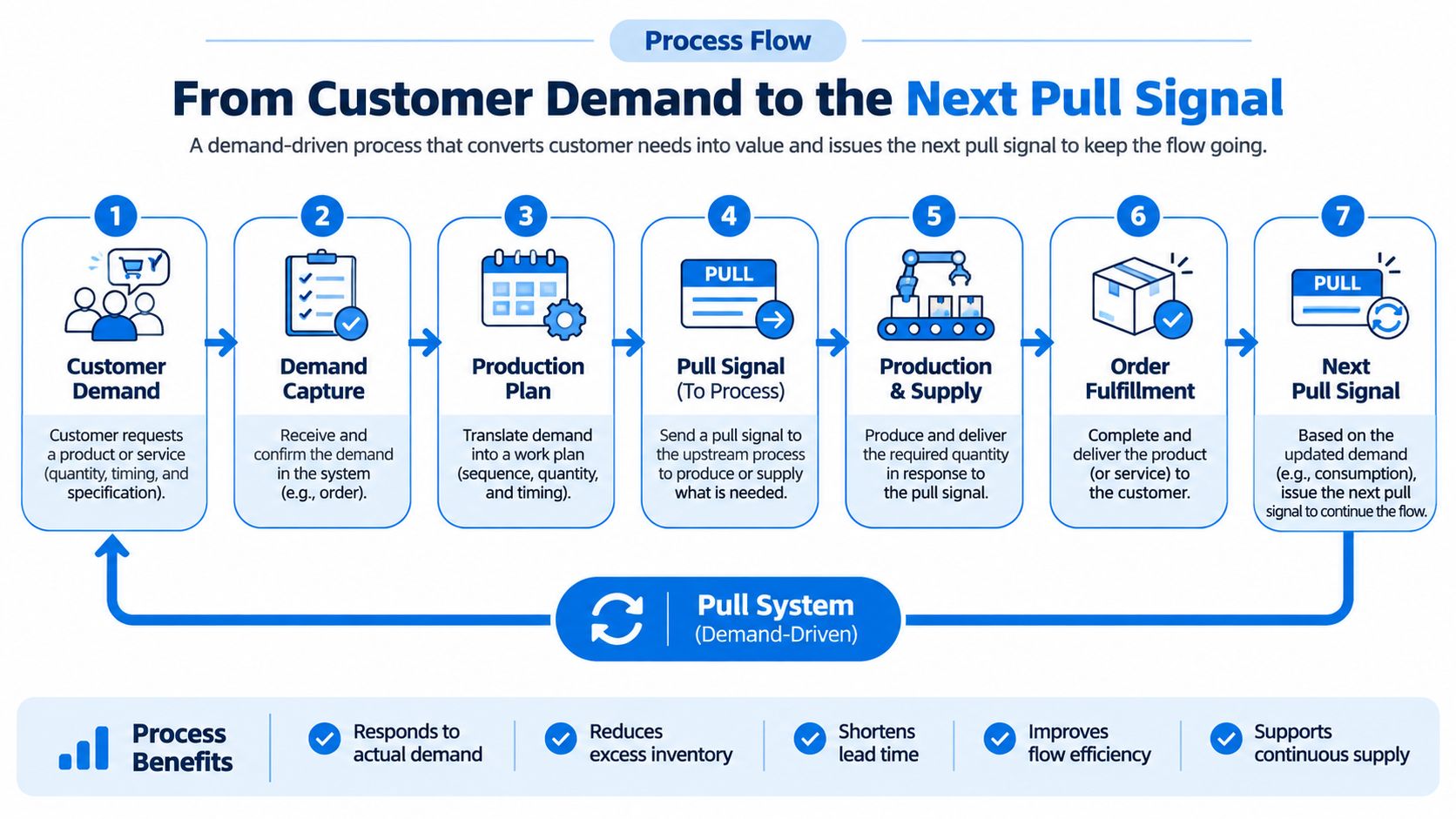
Pull means making or buying because the next step needs replenishment, not just because a forecast filled the calendar. Forecasts can guide preparation, but release decisions need a clear connection to demand and consumption. The signal may be a customer order, consumption from a stocked component bin, or a defined replenishment level. In each case, someone must own the response.
Consider a hypothetical sofa order. The customer chooses an upholstery option, while standard frames are already available. The handoffs should work like this:
- Sales confirms the demand. Sales owns the promise date and records the chosen specification. If finished stock is short, the customer order stays connected to the resulting purchasing or production requirement. A different fabric choice must not silently turn into an order for the default fabric.
- Planning checks readiness before release. The planner reviews materials, machine capacity, employee skills, and work-center load. A date on a calendar isn’t evidence that the order can run. If foam is due Thursday but upholstery cutting is planned Tuesday, the planner can move cutting or resolve the shortage before the order reaches the floor.
- Planning releases a structured manufacturing order. The order carries the BOM, routing, work steps, machines, employees, and planned times. Purchasing owns the supplier date for anything still outstanding. The released version should make the approved fabric and operation sequence unambiguous.
- The work center records execution. Operators withdraw components and record quantities against the operation. The work-center team owns actual time and explains exceptions. If three fabric panels are rejected, the usable quantity and remaining requirement should change rather than waiting for an end-of-week spreadsheet.
- Warehouse staff receive approved output. Completion receives good product into its storage location, deducts consumed material without double-counting earlier issues, and supports delivery and invoicing. Rejected pieces should not appear as available finished stock.
- Purchasing or planning acts on replenishment. When inventory reaches a defined level, a purchasing or production requirement replaces a manually retyped spreadsheet request. The owner still checks whether an open order, reservation, or known supplier delay changes the right response.
The connected handoffs should remain visible across departments. A pull signal is incomplete if production sees a shortage but purchasing cannot identify the item, required date, and affected order.
Choose where customization begins
Make-to-order production starts from confirmed customer demand. A hybrid approach can produce standard frames or semi-finished parts for stock, then delay final assembly or customizationCustomization changes or adds software functionality beyond standard settings. In an ERP project, it can meet specific business needs while adding development and maintenance work. until an order arrives. The guide From Customer Demand to Finished Goods explains the make-to-order and make-to-stock choices behind that decision.
For the sofa example, stocking standard frames can shorten the wait for assembly without committing warehouse space to every possible fabric and color combination. The planning question becomes where the product stops being interchangeable. Before upholstery is cut, several customer orders may still use the same frame. After a specific fabric is assigned, the work is tied to a narrower demand signal. Teams should record that point explicitly rather than treating every semi-finished unit as freely available.
Launch planning needs the same discipline. For bedding teams preparing new ranges, BEDHEAD’s resource to plan a successful mattress product launch provides commercial context. Operations must translate that launch plan into approved specifications and production demand before releasing work. A sales launch date does not establish that the new covering, labels, or packaging are available and approved.
SIX ManufacturingFlow connects production demand with inventory and purchasing and supports make-to-order production. It updates component stock from actual consumption and creates replenishment or purchasing requirements at defined inventory levels. Sales, purchasing, warehouse, and production teams work with the same current information.
A kanban card on a wall that purchasing never sees won’t achieve that connection. List which production signal is still an email today, then identify who must receive and act on it. For a pilot, record the time from a shortage signal to an owned purchasing or planning decision. The goal is not merely a faster notification; it is a clear answer about what happens to the affected order.
BOM Revisions That Stay Traceable
A lean system can’t treat the BOM and routing as static documents. The critical moment comes when a supplier can no longer deliver a component after an order has been scheduled. Replacing the part in a spreadsheet may solve today’s shortage while leaving tomorrow’s operator with the wrong instructions.
Say an approved fastener becomes unavailable. Engineering identifies a substitute, but its installation requires a different tool and operation time. The change affects more than the component line. Purchasing may already have an open order for the original fastener, stores may have reserved the remaining stock, and one production order may have passed the operation where the new tool would be used. Changing a master BOM alone cannot answer what each order should build.
Control the substitute before releasing it
An engineering change order, or ECO, provides a controlled route from proposed change to approved production use:
- Engineering evaluates the substitute. Check fit, function, specifications, and any required validation before approving it. A matching nominal size is not enough if the tool or installation method changes.
- The BOM owner revises the structure. Record the replacement, quantity, approvalAn approval is a formal decision that allows a request or action to proceed. An ERP system can route approvals and record who made each decision., and effective revision. Keep the reason for the change where future planners can find it.
- Production engineering checks the routing. Update the method, tooling, instructions, or operation time if the substitute changes the work. If a new fastening operation takes longer, capacity planning must reflect it.
- Planning and purchasing review the impact. Assess open purchases, reserved stock, cost, capacity, and scheduled orders before release. The original component may still be valid for some orders.
- The release owner defines applicability. Keep the original revision attached to existing orders unless an explicit, traceable change authorizes their conversion. Identify affected order numbers rather than assuming every open order can switch.
Walk through two orders to test the process. Order A has already issued the original fastener and completed assembly, so its history should retain the original revision. Order B has not started and may be eligible for the approved substitute. The release decision should say whether B changes revision, whether reservations need adjustment, and which instructions the operator will see.
Our production flow checks material availability before work begins, supports component reservation, and identifies shortages early. Controlled changes then let planners respond without overwriting what an existing order was authorized to build.
Operators need the specification, current BOM, routing, drawings, instructions, required materials, and quality requirements together on the work order. Our connected records also preserve materials, batches, serial numbers, employees, machines, and quality history from input to finished output. The guide to types of bills of materials and how ERP handles them helps distinguish the product structures those records describe.
The work-order view matters most during handover. If a drawing changes but a printed instruction stays at the station, the operator has to guess which is approved. Include the affected drawing and instruction revision in the same check used to release the changed material.
Separate legal duties from software support
For EU food and feed businesses, traceability is a legal requirement, not merely an improvement technique. The European Commission’s traceability factsheet on Regulation (EC) No. 178/2002 describes identifying suppliers and business customers, including their names and addresses, the nature of the product, and the delivery date, with information available rapidly to authorities.
That is the practical meaning of tracing one step back and one step forward. A finished-goods quantity alone doesn’t identify the businesses or deliveries involved.
For a dairy plant, design linked records for incoming material, production activity, the finished lot, and outbound delivery. In a trace exercise, start with one finished lot and ask which incoming lots were used and which business customers received the output. Then reverse the exercise: start with a suspect incoming lot and identify the production and deliveries that may be affected. A total quantity is not enough if it cannot be tied to specific records.
Software can preserve those links, but the company remains responsible for determining and meeting its legal duties. Connected records aren’t a claim of legal certification. Retention, access, and response procedures still require decisions outside the software screen.
If a component is discontinued today, which orders keep the old revision, and which can move to the substitute?
Use that question in a vendor demonstration. Require an order-level answer, not just a revised BOM on screen. Then ask to see the material and quality history of an order completed under each revision.
Where Material Waste Shows Up in the Numbers
Overall equipment effectiveness, or OEE, equals availability × performance × quality. Keep the components visible. A combined score tells you there’s a loss, but not which loss deserves attention first.
The OEE calculation guide defines the components and illustrates how 90% availability, 80% performance, and 95% quality produce 68.4% OEE, as shown below.
How the three OEE losses combine
| Component | What it measures | Example | Result |
|---|---|---|---|
| Availability | Run time divided by planned production time | 90 percent | Stops for breakdown, changeover, or missing material |
| Performance | Ideal cycle time times total count, divided by run time | 80 percent | Slow cycles and short stops |
| Quality | Good count divided by total count | 95 percent | Defects and rework |
| OEE | Availability times performance times quality | 0.90 × 0.80 × 0.95 | 68.4 percent |
Availability directs attention to lost running time. Performance exposes slow cycles and short stops, while quality shows the effect of defects and rework. Review the loss reasons alongside the calculation before deciding whether maintenance, material preparation, or process correction comes first.
Suppose a packaging line has an availability loss because it waits for labels. A maintenance project will not fix that stop. If availability is strong but performance falls during short runs, examine changeovers and the planned cycle standard. If quality falls after a material change, look at the affected lot and work instructions. The same OEE total can point to different actions.
For a deeper explanation of equipment reporting, use the guide From Downtime to OEE. Don’t let equipment output become the only measure of lean performance. Producing extra units to improve a machine metric can create inventory that the next step has not requested.
Follow excess consumption to the transaction
Actual material consumption versus planned BOM consumption exposes waste that an equipment score can miss. Read it alongside scrap and rejected quantity. A machine can run steadily while consuming more material than the approved product structure allows.
Imagine an order for 100 units whose approved BOM calls for one sheet of material per unit. The order shows 110 sheets issued, 100 good units completed, and no recorded scrap. The ten-sheet difference is a question, not proof of waste. Sheets may have been issued twice, returned without a transaction, used for setup, or consumed because the actual cutting method differs from the standard.
From an unusual consumption result, drill into the manufacturing order, BOM revision, work center, operation, and material transaction. Separate these possible causes before changing a standard:
- Wrong BOM quantity. The approved requirement may be inaccurate or use the wrong unit of measure.
- Excess scrap. Setup losses or cutting waste may exceed the allowance.
- Poor material or rework. Defective inputs may require repeated processing or replacement.
- A mismatched method. The actual operation may no longer follow the approved routing.
- An unrecorded substitution. Operators may be using a replacement with different consumption characteristics.
Check transaction errors too. A duplicate issue or an unrecorded return can look like physical waste even when the material is still usable. Reconcile the physical count with the issue, return, and scrap records before asking engineering to increase the BOM allowance. Otherwise, a data error becomes the new standard.
Improvement rule: Correct the cause, formalize any recurring method change, and measure the same KPI again.
For example, if setup consistently uses two extra sheets, determine whether the setup method can be improved. If not, make the approved allowance explicit and compare future orders against it. If the excess was a duplicate issue transaction, correct the capture process instead of changing the material standard.
Industry-specific handling matters as well. Brewery teams can use Carbon 6 Brewing Pty Ltd’s waste management guide for craft breweries as a practical companion when reviewing waste streams. Keep those handling decisions connected to recorded production losses. Material sent for a different disposal or recovery route should still be traceable to the operation that generated it.
Our shop-floor records capture work orders, machine activity, employee time, quantities, waste, and progress. Inspections, measurements, rejects, and rework are recorded at production so nonconforming quantities can be held before moving forward.
Cost analysis completes the investigation. Comparing planned cost with actual materials, labor, machine time, waste, and additional expenses shows the effect on product cost and margin. A consumption KPI identifies where to investigate; it doesn’t prove the cause without the underlying records. Review a small number of exception orders each week rather than burying the team in a plant-wide average.
What Changed on a Soft Furniture Line
A soft-furniture manufacturer’s implementation shows why connecting preparation with final assembly matters. Frames, foam, and upholstery materials need coordination before assembly can proceed. Separate purchasing, inventory, and scheduling records make that coordination harder.
Picture two orders scheduled for the same assembly cell. One has its frame and fabric ready but is waiting for cut foam. The other has every component available but requires a longer upholstery operation than the calendar slot allows. A single red status for both orders would hide two different decisions: resolve a material dependency for the first and review capacity for the second.
The implementation connected production planning, material requirements, purchasing, and shop-floor operations. The planning view showed material availability, planned operations, work-center workload, and production progress, so planners could tell a missing preparation step apart from an overloaded assembly resource.
Read the outcomes within their stated scope
The reported improvements covered three areas:
- Faster production scheduling and execution. Planners and production teams could work from connected material and operation information rather than reconcile separate preparation lists.
- Purchasing savings through structured just-in-time ordering. The outcome concerns purchasing activity; it is not a claim that every material should be ordered at the last possible moment.
- Lower warehouse space usage. Better coordination can change what needs to be held, but the reported result does not specify a universal inventory target.
None of these outcomes is a separately measured reduction in total order-to-delivery lead time. They are not promises for another manufacturer, and no published workshop result isolates a kaizen effect. Don’t combine them into a single productivity figure or assume they measure the same activity.
Component preparation and final assembly still need review as connected work. A practical daily meeting can start with orders due next, then check frame readiness, foam preparation, upholstery availability, and assembly capacity in sequence. The point is to identify the first unresolved dependency rather than read a list of late jobs after the fact.

Copy the operating decisions, not the headline numbers
The useful lesson is how planners handle dependencies. Preparing upholstery early doesn’t help an assembly team waiting for a frame. A full rack of frames doesn’t prove the required foam specification is available.
When a component or operation needed to change, the team reviewed BOM accuracy and routing requirements and made controlled revisions through an engineering change order. That keeps a recurring correction from becoming an undocumented instruction passed between shifts.
For context on the physical product, Meliusly on restoring sagging seating offers a useful perspective on sofa construction. Production teams still need to define their own approved component specifications and quality checks rather than treating similar-looking materials as interchangeable.
SIX ERP customers also report a 5x increase in data visibility through integrated manufacturing planning. That is a separate customer-reported statement, not a line-specific measurement or proof that visibility alone improves output.
A similar plant can copy two operating moves: connect the preparation steps that must finish before assembly, and treat a repeated shortage as a reason to review the BOM or routing. Measure the result against that plant’s own starting conditions. Useful local measures include orders released with all required materials available, time spent rescheduling, and the number of shortages discovered only after work begins. Define each measure before comparing periods.
Start with Master Data Not Another Dashboard
In the 2025 Deloitte smart manufacturing survey, 35% of manufacturing respondents identified adapting workers to the Factory of the Future as a top concern, including the skills and tools needed to use smart manufacturing effectively. Installing software doesn’t remove that work.
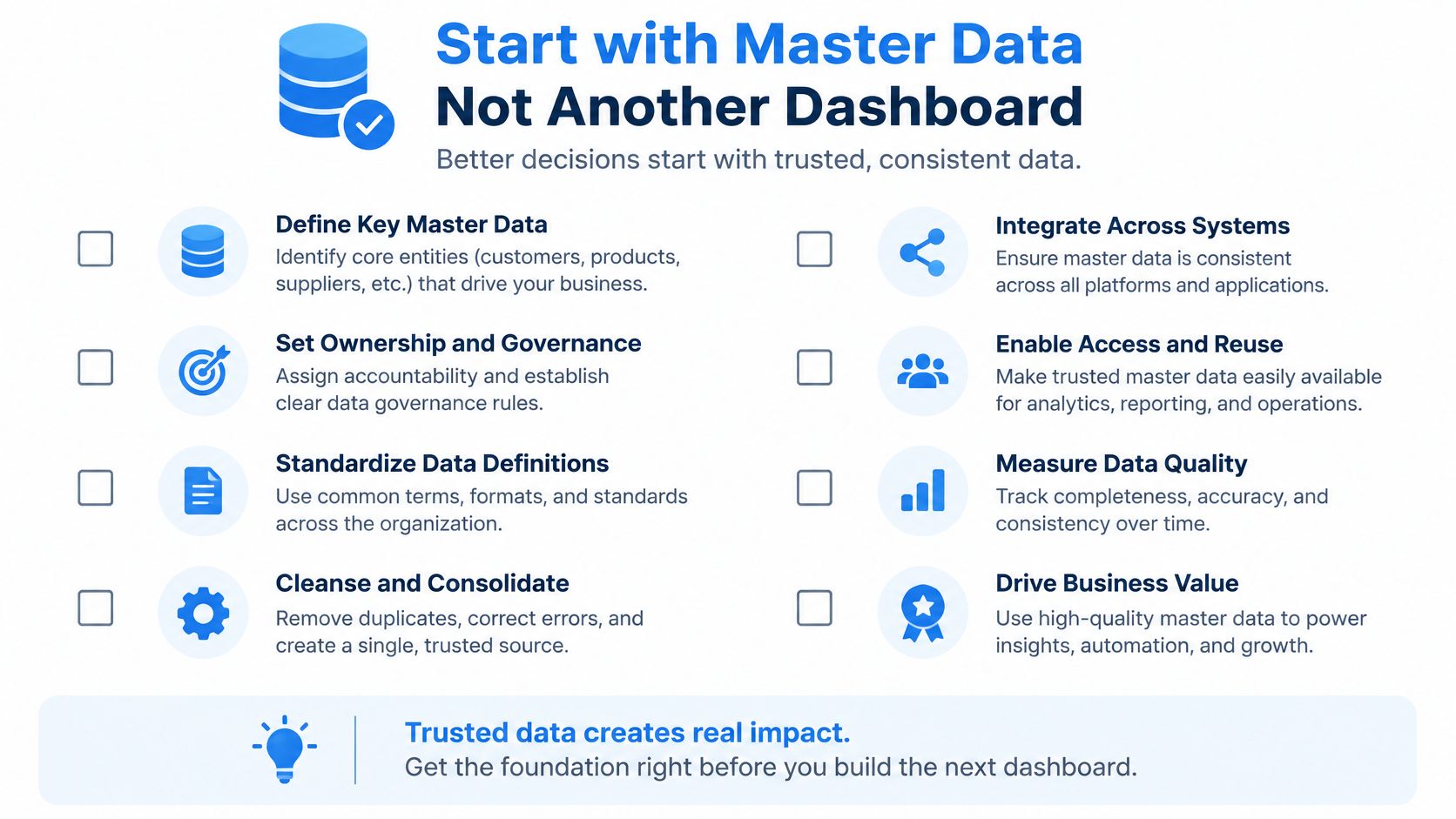
If operators retype what a production board already shows, the digital process adds motion instead of removing it. I would fix ownership, identifiers, and capture effort before designing another dashboard. A cleaner screen cannot correct an item listed as pieces in one system and boxes in another unless the conversion and its owner are agreed.
Establish the records people can trust
- Name the owners. Assign an accountable owner to each BOM and routing, including approval and revision responsibilities. When an operator finds a recurring mismatch, the owner should know how to review and release a correction.
- Standardize item units. Give each item a clear base unit and explicitly controlled purchasing or production conversions. Test a real purchase in boxes and consumption in pieces before going live.
- Agree on reason codes. Define downtime, scrap, and rework categories before go-live so operators don’t invent incompatible descriptions. Keep the list short enough to use at the workstation, with a way to explain unusual cases.
- Prove a product-family pilot. Test a shortage, substitution, and completion against the same manufacturing order. Include a return to stock and a rejected quantity if those events regularly occur.
- Separate essential integrations. The first release needs customer demand, stock balances, purchasing or production requirements, and manufacturing orders. Identify which system owns each record and when the other teams need to see a change.
- Measure adoption and effort. Track jobs recorded at the operation, inventory-record accuracy, rework, and hours spent reconciling spreadsheets. A reduction in spreadsheet work matters only if the underlying transactions are reliable.
Use the checklist to assign responsibilities before building screens. For each item, write down the owner, the source record, and a real exception that will prove the process works. If nobody owns a routing correction, a pilot will expose the gap even with perfect software configurationConfiguration sets up software using its existing options. In an ERP system, it adapts workflows, roles and other settings to the company’s business processes..
Apply the second-silo test
A lean screen that keeps its own shortage list while purchasing, inventory, and work orders live elsewhere forces the planner to reconcile competing versions. The pilot passes only when a shortage entered once is visible to planning and purchasing on the same order.
Run the test with an actual item identifier. Have a work-center user report the shortage, a planner assess the affected schedule, and a purchaser identify the next supply action. Then check whether a material receipt or approved substitution clears the exception for the right order. If each person has to create a separate record to make the next step happen, the new process still has a silo.
Park supplier portals, historical spreadsheets, and maintenance history as later connections unless they’re essential to the pilot. Keep that deferred work explicit so it doesn’t become a release requirement. Record what staff will do manually during the pilot and which failure would justify bringing a deferred integrationIntegration connects systems so they can exchange information or coordinate actions. An ERP integration helps link business tools and reduce manual transfers between them. forward.
Mobile capture and role-based screens are often better early investments than predictive analytics. Resistance may mean operators face too many fields, not that they oppose improvement. Each SIX customer runs a separate managed instance; implementation still requires clear process ownership.
Pick the product family with the most shortage surprises. Map its item, revision, location, supplier, and order identifiers before approving dashboard designs. The best first pilot is not necessarily the simplest line; it is one where a connected decision will be visible and measurable.
Review Your Flow with a Manufacturing Specialist
Pull needs a shared signal. A shortage that requires a substitute needs a controlled revision. A waste KPI is useful only when the planner can open the transaction underneath it.
Those are practical selection criteria for lean production Connect Your Business. Simplify Every Process.software. A polished schedule or dashboard isn’t enough if the production team must leave the system to establish which material, method, or quantity is correct. Bring an imperfect order to the discussion rather than a clean example built to make every step look easy.
Bring decisions to the meeting
Use these questions to focus a process review:
- Where do shortages surface? Which product family has the most components found missing after release? Bring one order number and the point when the shortage became visible.
- Who controls the product definition? Who owns the current BOM revision and approves changes? Ask what happens to orders already in progress.
- Do departments share the exception? Can purchasing see the same shortage production sees? Check whether both teams can identify the affected item, quantity, and required date.
- Can you follow the product? Can a finished lot be traced to its supplier and business customer? Try the trace in both directions using real records.
- What will prove the pilot worked? Which three measures will the team track against a clear baseline? Agree on how each will be calculated and who will review it.
Review the manufacturing solution against those questions rather than a generic feature checklist. It brings demand, materials, BOMs, planning, execution, quality, warehouses, and costs into a traceable process from customer order to finished product.
Manufacturing companies may also need PurchaseFlow for purchasing, StockFlow for inventory, and FinanceFlow for financial processes in the same environment. The right scope depends on the company’s actual handoffs, not an assumption that every customer needs every Flow.
Demonstrate your exception, not a perfect order
Customers can request a demonstration, describe their manufacturing process, and have a SIX specialist show how the production flow fits it. Review the manufacturing page and the verified customer outcomes business brief beforehand, but judge the demonstration against your own records and responsibilities.
Ask the specialist to follow an exception through approval, material availability, production, and cost. For example, start with a scheduled order whose component is unavailable. Ask who approves the substitute, which orders can use it, what the operator sees, how the warehouse handles the original reservation, and where the cost difference appears. A useful demonstration should clarify who acts next and what record changes, without promising another customer’s results.
SIX ERP offers connected manufacturing, purchasing, inventory, and financial workflows so teams can manage lean decisions through shared records.