

Nearly 60% of SAP migrations ran behind schedule and over budget, according to a 2026 report on SAP migrations that named underestimated complexity, expanding scope and limited internal capacity as the main causes (ERP Research). That figure isn’t really about a broken import script. It’s about everything that surrounds the load: scope nobody challenged, owners nobody named, and a definition of success that stops at the last row.
The fix is tighter scope and a harder definition of done. Migrate less, clean what you keep, and judge the result by whether a salesperson can quote, ship and invoice on the first Monday, not by whether the load log printed zero errors.
What follows is the working method: the stages, the decisions about what deserves to travel, the cleansing sequence, the test-load loop and the cutover controls that decide whether go-live holds.
ERP Data Migration Stages at a Glance
| Stage | Main question | Output |
|---|---|---|
| 1. Discovery and scoping | Which systems and data sets are in scope? | Source inventory with named data owners |
| 2. Profiling | How correct, complete, consistent and timely is each data set? | Data quality scores and a defect list |
| 3. Mapping | Where does each source field land in the target ERPAn ERP system connects a company’s core processes—such as sales, finance, inventory, manufacturing, and service—in one place so teams can work with shared information.? | Approved field-level mapping sheet |
| 4. Cleansing and deduplication | Which records are fixed, merged or removed? | Cleansed master data and a change log |
| 5. Test migrations | Do repeated loads behave as expected? | Defect log and corrected load scripts |
| 6. Validation | Do cross-module transactions work with migrated data? | Signed-off test results |
| 7. Cutover | Is the freeze window and rollback plan ready? | Go or no-go decision and final load |
| 8. Reconciliation | Do migrated balances match the legacy system? | Reconciled balances and business sign-off |
Eight stages, eight outputs, and none that survives being skipped when the calendar tightens. The order carries meaning. An unowned source system never gets profiled properly, a mapping sheet built without profiling carries duplicate codes into the target, and validation run against unapproved mappings tests the wrong data.
Data migration is a high-risk workstream, not a file-transfer exercise. A widely repeated 2005 estimate attributed to Gartner put the share of migrations that either failed outright or overran budget and schedule at 83%. That figure survives as a secondary citation rather than a study you can open and read today, so treat it as an indicative benchmark rather than a universal rate, which is how the Zinstall research summary presents it. The same summary notes a 2007 Bloor Research white paper finding that roughly three out of four migration projects ran with in-house approaches.
What travels is wider than the obvious lists. Customers, suppliers, stock, finance and employee records are the easy part. Migration also has to preserve the relationships between transactions, bills of material, inventory units, projects, service assets, approvals, audit histories and opening balances. A technically complete extraction fails in operation when duplicate codes collide, historical transactions won’t reconcile, master data breaks the target’s validation rules, or nobody can trace a migrated balance back to the source record. In a system where sales, purchasing, manufacturing, warehouse, service, finance and HR share one data model, each defect travels further than it would between separate systems.
Name the roles before anyone extracts a row: an executive sponsor who owns the go/no-go call, a project lead who owns the schedule, a data owner for each domain who signs off quality, a technical migration lead who owns the mappings and load scripts, and key users from each department who test.
Practical rule: a stage without a named owner is a stage that runs late, and the late ones land on the cutover weekend.
Copy the eight stages into the project plan this week with a name and a date beside each one. If a stage has no owner, its scope isn’t agreed, and extraction can wait.
Deciding What to Migrate, Archive or Exclude
| Data domain | Migrate | Archive | Exclude | Owner |
|---|---|---|---|---|
| Customers | Active accounts with open orders or unpaid invoices | Closed accounts within the legal retention period | Duplicate records and records with unverified tax or credit terms | Sales and finance |
| Suppliers | Active suppliers with open purchase orders | Inactive suppliers with historical invoices | Duplicate supplier records that disrupt payments | Purchasing |
| Inventory items | Items in stock or used on active bills of material | Obsolete items kept for historical reference | Items with no transactions and no planned use | Operations |
| Open transactions | Open orders, purchase orders and invoices | Closed transactions needed for reference | Stale open purchase orders that are no longer valid | Finance and purchasing |
| Opening balances | General ledger, receivables and payables at the cutover date | Prior-period detail | Unreconciled legacy adjustments | Finance |
| Service assets | Installed assets with active warranties | Expired warranty history | Test records and duplicate asset entries | Service team |
Treat that table as a set of rules, not a menu. Manufacturers and distributors arrive with years of obsolete items, duplicate customers, dormant suppliers, historical transactions and units of measure that never agreed with each other. Kanerika’s review of migration trends makes the case for selective migration, data minimization and archiving ahead of the move, to shrink the target footprint and cut downtime instead of running a lift-and-shift.
Why legacy volume is a liability
Migrating more data increases operational risk. Legacy volume isn’t business value. A closed sales order from a decade ago carries no operational weight, but it does carry customer identifiers, price lists and unit conventions that can contradict today’s master data. Ungoverned history undermines the shared master data model that connected workflows depend on, because two versions of the same customer or item eventually meet in the same transaction.
Archiving is the middle path, and it’s underused. A closed order that must stay available for audit can sit in a read-only archive outside the live tables, with a documented lookup route that an auditor or a controller can follow without asking IT. That keeps the record accessible without letting it pollute a validation rule eight years later.
Who signs off what
Ownership is the control that makes any of this real. Finance approves financial balances and opening entries. Operations approves items, routings and bills of material. Purchasing approves suppliers and payment terms. The service team approves asset and warranty histories. ApprovalAn approval is a formal decision that allows a request or action to proceed. An ERP system can route approvals and record who made each decision. happens against a written rule, not a general sense that the data looks fine from a spreadsheet.
An owner who can't say what happens to a record after go-live hasn't approved it. They've only confirmed it exists.
Personal data copied into the new system needs a retention schedule of its own. The schedule states how long each category is kept, the business or legal reason, and what happens at the end of that period, whether that’s anonymization, archiving or deletion. The EDPB guidelines on international transfers are clear that personal information should not be retained indefinitely and should remain identifiable only for as long as necessary for the purpose for which it was transferred and processed. Write the schedule down and treat it as a control, not housekeeping.
Apply three questions to every data set before it joins the migrate list:
- Is it still open? An order, invoice, purchase order or project that is unfinished has to travel.
- Is it required by law or audit? If yes, it travels or it goes to a controlled archive, and you say which.
- Does an approved workflowA workflow defines the steps, responsibilities and decisions needed to complete work. An ERP system can guide tasks through these stages and show progress. use it after go-live? If no workflow touches it, it doesn’t belong in the target.
Three noes mean archive or exclude.
Mapping and Cleansing Data Before Load
Every record kept off the migrate list is a record that cannot fail in cleansing. A tight scope decision shrinks the mapping, deduplication and verification work that lands in this phase, which already consumes more resources than any other, for the provider and for the customer. It is also the phase teams start last. Moving it from week ten to week two usually buys more than any tooling decision in the project.
On a SIX ERP implementation, the integrationIntegration connects systems so they can exchange information or coordinate actions. An ERP integration helps link business tools and reduce manual transfers between them. and configurationConfiguration sets up software using its existing options. In an ERP system, it adapts workflows, roles and other settings to the company's business processes. work assesses the required data flow and the technical scope of each source system before any data moves, and the mapping rules follow the approved workflows. The old schema’s quirks get documented in the mapping sheet rather than copied forward. Whatever route the data takes out of legacy, the work depends on the same asset: a mapping sheet someone has verified against the source, field by field.
The sequence I’d follow for every domain:
- List every source field and its code values. Export the distinct values behind each status, tax code, unit of measure and payment term. A good share of mapping failures come from code values nobody knew existed.
- Define the target model for each module. Know which entity owns the record and how modules link. The target model matters more than the source layout, and how ERP system data connects across modules explains why an order, a delivery and an invoice must agree on the same customer and item identifiers.
- Map each field and code to its target. Where a legacy code has no equivalent, mark it as a decision with a named decider. A code that passes through unmapped is a defect waiting for a test load to find it.
- Convert units of measure and currencies. Financial values land in the target’s base currency, with the rate, the rate date and the source recorded for every conversion.
- Merge duplicate customers and suppliers. Merge on verified identifiers and tax numbers. Similar names are how duplicates survive.
- Verify credit terms and tax classifications against the source. A tax class that’s wrong by one digit produces incorrect invoices for months.
- Log every transformation rule. The log is what lets you repeat a test load and explain a number six months later.
Three failures show up in almost every project. Duplicate supplier records disrupt payment processing. Stale open purchase orders create reconciliation noise that swamps the finance review. Customer records carrying unverified credit terms or tax classifications produce incorrect invoices after go-live. The Modus Alliance analysis of finance transformation traces these back to starting data-quality work too late and leaving domains without an accountable owner.
Audit fields deserve their own line in the mapping sheet. Who created a record, when, and what changed are the details a controller asks for six months after go-live, and preserving audit trails during migration sets out how to carry that history across instead of reconstructing it later.
The bar for marking a domain ready is lower than perfect and more specific. Every record a workflow touches must be complete enough to transact, and anything left incomplete needs an owner and a date. A clean load log only proves the file parsed. The proof that cleansing held comes later, when a sales order posts against a migrated customer, a receipt lands against a migrated purchase order and the invoice reconciles. The question each owner answers: can the receiving team do their job with these records on day one, or will they be sending corrections back to the project?
Running Test Loads in the ETL and Import Process
ETL is the plumbing. You extract data from the legacy system, transform it with the approved mapping rules, and load it into the target environment. You run it repeatedly rather than once, because each cycle tells you which rule was wrong.
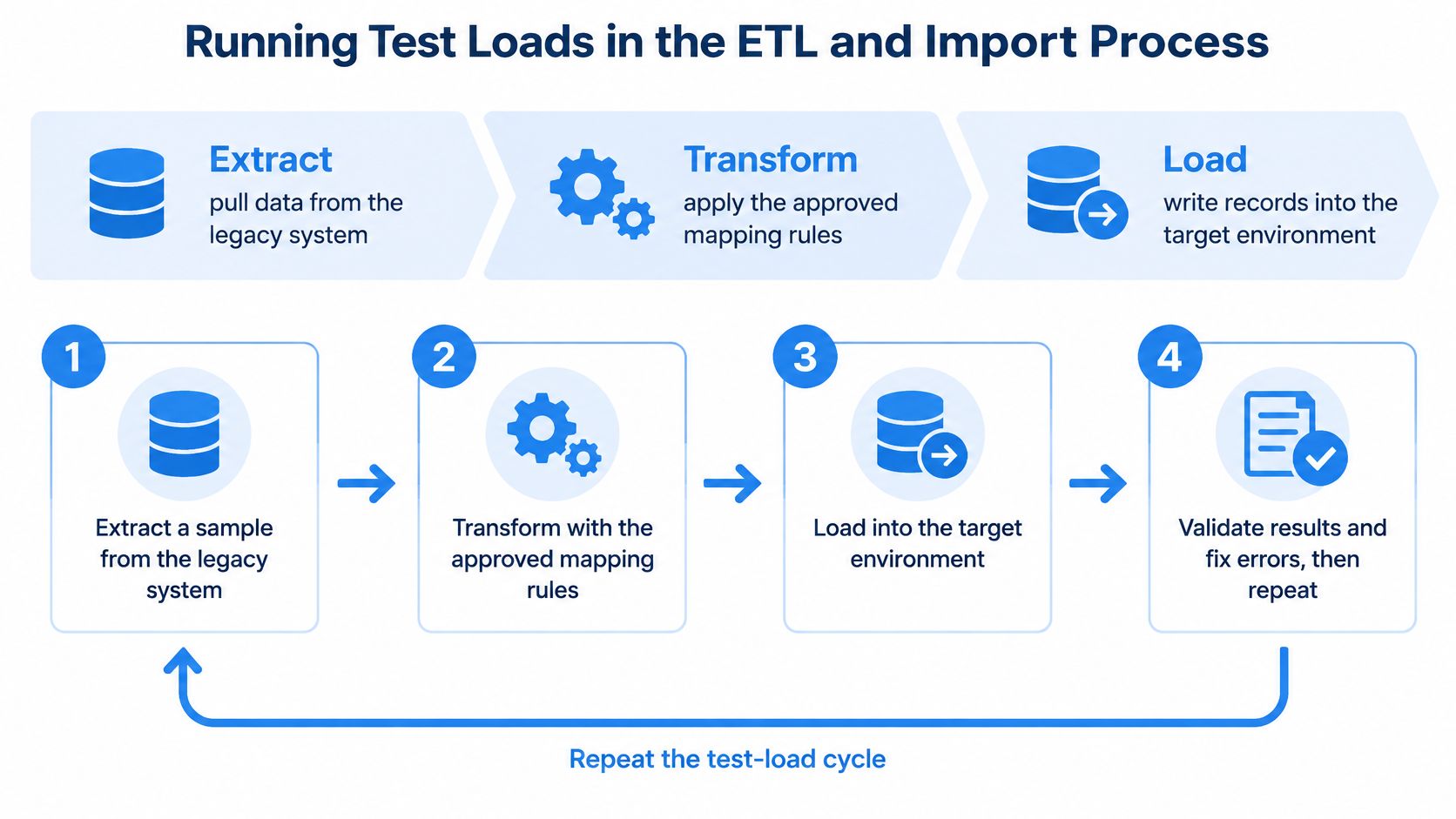
The cycle looks the same every time:
- Extract from a copy that looks like production. A trimmed extract hides the volume problems you’re testing for.
- Transform with the current mapping sheet. Any fix made inside the script goes back into the sheet the same day.
- Load into the target environment at full volume. Samples hide the failures that matter.
- Read the reject report and the load log. Every rejection gets a cause and an owner.
- Fix the mapping or the source data. Never edit the log to make it look clean.
- Rerun the full cycle. Same steps, same order, so you can compare one run with the next.
- Time each run against the cutover window. The last successful run is the one that has to fit inside it.
The research backs the discipline. An empirical study of 25 large German and Swiss companies found the four data-quality dimensions of correctness, consistency, completeness and timeliness loaded strongly as measurement indicators, with loadings of approximately 71.11% to 72.28%, while management support, timing, employee training and end-user communication and involvement explained migration success indicators at approximately 78.19% to 84.80% (MDPI, Big Data and Cognitive Computing). Measure the data and staff the change, and the loads follow.
Keep one load log with a count per entity for every cycle. A defect closes only when the next run shows the count it should, and the first cycle usually exposes mapping and transformation defects while later cycles prove that corrections hold and that the load fits the window. Prioritize shared master data such as customers, suppliers, products, units of measure, locations, employees, tax attributes and bills of material before module-specific history, because those records are what every later test depends on.
Migrating Field, Mobile and Connected System Data
Field records carry different risks from master data. A technician’s job update arrives with a status, a timestamp, a user ID and a photo attached, and all of it has to survive the journey into the central system or the office view contradicts the van.
Work through the feeds in this order:
- Inventory every input. List each mobile form, device feed and external interface, the entity it updates, and the direction data flows.
- Assess the scope before building. SIX assesses the required data flow and technical scope before implementing integrations with existing systems, which is the moment to discover that a portal sends a free-text status instead of a code.
- Map fields and status codes. Every mobile status needs a target equivalent, and the ones with no equivalent need a decision rather than a default.
- Load a sample that includes the mess. Half-finished job notes, missing signatures, offline entries and duplicate submissions.
- Check the metadata survives. Timestamps, statuses and user IDs must arrive intact or the audit trailAn audit trail records who created, changed or approved information and when. In an ERP system, it helps trace transactions, investigate errors and support audits. starts on the wrong date.
- Build error queues and monitoring for live feeds. A silent interface failure is worse than a loud one.
SIX ERP can be connected to existing accounting platforms, portals, machines or specialist systems as part of integration and configuration work, and each connection needs a named owner and a tested rollback path before it goes near production. If you’re weighing a long list of interfaces, the ERP integrations decision guide is worth reading first.
Test these feeds before cross-module validation begins. A broken mobile update hides easily inside an otherwise clean order-to-invoice flow, because the order posts perfectly and only the field status is wrong. Service asset and warranty histories should follow the rules in the domain table, so a field update attaches to the right asset from day one.
Testing Cross-Module Transactions Before Go-Live
A clean load log proves that rows landed. It proves nothing about whether the business works on Monday morning. The expensive failures live in the relationships: an order that won’t link to a delivery and an invoice, stock counted in incompatible units, production costs that don’t reconcile to finance. Every one of those passes a row count.
The timing evidence is blunt. A survey of more than 100 SAP customers and experts, reported by SAPinsider, found that 57% said data migration regularly delays ERP projects, with schedule overruns commonly reaching 10 to 25 percent and sometimes up to 50 percent. The delay isn’t the load itself. It’s the discovery, late in the project, that the loaded data doesn’t transact.
Run the flows end to end
Validation that catches this is scenario-based. Push representative flows through migrated data: quote-to-cash, procure-to-pay, plan-to-produce, service-to-cash and project-to-invoice. At each step, compare totals and inventory positions against the legacy system. Then test what the happy path hides: role permissions, audit trails on a changed record, a mobile update from a technician, an interface that fails halfway, and exception paths such as a partial delivery or a credit note.
| Check | How to test | Pass criteria |
|---|---|---|
| Record counts | Compare source and target counts for each entity | Counts match, or every gap has a documented reason |
| Financial balances | Compare trial balance and receivables totals with the legacy system | Totals match at the cutover date |
| Inventory quantities | Compare stock by item and location, including units of measure | Quantities and units match for every active item |
| Mandatory fields | Run a completeness report on required fields | Zero blank mandatory fields in active records |
| Referential integrity | Follow links from order to delivery to invoice | No orphaned or broken links |
| Quote-to-cash flow | Run a test quote, order, delivery and invoice on migrated data | Totals and stock reconcile at each step |
| Mobile updates | Record a field update and check the office view | Update appears in the central system with the correct status |
Test with the data you actually have
Sample-based validation is where go-lives go wrong. Load realistic volumes rather than a tidy extract, include edge cases and records you already know are poor, and run more than one cycle. The ERP data migration best-practice guide makes the same point, noting that the first cycle exposes mapping and transformation defects while later cycles verify that corrections work and that the migration performs inside the planned cutover window. Clean sample data proves the script runs. It doesn’t prove the business does.
Business owners sign off each flow, not the project team. A warehouse manager who has walked a delivery through to invoice on migrated data is a stronger go/no-go signal than any reconciliation report, and a flow without that signature is a flow you’re testing for the first time in production, with real customers on the other end.
Cutover, Reconciliation and Rollback Planning
Write the rollback plan before the freeze window opens. A plan drafted during cutover is drafted by the same tired people who have to decide whether to use it.
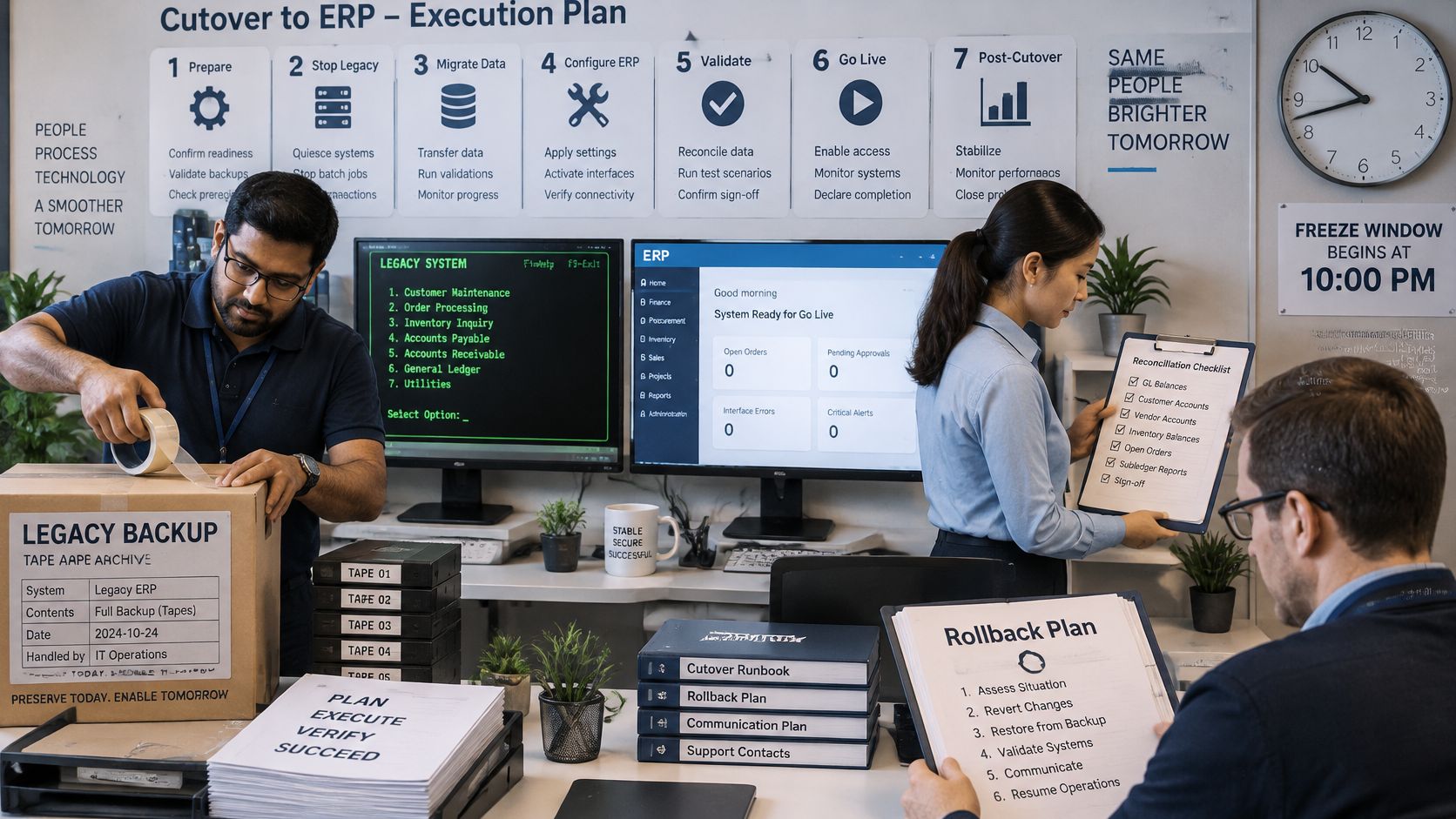
The cutover itself is a short, ordered sequence:
- Freeze data entry in the legacy system. Agree the exact time and who confirms it.
- Run the final extract immediately after the freeze, from the frozen copy.
- Load the final data set with the same scripts that passed the last test load.
- Reconcile counts, then balances. Inventory by item and location, receivables, payables and general ledger.
- Take sign-off domain by domain, with a name and a time recorded against each.
- Open the system to users, starting with the departments whose transactions are simplest.
- Verify on live transactions. Check the first orders, deliveries, invoices and stock movements as they happen.
Define rollback triggers in advance and name the one person who may call it: a failed balance check, an order that won’t link to its invoice, a payroll run producing wrong net pay, an invoicing error that reaches a customer. Anything on that list stops the cutover, and nobody negotiates it at two in the morning. Keep the legacy system read-only for an agreed period rather than switched off, so the team can recover a record without renegotiating access.
Reconciliation runs in phases rather than one grand total: inventory, orders, production, projects, service activity, then general ledger balances. This means that each phase closes with a business signature before the next one opens.
The success test is practical. All records are workable and users can do the work they’re supposed to do. Some records will need augmentation after go-live, and that’s normal as long as the gaps don’t block anyone’s daily work. SIX helps protect continuity, maintain data quality and review system performance after go-live, which matters far more in the first month than any feature on the roadmap.
Smaller moves around the same cutover deserve the same discipline, and assessing plugins, redirects and integrations is a useful companion when a shop, portal or website reads from the same data. If the go/no-go decision is still ahead of you, five tips for managing risk during an ERP implementation covers the controls that keep a cutover reversible.
Confirm Your Migration Scope Before You Start
Everything here resolves to decisions made before the first extraction: who owns each stage, which records travel, when copied personal data reaches the end of its retention period, what the mapping sheet says, which checks permit cutover, and who can call a rollback. Software supports those records and controls, while your company remains responsible for determining and meeting its own legal duties, including retention and data protection.
Testing scope is worth one final pass, and what test scope should cover is a clear checklist for confirming you’ve covered the flows rather than a tidy sample of rows.
Bring those decisions into a conversation instead of a blank page. SIX ERP offers a free demo, so a team can see connected records in action before committing to a design, and consulting and pre-integration support examines the organization, data, systems, responsibilities, compliance requirements and future operating model before technical work begins. Scope first, then mapping, then load.
A migration holds when the warehouse, the sales desk and the finance team all work from the same records on the first Monday, and SIX ERP is built for that outcome: one shared data foundation across CustomerFlow, SalesFlow, PurchaseFlow, StockFlow, ManufacturingFlow, ServiceFlow, ProjectFlow, PeopleFlow and FinanceFlow, with the traceabilityTraceability follows a product or material through its history, from origin to use or delivery. An ERP system connects the records needed to investigate issues and track affected items. that makes a migrated balance explainable. If you’d rather settle scope before the load than repair it afterwards, SIX ERP offers a free demo and pre-integration consulting that starts with your data, your processes and your owners. Bring the stage list and the domain rules you’ve already agreed, and you can test the decisions against a working system.